
Rhagymadrodd
This manual provides detailed instructions for the safe and efficient operation of your CAIWEI X99+ 4K Smart Projector. Please read this manual thoroughly before using the projector and retain it for future reference.
Gwybodaeth Diogelwch
Er mwyn sicrhau gweithrediad diogel ac atal difrod, dilynwch y rhagofalon canlynol:
- Do not place the projector in boxes or cabinets with poor ventilation properties. Ensure adequate airflow around the device to prevent overheating.
- Avoid direct exposure of the projector lens to sunlight.
- Peidiwch â rhwystro'r agoriadau awyru.
- Defnyddiwch yr addasydd pŵer a gyflenwir gyda'r taflunydd yn unig.
- Cadwch y taflunydd i ffwrdd o ddŵr neu hylifau eraill.
- Peidiwch â cheisio dadosod na thrwsio'r taflunydd eich hun. Cysylltwch â phersonél gwasanaeth cymwys i gael cymorth.
Cynnwys Pecyn
Gwiriwch fod yr holl eitemau yn bresennol yn y pecyn:
- CAIWEI X99+ Smart Projector
- Rheolaeth Anghysbell
- Cebl HDMI
- Power Cable (UK-plug)
- Cable AV
- Bag Taflunydd
- Llawlyfr Defnyddiwr (y ddogfen hon)
Cynnyrch Drosview
The CAIWEI X99+ is a smart projector designed for versatile entertainment and presentation needs. It features a native 1080P resolution with 4K support, 800 ANSI lumens brightness, and an integrated Android 9.0 operating system.

Figure 1: CAIWEI X99+ Smart Projector front view, dangosasinei ddyluniad cryno a'i nodweddion allweddol.
Nodweddion Allweddol:
- Technoleg Arddangos: Native 1920x1080P resolution, 4K support, 800 ANSI lumens, 15500:1 contrast ratio.
- OS Smart: Android 9.0 with access to over 6000 authorized apps (Netflix, YouTube, Prime Video, etc.).
- Cof: 2GB o RAM + 16GB o ROM.
- Cysylltedd Di-wifr: Dual 2.4G/5G WiFi, Airplay/DLNA/Miracast support, Bluetooth 5.0.
- Sain: Integrated 10W high-power stereo speakers, Dolby Audio support, 3.5mm audio output.
- Gwella Delwedd: HDR10 processing, MEMC technology for smoother motion.
- Addasiadau: 4D and ±50° vertical/horizontal electronic keystone correction, 40% digital image zoom.
- Gwydnwch: Fully sealed optical engine for dust protection and extended lifespan.

Figure 2: Visual representation of the projector's color accuracy, brightness, and image quality in various lighting conditions.
Gosod
1. Lleoliad
Position the projector on a stable, flat surface or mount it to the ceiling using the four screw holes. Ensure the projector is placed at an appropriate distance from the projection surface to achieve the desired screen size. Maintain adequate ventilation around the unit.
2. Cysylltiad Pwer
- Cysylltwch y cebl pŵer â phorthladd mewnbwn pŵer y taflunydd.
- Plygiwch ben arall y cebl pŵer i mewn i soced drydanol addas.
- Pwyswch y botwm pŵer ar y taflunydd neu'r teclyn rheoli o bell i droi'r ddyfais ymlaen.
3. Initial Focus and Keystone Adjustment
Upon initial power-on, the projected image may appear blurry or distorted. Adjust these settings for optimal clarity:
- Ffocws: Trowch y cylch ffocws ar lens y taflunydd nes bod y ddelwedd yn finiog ac yn glir.
- Cywiriad Keystone: Use the remote control to access the keystone correction settings. The projector supports 4D keystone correction and ±50° vertical/horizontal electronic correction to square the image if the projector is not perfectly perpendicular to the screen.
- Chwyddo Digidol: Adjust the image size without moving the projector using the digital zoom function (40% zoom out/in).
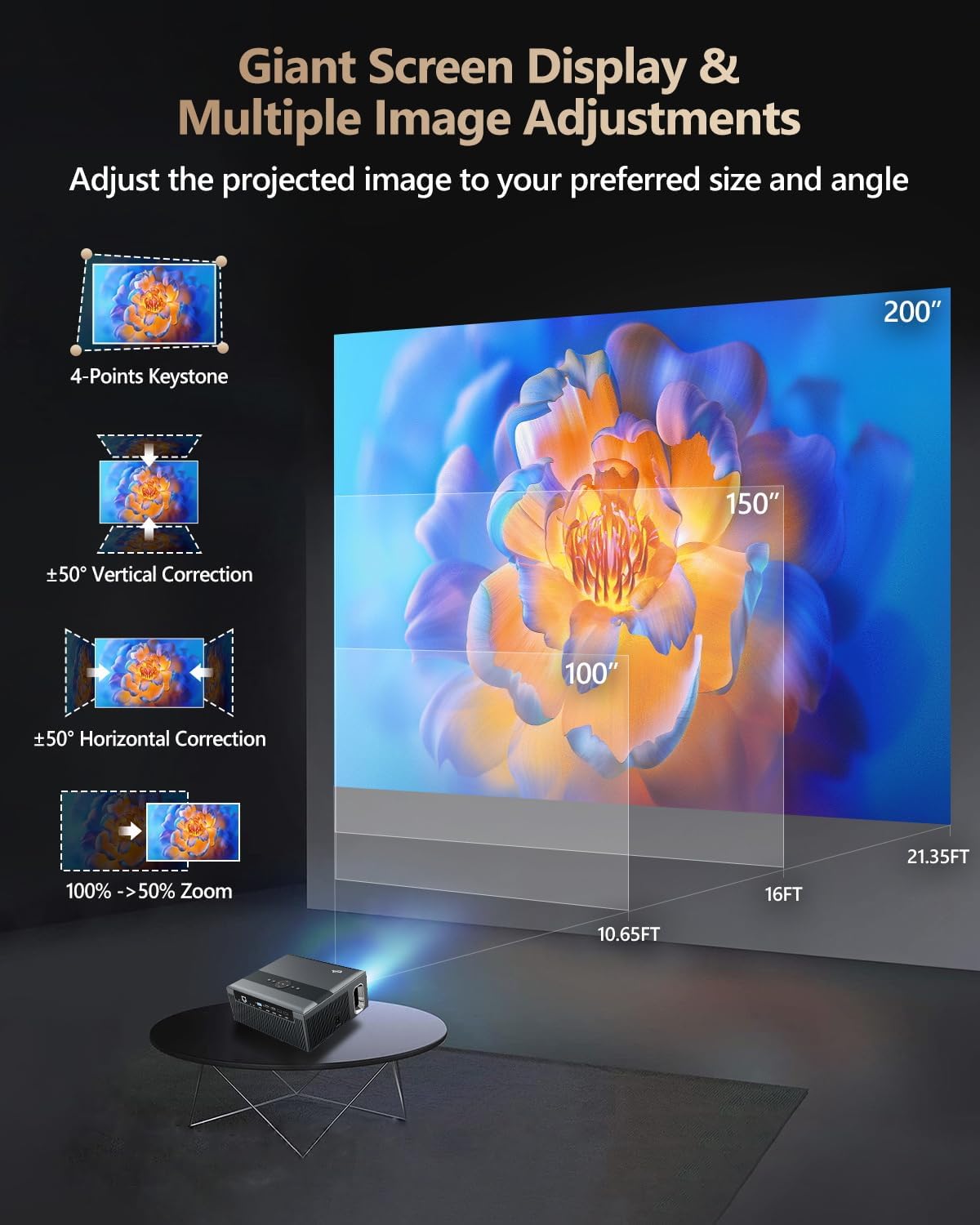
Figure 3: Image adjustment options including keystone correction and digital zoom.
4. Cysylltiad Rhwydwaith
Connect the projector to the internet for access to streaming apps and online content.
- Wi-Fi: Navigate to the network settings in the Android OS. Select your desired 2.4G or 5G Wi-Fi network and enter the password.
- LAN (Ethernet): Connect an Ethernet cable from your router to the RJ45 port on the projector for a wired internet connection.
5. Pâr Bluetooth
Pair Bluetooth devices such as external speakers, headphones, mice, keyboards, or gamepads.
- Sicrhewch fod y ddyfais Bluetooth yn y modd paru.
- On the projector, go to Bluetooth settings within the Android OS.
- Select the desired device from the list and confirm pairing.

Figure 4: Wireless connectivity for streaming and audio.
Cyfarwyddiadau Gweithredu
1. Android TV OS Navigation
Use the remote control to navigate the Android 9.0 interface. The home screen provides access to installed applications, settings, and input sources.

Figure 5: Android TV 9.0 interface with pre-installed and accessible applications.
2. Gosod a Defnyddio Apiau
The projector comes with pre-installed apps like Netflix, YouTube, and Prime Video. You can download additional authorized applications from the app store within the Android OS.
- Select an app icon from the home screen to launch it.
- Follow on-screen prompts for login or content selection.
3. Screen Mirroring (Airplay/DLNA/Miracast)
Synchronize your smartphone, tablet, or laptop screen wirelessly to the projector.
- Ensure your device and the projector are connected to the same Wi-Fi network.
- Select the appropriate mirroring function (Airplay for iOS, Miracast for Android/Windows, DLNA for compatible devices) on the projector's interface.
- Initiate screen mirroring from your source device.
4. Cysylltu Dyfeisiau Allanol
The projector offers multiple ports for connecting various external devices.

Figure 6: Available input and output ports for external devices.
- HDMI: Connect Blu-ray/DVD players, TV sticks, game consoles (PS5), PCs, or laptops using an HDMI cable. Select the corresponding HDMI input from the projector's source menu.
- USB: Insert USB flash drives or hard drives into the USB ports to play media files yn uniongyrchol.
- VGA: Connect older PCs or laptops using a VGA cable.
- O: Use the AV cable to connect devices with composite video and stereo audio outputs.
5. Allbwn Sain
The projector features built-in 10W stereo speakers. For alternative audio experiences:
- Bluetooth: Pair with external Bluetooth speakers or headphones as described in the Setup section.
- 3.5mm Sain Allan: Connect wired headphones or external speakers using a 3.5mm audio cable.

Figure 7: Projector's integrated audio system.
Cynnal a chadw
1. Glanhau
- Lens: Defnyddiwch frethyn meddal, di-flwff sydd wedi'i gynllunio'n benodol ar gyfer lensys optegol. Peidiwch â defnyddio glanhawyr sgraffiniol.
- Tu allan: Sychwch du allan y taflunydd gyda lliain meddal, sych. Ar gyfer marciau ystyfnig, sychwch ychydigampen y brethyn â dwfr.
- Agoriadau Awyru: Periodically check and gently clean the ventilation openings to ensure unobstructed airflow.
2. Diogelu rhag Llwch
The CAIWEI X99+ features a fully sealed optical engine and an air purifier filter, which significantly reduces dust accumulation and light decay, contributing to a longer service life.

Figure 8: Dust-proof design of the CAIWEI X99+ projector.
3. Storio
When not in use for extended periods, store the projector in a cool, dry place, preferably in its original packaging or the provided projector bag, to protect it from dust and physical damage.
Datrys problemau
Os byddwch chi'n dod ar draws problemau gyda'ch taflunydd, cyfeiriwch at y problemau a'r atebion cyffredin canlynol:
| Problem | Achos Posibl | Ateb |
|---|---|---|
| Dim delwedd na neges "Dim Signal" | Incorrect input source selected; loose cable connection; device not powered on. |
|
| Delwedd aneglur | Focus not adjusted; keystone correction needed. |
|
| Dim sain | Volume too low; incorrect audio output selected; external device audio issue. |
|
| Materion cysylltiad Wi-Fi | Incorrect password; out of range; router issues. |
|
| Rheolaeth bell ddim yn gweithio | Batris marw; rhwystr; problem paru. |
|
Manylebau
| Brand | CAIWEI |
| Model | X99+ |
| Cydraniad Arddangos | Brodorol 1920 x 1080 (Yn cefnogi 4K) |
| Disgleirdeb | 800 ANSI Lumens (12000 LED Lumens) |
| Cymhareb Cyferbyniad | 15500:1 |
| System Weithredu | Android 9.0 |
| Cof | 2GB RAM + 16GB ROM |
| Technoleg Cysylltedd | Bluetooth 5.0, Dual-band Wi-Fi (2.4G/5G), USB, HDMI, VGA, AV, LAN (RJ45) |
| Nodweddion Arbennig | Built-In Wi-Fi, Portable, Wireless, HDR10, MEMC, Dolby Audio, Sealed Optical Engine, 4D Keystone Correction, Digital Zoom |
| Sain | 10W High Power Stereo Speakers, 3.5mm Audio Output |
| Dimensiynau Cynnyrch | 10.55 x 9.25 x 4.92 modfedd |
| Pwysau Eitem | 7.48 pwys |
Gwarant a Chefnogaeth
For warranty information and technical support, please refer to the warranty card included with your product or visit the official CAIWEI websafle. Cysylltwch â gwasanaeth cwsmeriaid i gael cymorth gydag unrhyw faterion nad ydynt wedi'u cynnwys yn y llawlyfr hwn.
Gwneuthurwr: CAIWEI
Websafle: CAIWEI Official Store on Amazon