
1. Cynnyrch Drosview
The UNI-T UT372 is a non-contact digital laser tachometer designed for measuring the rotational speed (RPM) and count of objects. It utilizes a laser pointer and reflective tape to provide accurate and stable measurements without physical contact. This device is suitable for various industrial and scientific applications.
Nodweddion Allweddol:
- 5-digit LCD screen with RPM/count and time dual display.
- Measurement modes: MAX (Maximum), MIN (Minimum), AVG (Average), and Normal.
- gymwysadwy sampling rate (0.5-255 seconds).
- Automatic power-off function (cancelable).
- Selectable laser pointer (on/off).
- Clock and time setting capabilities.
- Swyddogaeth dal data.
- Low power consumption, allowing for approximately 40 hours of continuous operation.
- Equipped with a USB interface for data transfer (UT372 only).
- Certified with CE and UKCA standards.
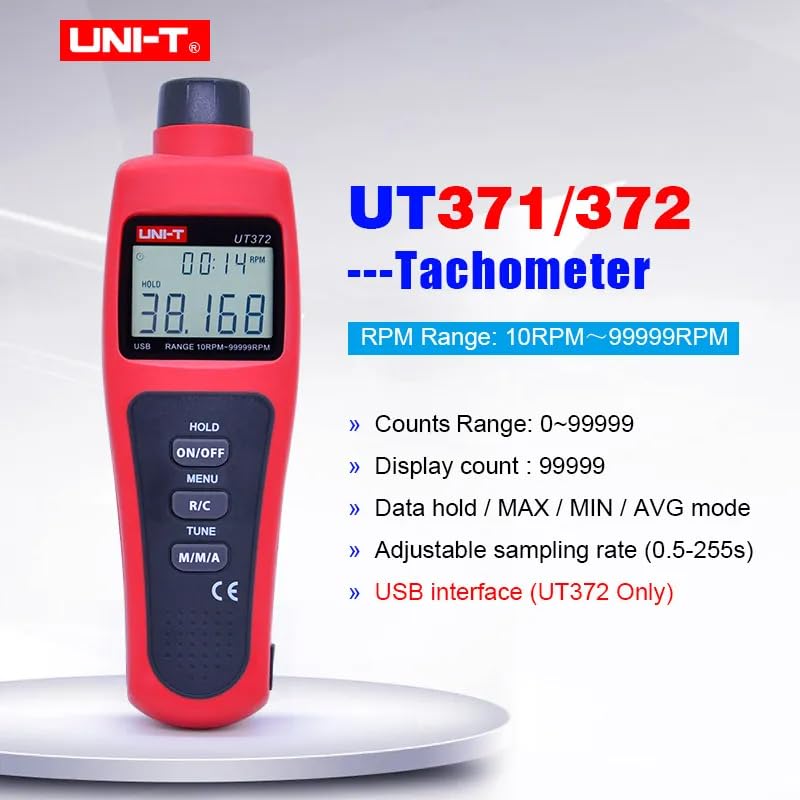
Image 1.1: The UNI-T UT372 tachometer displaying its main features and specifications.
2. Gwybodaeth Diogelwch
Please read and understand all safety instructions before operating the device. Failure to follow these instructions may result in injury or damage to the device.
- Do not look directly into the laser beam. The laser is a Class 2 laser product.
- Do not attempt to modify or disassemble the device. Repairs should only be performed by qualified personnel.
- Ensure the battery compartment is securely closed before use.
- Tynnwch y batris os na fydd y ddyfais yn cael ei defnyddio am gyfnod hir er mwyn atal gollyngiadau.
- Keep the device away from water, dust, and extreme temperatures.
3. Cynnwys Pecyn
Carefully unpack the box and check if all items are present and undamaged. If any item is missing or damaged, contact your supplier.
- UNI-T UT372 Digital Laser Tachometer
- Tâp Myfyriol
- USB Interface Cable (for UT372 only)
- PC Software CD (for UT372 only)
- Llawlyfr Defnyddiwr Saesneg
- Batteries (1.5V LR6 x 4)

Image 3.1: The UNI-T UT372 tachometer and its standard accessories as packaged.
4. Product Layout and Panel Introduction
Familiarize yourself with the components and controls of your UT372 tachometer.

Delwedd 4.1: Blaen ac ochr view of the UT372 tachometer with labeled components.
- Tachometer Light Source: Yn allyrru'r trawst laser ar gyfer mesur.
- Arddangosfa LCD: Shows measurement readings, modes, and other indicators.
- HOLD / ON/OFF Button: Press to power on/off the device. Short press to activate/deactivate data hold.
- Botwm BWYDLEN: Yn cyrchu'r ddewislen ar gyfer addasiadau gosodiadau.
- R/C (RPM / Counts) Button: Toggles between RPM and Count measurement modes.
- Botwm TIWNIO: Used for adjusting settings within the menu.
- M/M/A (MAX/MIN/AVG) Button: Cycles through Maximum, Minimum, and Average measurement modes.
- USB Port (UT372 only): Ar gyfer cysylltu â chyfrifiadur ar gyfer trosglwyddo data.
5. Gosod a Gosod Batri
5.1 Gosod Batri
- Lleolwch glawr adran y batri ar gefn y ddyfais.
- Open the cover by sliding or unscrewing it.
- Insert four 1.5V LR6 (AA) batteries, ensuring correct polarity (+/-).
- Caewch y clawr adran batri yn ddiogel.
5.2 Applying Reflective Tape
For accurate non-contact measurement, apply a piece of reflective tape to the rotating object whose speed or count you wish to measure. Ensure the tape is clean and securely attached.
6. Cyfarwyddiadau Gweithredu
6.1 Pŵer Ymlaen/Diffodd
Gwasgwch y HOLD / ON/OFF button to turn the tachometer on or off.
6.2 RPM Measurement
- Ensure the device is in RPM measurement mode (indicated on the LCD). If not, press the R/C botwm i newid.
- Point the laser beam at the reflective tape on the rotating object.
- Maintain a measurement distance between 50mm and 200mm (2 to 8 inches) from the target.
- The RPM reading will be displayed on the LCD.
- Nodyn: If no signal is detected within 7 seconds, the LCD will display "0.0000". If the RPM exceeds 99999, the LCD will display "OL" (Overload).

Image 6.1: Illustrates the correct distance and method for RPM measurement.
6.3 Counts Measurement
- Gwasgwch y R/C button to switch to Count measurement mode.
- Point the laser beam at the reflective tape on the object.
- The device will count the number of times the laser beam reflects off the tape.
6.4 Mode Selection (MAX/MIN/AVG)
Gwasgwch y M/M/A button repeatedly to cycle through the following display modes:
- MAX: Displays the maximum measured value.
- MIN: Displays the minimum measured value.
- AVG: Displays the average measured value.
- Arferol: Displays the current real-time measurement.
6.5 Dal Data
During measurement, a short press of the HOLD / ON/OFF button will freeze the current reading on the display. Press it again to release the data hold and resume live measurement.
6.6 SampAddasiad Cyfradd Ling
Y sampling rate can be adjusted from 0.5 to 255 seconds. Refer to the detailed user manual for specific steps on how to access and change this setting via the BWYDLEN a Tiwn botymau.
6.7 USB Interface (UT372 Only)
The UT372 model features a USB port for connecting to a computer. Use the provided USB cable and PC software CD to transfer measurement data for analysis and logging. Follow the instructions provided with the software for installation and operation.
7. cynnal
- Glanhau: Defnyddiwch frethyn meddal, sych i lanhau'r ddyfais. Peidiwch â defnyddio glanhawyr sgraffiniol na thoddyddion.
- Storio: Store the tachometer in a cool, dry place away from direct sunlight and extreme temperatures. Remove batteries if storing for extended periods.
- Tâp Myfyriol: Ensure the reflective tape is clean and free from damage for accurate readings. Replace as needed.
8. Datrys Problemau
- Nid yw'r ddyfais yn troi ymlaen: Gwiriwch osodiad y batri a gwnewch yn siŵr nad yw'r batris wedi'u disbyddu. Amnewidiwch os oes angen.
- "0.0000" displayed during RPM measurement: Ensure the laser is correctly aimed at the reflective tape and the measurement distance is within 50-200mm. Check if the reflective tape is properly applied and clean.
- "OL" displayed: The measured RPM exceeds the device's maximum range (99999 RPM).
- Darlleniadau anghywir: Verify the reflective tape is securely attached and clean. Ensure the target object is stable during measurement. Check for any obstructions in the laser path.
- Dangosydd batri isel: Replace batteries promptly when the low battery icon appears on the display.
9. manylebau
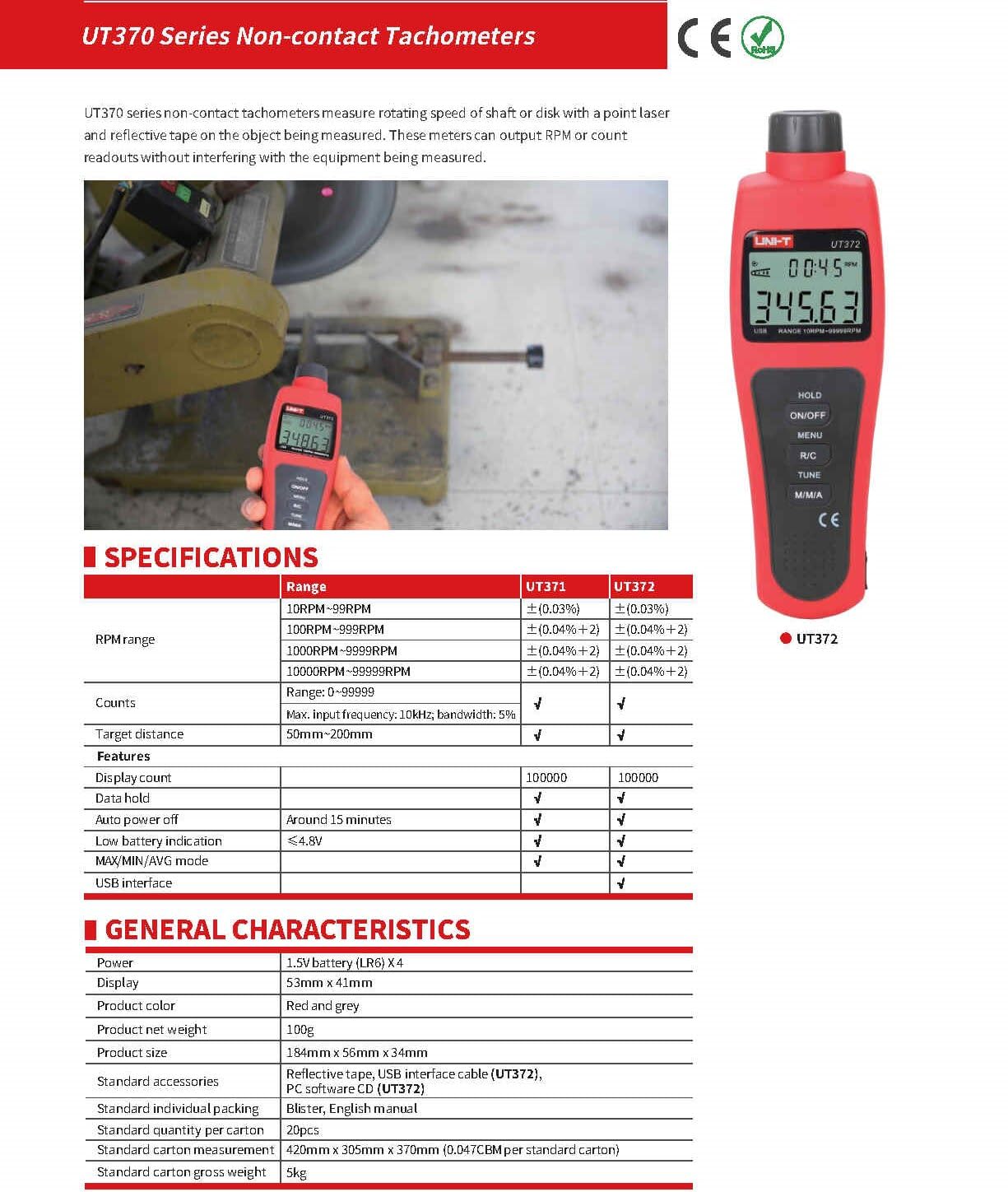
Image 9.1: Detailed specifications for the UT370 series tachometers.
| Paramedr | UT372 Specification |
|---|---|
| Ystod RPM | 10 RPM ~ 99999 RPM (Accuracy: ±(0.04%+2)) |
| Counts Range | 0~99999 |
| Cyfrif Arddangos | 99999 |
| Pellter Targed | 50mm ~ 200mm |
| Amlder Mewnbwn Uchaf | 10kHz, bandwidth: 5% |
| Grym | 1.5V Battery (LR6) x 4 |
| Arddangos | 53mm x 41mm LCD |
| Lliw Cynnyrch | Coch a Llwyd |
| Pwysau Net Cynnyrch | 100g |
| Maint Cynnyrch | 184mm x 56mm x 34mm |
| Auto Power Off | Around 15 minutes (cancelable) |
| Arwydd Batri Isel | <4.8V |
| Rhyngwyneb USB | Oes |
| Tymheredd Gweithredu | 0°C i 50°C (32°F i 122°F) |
| Tymheredd Storio | -20°C i 60°C (-4°F i 140°F) |
| Lleithder | <80% RH (heb gyddwyso) |
10. Gwarant a Chefnogaeth
UNI-T products are designed and manufactured to high quality standards. For warranty information, technical support, or service, please refer to the warranty card included with your product or contact your local UNI-T distributor or customer service center. Please have your product model number (UT372) and purchase date available when contacting support.