
symcode USA-6709DA-Green
Symcode Wireless Bluetooth Barcode Scanner User Manual
Model: USA-6709DA-Green
1. Rhagymadrodd
This user manual provides comprehensive instructions for the Symcode Wireless Bluetooth Barcode Scanner, Model USA-6709DA-Green. This device is designed for accurate and efficient data capture, supporting various 1D and 2D barcode types. It offers versatile connectivity options including Bluetooth, 2.4G wireless, and USB wired connections, making it suitable for a wide range of business applications.

Image 1: Symcode Wireless Bluetooth Barcode Scanner and accessories.
2. Cynnwys Pecyn
Gwiriwch fod yr holl eitemau yn bresennol yn eich pecyn:
- Symcode Barcode Scanner (Model: USA-6706DA-Green)
- Cebl Codi Tâl USB
- Dongle USB 2.4G
- Llawlyfr Defnyddiwr

Image 2: Components included with the Symcode Barcode Scanner.
3. Nodweddion Cynnyrch
- Technoleg sganio uwch: CMOS optical imaging for quick and precise scanning of 1D and 2D barcodes (QR, DataMatrix, PDF417, Aztec, Hanxin, etc.) even on damaged or poorly printed labels.
- Moddau Cysylltedd Triphlyg: Supports Bluetooth, 2.4G wireless, and USB wired connections for maximum flexibility.
- Ystod Diwifr Estynedig: Up to 200m in open environments and 30m indoors with the 2.4G USB dongle.
- Bywyd batri hir: 2000mAh battery provides up to 30 hours of continuous scanning, with a full recharge in approximately 2 hours.
- Ffurfweddiad Amlbwrpas: Features include hands-free intelligent sensor mode, trigger scan mode, vibration/buzzer settings, data storage/instant upload modes, multiple keyboard languages, and customizable prefix/suffix options.
- Gwydnwch Uwch: Constructed with strong ABS material, designed to withstand drops of up to 2.4 meters (8 ft) and features an integrated dustproof housing (IP67 rated).
4. Gosod a Chysylltiad
The scanner offers three primary connection methods:
4.1. Cysylltiad Diwifr 2.4G
- Plygiwch y dongl USB 2.4G i mewn i borthladd USB sydd ar gael ar eich cyfrifiadur.
- Turn on the scanner. It will automatically pair with the dongle.
- A successful connection is indicated by a specific beep sound and LED indicator.
4.2. Cysylltiad Bluetooth
- Gwnewch yn siŵr bod Bluetooth wedi'i alluogi ar eich dyfais (clyfar, tabled, cyfrifiadur).
- Scan the Bluetooth pairing barcode (usually found in the user manual or on a setup card).
- On your device, search for Bluetooth devices and select "Symcode Scanner" (or similar name).
- Cadarnhewch y paru.
4.3. Cysylltiad Gwifredig USB
- Cysylltwch y sganiwr â'ch cyfrifiadur gan ddefnyddio'r cebl USB a ddarperir.
- Bydd y sganiwr yn gweithredu fel dyfais â gwifrau a hefyd yn gwefru ar yr un pryd.

Image 3: Connectivity options for the Symcode Barcode Scanner.

Image 4: Operating system compatibility.
5. Cyfarwyddiadau Gweithredu
5.1. Gweithrediad Sganio Sylfaenol
To scan a barcode, point the scanner's window at the barcode and press the trigger button. A successful scan will be indicated by a beep and/or vibration, and the data will be transmitted to your connected device.
5.2. Data Upload Modes
Mae'r sganiwr yn cefnogi dau ddull uwchlwytho data:
- Modd Uwchlwytho ar Unwaith: Data is transmitted to the connected device immediately after each scan. This is the default mode.
- Modd Storio All-lein: Scanned data is stored in the scanner's internal memory (up to 10,000 codes). To upload stored data, scan the specific setup code for 'Upload Data' found in your detailed user manual.

Image 5: Instant Upload Mode vs. Offline Storage Mode.
5.3. Decoding Capabilities
The scanner can decode a wide array of barcode types, including:
- Codau Bar 1D: UPC/EAN, Code 39, Code 128, Codabar, Interleaved 2 of 5, Code 93, MSI, Code 11, RSS variants, etc.
- Codau Bar 2D: QR Code, Data Matrix, PDF417, Aztec, Hanxin.
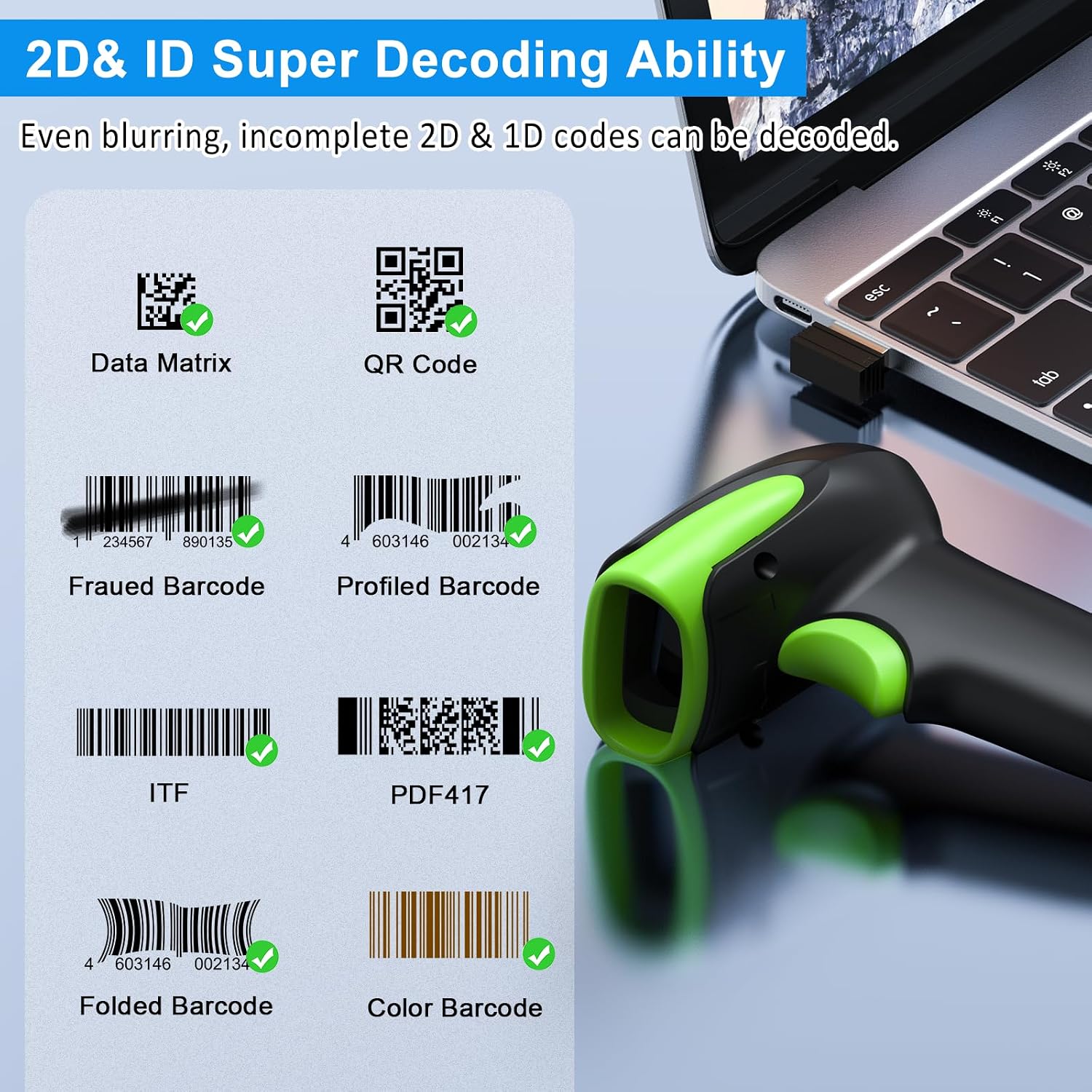
Delwedd 6: Enghraifftamples of decodable 1D and 2D barcodes.
6. cynnal
Er mwyn sicrhau perfformiad a hirhoedledd gorau posibl eich sganiwr:
- Glanhau: Defnyddiwch frethyn meddal, sych i lanhau tu allan y sganiwr. Ar gyfer y ffenestr sganio, defnyddiwch frethyn glanhau lens i osgoi crafiadau. Peidiwch â defnyddio glanhawyr sgraffiniol na thoddyddion.
- Codi tâl: Recharge the battery using the provided USB cable. Avoid overcharging or completely draining the battery for extended periods.
- Storio: Storiwch y sganiwr mewn lle oer, sych i ffwrdd o olau haul uniongyrchol a thymheredd eithafol.
- Gwydnwch: While rugged, avoid intentional drops or impacts. The scanner is designed to withstand accidental drops up to 2.4 meters.

Image 7: The scanner's rugged design and drop resistance.
7. Datrys Problemau
Os byddwch chi'n dod ar draws problemau gyda'ch sganiwr, cyfeiriwch at y problemau a'r atebion cyffredin canlynol:
- Sganiwr ddim yn cysylltu:
- Gwnewch yn siŵr bod y sganiwr wedi'i wefru.
- Verify the correct connection mode (Bluetooth, 2.4G, USB) is selected and properly set up.
- For 2.4G, ensure the dongle is securely plugged in. For Bluetooth, ensure your device's Bluetooth is on and the scanner is paired.
- Ceisiwch ailgychwyn y sganiwr a'r ddyfais gwesteiwr.
- Sganiwr ddim yn darllen codau bar:
- Ensure the barcode is not excessively damaged, smudged, or poorly printed.
- Check the distance and angle of the scanner to the barcode.
- Gwiriwch fod y math o god bar yn cael ei gefnogi gan y sganiwr.
- Glanhewch y ffenestr sganio os yw'n fudr.
- Data not transmitting:
- Confirm the scanner is successfully connected to your device.
- Check if the scanner is in 'Offline Storage Mode' and needs to be manually uploaded.
- Ensure the application on your device is ready to receive input.
For further assistance, please refer to the comprehensive troubleshooting section in the full user manual or contact Symcode customer support.
8. manylebau
| Nodwedd | Manyleb |
|---|---|
| Rhif Model | USA-6709DA-Green |
| Mewnbwn Voltage | DC5V±0.25v |
| Current (Work/Instantaneous) | 25 mA / 95 mA |
| Cyflymder Datgodio | 100 gwaith / eiliad |
| Ystod Di-wifr (2.4G) | Up to 200m (open air), 30m (indoors) |
| Amser Codi Tâl | Tua. 2.5 Awr |
| Bywyd Batri | Up to 30 Hours (continuous scanning) |
| Math Batri | 1 batri Lithiwm Polymer (wedi'i gynnwys) |
| Cysylltedd | Bluetooth 6.1, Wireless 2.4G, USB Cable |
| Dyfeisiau Cydnaws | Desktop, Laptop, Smartphone, POS systems |
| Systemau Gweithredu | Windows 11/10/8/7/XP, Mac OS, iOS, Android, Linux |
| Pwysau Eitem | 10.2 owns |
| Dimensiynau Pecyn | 6.89 x 4.49 x 3.31 modfedd |

Image 8: Wireless transmission range.
9. Gwarant a Chefnogaeth
This Symcode product is manufactured by USA Scanner. For any product inquiries, technical support, or warranty claims, please contact USA Scanner directly. Refer to the contact information provided in your product packaging or visit the official Symcode brand store on Amazon for support resources.
Ymwelwch â'r Symcode Store am fwy o wybodaeth.