
Hoco WE-1005004459784466-002
Hoco Smart Ear Wireless Bluetooth 5.3 Earbuds User Manual
Model: WE-1005004459784466-002
Cynnyrch Drosview
The Hoco Smart Ear Wireless Bluetooth 5.3 Earbuds offer a seamless audio experience with advanced features. These smart touch stereo earbuds come with a digital LED display charging case, providing convenience and clear battery status at a glance. Designed for comfort and high-quality sound, they are ideal for daily use with mobile phones and other compatible devices.
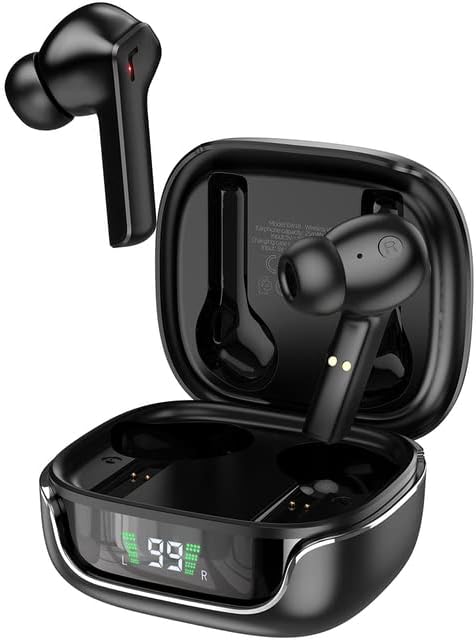
Image: The Hoco Smart Ear Wireless Bluetooth 5.3 Earbuds, showcasing both earbuds and their sleek charging case with a digital LED display.
Cynnwys Pecyn
- Hoco Smart Ear Wireless Bluetooth 5.3 Earbuds
- Achos Codi Tâl
- Llawlyfr Defnyddiwr
- Cebl Codi Tâl
Gosod
Paru Cychwynnol
To pair your Hoco Smart Ear Earbuds for the first time, ensure they are fully charged. Open the charging case; the earbuds will automatically enter pairing mode. On your device (e.g., smartphone), navigate to Bluetooth settings and select 'Hoco EW18' or a similar name from the list of available devices. Once connected, the earbuds are ready for use.

Image: A visual representation of the Hoco earbuds establishing a wireless connection using Bluetooth 5.3 technology, highlighting stable and low-power consumption.

Image: The earbuds and charging case next to a smartphone, illustrating the automatic pairing feature and the ability to switch between devices seamlessly.
Ailgysylltu
After initial pairing, the earbuds will automatically reconnect to the last paired device when taken out of the charging case and Bluetooth is enabled on the device.
Cyfarwyddiadau Gweithredu
The Hoco Smart Ear Earbuds feature intuitive touch controls for various functions:

Image: A detailed diagram illustrating the touch control functions of the Hoco earbuds, including playback, track navigation, call management, power, and voice assistant activation.
- Chwarae/Seibiant: Click the touch area once.
- Trac Nesaf: Double click the touch area.
- Trac Blaenorol: Triple click the touch area.
- Ateb Galwad: Click the touch area once.
- Galwad Hang Up: Double click the touch area.
- Gwrthod Galwad: Pwyswch yr ardal gyffwrdd yn hir am 2 eiliad.
- Troi Ymlaen: Open the cover of the charging case (automatic boot).
- Deffro Siri/Cynorthwyydd Llais: Pwyswch yr ardal gyffwrdd yn hir am 2 eiliad.
Cynnal a chadw
Er mwyn sicrhau hirhoedledd a pherfformiad gorau posibl eich clustffonau, dilynwch y canllawiau cynnal a chadw hyn:
- Glanhau: Glanhewch y clustffonau a'r cas gwefru yn rheolaidd gyda lliain meddal, sych, heb lint. Peidiwch â defnyddio cemegau llym na deunyddiau sgraffiniol.
- Cysylltiadau Codi Tâl: Periodically clean the charging contacts on both the earbuds and inside the case to ensure a proper connection.
- Storio: Pan nad ydynt yn cael eu defnyddio, storiwch y clustffonau yn eu cas gwefru i'w hamddiffyn rhag llwch a difrod.
- Osgoi Lleithder: Keep the earbuds and case away from water and excessive moisture.
- Tymheredd: Osgoi amlygu'r cynnyrch i dymheredd eithafol.
Datrys problemau
If you encounter issues with your Hoco Smart Ear Earbuds, refer to the following common solutions:
- Dim Sain:
- Gwnewch yn siŵr bod y clustffonau wedi'u gwefru.
- Gwiriwch gyfaint y ddyfais a chyfaint y clustffonau.
- Verify Bluetooth connection. Try disconnecting and reconnecting.
- Clustffonau Ddim yn Paru:
- Gwnewch yn siŵr bod y clustffonau yn y modd paru (cas agored).
- Diffoddwch ac ymlaen Bluetooth ar eich dyfais.
- Anghofiwch y ddyfais yng ngosodiadau Bluetooth eich ffôn ac ail-baru.
- Gwnewch yn siŵr nad oes unrhyw ddyfeisiau eraill wedi'u cysylltu â'r clustffonau.
- Materion Codi Tâl:
- Check if the charging cable is securely connected.
- Ensure the charging contacts on both earbuds and case are clean.
- Rhowch gynnig ar gebl gwefru neu addasydd pŵer gwahanol.
- Cysylltiad ysbeidiol:
- Ensure you are within the effective Bluetooth range.
- Lleihau ymyrraeth gan ddyfeisiau diwifr eraill.
Manylebau
Detailed technical specifications for the Hoco Smart Ear Wireless Bluetooth 5.3 Earbuds:
| Nodwedd | Manyleb |
|---|---|
| Model | WE-1005004459784466-002 |
| Fersiwn Bluetooth | 5.3 |
| Nifer y Gyrwyr | 2 |
| Diamedr Gyrrwr | 13mm |
| Afluniad Harmonig Cyfanswm | 15% |
| rhwystriant | 32 Ohm |
| Ffactor Ffurflen Clustffon | Yn-Glust |
| Technoleg Cysylltedd | Bluetooth |
| Technoleg Cyfathrebu Di-wifr | Bluetooth |
| Dyfeisiau Cydnaws | Ffonau Symudol |
| Nodwedd cebl | Cable-free (Wireless) |
| Lliw | Du |
| Dyddiad Cyntaf Ar Gael | Gorffennaf 6, 2023 |

Delwedd: Ffrwydrad view illustrating the 13mm moving coil driver and bio-carbon fiber composite diaphragm, designed for immersive sound quality.

Image: A person wearing the Hoco earbuds, highlighting the soft silicone ear caps and in-ear ergonomic design for comfortable wear and pure sound enjoyment.
Gwarant a Chefnogaeth
Hoco is committed to customer satisfaction and product quality. We offer the following:
- Gwarant 12 Mis: All products come with a 12-month warranty.
- Gwasanaeth Cwsmer: If you experience any issues with defective or incorrect products, please contact us through the Amazon platform. We are dedicated to providing the best solution, including full refunds or product replacements, to ensure 100% customer satisfaction.
- Gwarant Dosbarthu: We ensure product delivery within the specified timeframe on our sales page.
Ask a question about this manual
Ask about setup, troubleshooting, compatibility, parts, safety, or missing instructions. Manuals+ will review the question and use this page’s manual context to help answer it.