
Rhagymadrodd
This manual provides comprehensive instructions for the Veho Kuzo Sports Smart Watch F1S. Please read this manual carefully before using your device to ensure proper operation and to maximize its features. Keep this manual for future reference.

Delwedd: Blaen view of the Veho Kuzo Sports Smart Watch F1S, showcasing its round display and rugged design.
Gwybodaeth Diogelwch
Always follow basic safety precautions when using this device to reduce the risk of injury, electric shock, fire, or damage to the product.
- Peidiwch â cheisio dadosod neu addasu'r ddyfais.
- Cadwch y ddyfais i ffwrdd o dymheredd eithafol a golau haul uniongyrchol.
- Osgowch amlygu'r ddyfais i effeithiau cryf neu ollyngiadau.
- Ymgynghorwch â gweithiwr meddygol proffesiynol cyn dechrau unrhyw drefn ymarfer corff newydd, yn enwedig os oes gennych gyflyrau iechyd sy'n bodoli eisoes.
- The device is water-resistant (IP68) but not waterproof for diving or high-pressure water activities.
Cynnwys Pecyn
Gwnewch yn siŵr bod yr holl eitemau yn bresennol yn y blwch:
- Veho Kuzo Sports Smart Watch F1S (Black)
- Magnetic Charging Cradle (USB-A)
- Llawlyfr Defnyddiwr Aml-iaith
Gosod
1. Gwefru'r Oriawr Clyfar
Before first use, fully charge your Veho Kuzo F1S Smart Watch.
- Connect the magnetic charging cradle to a USB-A power source (e.g., computer USB port, wall adapter).
- Align the magnetic pins of the cradle with the charging contacts on the back of the watch. The watch will snap into place and display a charging indicator.
- Charge for approximately 2 hours for a full charge. A full charge provides up to 15 days of typical use.

Image: Graphic illustrating the 15-day battery life of the Veho Kuzo F1S Smart Watch.
2. Gosod yr Ap Cydymaith
To unlock all features and synchronize data, download the official companion app on your smartphone.
- The app is compatible with Apple iOS and Android devices.
- Chwiliwch am "Kuzo" or "Veho Kuzo" in your device's app store.
- Install the app and follow the on-screen instructions to create an account.
3. Paru â'ch Ffôn Clyfar
After installing the app, pair your watch with your phone via Bluetooth.
- Sicrhewch fod Bluetooth wedi'i alluogi ar eich ffôn clyfar.
- Open the companion app and navigate to the device pairing section.
- Turn on your Veho Kuzo F1S Smart Watch.
- Select your watch from the list of available devices in the app.
- Cadarnhewch y cais paru ar eich oriawr a'ch ffôn clyfar.

Image: A smartphone displaying the Veho Kuzo companion app, showing health and activity data.
Cyfarwyddiadau Gweithredu
Llywio Sylfaenol
The Veho Kuzo F1S features a 1.3-inch AMOLED touchscreen and physical buttons for navigation.
- Sgrin gyffwrdd: Swipe up, down, left, or right to navigate through menus and widgets. Tap to select items.
- Botymau Ochr: Use the physical buttons on the side of the watch to return to the home screen, access sports modes, or other quick functions.
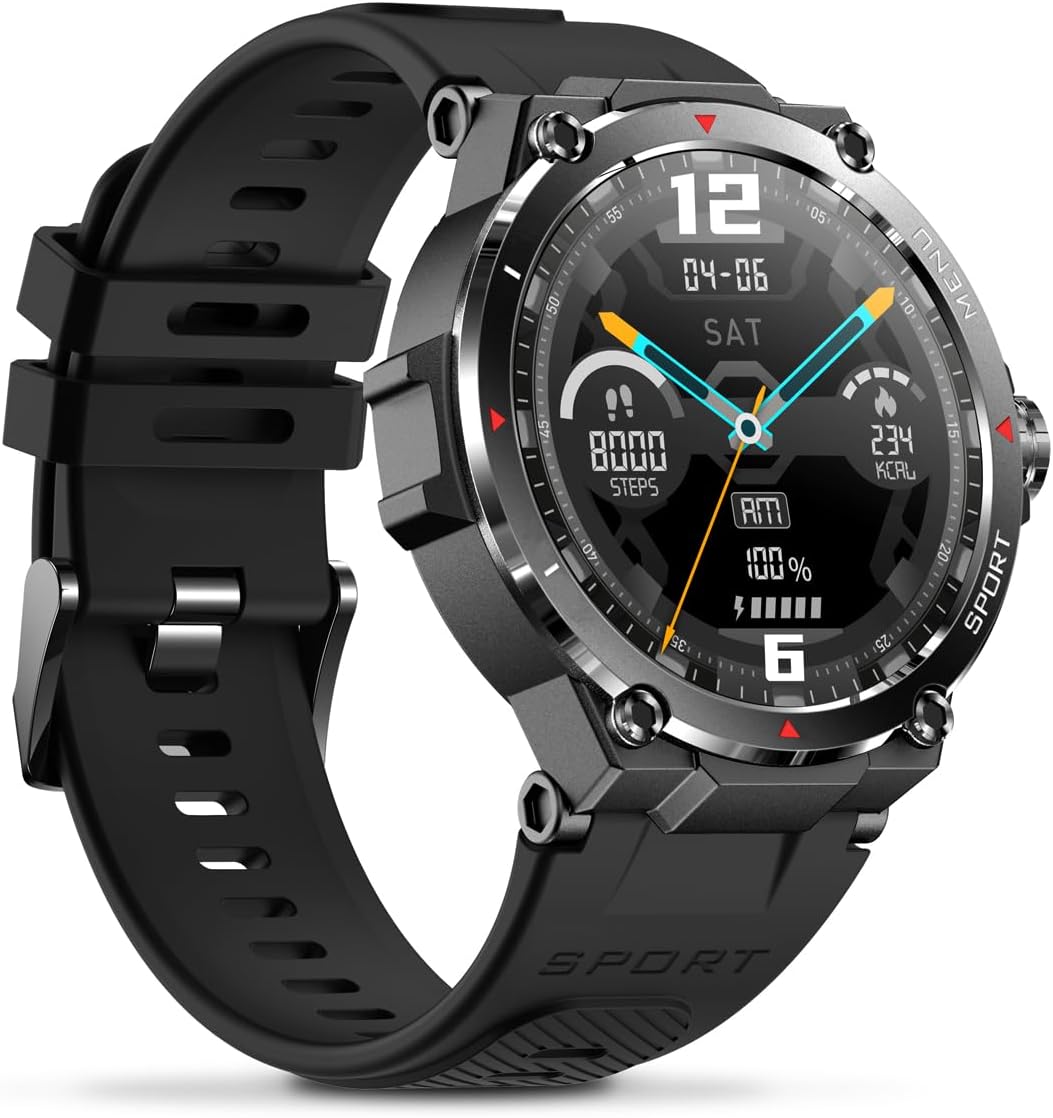
Delwedd: Ochr view of the Veho Kuzo F1S Smart Watch, highlighting the control buttons and rugged casing.
Olrhain Iechyd a Ffitrwydd
The watch continuously monitors various health and fitness metrics.
- Cyfradd y galon: 24/7 heart rate monitoring. View data amser real ar yr oriawr neu dueddiadau manwl yn yr ap.
- Ocsigen gwaed: Mesurwch lefelau ocsigen eich gwaed.
- Traciwr Gweithgaredd: Tracks steps, calories burned, and distance covered. Supports walking, running, and cycling.
- Monitor Cwsg: Monitors daily, weekly, and monthly sleep patterns, detailing deep sleep, light sleep, and awake times.
- GPS: Built-in 3-mode GPS (GPS+Beidou+Glonass) and Assisted GPS (AGPS) for accurate outdoor performance tracking and live map positioning. Compatible with STRAVA.

Image: The Veho Kuzo F1S Smart Watch displaying heart rate monitoring data.
Nodweddion Smart
- Hysbysiadau: Receive push notifications from apps like WhatsApp, Twitter, Facebook, LinkedIn, Skype, YouTube, Messenger, and Instagram directly on your watch.
- Rheoli Cerddoriaeth: Control music playback (volume, skip tracks, play/pause) on your paired smartphone directly from the watch.
- Swyddogaethau Amser: Access alarm, timer, intermittent timer, stopwatch, and countdown functions.
- Dod o hyd i Ffôn: Use your watch to locate your paired smartphone.
- News/Weather App: Integrated news and weather application functionality.
- Wynebau Gwylio y gellir eu Addasu: Choose from hundreds of different watch face designs through the companion app.
Cynnal a chadw
Glanhau
To maintain the watch's appearance and functionality:
- Sychwch yr oriawr a'r strap yn rheolaidd gyda lliain meddal, damp brethyn.
- Ceisiwch osgoi defnyddio cemegau llym neu lanhawyr sgraffiniol.
- Gwnewch yn siŵr bod y cysylltiadau gwefru yn lân ac yn sych cyn gwefru.
Gwrthiant Dŵr (IP68)
The Veho Kuzo F1S Smart Watch has an IP68 rating, meaning it is water-resistant in fresh water up to a maximum depth of 1.5 meters for up to 30 minutes, and is protected from dust.
- Do not use the watch for diving, snorkeling, or high-speed water sports.
- Osgowch amlygu'r oriawr i ddŵr poeth, stêm, neu lanedyddion.
- Sychwch yr oriawr yn drylwyr ar ôl dod i gysylltiad â dŵr.
Gofal Batri
- Charge the watch regularly to maintain battery health.
- Osgowch ddraenio'r batri'n llwyr yn aml.
- Store the watch in a cool, dry place if not used for extended periods.
Datrys problemau
If you encounter issues with your Veho Kuzo F1S Smart Watch, refer to the following common solutions:
- Oriawr ddim yn troi ymlaen: Ensure the watch is fully charged. Connect it to the charging cradle and check for the charging indicator.
- Methu paru â ffôn:
- Gwnewch yn siŵr bod Bluetooth wedi'i alluogi ar eich ffôn a'r oriawr.
- Gwnewch yn siŵr bod yr oriawr o fewn cyrraedd eich ffôn.
- Ailgychwynwch yr oriawr a'ch ffôn.
- Rhowch gynnig ar ddad-baru ac ail-baru'r ddyfais drwy'r ap.
- Data iechyd anghywir:
- Gwnewch yn siŵr bod yr oriawr yn cael ei gwisgo'n glyd ar eich arddwrn, ond nid yn rhy dynn.
- Glanhewch y synhwyrydd ar gefn yr oriawr.
- Environmental factors and skin conditions can affect accuracy.
- Hysbysiadau nad ydynt yn ymddangos:
- Check app notification settings on your phone and within the companion app.
- Gwnewch yn siŵr bod yr oriawr wedi'i chysylltu â'ch ffôn trwy Bluetooth.
Am gymorth pellach, cyfeiriwch at yr adran gymorth neu cysylltwch â gwasanaeth cwsmeriaid.
Manylebau
| Enw Model | F1S |
| Rhif Model | VSW-001-F1S-B (164426) |
| Arddangos | Sgrin Gyffwrdd AMOLED 1.3" |
| Datrysiad | 360 x 360 picsel |
| Chipset | Dialogue14695, PPGHX3690 |
| Cof | ROM 128MB + RAM 2MB |
| Bluetooth | v5.1 |
| Gallu Batri | Lithiwm-polymer 300mAh |
| Amser Gweithio | Hyd at 15 diwrnod |
| Amser Wrth Gefn | Hyd at 21 diwrnod |
| Amser Codi Tâl | Tua. 2 awr |
| Math Codi Tâl | USB-A to Magnetic Charging Cradle |
| Gwrthiant Dŵr | IP68 (up to 1.5 meters for 30 minutes in fresh water) |
| System GPS | 3-mode (GPS+Beidou+Glonass) |
| Dimensiynau | 46 mm x 12.9 mm |
| Pwysau | 51g |
| Lled Strap | 22mm |
| Hyd strap | 260mm |
| Cydweddoldeb OS | Android, iOS |
| Ieithoedd â Chymorth | All major languages (replicates paired smartphone language) |
Gwarant a Chefnogaeth
The Veho Kuzo Sports Smart Watch F1S comes with a limited warranty. Please refer to the warranty card included in your package or visit the official Veho websafle am delerau ac amodau gwarant manwl.
Cefnogaeth i Gwsmeriaid
For technical support, troubleshooting, or warranty claims, please contact Veho customer service through their official websafle neu'r wybodaeth gyswllt a ddarperir yn nogfennaeth eich cynnyrch.
- Cymorth Ar-lein: www.veho-world.com/support (exampy ddolen, gall y ddolen wirioneddol amrywio)
- E-bost: support@veho-world.com (Example email, actual email may vary)