
1. Rhagymadrodd
This manual provides essential instructions for the safe and effective use of your FLYLINKTECH 4000A Portable Car Battery Jump Starter. Please read this manual thoroughly before operation and retain it for future reference. This device is designed to jump-start vehicles with dead or low-voltage batteries and can also function as a portable power bank and LED flashlight.
2. Beth sydd yn y Bocs
Gwiriwch fod yr holl eitemau yn bresennol wrth agor y pecyn:
- FLYLINKTECH CF900 Jump Starter Unit
- Ceblau Siwmper Clyfar
- Cebl Codi Tâl USB-C
- Portable EVA Carrying Case
- Llawlyfr Defnyddiwr (y ddogfen hon)

Image: Contents of the FLYLINKTECH CF900 package. This includes the jump starter unit, smart jumper cables, a USB-C charging cable, a portable EVA carrying case, and the user manual.
3. Nodweddion Cynnyrch
- High-Power Jump Starter: Delivers 4000A peak current, suitable for vehicles with up to 9.0L gas or 8.0L diesel engines. Capable of up to 30 jump starts on a single charge.
- Versatile Power Bank: Features an 18,000mAh battery capacity and dual USB ports, including Quick Charge 3.0, for charging various electronic devices. Maintains charge for up to 24 months when not in use.
- Multi-functional LED Flashlight: Equipped with a bright 600-lumen LED light offering standard, SOS, and strobe modes for emergencies. Provides up to 48 hours of continuous illumination.
- Nodweddion Diogelwch Gwell: Integrated smart protection system provides 10 layers of safety, including reverse polarity, over-current, and over-voltage protection. Ensures safe operation in extreme temperatures (-4°F to 140°F) and prevents sparks or incorrect connections.
- Dyluniad Gwydn a Chludadwy: Compact and lightweight (820g) with a rugged ABS exterior for protection against impacts and scratches.

Delwedd: Manwl view of the FLYLINKTECH CF900 jump starter, highlighting the LED display, power button, LED flashlight, USB output ports (USB1 5V/2.4A, USB2 Quick Charge 3.0), jump start socket, and 5V/2A USB-C input port.
4. Gosod a Chodi Tâl
Before first use, fully charge the jump starter. It is recommended to recharge the unit every 3-6 months to maintain optimal battery health.
- Locate the USB-C input port on the jump starter.
- Connect the provided USB-C charging cable to the jump starter's input port.
- Connect the other end of the USB-C cable to a 5V/2A USB wall adapter (not included) or a compatible USB charging port.
- Bydd yr arddangosfa LCD yn dangos y cynnydd wrth wefru. Gwefrwch nes bod yr arddangosfa'n dangos 100%.

Image: The FLYLINKTECH jump starter functioning as a portable power bank, charging a smartphone and a tablet via its USB output ports. The image highlights the 18000mAh capacity and Quick Charge 3.0 feature.
5. Cyfarwyddiadau Gweithredu
5.1. Cychwyn Cerbyd gyda Neidio
Gwnewch yn siŵr bod y cychwynnydd neidio wedi'i wefru o leiaf 50% cyn ceisio cychwyn cerbyd â neidio.
- Connect Smart Jumper Cables: Insert the blue plug of the smart jumper cables completely into the jump start socket on the jump starter unit. Ensure a secure connection. The indicator light on the smart clamp will flash green and red.
- Cysylltu â Batri Car: Atodwch y clamp i derfynell bositif (+) y batri car a'r cl duamp i'r derfynell negatif (-).
- Gwirio Golau Dangosydd:
- Gwyrdd solet: Connection is correct and safe. Proceed to start the vehicle.
- Coch solet gyda bîp: Canfuwyd polaredd gwrthdro. Datgysylltwch y clamps and re-attach correctly.
- Gwyrdd sy'n fflachio: Batri cyftage is too low. Press the "BOOST" button on the smart clamp for 3 seconds until the light turns solid green. Start the vehicle within 30 seconds.
- No Light/No Beep: Check connections or if the car battery is severely damaged.
- Cerbyd Cychwyn: Once the indicator light is solid green, start your vehicle's engine.
- Dileu Clamps: As soon as the engine starts, remove the smart jumper cables from the car battery terminals first, then disconnect the blue plug from the jump starter unit.

Image: Easy operation guide for jump starting a car. Step 1: Insert the jump clamp into the booster. Step 2: Connect the clamps to the car battery. Step 3: Start your car. Step 4: Remove the clamps.
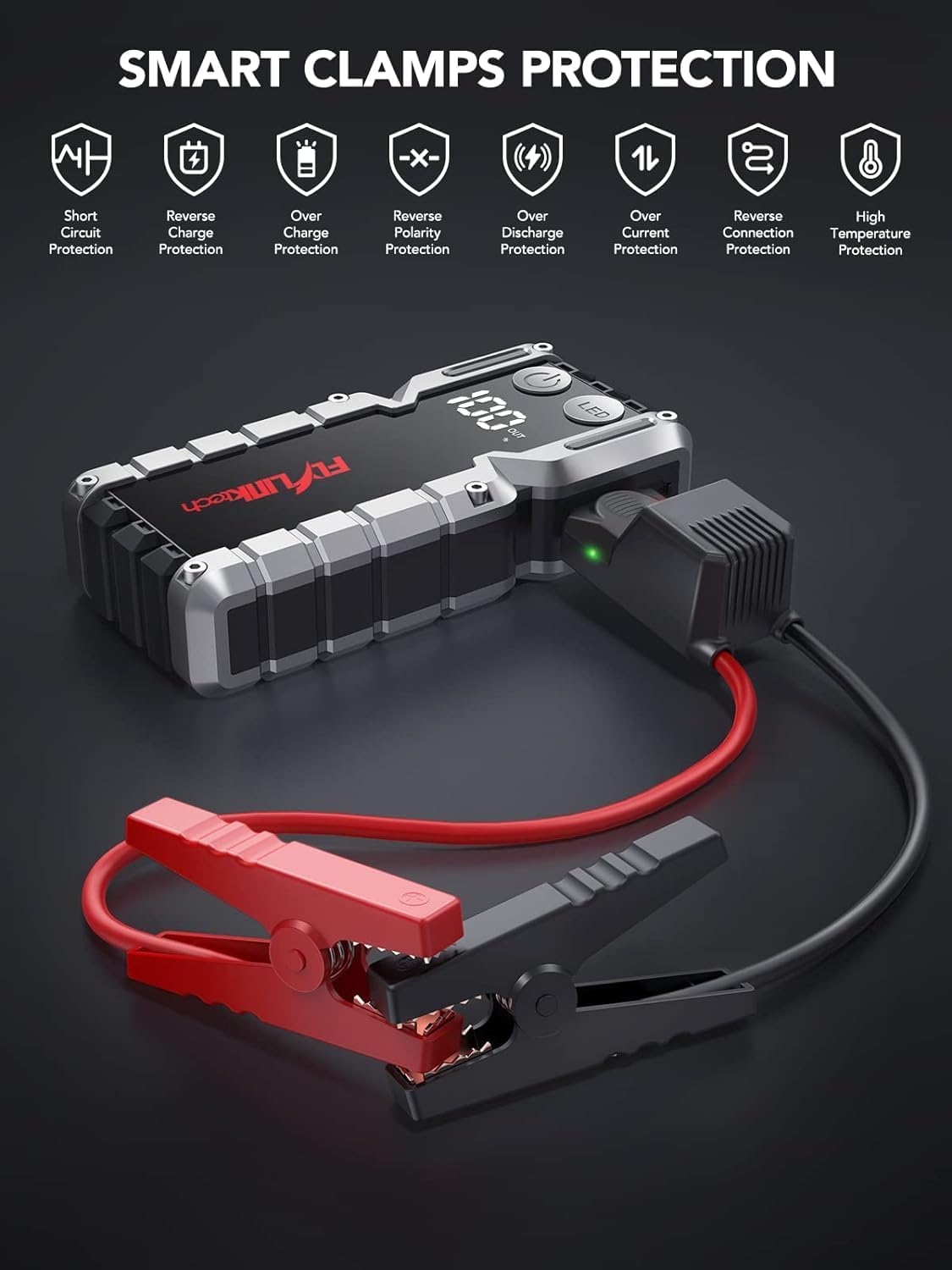
Image: Smart Clamps Protection. Icons represent various safety features including short circuit protection, reverse charge protection, over charge protection, reverse polarity protection, over discharge protection, over current protection, and high temperature protection.
5.2. Defnyddio fel Banc Pŵer
The jump starter can charge various USB-powered devices.
- Connect your device's USB charging cable to one of the USB output ports (USB1 or USB2 QC3.0) on the jump starter.
- Bydd y cychwynnydd neidio yn dechrau gwefru'ch dyfais yn awtomatig.
- The LCD display will show the remaining battery percentage o'r naid gychwyn.
5.3. Defnyddio'r Fflacholau LED
The built-in LED flashlight has three modes: standard, SOS, and strobe.
- Press and hold the "LED" button for 3 seconds to turn on the standard flashlight mode.
- Press the "LED" button again to cycle through the modes: Standard > SOS > Strobe.
- Press and hold the "LED" button for 3 seconds to turn off the flashlight.

Image: The built-in LED flashlight of the FLYLINKTECH jump starter, demonstrating its three modes: standard flashlight, SOS signal, and strobe light.
6. cynnal
- Store the jump starter in its portable EVA carrying case when not in use to protect it from dust and damage.
- Recharge the unit every 3-6 months, even if not used, to maintain battery health and extend its lifespan.
- Glanhewch y tu allan gyda lliain meddal, sych. Peidiwch â defnyddio cemegau llym na glanhawyr sgraffiniol.
- Keep the jump starter away from direct sunlight, heat sources, and moisture.
- Do not disassemble the unit. Servicing should only be performed by qualified personnel.
7. Datrys Problemau
| Problem | Achos Posibl | Ateb |
|---|---|---|
| Nid yw'r cychwynnydd neidio yn troi ymlaen. | Mae'r batri wedi'i ryddhau'n llwyr. | Gwefrwch y cychwynnydd neidio yn llawn gan ddefnyddio'r cebl USB-C a ddarperir. |
| Nid yw'r cerbyd yn cychwyn ar ôl cysylltu. | clamp cysylltiad (polaredd gwrthdro). Batri'r cychwynnydd neidio yn rhy isel. Vehicle battery severely damaged. Cl smartamp indicator not solid green. | Sicrhewch clampwedi'u cysylltu'n gywir (coch i +, du i -). Ailwefru'r peiriant neidio. Ymgynghorwch â mecanig proffesiynol. Follow indicator light instructions in Section 5.1. If flashing green, use BOOST function. |
| Cl smartamp indicator is solid red and beeping. | Cysylltiad polaredd gwrthdroi. | Datgysylltwch y cl ar unwaithamps and re-attach correctly (red to +, black to -). |
| Nid yw'r fflacholau'n gweithio. | Mae'r batri yn rhy isel. LED button not pressed correctly. | Codi tâl ar y naid gychwyn. Press and hold the "LED" button for 3 seconds to activate. |
| Dyfeisiau nad ydynt yn gwefru trwy borthladdoedd USB. | Batri'r cychwynnydd neidio yn rhy isel. Mater cysylltiad cebl. | Codi tâl ar y naid gychwyn. Ensure USB cables are securely connected to both the jump starter and the device. Try a different cable. |
8. manylebau
| Nodwedd | Manylyn |
|---|---|
| Model | CF900 |
| Gallu Batri | 18000 mAh (66.6Wh) |
| Cyfredol Uchaf | 4000A |
| Allbwn Cychwyn Neidio | 12V |
| Allbwn USB1 | 5V/2.4A |
| USB2 Output (QC3.0) | 5V/2.4A, 9V/2A, 12V/1.5A |
| Mewnbwn Math-C | 5V/2A |
| Tymheredd Gweithredu | -20°C i 60°C (-4°F i 140°F) |
| Dimensiynau Cynnyrch | 19 cm x 9 cm x 4 cm (tua) |
| Pwysau Eitem | 820 g |
| Cydweddoldeb Engine | Up to 9.0L Gas or 8.0L Diesel |
9. Gwarant a Chefnogaeth
FLYLINKTECH provides the following support for this product:
- 3-Year Free Warranty: Yn cwmpasu diffygion gweithgynhyrchu a chamweithrediadau o dan ddefnydd arferol.
- Cymorth Technegol Oes: Assistance with product usage, troubleshooting, and general inquiries.
- Gwasanaeth Cwsmer 7/24: Available around the clock for any questions or concerns.
For support, please refer to the contact information provided in your product packaging or visit the official Flylinktech websafle.