
Rhagymadrodd
The LAUNCH X431 Pro Elite is a professional OBD2 diagnostic tool designed for comprehensive vehicle analysis. It features bi-directional control, online ECU coding, full system diagnostics, and over 45 reset and maintenance services. This device supports advanced protocols like CANFD and DOIP, and includes FCA SGW access. Equipped with Android 10.0, an 8-inch touch screen, 4GB RAM, and 64GB ROM, it offers a robust platform for automotive diagnostics.
This manual provides detailed instructions for setting up, operating, maintaining, and troubleshooting your LAUNCH X431 Pro Elite diagnostic tool.
Cynnwys Pecyn
Wrth agor y pecyn, gwnewch yn siŵr bod yr holl gydrannau yn bresennol:
- 1 LAUNCH X431 PRO Elite Diagnostic Tablet
- Cebl Diagnostig OBD2
- Addasydd Pŵer
- Llawlyfr Defnyddiwr (y ddogfen hon)
- Other necessary accessories (refer to the packing list for full details)
Gosod
Initial Power On and Language Selection
- Gwefru'r Dyfais: Connect the provided power adapter to the LAUNCH X431 Pro Elite and a power outlet. Ensure the device is fully charged before first use.
- Pŵer Ymlaen: Pwyswch a daliwch y botwm pŵer nes bod y sgrin yn goleuo.
- Dewin Gosod Cychwynnol: Follow the on-screen instructions to complete the initial setup. This includes selecting your preferred language. The device supports German, English, Spanish, French, and Italian.
- Cysylltu â Wi-Fi: During setup, connect the device to a stable Wi-Fi network (2.4GHz & 5.0GHz supported) to enable software updates and online functions.
Cysylltiad Cerbyd
- Lleolwch y Porthladd OBD-II: The OBD-II port is typically located under the dashboard on the driver's side. Consult your vehicle's manual if you cannot find it.
- Cysylltwch y Cebl Diagnostig: Plug one end of the diagnostic cable into the OBD-II port of your vehicle and the other end into the LAUNCH X431 Pro Elite device.
- Trowch y tanio cerbyd ymlaen: Trowch danio'r cerbyd i'r safle "ON" (injan i ffwrdd).
- Establish Communication: The device will automatically attempt to establish communication with the vehicle's ECU.
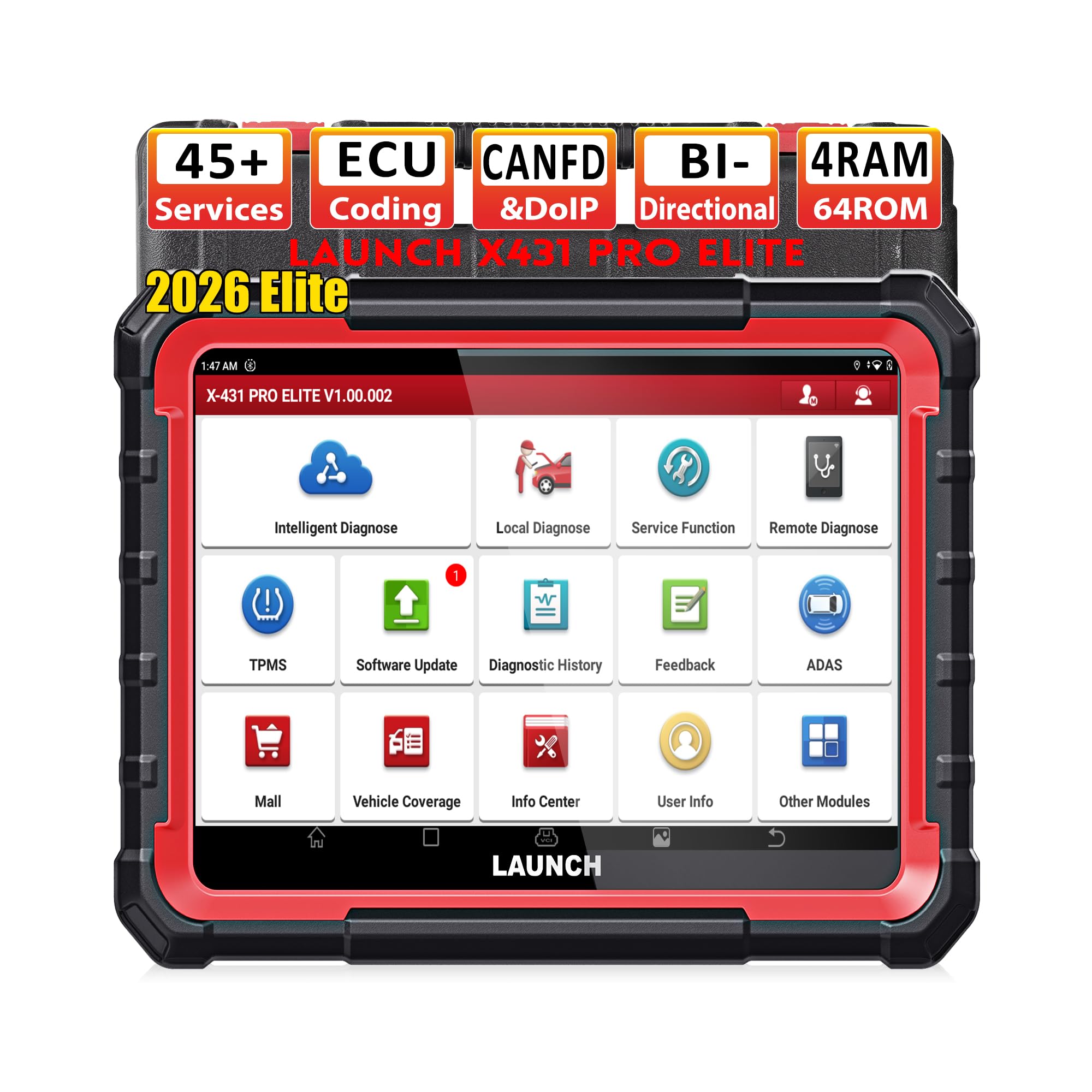
Image: The LAUNCH X431 Pro Elite device connected to a vehicle's diagnostic port.
Cyfarwyddiadau Gweithredu
The LAUNCH X431 Pro Elite offers a wide range of diagnostic and service functions. Navigate through the intuitive Android interface using the 8-inch touch screen.
System Diagnostics (OE-Level)
This function allows for comprehensive scanning of all available vehicle systems, including Engine, Transmission, ABS, SRS, Body System, Chassis, Powertrain, Fuel System, Lighting System, and more.
- From the main menu, select "Intelligent Diagnose" or "Local Diagnose".
- The system will automatically identify the vehicle via Auto VIN or prompt for manual selection.
- Choose "Health Report" for a quick scan of all systems or select specific systems for detailed diagnostics.
- Ymhlith y swyddogaethau mae:
- Darllen/Clirio DTCs: Retrieve and erase diagnostic trouble codes.
- Llif Data Byw: View real-time data parameters in text, graph, or gauge format.
- Ffrâm Rhewi: View vehicle operating conditions at the time a fault code is triggered.
- Gwybodaeth ECU: Display control unit information.

Delwedd: Drosoddview of OE-level all system diagnostics capabilities.
Bi-directional Control (Actuation Test)
This feature allows you to send commands to vehicle systems and components to test their functionality, aiding in pinpointing faulty parts.
- Examples include: Fuel pump test, radiator fan test, injector kill tests, relay activation, solenoid tests, throttle body control, window/door/sunroof operation, A/C clutch engagement, and headlight activation.
- To perform an actuation test, navigate to the specific system, select "Actuation Test," and follow the on-screen prompts.

Image: Illustration of bi-directional control and ECU coding capabilities.
ECU Coding and Online Functions
The device supports advanced ECU coding and online functions for various vehicle brands (e.g., Mercedes-Benz, Audi, BMW, Skoda).
- Online ECU Coding: For specific vehicle models, this allows for module replacement, component matching, programmable module installation (PMI), and adaptive data reset.
- Swyddogaethau dan arweiniad: Provides step-by-step instructions for complex procedures.
- Refresh Hidden Functions: Activates dormant features in certain vehicles.
- Online Calibration/Parameterization: Customizes vehicle settings, such as disabling seat belt alarms or adjusting speed limiters.
45+ Reset and Maintenance Services
The LAUNCH X431 Pro Elite provides a wide array of special functions for maintenance and service tasks.
- Ailosodiad Olew: Yn ailosod y system oes olew ar ôl newid olew.
- Ailosodiad EPB: Yn ailosod y brêc parcio electronig ar ôl newid y pad brêc.
- Graddnodi SAS: Yn calibradu'r synhwyrydd ongl llywio.
- Gwasanaeth IMMO: Performs immobilizer matching (basic functions).
- Adfywio DPF: Initiates diesel particulate filter regeneration.
- Ailosod BMS: Resets the battery management system.
- Cyfatebu Throttle: Yn ailddysgu safle corff y sbardun.
- Ailosod TPMS: Resets the tire pressure monitoring system.
- Gwaedu ABS: Performs ABS brake bleeding.
- Codio Chwistrellwr: Codes new injector numbers.
- And many more, including Gearbox Matching, Suspension Calibration, EGR Relearn, A/C Relearn, A/F Reset, Start/Stop Reset.

Image: Display of the 45+ reset and special functions available.
Advanced Protocols and Vehicle Coverage
The device supports modern vehicle communication protocols:
- CAN FD: Compatible with GM models (2020 and later).
- DOIP: Compatible with BMW (F&G chassis), Volvo (2018 and later), Land Rover & Jaguar (2017 and later). No additional adapters required.
- FCA SGW: Provides access for 2018 and newer Chrysler, Jeep, Dodge, and Fiat vehicles.
- Supports over 200 car brands and 100,000+ car models worldwide.

Image: Vehicle compatibility and supported advanced protocols.
Modiwlau Dewisol ac Ategolion
The LAUNCH X431 Pro Elite can be expanded with optional modules for enhanced functionality:
- X431 TSGUN (TPMS Tool): Enables full TPMS services including diagnosis, sensor activation, sensor status check, relearn (stationary, auto, OBD), DTC reading/clearing, and sensor programming.
- X431 PROG 3 (Key Programmer): For advanced key programming, adding/deleting keys, and cloning IMMO ECUs.
- Other modules include ADAS calibration tools, battery testers, videoscopes, oscilloscopes, sensor boxes, and multimeters.

Image: Optional extension modules for expanded diagnostic capabilities.
Cynnal a chadw
- Diweddariadau Meddalwedd: Regularly check for and install software updates to ensure optimal performance and compatibility with new vehicle models and functions. Connect to Wi-Fi and navigate to "Software Update" on the device.
- Glanhau: Defnyddiwch feddal, damp cloth to clean the device screen and body. Avoid abrasive cleaners or solvents.
- Storio: Storiwch y ddyfais mewn lle oer, sych, i ffwrdd o olau haul uniongyrchol a thymheredd eithafol.
- Gofal Batri: Er mwyn ymestyn oes y batri, osgoi rhyddhau'r batri'n llwyr yn aml. Gwefrwch y ddyfais yn rheolaidd, hyd yn oed os nad yw'n cael ei defnyddio am gyfnodau hir.
- Archwiliad cebl: Periodically inspect diagnostic cables for any signs of wear, damage, or fraying. Replace damaged cables immediately to prevent electrical issues or inaccurate readings.
Datrys problemau
| Problem | Achos Posibl | Ateb |
|---|---|---|
| Nid yw'r ddyfais yn pweru ymlaen. | Batri isel; addasydd pŵer diffygiol. | Ensure the device is fully charged. Check the power adapter and cable for damage. |
| Cannot establish communication with vehicle. | Incorrect cable connection; vehicle ignition off; faulty OBD-II port; incompatible vehicle protocol. | Verify the diagnostic cable is securely connected. Turn vehicle ignition to "ON". Check vehicle's OBD-II port. Ensure vehicle is supported by the tool. |
| Device interface is in the wrong language. | Gosodiad iaith anghywir. | Navigate to "Settings" on the device and select your desired language (German, English, Spanish, French, Italian are supported). |
| Software update fails or is slow. | Cysylltiad Wi-Fi ansefydlog; storfa annigonol. | Ensure a strong and stable Wi-Fi connection. Clear unnecessary files to free up storage space (device has 64GB ROM). |
| Touch screen unresponsive or malfunctioning. | Gwall meddalwedd; difrod corfforol. | Restart the device. If the problem persists, contact customer support. |
| Specific function (e.g., 38 special functions) not available. | Function not supported for the specific vehicle model; requires optional module; software not updated. | Verify vehicle compatibility for the specific function. Check if an optional module (e.g., X431 TSGUN, X431 PROG 3) is required. Ensure software is up to date. |
Manylebau
| Nodwedd | Manylyn |
|---|---|
| Brand | LANSIO |
| Rhif Model | X431 Pro Elite |
| Ffynhonnell Pwer | Wedi'i Bweru â Batri |
| System Weithredu | Android 10.0 |
| Maint Sgrin | 8 modfedd |
| Datrysiad Brodorol | 720x1440 |
| HWRDD | 4GB |
| ROM | 64GB |
| Ieithoedd â Chymorth | German, English, Spanish, French, Italian (25+ languages in total) |
| Dimensiynau Cynnyrch (L x W x H) | 17.2 x 5 x 22.4 cm |
| Pwysau Eitem | 3.69 Cilogram |
| Cysylltedd | 2.4 & 5.0 GHz Wi-Fi |
| Diweddariadau | Diweddariad Am Ddim 2 Blynedd |
| Protocolau a Gefnogir | CAN FD, DOIP, OBD1, OBD2 |
| Swyddogaethau Arbennig | Bi-directional Control, ECU Coding, 45+ Reset Services, FCA SGW Access, Guided Functions, Hidden Functions Refresh |
Gwarant a Chefnogaeth
The LAUNCH X431 Pro Elite comes with a comprehensive warranty and dedicated customer support.
- Polisi Dychwelyd: Enjoy a 60-day return period for refunds or replacements.
- Cymorth Technegol: Lifetime technical support is provided. For assistance, contact LAUNCH customer service.
- Diweddariadau Meddalwedd: The device includes 2 years of free software updates. Regular updates ensure access to the latest vehicle models and diagnostic functions.
- Adnoddau Ar-lein: Access online repair information, diagnostic reports, live data graphs, and DTC assistance through the device's interface.
For any issues or questions, please refer to the contact information provided with your purchase or visit the official LAUNCH websafle ar gyfer adnoddau cymorth.