
Rhagymadrodd
The OtO Lawn Smart Sprinkler is an innovative irrigation system designed for precise and efficient watering of your lawn and plants. This manual provides detailed instructions for setting up, operating, and maintaining your OtO device to ensure optimal performance and water conservation.
Nodweddion Cynnyrch
- Dyfrhau Clyfar: Automatically waters exactly where needed, saving time and effort.
- Precision Zones: Unlimited customizable spray zones for lawns, shrubs, gardens, and trees.
- Solar-Power: Operates using solar energy, eliminating the need for batteries, wires, or outlets.
- Weather Intelligence: Checks local forecasts to skip watering during rain or high winds.
- Quick DIY Setup: Easy installation requiring only a hose and Wi-Fi, no trenching or digging.
- Adeiladu Gwydn: UV-resistant body, weatherproof housing (32°–149°F), and solid brass fittings for year-round use.
- Expandable Coverage: One unit covers up to 5,000 sq ft, with the option to daisy-chain multiple units.
- Rheoli Ap: Manage schedules and units remotely using the free OtO app.
- Security Loop: Allows for securing the device to an object for peace of mind.
Beth Sydd yn y Bocs
Your OtO Lawn Smart Sprinkler package includes:
- OtO Lawn Smart Sprinkler Unit
- Mounting Bracket (Steel)
- 1 Lithium Ion battery (included, pre-installed)
- Llawlyfr Cyfarwyddiadau
Canllaw Gosod
1. Dadbocsio a Thâl Cychwynnol
Remove all components from the packaging. Ensure the unit is fully charged before initial setup. The device is solar-powered, but an initial charge via the provided wall plug is recommended for optimal performance.
2. Mounting the OtO Unit
The OtO unit can be installed in minutes without complex tools or professional assistance. It can be elevated on a fence or staked directly into the ground using the included steel mounting bracket.
- Choose a location with direct sunlight exposure for the solar panel.
- Secure the mounting bracket to your desired surface (fence or ground).
- Attach the OtO unit securely to the mounting bracket.

Figure 1: Various installation methods for the OtO Smart Sprinkler, demonstrating its flexibility for different yard layouts.
3. Connecting to Water and Wi-Fi
Connect a standard garden hose to the inlet on the OtO unit. Ensure a secure connection to prevent leaks. The OtO unit requires a 2.4 GHz Wi-Fi signal for app connectivity. Place the device within range of your home's Wi-Fi router.
4. Lawrlwytho Ap a Pharu Dyfeisiau
- Download the free OtO Lawn app from your smartphone's app store.
- Creu cyfrif neu fewngofnodi.
- Follow the in-app instructions to pair your OtO device. This typically involves turning on the device and connecting to its unique Wi-Fi signal temporarily during the pairing process.
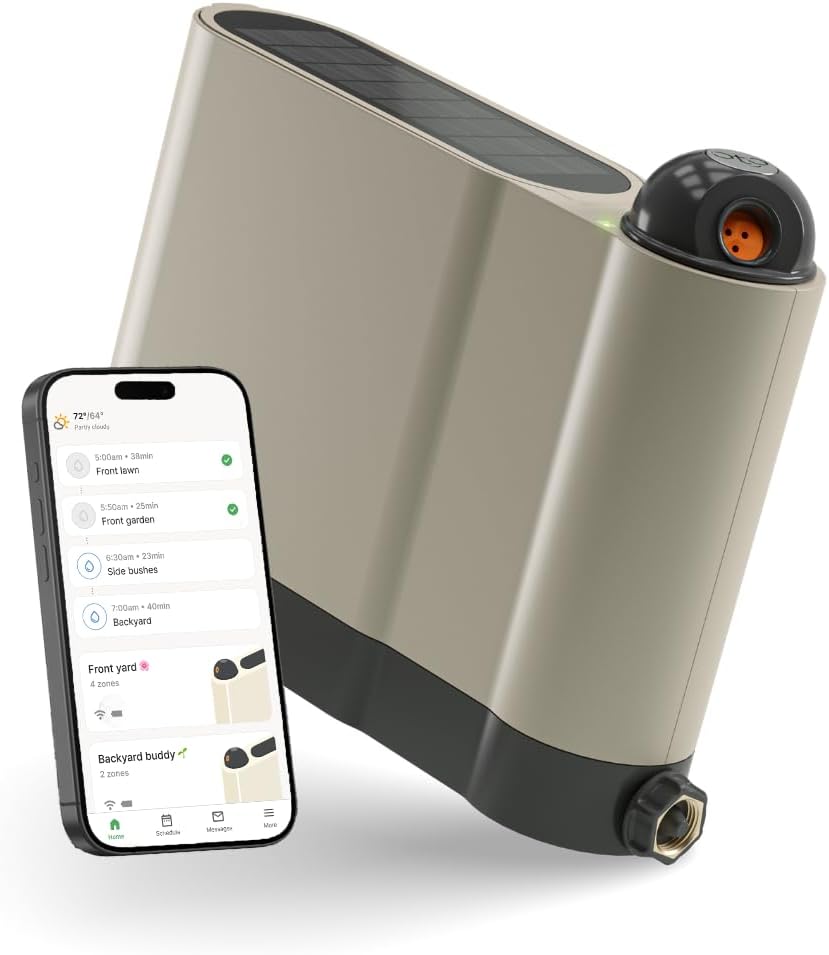
Figure 2: The OtO Smart Sprinkler unit shown alongside the mobile application, highlighting its app-controlled functionality.
Cyfarwyddiadau Gweithredu
1. Defining Watering Zones
Use the OtO app to define unlimited customizable spray zones for your yard. This precision allows you to water specific areas like lawns, shrubs, or garden beds without overwatering sidewalks or dry spots.
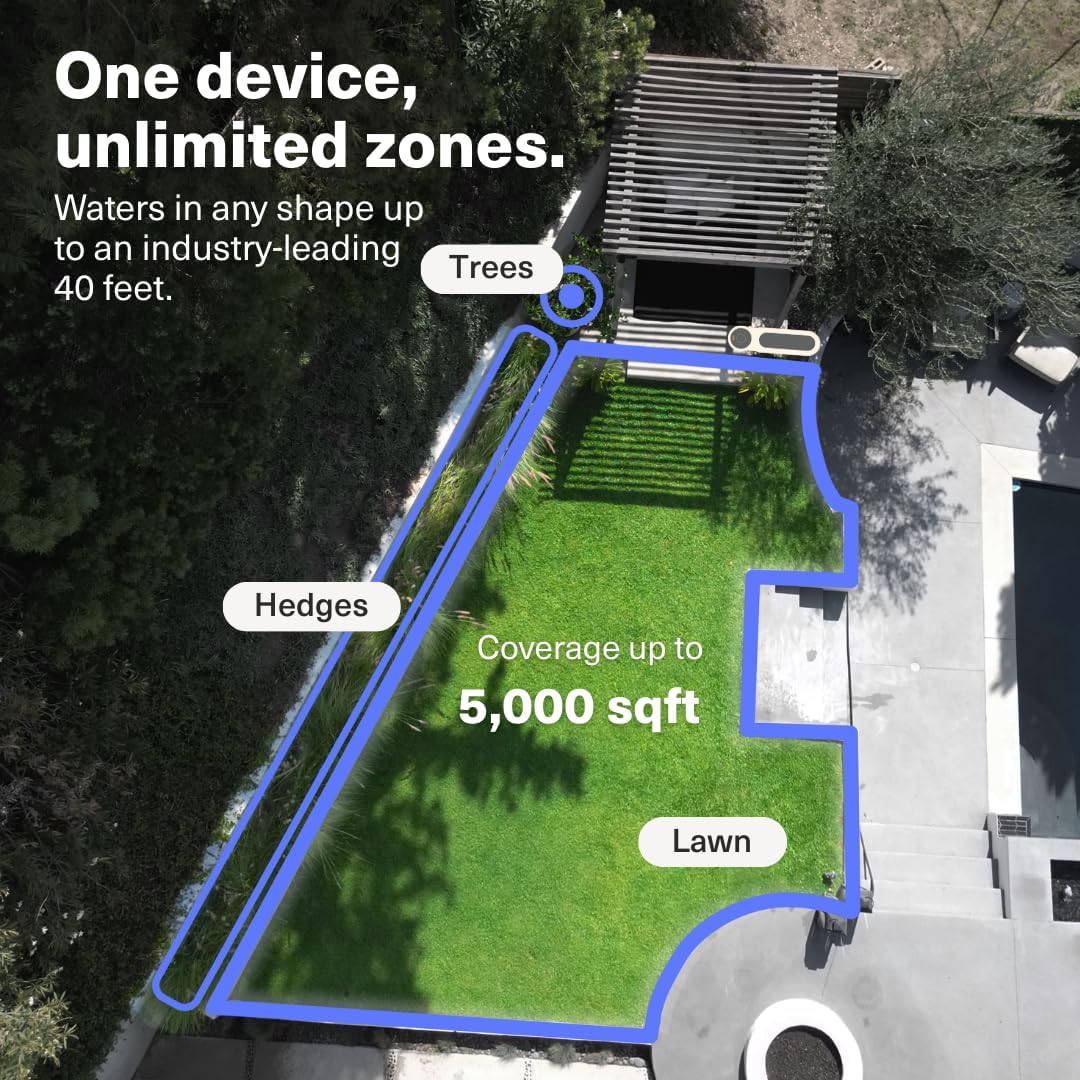
Figure 3: An aerial perspective illustrating how the OtO Smart Sprinkler can define multiple, customized watering zones within a single yard.
2. Setting Up Schedules
The OtO app allows you to create and manage watering schedules. Leverage the weather intelligence feature for optimal watering. The system checks local forecasts and automatically skips watering if rain or high winds are detected, conserving water.

Figure 4: The OtO app interface demonstrating smart scheduling capabilities, including irrigation history and weather-based skip functions.
3. Dyfrio â Llaw
For immediate watering needs, you can initiate manual watering directly from the app. This is useful for testing zones or providing extra water to specific areas as needed.
Video 1: A demonstration of how the OtO Smart Sprinkler precisely waters a lawn, showcasing its spray patterns and coverage.
Cynnal a chadw
1. Gofal Cyffredinol
The OtO Smart Sprinkler is designed for durability with a UV-resistant body and weatherproof housing. Regularly inspect the unit for any debris or obstructions that might affect its performance. Clean the solar panel periodically to ensure efficient charging.
2. Gaeafu
Before the first freeze, disconnect the OtO unit from the hose and store it indoors in a dry, protected area. This prevents damage from freezing water and extends the lifespan of the device. Ensure the unit is fully charged before storage.
Datrys problemau
If you encounter issues with your OtO Smart Sprinkler, consider the following:
- Dim Chwistrellu Dŵr: Check if the hose is securely connected and the water supply is turned on. Verify that the app schedule is active or initiate a manual run.
- Poor Spray Coverage: Ensure the nozzle is clear of debris. Adjust the spray zones in the app to optimize coverage.
- Dyfais All-lein: Check your Wi-Fi connection and ensure the OtO unit is within range. Restart your Wi-Fi router and the OtO device if necessary.
- Batri Ddim yn Codi Tâl: Confirm the solar panel is receiving direct sunlight. Clean the solar panel if it's dirty.
For further assistance, please refer to the in-app help section or contact OtO customer support.
Manylebau
| Dimensiynau Pecyn | 17.25 x 14.25 x 5.75 modfedd |
| Pwysau Eitem | 9.23 pwys |
| ASIN | B0C78GV866 |
| Batris | Mae angen 1 batris Ion Lithiwm. (wedi'i gynnwys) |
| Brand | OtO |
| Lliw | llwydfelyn |
| Deunydd | Pres |
| Arddull | Awtomatig |
| UPC | 628011530172 |
Gwybodaeth Diogelwch
Gall y cynnyrch hwn gynnwys cemegau y gwyddys gan Talaith California eu bod yn achosi canser a namau geni neu niwed atgenhedlu arall. Am ragor o wybodaeth, ewch i www.P65Warnings.ca.gov.
Gwarant a Chefnogaeth
The OtO Lawn Smart Sprinkler comes with a standard manufacturer's warranty. For details regarding warranty coverage and terms, please refer to the product packaging or contact OtO customer support. Extended protection plans are available for purchase separately.
- Cynllun Diogelu 2 Blynedd: $49.99
- Cynllun Diogelu 3 Blynedd: $64.99
For technical support or inquiries, please visit the official OtO websafle neu cysylltwch â'u tîm gwasanaeth cwsmeriaid.