
1. Rhagymadrodd
Diolch am brynuasing the CANYON BSP-8 Bluetooth Speaker. This manual provides essential information for the safe and efficient use of your device. Please read it thoroughly before operation and retain it for future reference.
Nodweddion Allweddol:
- Allbwn Sain 10W: Yn darparu sain glir a phwerus.
- Bluetooth 5.2: For stable and energy-efficient wireless connection up to 10 meters.
- Goleuadau Cefn RGB: Integrated lighting for enhanced ambiance.
- Gwir Stereo Di-wifr (TWS): Connect two BSP-8 speakers for a full stereo sound experience.
- Opsiynau Chwarae Lluosog: Supports Bluetooth, AUX, USB, and MicroSD card inputs.
- Dyluniad Symudol: Compact size with a convenient hanger for easy transport.
- Bywyd batri hir: Hyd at 3 awr o amser chwarae ar un tâl.
2. Gwybodaeth Diogelwch
- Peidiwch ag amlygu'r siaradwr i dymheredd eithafol, golau haul uniongyrchol, na lleithder uchel.
- Osgoi gollwng neu orfodi'r siaradwr i effeithiau cryf.
- Do not disassemble or attempt to repair the speaker yourself. Contact qualified service personnel.
- Keep the speaker away from water and other liquids. It is not waterproof.
- Defnyddiwch y cebl gwefru a ddarperir neu gebl Math-C ardystiedig yn unig ar gyfer gwefru.
- Gwaredu'r batri a'r siaradwr yn unol â rheoliadau lleol.
3. Cynnwys Pecyn
- CANYON BSP-8 Bluetooth Speaker
- Cebl Codi Tâl USB Math-C
- Llawlyfr Defnyddiwr
4. Cynnyrch Drosview
Ymgyfarwyddwch â chydrannau a rheolyddion y siaradwr.
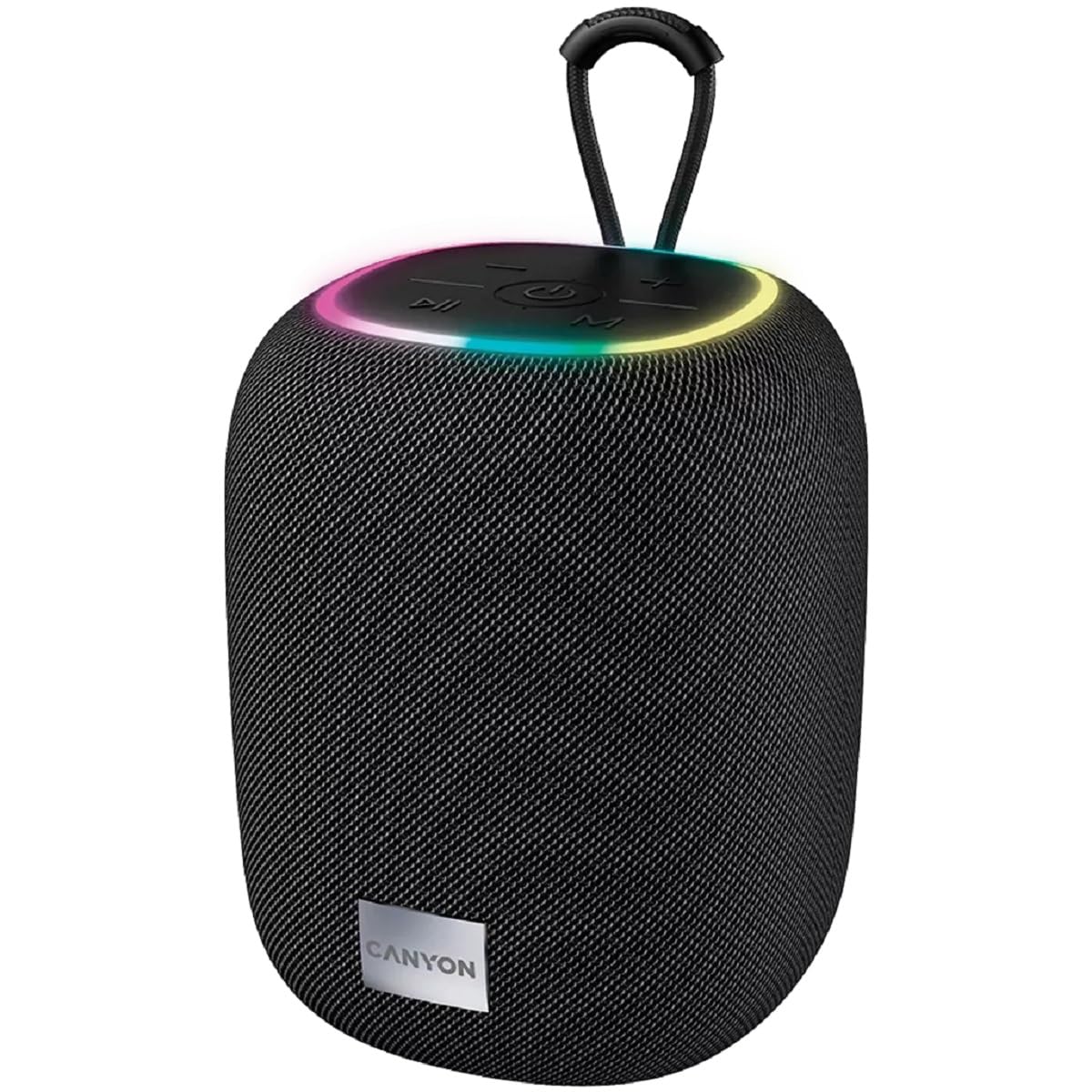
Delwedd 1: Top view of the CANYON BSP-8 speaker, showing the control buttons, RGB backlight, and integrated hanger.
Botymau Rheoli (Panel Uchaf):
- Botwm Pŵer: Press and hold to turn on/off. Short press to play/pause.
- Botwm Cyfaint i Lawr / Trac Blaenorol: Pwyswch yn fyr i ostwng y gyfrol. Pwyswch yn hir am y trac blaenorol.
- Botwm Cyfaint i Fyny / Trac Nesaf: Pwyswch yn fyr i gynyddu'r gyfrol. Pwyswch yn hir am y trac nesaf.
- Botwm Modd (M): Short press to switch between Bluetooth, AUX, USB, and MicroSD modes.

Delwedd 2: Cefn view of the CANYON BSP-8 speaker, illustrating the various input ports including AUX, USB, TF (MicroSD) card slot, and DC5V Type-C charging port.
Input Ports (Rear Panel):
- Porthladd AUX: Ar gyfer cysylltu dyfeisiau sain allanol trwy gebl sain 3.5mm.
- Porth USB: Ar gyfer chwarae sain o yriant fflach USB.
- TF Card Slot (MicroSD): For playing audio from a MicroSD card.
- DC5V (Type-C) Port: Am godi tâl ar y siaradwr.
5. Gosod
5.1 Gwefru'r Siaradwr
- Connect the provided USB Type-C cable to the DC5V port on the speaker.
- Cysylltwch ben arall y cebl ag addasydd pŵer USB (argymhellir 5V/1A) neu borthladd USB cyfrifiadur.
- Bydd y golau dangosydd gwefru yn goleuo. Bydd yn diffodd neu'n newid lliw unwaith y bydd wedi'i wefru'n llawn.
Nodyn: I gael bywyd batri gorau posibl, gwefrwch y siaradwr yn llawn cyn ei ddefnyddio gyntaf.

Image 3: Illustration showing the 1800 mAh battery capacity and up to 3 hours of playtime for the CANYON BSP-8 speaker.
5.2 Pweru Ymlaen/Diffodd
- I Bweru Ymlaen: Press and hold the Power button for approximately 3 seconds. You will hear an audible prompt.
- I Bweru i ffwrdd: Press and hold the Power button for approximately 3 seconds. You will hear an audible prompt.
5.3 Pâr Bluetooth
- Trowch y siaradwr ymlaen. Bydd yn mynd i mewn i'r modd paru Bluetooth yn awtomatig, a nodir gan olau LED sy'n fflachio.
- Galluogwch Bluetooth ar eich dyfais symudol (ffôn clyfar, tabled, cyfrifiadur).
- Chwiliwch am available Bluetooth devices and select "CANYON BSP-8" from the list.
- Once paired, the LED light will stop flashing, and you will hear a confirmation sound.
Note: The speaker will automatically reconnect to the last paired device if it is within range and Bluetooth is enabled.

Image 4: Illustration highlighting the stable and energy-efficient Bluetooth 5.2 connection with an operating range of up to 10 meters.
Paru Stereo Di-wifr Gwirioneddol 5.4 (TWS)
To connect two CANYON BSP-8 speakers for a stereo sound experience:
- Gwnewch yn siŵr bod y ddau siaradwr BSP-8 wedi'u troi ymlaen ac nad ydynt wedi'u cysylltu ag unrhyw ddyfais Bluetooth.
- Ar un siaradwr (hwn fydd y prif siaradwr), pwyswch y botwm Pŵer ddwywaith. Bydd yn mynd i mewn i'r modd paru TWS.
- Bydd y ddau siaradwr yn chwilio am ei gilydd ac yn cysylltu â'i gilydd yn awtomatig. Byddwch yn clywed sain cadarnhau unwaith y byddwch wedi cysylltu.
- Once TWS is established, connect your mobile device to the primary speaker via Bluetooth as described in section 5.3.
Note: TWS mode only works with two identical CANYON BSP-8 speakers.
6. Cyfarwyddiadau Gweithredu
6.1 Chwarae Sain
- Modd Bluetooth: Ar ôl paru llwyddiannus, bydd sain o'ch dyfais gysylltiedig yn chwarae drwy'r siaradwr.
- Modd AUX: Connect a 3.5mm audio cable from your external audio device to the AUX port on the speaker. Press the 'M' button to switch to AUX mode.
- Modd USB: Insert a USB flash drive into the USB port. The speaker will automatically switch to USB mode and begin playing audio files. If not, press the 'M' button.
- Modd Cerdyn MicroSD: Insert a MicroSD card into the TF card slot. The speaker will automatically switch to MicroSD mode and begin playing audio files. If not, press the 'M' button.
6.2 Rheoli Chwarae
- Chwarae/Seibiant: Pwyswch y botwm Power yn fyr.
- Cyfrol i Fyny: Pwyswch y botwm Cyfaint i Fyny (+) yn fyr.
- Cyfrol i Lawr: Pwyswch y botwm Cyfaint i Lawr (-) yn fyr.
- Trac Nesaf: Pwyswch y botwm Cyfaint i Fyny (+) yn hir.
- Trac Blaenorol: Pwyswch y botwm Cyfaint i Lawr (-) yn hir.
6.3 RGB Backlight
The speaker features an integrated RGB backlight on the top panel. The backlight activates automatically when the speaker is powered on. There are no specific controls for changing the RGB pattern or turning it off/on independently of the speaker's power state.