
1. Rhagymadrodd
This manual provides instructions for the proper use and care of your Docooler Portable USB Cassette Player. This device allows you to play audio cassettes and convert their content into digital MP3 files via a USB connection to a computer. Please read this manual thoroughly before operating the device to ensure optimal performance and longevity.
2. Cynnyrch Drosview
The Docooler Portable USB Cassette Player is a compact, handheld device designed for playing and digitizing audio cassettes. It features a transparent casing, allowing visibility of the internal mechanism.
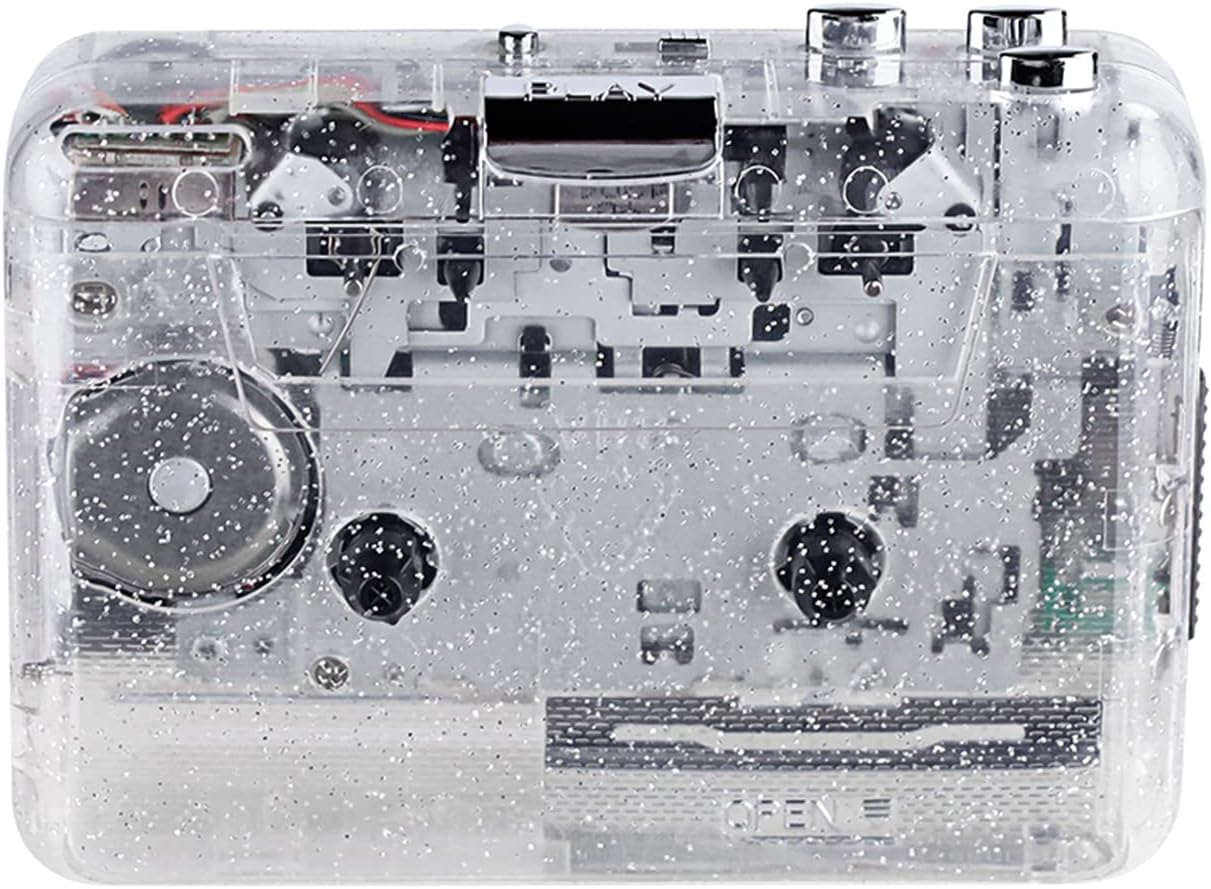
Ffigur 1: Blaen view of the Docooler Portable USB Cassette Player, showcasing ei ddyluniad tryloyw.

Figure 2: Various angles of the cassette player, including top, side, and open views.
Cynnwys y Pecyn:
- Docooler Portable USB Cassette Player
- Cebl USB
- Llawlyfr Defnyddiwr (y ddogfen hon)
- Headphones (may vary by package)
3. Gosod
3.1 Cyflenwad Pŵer
The cassette player can be powered by either batteries or a USB connection.
Gosod Batri:
- Lleolwch y compartment batri ar y ddyfais.
- Agorwch y clawr adran batri.
- Mewnosodwch 2 x batris AA (heb eu cynnwys), gan sicrhau'r polaredd cywir (+/-).
- Caewch y clawr adran batri yn ddiogel.
Pŵer USB:
Connect the provided USB cable to the player's USB port and the other end to a powered USB port on your computer or a USB wall adapter. The device will draw power from the USB connection.
4. Cyfarwyddiadau Gweithredu
4.1 Playing a Cassette Tape
- Agorwch glawr yr adran casét.
- Insert an audio cassette tape with the open edge facing upwards.
- Close the cassette compartment cover firmly.
- Connect headphones or external speakers to the 3.5mm audio output jack.
- Gwasgwch y CHWARAE botwm i ddechrau chwarae.
- Defnyddiwch y AROS botwm i atal chwarae.
- Defnyddiwch y FF (Ymlaen Cyflym) a REW (ailddirwyn) botymau i lywio drwy'r tâp.
- Adjust the volume using the volume control dial.
- The "DIR" button allows you to quickly flip the tape direction. The "play mode" button can be used to reverse playback once or an unlimited number of times.

Figure 3: The cassette player in use, demonstrating tape insertion and playback setup.

Figure 4: Users listening to audio through headphones connected to the cassette player.
4.2 Converting Tapes to MP3 Files
The Docooler Portable USB Cassette Player can convert your analog cassette audio into digital MP3 files. This process requires a computer and compatible audio recording software (not included).
- Ensure the cassette player is powered (via batteries or USB).
- Connect the cassette player to your computer using the provided USB cable.
- Install and open your preferred audio recording software on your computer. Software such as Audacity (free and open-source) is commonly used for this purpose.
- Configure your recording software to recognize the cassette player as an audio input device.
- Mewnosodwch y tâp casét rydych chi am ei drosi i'r chwaraewr.
- Start recording in your software, then press the CHWARAE button on the cassette player.
- Monitor the recording process. Once the tape has finished playing, stop the recording in your software.
- Save the recorded audio as an MP3 file ar eich cyfrifiadur.

Figure 5: Illustration of the process to convert cassette audio to MP3 files using the player and a computer.
5. cynnal
5.1 Glanhau'r Dyfais
- Wipe the exterior of the player with a soft, dry cloth.
- Do not use liquid cleaners or abrasive materials, as they may damage the surface.
- Periodically clean the tape heads and pinch rollers using a cotton swab lightly dampwedi'i ychwanegyn ag alcohol isopropyl i sicrhau'r ansawdd sain gorau posibl ac atal difrod i'r tâp.
5.2 Storio
- Pan nad ydynt yn cael eu defnyddio am gyfnodau hir, tynnwch y batris i atal gollyngiadau.
- Storiwch y chwaraewr mewn lle oer, sych i ffwrdd o olau haul uniongyrchol a thymheredd eithafol.
6. Datrys Problemau
| Problem | Achos Posibl | Ateb |
|---|---|---|
| Dim pŵer | Dead batteries; USB cable not connected properly. | Replace batteries; ensure USB cable is securely connected. |
| Dim sain | Headphones/speakers not connected; volume too low; dirty tape heads. | Connect audio output device; increase volume; clean tape heads. |
| Poor sound quality (hissing, muffled) | Dirty tape heads; worn-out tape; low battery. | Clean tape heads; try a different tape; replace batteries. |
| Tape not playing or moving | Tape jammed; mechanism issue; low battery. | Check tape for damage; replace batteries. |
| Cannot convert to MP3 | USB connection issue; software not configured correctly; no recording software. | Ensure USB is connected; check software settings; install compatible recording software. |
7. manylebau
- Model: B0C69FDZF6
- Cyflenwad Pŵer: 2 x AA Batteries or USB 5V DC
- Rhyngwyneb: USB 2.0
- Allbwn sain: Jac stereo 3.5mm
- Dimensiynau: 7.2 x 5.91 x 1.54 modfedd (tua)
- Pwysau: 9.6 owns (tua)
- Gwneuthurwr: Docooler
8. Gwybodaeth Diogelwch
- Peidiwch ag amlygu'r ddyfais i ddŵr na lleithder gormodol.
- Osgoi gollwng neu orfodi'r ddyfais i effeithiau cryf.
- Peidiwch â cheisio dadosod na thrwsio'r ddyfais eich hun. Cyfeiriwch at bersonél gwasanaeth cymwys.
- Cadwch allan o gyrraedd plant.
- Cael gwared ar fatris yn unol â rheoliadau lleol.
9. Gwarant a Chefnogaeth
For warranty information or technical support, please refer to the documentation included with your purchase or contact Docooler customer service through their official website or the retailer where the product was purchased. Please have your model number (B0C69FDZF6) and purchase date available when contacting support.