
1. Rhagymadrodd
Welcome to the user manual for your new ZZB ZB10 10.1-inch Android 14 Tablet PC. This guide provides essential information for setting up, operating, maintaining, and troubleshooting your device. Please read this manual thoroughly to ensure optimal performance and longevity of your tablet.

Ffigur 1: Blaen view of the ZZB ZB10 Tablet.
2. Beth sydd yn y Bocs
Upon opening your ZZB ZB10 Tablet PC package, please verify that all the following items are included:
- ZZB ZB10 10.1-inch Android 14 Tablet PC
- Cebl Math-C
- Llawlyfr Defnyddiwr (y ddogfen hon)

Figure 2: The ZZB ZB10 Tablet and its packaging.
3. Cynnyrch Drosview
Familiarize yourself with the physical components of your ZZB ZB10 Tablet.
3.1 Cydrannau Ffisegol
- Arddangos: Sgrin IPS 10.1 modfedd.
- Camera blaen: Located above the screen.
- Camera Cefn: Located on the back panel.
- Botwm Pŵer: Typically on the side or top edge.
- Botymau Cyfrol: Addaswch lefelau sain.
- Porth USB Math-C: Ar gyfer codi tâl a throsglwyddo data.
- Slot Cerdyn MicroSD: Ar gyfer storfa ehangadwy.

Ffigur 3: Cefn view of the ZZB ZB10 Tablet, highlighting the camera and model information.
4. Gosod
4.1 Gwefru'r Tabled
Before first use, fully charge your tablet. Connect the provided Type-C cable to the tablet's charging port and the other end to a compatible USB power adapter (not included) or a computer's USB port. The battery indicator on the screen will show charging status.
4.2 Pŵer Ymlaen/Diffodd
- I Bweru Ymlaen: Pwyswch a dal y botwm Power nes bod y sgrin yn goleuo.
- I Bweru i ffwrdd: Pwyswch a daliwch y botwm Pŵer nes bod dewislen yn ymddangos, yna dewiswch 'Diffodd'.
- I ailgychwyn: Pwyswch a daliwch y botwm Pŵer nes bod dewislen yn ymddangos, yna dewiswch 'Ailgychwyn'.
4.3 Gosodiad Cychwynnol
Upon first power-on, the tablet will guide you through the initial setup process. This typically includes:
- Yn dewis eich iaith.
- Cysylltu â rhwydwaith Wi-Fi.
- Setting up your Google account (or skipping for later).
- Reviewderbyn a derbyn telerau ac amodau.
5. Cyfarwyddiadau Gweithredu
5.1 Mordwyo Sylfaenol
The ZZB ZB10 Tablet runs on Android 14, offering an intuitive touch interface.
- Tap: Dewiswch eitem neu agorwch ap.
- Swipe: Llywio drwy sgriniau neu sgrolio cynnwys.
- Pinsio-i-Chwyddo: Chwyddo neu leihau cynnwys ar y sgrin.
- Gwasg Hir: Mynediad i ddewislenni cyd-destunol neu symud eiconau.
5.2 Cysylltu â Wi-Fi
- Ewch i Gosodiadau > Rhwydwaith a rhyngrwyd > Wi-Fi.
- Togglo Wi-Fi On.
- Dewiswch eich rhwydwaith dymunol o'r rhestr.
- Rhowch y cyfrinair os gofynnir amdano, yna tapiwch Cyswllt.
5.3 Pâr Bluetooth
- Ewch i Gosodiadau > Dyfeisiau cysylltiedig > Bluetooth.
- Toglo Bluetooth On.
- Ensure the device you wish to pair is in pairing mode.
- Select the device from the 'Available devices' list and follow on-screen prompts.
5.4 Defnyddio'r Camera
The tablet features a 2MP front camera and an 8MP rear camera.
- Agorwch y Camera ap.
- Tapiwch y botwm caead i dynnu llun.
- Newidiwch rhwng camerâu blaen a chefn gan ddefnyddio eicon y camera.
- Dewiswch y modd fideo i recordio fideos.

Figure 4: Using the tablet's camera for photos or video calls.
5.5 Rheoli Storfa
The tablet comes with 32GB of internal storage and supports up to 1TB expandable storage via a MicroSD card.
- To insert a MicroSD card, locate the card slot on the side of the tablet.
- Gently insert the MicroSD card until it clicks into place.
- You can manage storage in Gosodiadau > Storio.

Figure 5: The tablet supports extended storage up to 1TB.
5.6 Modd Darllen
The tablet features a reading mode designed to reduce eye strain by adjusting screen colors and brightness. This mode can typically be activated from the quick settings panel (swipe down from the top of the screen) or within the display settings.
6. cynnal
6.1 Glanhau
Use a soft, lint-free cloth to clean the screen and body of the tablet. Avoid using harsh chemicals or abrasive materials, which can damage the device.
6.2 Gofal Batri
- Osgowch amlygu'r dabled i dymheredd eithafol.
- Peidiwch â gadael i'r batri ollwng ei ollwng yn aml.
- Defnyddiwch y cebl Math-C a ddarperir yn unig ar gyfer gwefru.
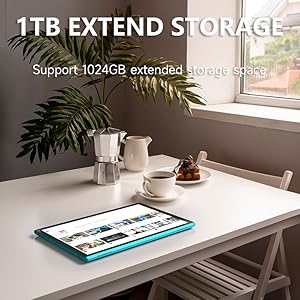
Figure 6: The tablet features a 6000mAh battery for extended use.
6.3 Diweddariadau Meddalwedd
Periodically check for system updates to ensure your tablet has the latest features and security patches. Go to Gosodiadau > System > Diweddariad system.
7. Datrys Problemau
If you encounter issues with your tablet, refer to the following common solutions:
| Problem | Ateb Posibl |
|---|---|
| Nid yw'r tabled yn troi ymlaen | Ensure the battery is charged. Connect to a power source for at least 30 minutes. |
| Nid yw'r sgrin yn ymateb | Restart the tablet by holding the power button for 10-15 seconds. |
| Materion cysylltiad Wi-Fi | Restart your Wi-Fi router. Forget the network in tablet settings and reconnect. |
| Mae apiau'n chwalu neu'n rhewi | Clear the app's cache (Settings > Apps > [App Name] > Storage > Clear cache). If the problem persists, uninstall and reinstall the app. |
| Perfformiad araf | Cau apiau cefndir diangen. Clirio'r storfa a'r apiau dros dro. files. Consider a factory reset if issues persist (backup data first). |
8. manylebau
Key technical specifications for the ZZB ZB10 Tablet PC:
- Model: ZB10
- System Weithredu: Android 14
- Arddangos: 10.1-inch IPS, 1280 x 800 pixels
- RAM: 6GB (including 4GB virtual memory)
- Storio mewnol: 32GB ROM
- Storfa Ehangadwy: Hyd at 1TB trwy gerdyn MicroSD
- Camera Cefn: 8 AS
- Camera blaen: 2 AS
- Cysylltedd Di-wifr: Wi-Fi 802.11ac, Bluetooth
- Batri: 6000mAh, up to 12 hours average life
- Dimensiynau: 12 x 7 x 0.3 modfedd
- Pwysau: 1 pwys
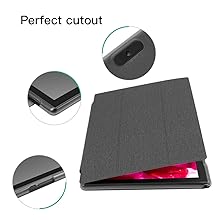
Figure 7: The tablet's 10.1-inch IPS display.
9. Gwarant a Chefnogaeth
For warranty information and customer support, please refer to the documentation provided with your purchase or visit the official ZZB websafle. Cadwch eich prawf prynu ar gyfer hawliadau gwarant.