
1. Rhagymadrodd
Thank you for choosing the FLYLINKTECH BD10 6000A 12V Car Jump Starter and Power Bank. This device is designed to provide emergency jump-starting for vehicles and serve as a portable power bank for various electronic devices. Please read this manual thoroughly before use to ensure safe and optimal operation.

Image 1.1: The FLYLINKTECH BD10 Jump Starter unit with its smart battery clamps.
2. Gwybodaeth Diogelwch
Always observe the following safety precautions to prevent injury or damage to the device or vehicle:
- Peidiwch â cheisio cychwyn batri sydd wedi rhewi.
- Ensure proper polarity connection (red clamp i cadarnhaol, du clamp to negative). Reverse polarity can cause damage.
- Do not allow the smart clamps to touch each other when connected to the jump starter.
- Cadwch y ddyfais i ffwrdd oddi wrth blant.
- Do not expose the device to extreme temperatures (above 60°C / 140°F or below -20°C / -4°F) or direct sunlight for extended periods.
- Peidiwch â dadosod nac addasu'r ddyfais.
- Use only the provided smart clamps and charging cables.
- If the device becomes excessively hot during use, disconnect it immediately.

Image 2.1: The jump starter incorporates multiple safety features such as spark-proof, reverse polarity, overvoltage, short circuit, overload, and high-temperature protection.
3. Cynnwys Pecyn
Gwiriwch fod yr holl eitemau yn bresennol yn y pecyn:
- FLYLINKTECH BD10 Jump Starter Unit
- Batri Smart Clamps
- Cebl USB-C i USB-C
- Cebl USB-A i USB-C
- 12V DC Car Charger Adapter
- Llawlyfr Defnyddiwr
- Achos Storio

Image 3.1: The complete package includes the jump starter, smart clamps, various cables, user manual, and a protective storage case.
4. Gosod a Chodi Tâl
4.1 Tâl Cychwynnol
Before first use, fully charge the jump starter. The device features a 26800mAh battery capacity.
- Connect the provided USB-C cable to the jump starter's USB-C input port.
- Connect the other end of the cable to a compatible USB wall charger (not included). For fastest charging, use a PD 45W charger.
- The LED screen will display the charging status and battery percentage.
4.2 Charging Times
| Sgorio Gwefrydd | Bras Amser Codi Tâl |
|---|---|
| 5W | 18 Awr |
| 18W | 7 Awr |
| 45W | 2 Awr |
Note: A 45W wall charger is not included in the package.

Image 4.1: The device supports PD 45W fast charging, significantly reducing recharge time when using a compatible charger.
5. Cyfarwyddiadau Gweithredu
5.1 Neidio Cychwyn Cerbyd
The FLYLINKTECH BD10 is capable of jump-starting all gas engines and diesel engines up to 12.0L.
- Sicrhewch Dâl Digonol: Check the jump starter's LED screen to ensure it has at least 50% charge.
- Cysylltu Smart Clamps: Insert the blue plug of the smart clamps into the jump starter's 12V output port. Ensure a firm connection.
- Cysylltu â Batri Car:
- Atodwch y coch (+) clamp to the vehicle's positive battery terminal.
- Atodwch y du (-) clamp to the vehicle's negative battery terminal.
- Dangosydd Gwirio: Mae'r clamp indicator light should turn solid green, indicating a correct connection. If it flashes or shows red, check connections and battery status.
- Press BOOST (if needed): If the vehicle battery is extremely low or completely dead, press the 'BOOST' button on the jump starter. Wait for the indicator light on the smart clamps to turn solid green.
- Cerbyd Cychwyn: Attempt to start your vehicle. If it doesn't start on the first try, wait 30 seconds before trying again. Do not attempt more than 3 consecutive starts.
- Dileu Clamps: Once the vehicle starts, immediately remove the smart clamps from the car battery, then disconnect them from the jump starter.

Image 5.1: The jump starter connected to a car battery, ready for operation. It supports 6000A peak current, 12V output, and is suitable for a wide range of engines.

Image 5.2: Visual guide illustrating the four steps to jump-start a vehicle: connect the plug, attach clamps, press boost, and start the engine.
5.2 Swyddogaeth y Banc Pŵer
The BD10 can charge multiple electronic devices via its USB-A and USB-C ports.
- Allbwn USB1: Up to 18W (max)
- Allbwn USB2: Up to 18W (max)
- Allbwn USB-C: Hyd at 45W (PD)
Connect your device using the appropriate USB cable to the desired output port. The LED screen will show 'OUT' and the wattage being drawn.

Image 5.3: The jump starter functioning as a power bank, simultaneously charging a smartphone and a tablet via its USB ports.
5.3 Flashlight LED
The built-in LED flashlight offers three modes: constant light, SOS signal, and strobe light.
- Press and hold the flashlight button to turn on the constant light.
- Press the button again to cycle through SOS and strobe modes.
- Pwyswch a daliwch eto i ddiffodd.

Image 5.4: The integrated LED flashlight provides illumination, an SOS signal, and a strobe function for emergency situations.
5.4 Informative LED Screen
The 6.0-inch LED screen provides real-time information about the device's status:
- Lefel Batri: Yn dangos y canran batri sy'n weddilltage.
- IN/OUT Indicator: Shows whether the device is charging (IN) or discharging (OUT).
- Wattage Arddangos: Indicates the power (W) being drawn or supplied.
- Rhybuddion Gwall: Displays specific error codes or symbols if an issue occurs.
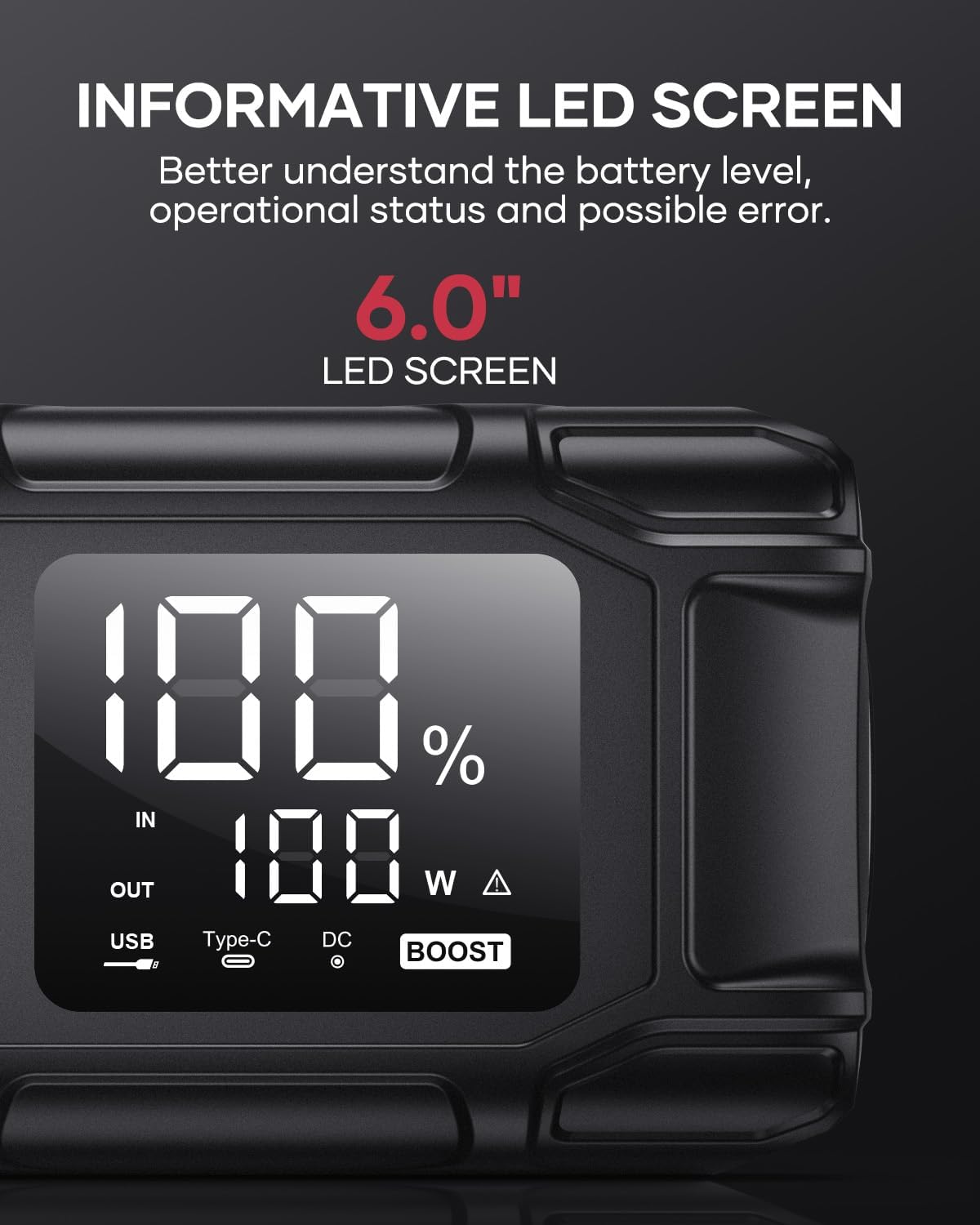
Image 5.5: The 6.0-inch LED screen provides clear information on battery percentage, input/output status, and power consumption.
6. cynnal
- Ail-godi tâl yn rheolaidd: To prolong battery life, recharge the jump starter every 3-6 months, even if not in use.
- Storio: Store the device in its protective case in a cool, dry place, away from direct sunlight and moisture.
- Glanhau: Sychwch y ddyfais gyda lliain meddal, sych. Peidiwch â defnyddio cemegau llym na deunyddiau sgraffiniol.
- Clamp Gofal: Sicrhewch y cl clyfarampyn lân ac yn rhydd o gyrydiad cyn ac ar ôl pob defnydd.
7. Datrys Problemau
The device features multiple alarm situations indicated by audible signals and screen displays:
- Isel Voltage Amddiffyn: Audible signal "3". Recharge the device.
- Vol Allanoltage Exceeds Vehicle Voltage: Audible signal "4". Check vehicle battery voltage.
- Diogelu Cylchdaith Byr: Audible signal "5". Check clamp connections for short circuits.
- Safety Mode Activated: Audible signal "6". Device has entered safety mode due to an issue.
- Amddiffyniad Gorgyfredol: Audible signal "7". Reduce load or check connections.
- Larwm Tymheredd Uchel/Isel: Audible signal "8". Allow device to return to operating temperature range (-20°C to 60°C).
- Reverse Connection: Audible signal "9". Correct the clamp polaredd.

Delwedd 7.1: Drosoddview of the device's multi-alarm system, indicating various protection states with unique audible signals.
Os yw problemau'n parhau ar ôl dilyn y camau hyn, cysylltwch â chymorth cwsmeriaid.
8. manylebau
| Nodwedd | Manyleb |
|---|---|
| Brand | FLYLINKTECH |
| Model | BD10 |
| Allbwn Brig Cyfredol | 6000 Ampere |
| Gallu Batri | 26800mAh |
| Allbwn Voltage | 12V |
| Mewnbwn/Allbwn USB-C | PD 45W |
| Allbwn USB-A | 18W (uchafswm) |
| Applicable Engine Types | All Gas, up to 12.0L Diesel |
| Tymheredd Gweithredu | -20°C i 60°C (-4°F i 140°F) |
| Dimensiynau Cynnyrch | 23.95 x 10 x 5.69 cm |
| Pwysau Eitem | 920 g |

Image 8.1: The device is designed to operate reliably in extreme climates, from -20°C (-4°F) to 60°C (140°F).
9. Gwarant a Chefnogaeth
FLYLINKTECH is committed to providing high-quality products. For any questions, technical assistance, or warranty claims, please refer to the contact information provided with your purchase or visit the official FLYLINKTECH websafle. Cadwch eich prawf prynu at ddibenion gwarant.