
1. Rhagymadrodd
This manual provides comprehensive instructions for the Manfrotto 055 Carbon Fiber 4-Section Tripod, featuring a professional ball head and the innovative MOVE quick release system. Learn about setup, operation, maintenance, and troubleshooting to maximize your photography experience with this versatile and stable kit. Please read this manual thoroughly before using the product.
2. Gwybodaeth Diogelwch
- Always ensure all locking mechanisms are securely fastened before mounting equipment or leaving the tripod unattended.
- Do not exceed the maximum weight limit of 19 pounds (8.6 kg) for the tripod.
- Avoid placing the tripod on unstable or uneven surfaces.
- Be cautious when extending or collapsing the tripod legs and center column to prevent pinching fingers.
- Do not expose the tripod to extreme temperatures or corrosive substances.
- Cadwch y cynnyrch i ffwrdd oddi wrth blant.
3. Cynnwys Pecyn
Gwiriwch fod yr holl eitemau yn bresennol yn eich pecyn:
- Manfrotto 055 Carbon Fiber 4-Section Tripod
- Professional Ball Head
- MOVE Quick Release System (pre-attached or separate)
- Plât Camera
4. Cyfarwyddiadau Gosod
4.1 Unfolding the Tripod Legs
Gently spread the tripod legs until they are fully extended or set to your desired angle. The Quick Lock locking system allows for rapid deployment.
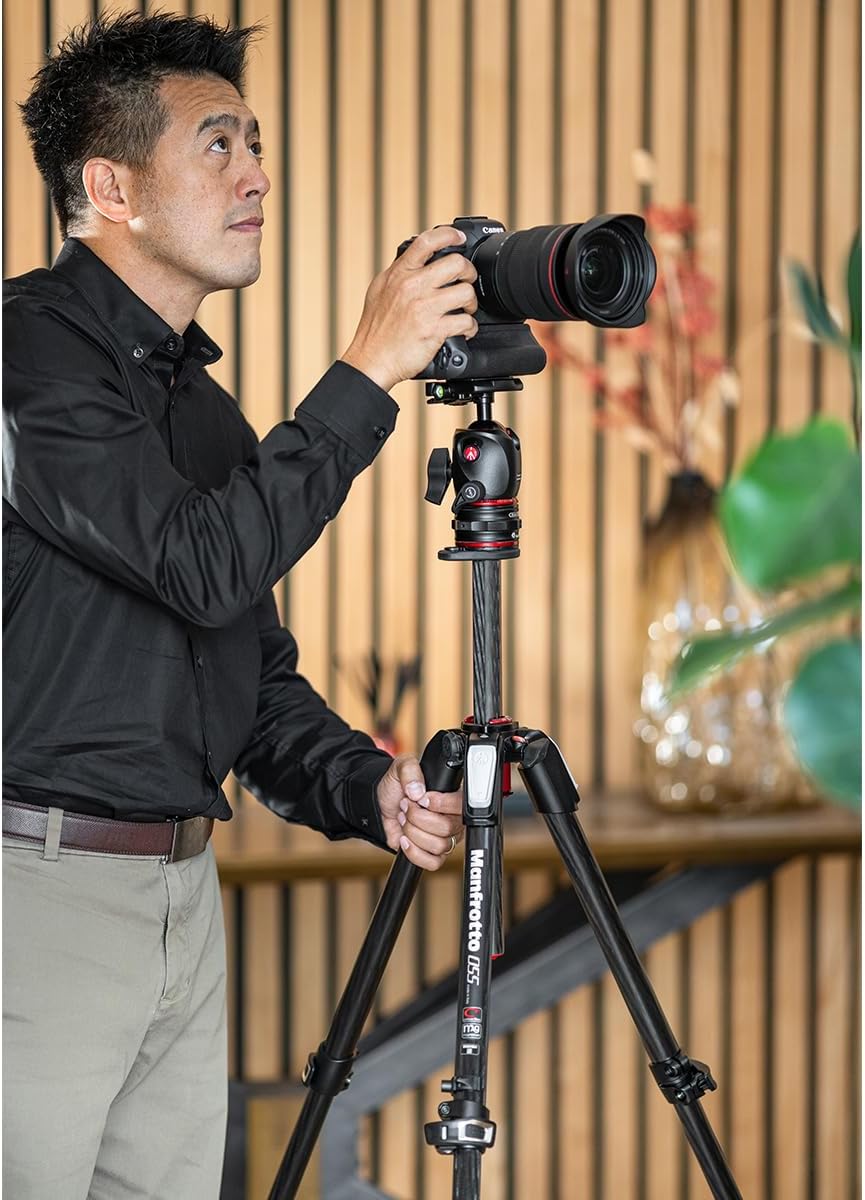
Image: A photographer adjusting the Manfrotto 055 tripod with a camera mounted, demonstrating typical setup.
4.2 Adjusting Leg Angles
Each leg features ergonomic angle selectors. Press the selector to release the leg and adjust it to one of the predefined angles. Ensure the selector clicks back into place to secure the leg.
4.3 Extending the Center Column
To extend the center column vertically, unlock the column collar and pull the column upwards. Lock the collar securely once the desired height is reached.
For horizontal positioning, unlock the center column and pull it completely out. Reinsert it into the tripod's top casting horizontally, then lock it in place. This allows for overhead or low-angle shots.

Delwedd: Llun agos view of the Manfrotto 055 tripod with its center column extended horizontally, showcasinei hyblygrwydd.
4.4 Attaching the Ball Head and MOVE Quick Release System
The professional ball head is designed to integrate with the MOVE quick release system. If not already assembled, attach the ball head to the tripod's center column using the standard mounting screw. Ensure it is tightened securely.

Image: The Manfrotto 055 tripod fully assembled with the ball head and quick release system.
4.5 Using the MOVE Quick Release System
The MOVE quick release system allows for rapid attachment and detachment of your camera setup. To attach, align the camera plate (with camera attached) with the receiver on the ball head and press down until it locks into place. To release, activate the locking lever and lift the camera assembly.

Image: A close-up of the Manfrotto MOVE quick release system, showing the two main components separated.
For a visual guide on the quick release system:
Video: Demonstrates the quick setup and use of the Manfrotto 055 tripod with the ball head and MOVE quick release system.
4.6 Atodi'r Camera
Screw the camera plate onto the base of your camera. Ensure it is tightly secured to prevent accidental detachment. Then, attach the camera with the plate to the MOVE quick release system as described above.
4.7 Leveling the Camera
The ball head includes a leveling bubble. Adjust the tripod legs and/or the ball head until the bubble indicates a level position, ensuring precise framing.

Image: A close-up of the Manfrotto ball head, highlighting the integrated leveling bubble for accurate setup.
4.8 Using the Easy Link Connector
The tripod features an Easy Link connector, allowing you to attach accessories such as LED lights or reflectors directly to the tripod for enhanced versatility.
5. Cyfarwyddiadau Gweithredu
5.1 Adjusting the Ball Head
The ball head allows for smooth and precise camera positioning. Loosen the main locking knob to adjust the camera angle. Tighten the knob firmly to secure the camera in the desired position.

Delwedd: Manwl view of the Manfrotto ball head, showing its various locking knobs and controls.
5.2 Panio a Thogwyddo
The ball head allows for 360-degree panning. Use the dedicated panning lock knob (if present) to control horizontal rotation independently. The ball mechanism provides fluid tilt adjustments in all directions.
For a demonstration of smooth framing with the ball head:
Video: Illustrates the smooth and precise framing capabilities of the Manfrotto ball head.
6. cynnal
- Glanhau: Wipe the tripod and ball head with a soft, damp cloth. Avoid harsh chemicals or abrasive cleaners. Ensure all parts are dry before storage.
- Iro: No regular lubrication is required for the leg locks or ball head mechanism. If movement becomes stiff, consult Manfrotto support.
- Storio: Store the tripod in a dry, clean environment, preferably in its carrying bag (if included) to protect it from dust and scratches.
7. Datrys Problemau
| Problem | Achos Posibl | Ateb |
|---|---|---|
| Mae'r tripod yn ansefydlog. | Leg locks not fully engaged; uneven surface; weight imbalance. | Ensure all leg locks are securely fastened. Adjust leg angles for stability on uneven ground. Distribute camera weight evenly. |
| Ball head movement is stiff or loose. | Locking knob not properly adjusted. | Tighten the main locking knob for stiffer movement or loosen for smoother adjustment. Do not overtighten. |
| Camera detaches from quick release. | Camera plate not securely attached; quick release lever not fully engaged. | Ensure the camera plate is tightly screwed to the camera. Verify the quick release lever is fully locked after attaching the camera. |
8. manylebau
| Nodwedd | Manylyn |
|---|---|
| Brand | Manfrotto |
| Rhif Model | MK055CXPRO4BHQR |
| Deunydd | Ffibr Carbon |
| Adrannau | 4 |
| Math Pen Tripod | Ball Head (with MOVE Quick Release System) |
| Uchder Uchaf | 150 Centimedr |
| Terfyn Pwysau | 19 pwys (8.6 kg) |
| Pwysau Eitem | 7.8 pwys (3.5 kg) |
| Dimensiynau Cynnyrch (wedi'u pacio) | 5.59 x 5.59 x 2.87 modfedd |
| Nodweddion Arbennig | Adjustable, Ergonomic, Portable, 90° Center Column, Easy Link Connector, Leveling Bubble |
9. Gwarant a Chefnogaeth
Manfrotto products are manufactured to high quality standards and are guaranteed against defects in materials and workmanship. For specific warranty terms and conditions, please refer to the warranty card included with your product or visit the official Manfrotto websafle.
For technical support, spare parts, or service inquiries, please contact Manfrotto customer service through their official websafleoedd neu ganolfannau gwasanaeth awdurdodedig.