
1. Rhagymadrodd
Thank you for choosing the GenMachine Mini PC. This compact yet powerful computer is designed to deliver exceptional performance for a variety of tasks, including gaming, office productivity, and creative design. Equipped with an AMD Ryzen 7 3750H processor, ample memory, and fast storage, it offers a seamless computing experience. This manual provides essential information for setting up, operating, maintaining, and troubleshooting your new Mini PC.
2. Beth sydd yn y Bocs
Please verify that all items are present and in good condition upon unboxing.
- 1 x GenMachine Mini PC
- 1 x cebl HDMI
- 1 x Addasydd Pŵer
- 1 x Llawlyfr Defnyddiwr (y ddogfen hon)
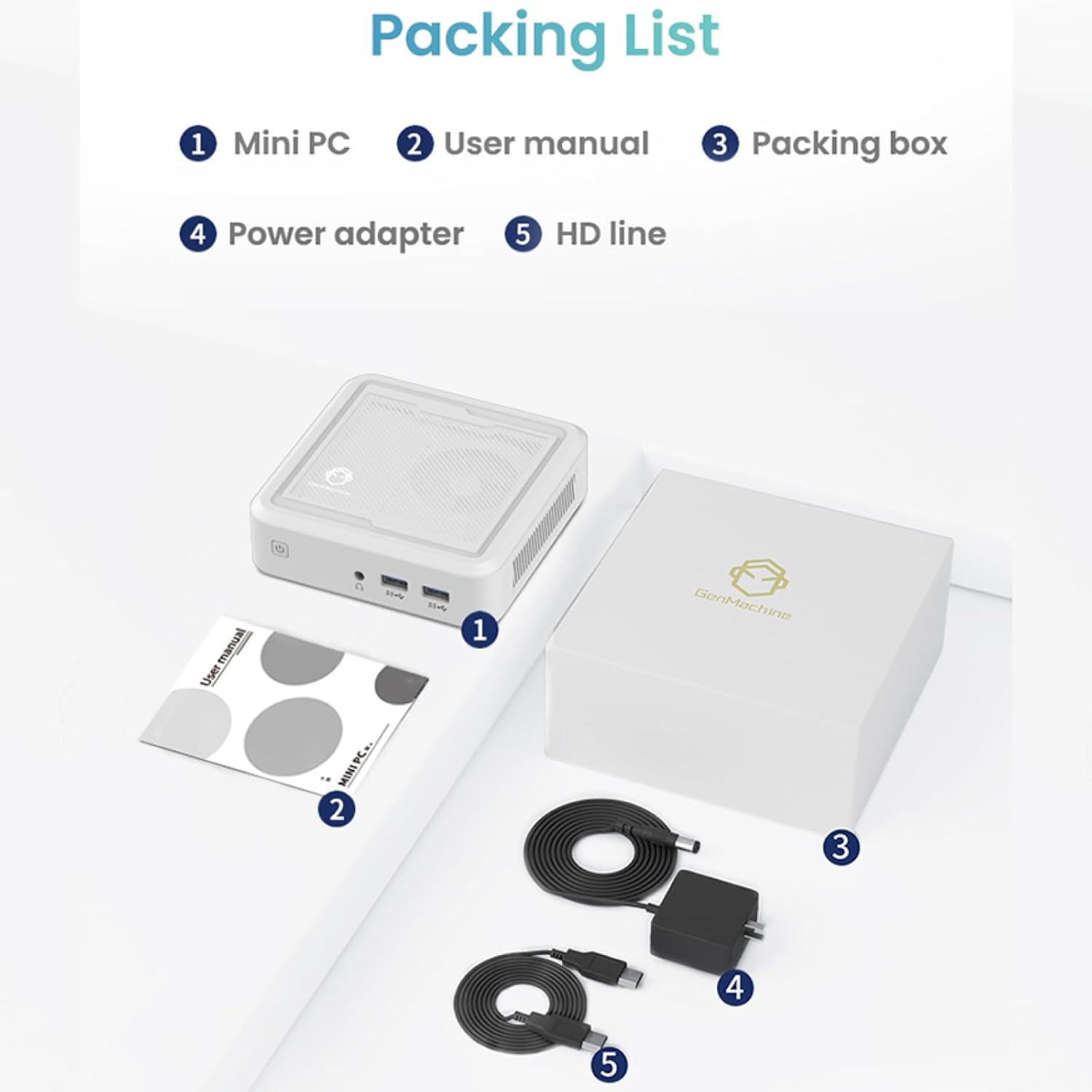
Figure 2.1: Packaging contents of the GenMachine Mini PC.
3. Nodweddion Cynnyrch
The GenMachine Mini PC is engineered with features to enhance your computing experience:
- Perfformiad pwerus: Equipped with an AMD Ryzen 7 3750H processor, delivering speeds up to 4.0GHz with 4 cores and 8 threads for demanding tasks.
- Ample Memory and Storage: Features 8GB of DDR4 RAM and a 256GB SSD with M.2 NVMe support for seamless multitasking and quick file mynediad.
- Cysylltedd Amlbwrpas: Advanced WiFi 6 and Bluetooth 5.2 capabilities ensure high-speed internet and smooth device pairing.
- Dyluniad Compact: A sleek, small form factor that fits easily into any workspace or gaming setup.
- Dewisiadau Arddangos Lluosog: HDMI and DisplayPort outputs support dual 4K displays for expanded productivity and immersive visuals.

Ffigur 3.1: Blaen view of the GenMachine Mini PC.
3.1 Rich Interface for Easy Connection
The Mini PC offers a comprehensive set of ports to meet various connectivity needs:
- USB 3.0 x 4
- HDMIx1
- DisplayPort (DP) x 1
- LAN (Ethernet) x 1
- 3.5mm Audio Jack x 1
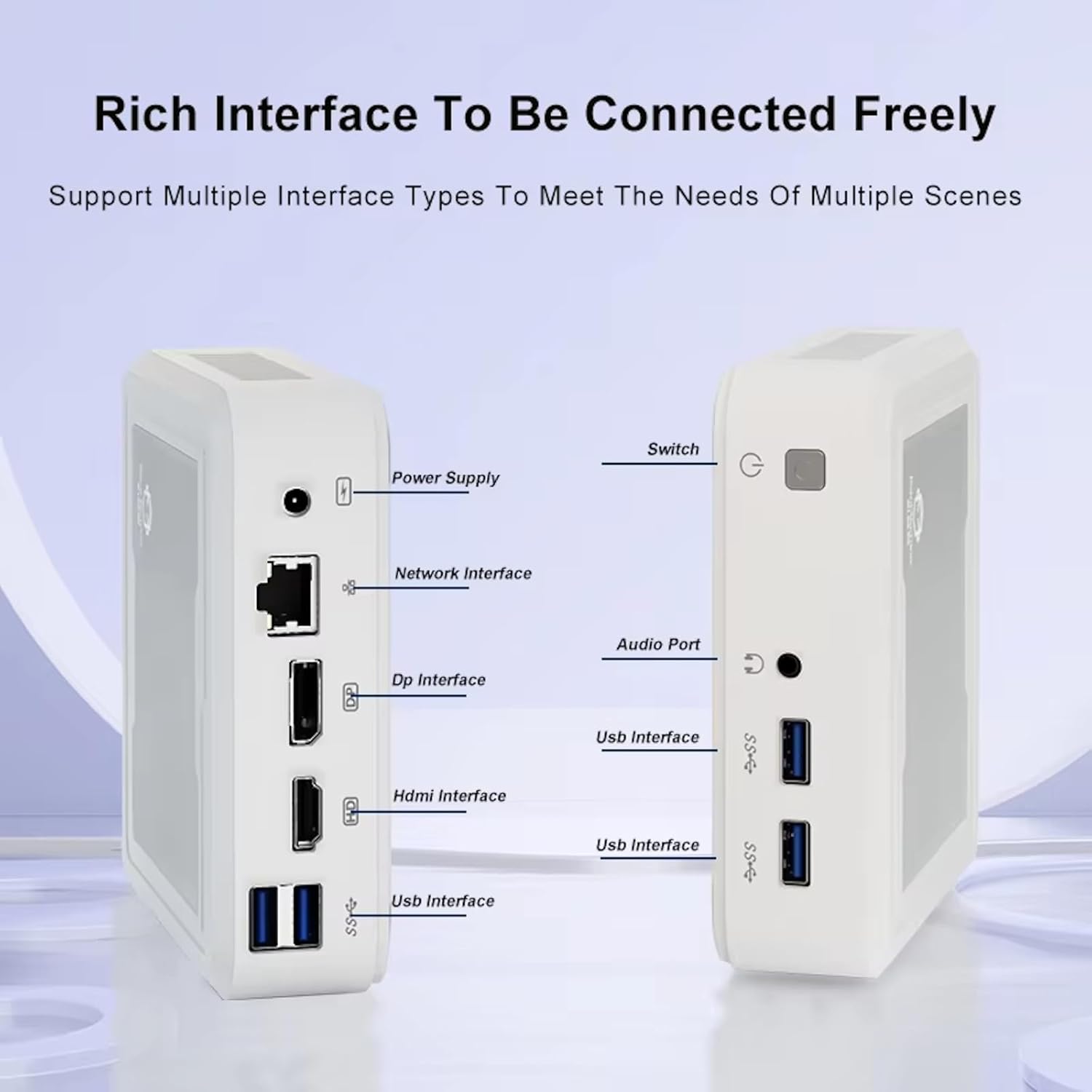
Figure 3.2: Available ports on the GenMachine Mini PC.
3.2 Dual Monitor Support
Enhance your productivity or gaming experience by connecting up to two 4K displays simultaneously using the HDMI and DisplayPort outputs.

Figure 3.3: Dual 4K display setup with the GenMachine Mini PC.
Video 3.1: Demonstration of the GenMachine Mini PC supporting two monitors simultaneously.
3.3 Energy Efficiency and Quiet Operation
Designed for low noise operation, the Mini PC maintains a quiet environment, making it suitable for various settings.

Figure 3.4: Noise level comparison of the GenMachine Mini PC.
3.4 Compact and Durable Design
The Mini PC features an ultra-durable, lightweight metal casing, making it space-saving and robust for any work environment.
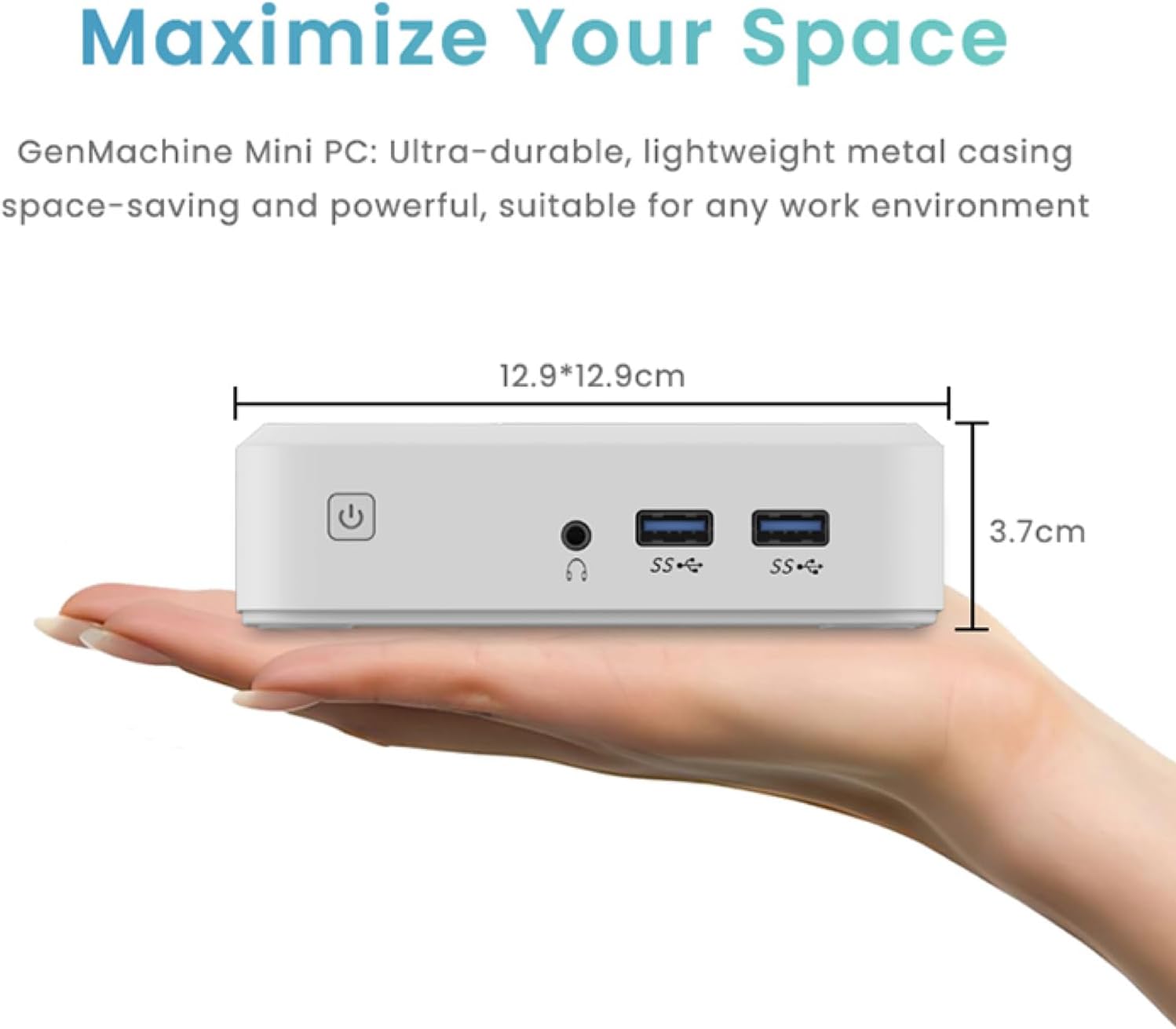
Figure 3.5: Compact size of the GenMachine Mini PC.
Fideo 3.2: Drosoddview of the GenMachine Mini PC's features and compact design.
4. Canllaw Gosod
Follow these steps to set up your GenMachine Mini PC:
- Unpack the Mini PC: Tynnwch yr holl gydrannau o'r pecyn yn ofalus.
- Cysylltu ag Arddangosfa: Use the provided HDMI cable to connect the Mini PC to your monitor or TV. If using a DisplayPort monitor, use a compatible DP cable (not included).
- Cysylltu Perifferolion: Plug in your keyboard, mouse, and any other USB devices into the available USB 3.0 ports.
- Cysylltu â'r Rhwydwaith (Dewisol): For a wired internet connection, connect an Ethernet cable to the LAN port. For wireless, ensure your WiFi network is available during initial setup.
- Pwer Cysylltu: Plug the power adapter into the DC-in port on the Mini PC, then plug the adapter into a power outlet.
- Pŵer Ymlaen: Press the power button on the front of the Mini PC. The system should boot up.
5. Cyfarwyddiadau Gweithredu
5.1 Cychwyn Cychwynnol a Gosod System Weithredu
Upon first power-on, the Mini PC will guide you through the operating system setup process. Follow the on-screen prompts to configure language, region, user accounts, and network settings.
5.2 Rheoli Pŵer
- Pŵer Ymlaen: Pwyswch y botwm pŵer unwaith.
- Cau i Lawr: Access the power options through the operating system's start menu and select 'Shut down'.
- Ailgychwyn: Access the power options through the operating system's start menu and select 'Restart'.
- Modd Cwsg: Access the power options through the operating system's start menu and select 'Sleep'.
5.3 Cysylltu â Wi-Fi a Bluetooth
To connect to a wireless network or Bluetooth device, use the respective settings within your operating system. The Mini PC supports WiFi 6 and Bluetooth 5.2 for fast and reliable connections.
6. cynnal
Regular maintenance helps ensure the longevity and optimal performance of your Mini PC:
- Glanhau: Use a soft, dry cloth to clean the exterior. For dust in vents, use compressed air. Ensure the device is powered off and unplugged before cleaning.
- Awyru: Ensure the Mini PC is placed in a well-ventilated area. Do not block the air vents.
- Diweddariadau Meddalwedd: Regularly update your operating system, drivers, and applications to ensure security and performance.
- Copi wrth gefn o ddata: Gwnewch gopïau wrth gefn o ddata pwysig i yriant allanol neu storfa cwmwl o bryd i'w gilydd.
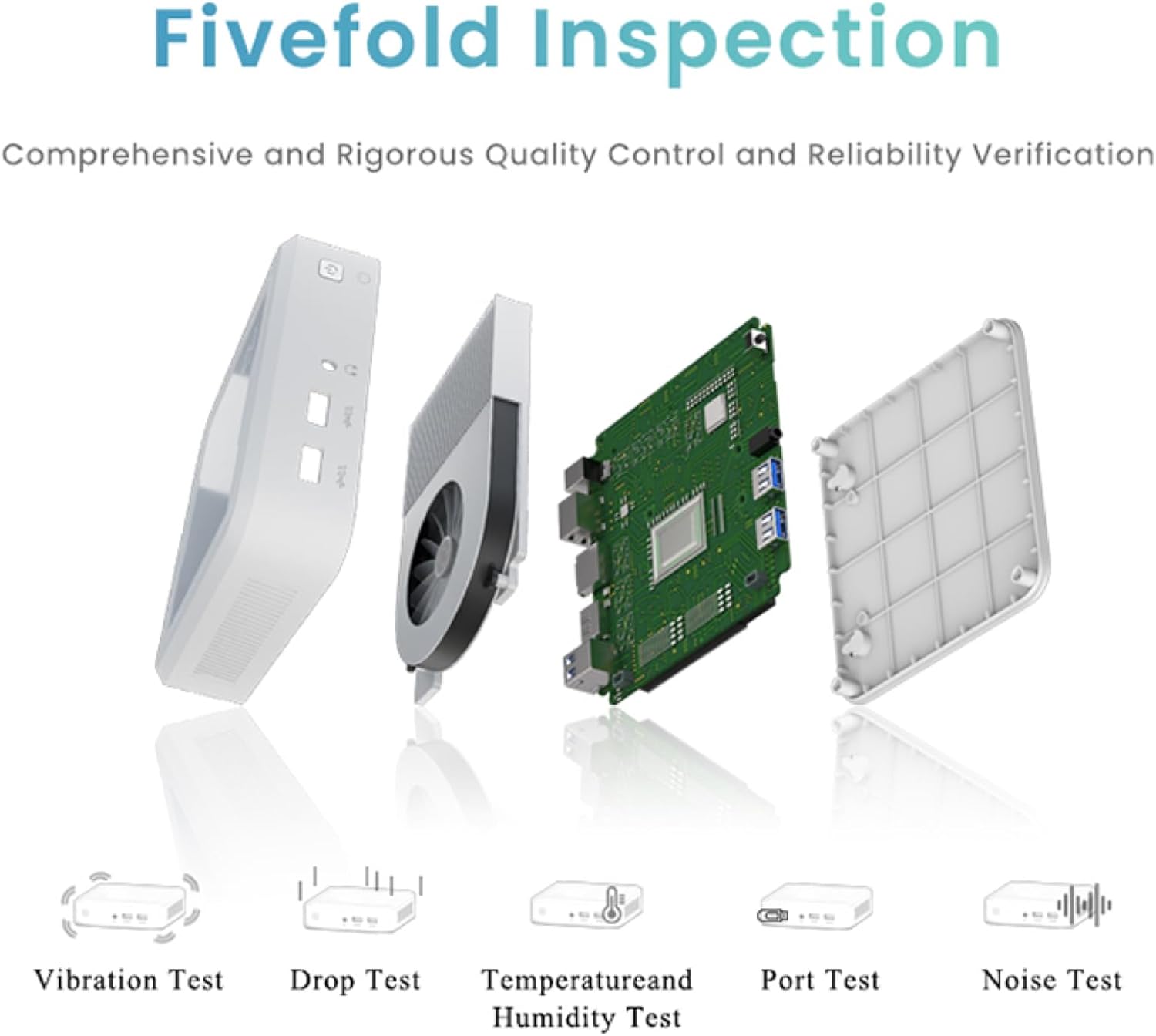
Figure 6.1: GenMachine's Fivefold Inspection process for quality control.
7. Datrys Problemau
If you encounter issues with your Mini PC, refer to the following common problems and solutions:
- Dim pŵer:
- Gwnewch yn siŵr bod yr addasydd pŵer wedi'i gysylltu'n ddiogel â'r Mini PC ac allfa bŵer sy'n gweithio.
- Rhowch gynnig ar allfa bŵer wahanol.
- Dim Arddangosfa:
- Verify that the HDMI or DisplayPort cable is securely connected to both the Mini PC and the monitor.
- Gwnewch yn siŵr bod y monitor wedi'i droi ymlaen ac wedi'i osod i'r ffynhonnell fewnbwn gywir.
- Try a different display cable or monitor if possible.
- System Freezes or Unresponsive:
- Perfformiwch ailosodiad caled trwy ddal y botwm pŵer am 5-10 eiliad nes bod y ddyfais yn diffodd, yna ailgychwynwch.
- Ensure the operating system and drivers are up to date.
- Check for overheating; ensure proper ventilation.
- Run a system diagnostic or memory test if the issue persists.
- Dim Cysylltiad Rhyngrwyd:
- Ar gyfer cysylltiadau gwifrau, gwiriwch statws y cebl Ethernet a'r llwybrydd.
- For Wi-Fi, ensure Wi-Fi is enabled in the operating system and you are connected to the correct network with the correct password.
- Ailgychwynwch eich llwybrydd/modem.
8. manylebau
| Nodwedd | Manyleb |
|---|---|
| Prosesydd | AMD Ryzen 7 3750H (4 cores, 8 threads, up to 4.0GHz) |
| HWRDD | 8GB DDR4 |
| Storio | 256GB SSD (with M.2 NVMe support) |
| Cydbrosesydd graffeg | Graffeg AMD Radeon Vega 10 |
| Cydraniad Sgrin Max | 3840 x 2160 picsel (4K) |
| Math Di-wifr | 802.11ac (WiFi 6), Bluetooth 5.2 |
| Porthladdoedd USB | 4 x USB 3.0 |
| Allbynnau Fideo | HDMI, DisplayPort |
| System Weithredu | OS (Pre-installed) |
| Pwysau Eitem | 2.1 pwys |
| Dimensiynau Cynnyrch | 4.9 x 4.9 x 1.4 modfedd |
| Lliw | Du |
9. Gwarant a Chefnogaeth
For warranty information and technical support, please refer to the warranty card included with your product or visit the official GenMachine websafle. Cadwch eich derbynneb prynu fel prawf o brynu ar gyfer hawliadau gwarant.
If you require further assistance, please contact GenMachine customer support through the channels provided on their official websafle.