
1. Rhagymadrodd
Thank you for choosing the FOSSiBOT F2400 Portable Power Station. This device is designed to provide reliable power for various applications, including outdoor activities, camping, and emergency backup during power outages. Featuring a 2048Wh LiFePO4 battery and 2400W AC output, the F2400 offers versatile charging options and robust performance. Please read this manual thoroughly before operating the unit to ensure safe and optimal use.

Image: FOSSiBOT F2400 Portable Power Station with an accompanying solar panel, set up outdoors.
2. Cynnyrch Drosview a Chydrannau
The FOSSiBOT F2400 is equipped with multiple ports and controls for efficient power management. Familiarize yourself with the layout and functions of each component.
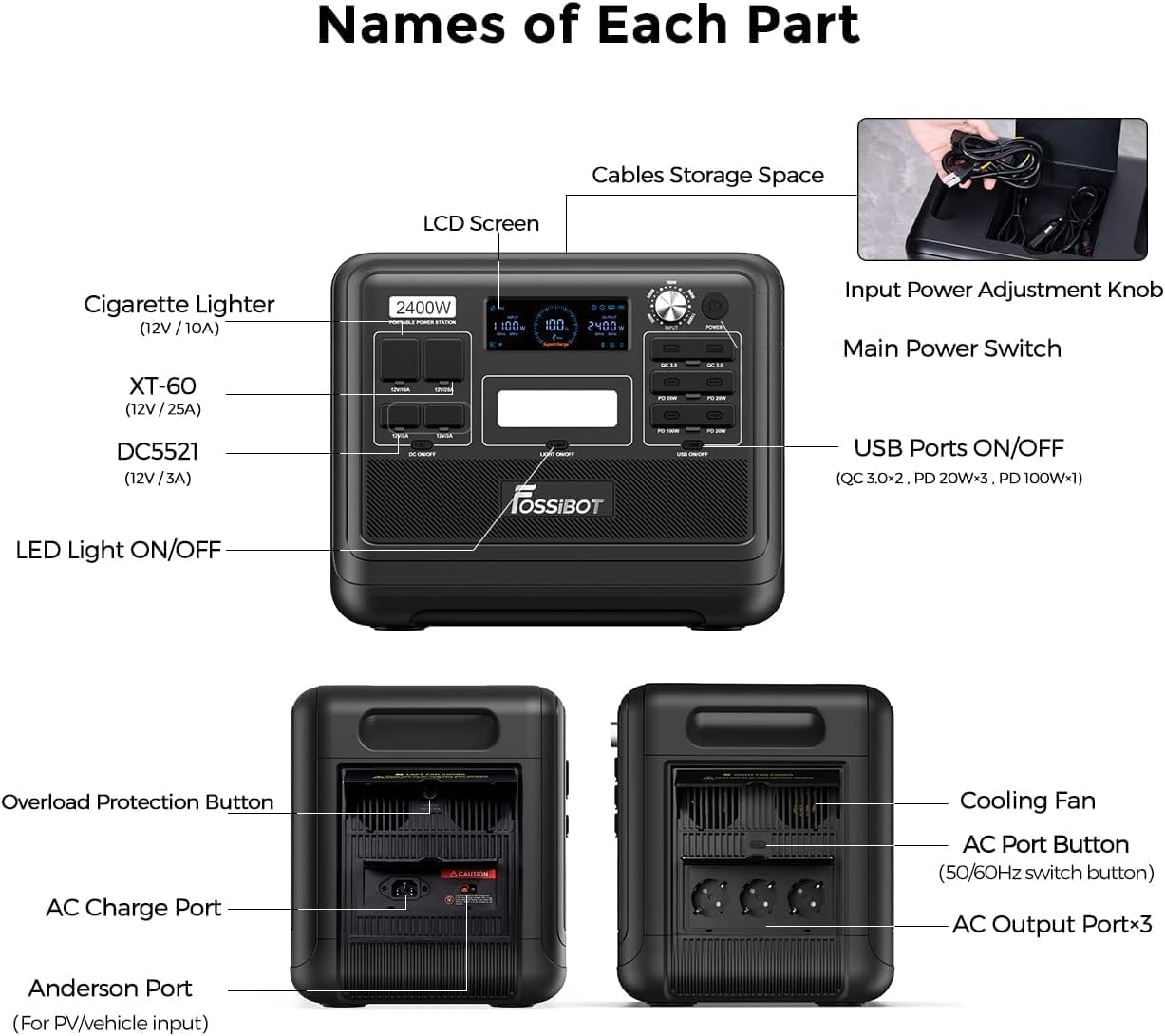
Image: Detailed diagram illustrating the various ports, buttons, and features of the FOSSiBOT F2400, including the LCD screen, input power adjustment knob, main power switch, USB ports, AC output ports, DC5521, XT60, cigarette lighter port, LED light, overload protection button, AC charge port, and Anderson port.
2.1 Cydrannau Allweddol
- Sgrin LCD: Displays real-time power input/output, battery level, and operational status.
- Input Power Adjustment Knob: Allows adjustment of input power (300W, 500W, 700W, 900W, 1100W) to protect the battery and extend its lifespan.
- Prif Newid Pwer: Yn troi'r uned gyfan ymlaen neu i ffwrdd.
- Porthladdoedd Allbwn AC (x3): Provides 2400W (4800W peak) AC power for household appliances. Includes a 50/60Hz switch button.
- Porthladdoedd USB: Includes 2 USB-A ports (QC 3.0) and 4 USB-C ports (PD 20W x3, PD 100W x1) for charging mobile devices.
- Porthladdoedd Allbwn DC: Includes a Cigarette Lighter port (12V/10A), an XT60 port (12V/25A), and two DC5521 ports (12V/3A).
- Golau LED: Golau integredig ar gyfer goleuo.
- Botwm Diogelu Gorlwytho: Resets the unit in case of an overload.
- AC Charge Port: For charging the power station via a standard wall outlet.
- Anderson Port: For solar panel or vehicle input.
- Fan oeri: Activates automatically to dissipate heat during operation.
- Cables Storage Space: Integrated compartment for storing charging cables.
3. Gosod
3.1 Tâl Cychwynnol
Before first use, it is recommended to fully charge the FOSSiBOT F2400. Connect the provided AC charging cable to the AC Charge Port and plug it into a standard wall outlet. The LCD screen will indicate the charging status.
3.2 Lleoliad
Place the power station on a stable, flat surface with adequate ventilation. Ensure that the cooling fan vents are not obstructed. Avoid direct sunlight or extreme temperatures.
4. Cyfarwyddiadau Gweithredu
4.1 Pweru Ymlaen/Diffodd
- To turn on the unit, press and hold the Prif Newid Pwer for a few seconds until the LCD screen illuminates.
- I ddiffodd yr uned, gwasgwch a dal y Prif Newid Pwer again until the LCD screen turns off.
4.2 Defnyddio Allbynnau AC
- Gwasgwch y AC Port Button to activate the AC outlets. The AC indicator on the LCD screen will light up.
- Plug your AC appliances into the AC output ports.
- Ensure the total power consumption of your devices does not exceed 2400W.
- To switch between 50Hz and 60Hz, press the small button located near the AC outlets.
- Ar ôl ei ddefnyddio, pwyswch y AC Port Button again to turn off the AC outputs and conserve power.
4.3 Defnyddio Allbynnau DC ac USB
- Gwasgwch y USB Ports ON/OFF button to activate the USB-A and USB-C ports.
- Gwasgwch y DC ON / OFF button to activate the Cigarette Lighter, XT60, and DC5521 ports.
- Connect your devices to the appropriate ports.
- After use, turn off the DC and USB outputs to conserve power.
4.4 Defnyddio'r Golau LED
- Gwasgwch y Golau LED YMLAEN / I FFWRDD button to turn on the integrated light.
- Press again to cycle through different brightness modes or turn off.
5. Dulliau Codi Tâl
The FOSSiBOT F2400 offers multiple ways to recharge its internal battery.
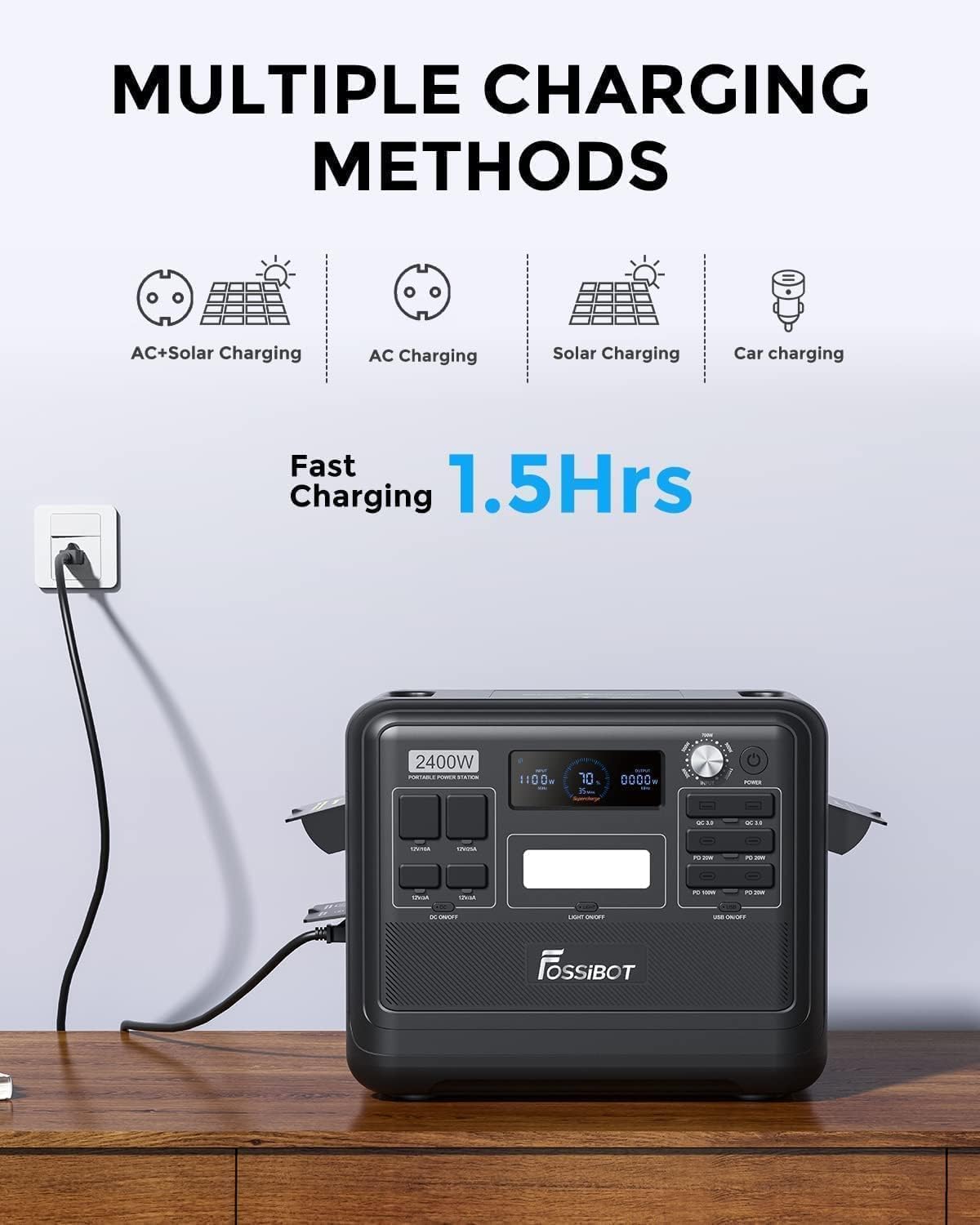
Image: Visual representation of the FOSSiBOT F2400 being charged via various methods, including AC, solar, and car charging, with an emphasis on fast charging capabilities.
5.1 Gwefru Wal AC
- Connect the AC charging cable to the AC Charge Port and a wall outlet.
- The F2400 supports 1100W fast charging, allowing it to charge from 0% to 80% in approximately 1 hour, and fully charge in about 1.5 hours.
- Defnyddiwch y Knob Addasiad Pŵer Mewnbwn to select desired input wattage (300W, 500W, 700W, 900W, 1100W) to manage charging speed and battery longevity.
5.2 Codi Tâl Solar
- Connect compatible solar panels (up to 500W max solar input) to the Anderson Port using the provided solar charging cable.
- Ensure solar panels are placed in direct sunlight for optimal charging efficiency.
- The F2400 can be fully charged in approximately 1.5 hours when combining 1100W AC input with 500W solar input.

Image: The FOSSiBOT F2400 power station connected to a foldable solar panel, positioned in a grassy area with tents in the background, demonstrating solar charging in a camping amgylchedd.
5.3 Codi Tâl am Geir
- Connect the car charging cable to the Cigarette Lighter port of your vehicle and the F2400's input port.
- Car charging is suitable for topping up the battery while traveling.
6. Uninterruptible Power Supply (UPS) Functionality
The FOSSiBOT F2400 features an Uninterruptible Power Supply (UPS) function, providing seamless power during outages.

Image: A diagram demonstrating the FOSSiBOT F2400's UPS capability, showing how it automatically switches to internal battery power within 0.008 seconds when the main power supply is interrupted, ensuring continuous operation for connected devices like a computer.
- When connected to a wall outlet and simultaneously powering devices, the F2400 acts as a pass-through power source.
- In the event of a sudden power interruption, the UPS system will automatically switch to the internal battery power within 0.008 seconds. This ensures that sensitive electronics remain powered without interruption.
- This feature is ideal for protecting computers, medical equipment, and other critical devices from data loss or operational disruption during blackouts.
7. cynnal
7.1 Battery Care and Lifespan
The FOSSiBOT F2400 utilizes a LiFePO4 battery, known for its safety and long lifespan.

Image: An illustration highlighting the superior lifespan of the FOSSiBOT F2400's LiFePO4 battery, indicating over 3500 charge cycles and more than 10 years of use, in contrast to other battery types.
- The battery is rated for over 3500 charge cycles, providing a reliable power source for more than a decade with proper care.
- The integrated Battery Management System (BMS) offers multiple protection functions, including over-charge, over-discharge, over-current, and short-circuit protection.
- For optimal battery health, avoid completely draining the battery frequently. Recharge it when the level drops below 20%.
7.2 Storio
- If storing the unit for an extended period, ensure the battery is charged to approximately 50-80%.
- Storiwch mewn lle oer, sych, i ffwrdd o olau haul uniongyrchol a thymheredd eithafol.
- Recharge the unit every 3-6 months to prevent deep discharge and maintain battery health.
7.3 Glanhau
- Use a soft, dry cloth to clean the exterior of the power station.
- Peidiwch â defnyddio glanhawyr neu doddyddion sgraffiniol.
- Keep the cooling fan vents free from dust and debris.
8. Datrys Problemau
If you encounter issues with your FOSSiBOT F2400, refer to the following common problems and solutions.
| Problem | Achos Posibl | Ateb |
|---|---|---|
| Nid yw'r uned yn troi ymlaen. | Battery is completely drained or Main Power Switch not pressed correctly. | Charge the unit via AC wall outlet. Press and hold the Main Power Switch firmly for a few seconds. |
| Nid yw socedi AC yn darparu pŵer. | AC output not activated, or overload protection triggered. | Press the AC Port Button to activate. If overloaded, disconnect devices, press the Overload Protection Button, then reconnect devices with lower total wattage. Ensure the small button for Schuko outlets is pressed if applicable (as per user review). |
| Cyflymder codi tâl araf. | Input Power Adjustment Knob set to lower wattage, or insufficient solar input. | Adjust the Input Power Adjustment Knob to a higher wattage. For solar charging, ensure panels are in direct sunlight and free from obstructions. |
| Uned yn gorboethi. | Cooling fan vents obstructed, or operating in high ambient temperatures. | Ensure vents are clear. Move the unit to a cooler environment. The cooling fan should activate automatically. |
| USB/DC ports not working. | USB/DC output not activated. | Press the respective ON/OFF buttons for USB or DC outputs. |
9. manylebau
Below are the technical specifications for the FOSSiBOT F2400 Portable Power Station.
| Nodwedd | Manylyn |
|---|---|
| Enw Model | F2400-EU |
| Math Batri | LiFePO4 (Ffosffad Haearn Lithiwm) |
| Gallu | 2048Wh |
| Pŵer Allbwn AC | 2400W (Continuous), 4800W (Peak) |
| Allbwn AC Cyftage | 230 folt (AC) |
| AC Amlder Allbwn | 50/60 Hz (Switchable) |
| Cyfanswm Allfeydd | 13 (3x AC, 2x USB-A, 4x USB-C, 1x Cigarette Lighter, 1x XT60, 2x DC5521) |
| Mewnbwn AC yn codi tâl | Up to 1100W (Adjustable) |
| Codi Tâl Mewnbwn Solar | Up to 500W (via Anderson Port) |
| Amser Newid UPS | 0.008 eiliad |
| Rhychwant oes | Over 3500 cycles to 80% capacity |
| Dimensiynau (L x W x H) | 39L x 29W x 32H cm |
| Pwysau | 22.04 Cilogram |
| Deunydd | Steel, aluminum, plastic, rubber, lithium iron phosphate |
10. Gwarant a Chefnogaeth
10.1 Gwybodaeth Gwarant
The FOSSiBOT F2400 Portable Power Station comes with a Gwarant 2 flynedd heb bryder o ddyddiad y pryniant. Mae'r warant hon yn cwmpasu diffygion gweithgynhyrchu ac yn sicrhau gweithrediad dibynadwy o dan ddefnydd arferol. Cadwch eich prawf prynu ar gyfer hawliadau gwarant.
10.2 Cefnogaeth i Gwsmeriaid
For any questions, technical assistance, or warranty claims, please contact FOSSiBOT customer support. Refer to the contact information provided with your purchase or visit the official FOSSiBOT websafle am fanylion cymorth.