
Rhagymadrodd
This manual provides detailed instructions for the safe and efficient installation, operation, and maintenance of your Kanto DML1000 Single Monitor Desktop Arm. Please read this manual thoroughly before installation and retain it for future reference.
Gwybodaeth Ddiogelwch Bwysig
RHYBUDD: Failure to read and follow these instructions may result in serious personal injury, property damage, or voiding of your warranty. If you do not understand these instructions or have doubts about the safety of the installation, please contact Kanto Customer Support.
- Do not install this product if the desk surface is not structurally sound or if there are hidden obstructions such as electrical wiring or plumbing.
- Ensure the monitor weight and size are within the specified limits (17" to 34" monitors, up to 22.1 lbs / 10 kg). Exceeding these limits may result in instability and potential injury.
- Always use two people for lifting and positioning the monitor during installation to prevent injury.
- Tighten all screws firmly but do not overtighten. Overtightening can damage the screws or the mounting surface.
- Keep all small parts and packaging materials out of reach of children.
Cynnwys Pecyn
Verify that all components are present and undamaged before beginning installation. If any parts are missing or defective, contact Kanto Customer Support.

Delwedd: Drosoddview of the Kanto DML1000 monitor stand and its main components.
Dylai eich pecyn gynnwys:
- Cynulliad Braich Monitro
- Desg Clamp Cynulliad
- Grommet Mount Hardware
- VESA Monitor Plate
- Clipiau Rheoli Ceblau
- Assorted Screws and Washers for Monitor Attachment
- Allweddi Hecs ar gyfer Addasu
Gosod a Gosod
The DML1000 offers two installation methods: desk clamp and grommet mount. Choose the method best suited for your desk.
1. Desg Clamp Gosodiad
- Atodwch y ddesg clamp i brif bolyn braich y monitor.
- Position the monitor arm assembly on the edge of your desk. Ensure the desk thickness is between 0.4" and 2.8" (10mm and 70mm).
- Tynhau'r clamp screw until the arm is securely fastened to the desk. Do not overtighten.
2. Grommet Mount Installation
- If your desk has a grommet hole, insert the grommet bolt through the hole from the top.
- From underneath the desk, attach the grommet plate and tighten the nut onto the bolt until the arm is secure.
3. Cysylltu'r Monitor
The DML1000 features a detachable VESA monitor plate for easier installation.

Image: VESA mounting plate showing 75mm and 100mm hole patterns.

Image: Illustration of the detachable monitor plate and desk clamp/grommet mounting options.
- Remove the VESA plate from the monitor arm by sliding it upwards.
- Attach the VESA plate to the back of your monitor using the appropriate screws and washers provided. Ensure your monitor has VESA 75x75mm or 100x100mm mounting holes.
- With assistance, carefully slide the monitor (with the attached VESA plate) onto the monitor arm until it clicks securely into place.
Cyfarwyddiadau Gweithredu
The DML1000 allows for various adjustments to achieve an ergonomic viewing profiad.
Addasiad Uchder

Image: Monitor arm showing the height adjustment lever and 360° rotation capability.
To adjust the monitor height, loosen the toolless lever on the main pole. Move the monitor arm up or down to your desired height (between 5.1" and 16.7" / 13cm and 42cm from the desk surface). Tighten the lever firmly to secure the position.
Addasiad Tilt a Swivel
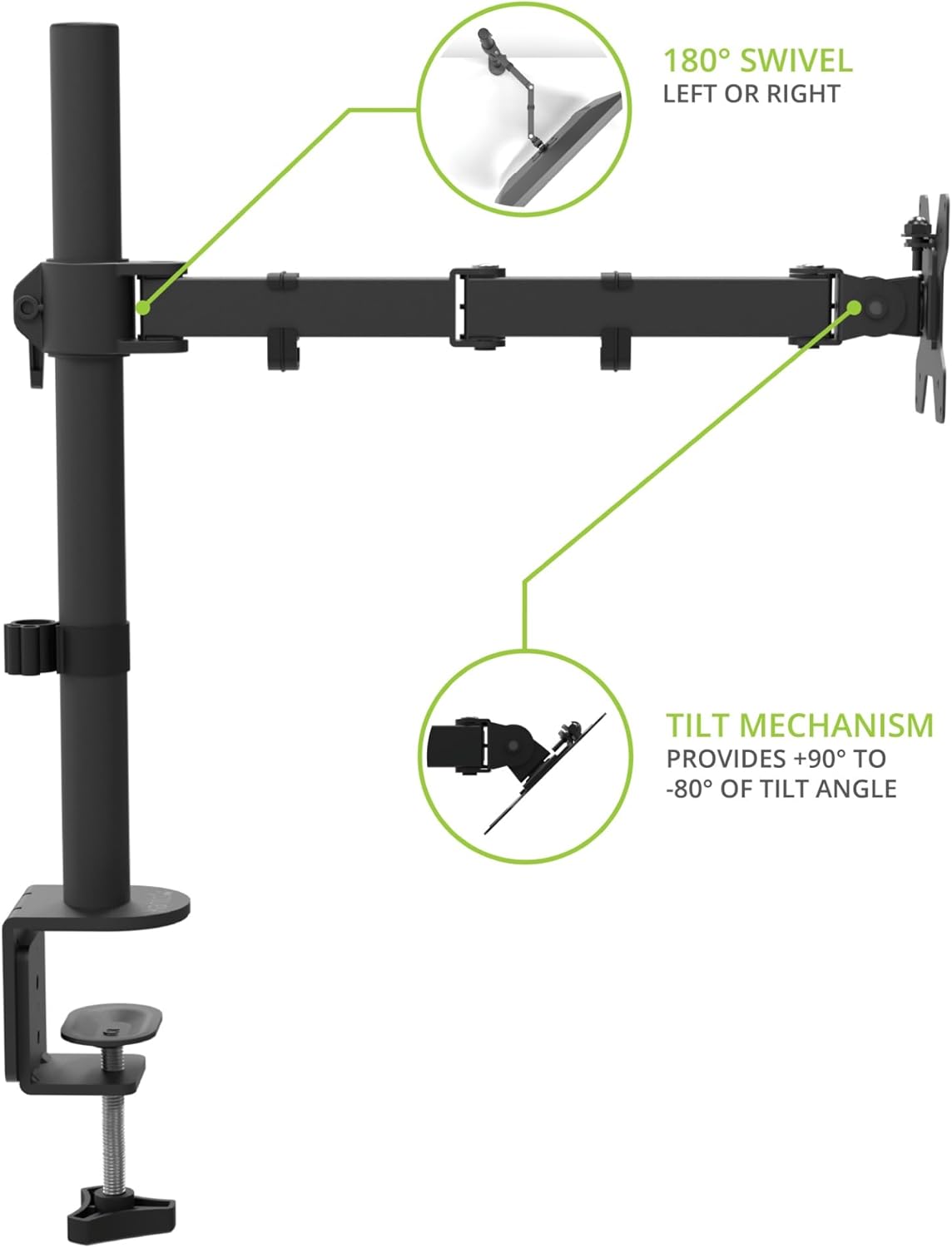
Image: Monitor arm illustrating 180° swivel left or right and tilt mechanism from +90° to -80°.
The monitor can be tilted from +90° to -80° and swiveled 180° left or right. Gently adjust the monitor to your preferred viewing angle. Use the provided hex key to adjust the tension of the tilt mechanism if the monitor is too loose or too stiff.
Cylchdro

Image: A monitor mounted on the DML1000 in portrait orientation, demonstrating 360° rotation.
The monitor can be rotated 360° to switch between landscape and portrait orientations. Simply turn the monitor gently to achieve the desired orientation.
Rheoli Ceblau
The DML1000 includes cable management clips to keep your workspace tidy and reduce clutter.

Image: Close-up of the monitor arm showing cables routed through the integrated cable management clips.
Route your monitor and power cables through the clips located along the arm and down the main pole. This helps to organize cables and maintain a clean aesthetic.
Cynnal a chadw
- Glanhau: Wipe the monitor arm with a soft, dry cloth. Do not use abrasive cleaners or solvents.
- Gwiriadau Cyfnodol: Gwiriwch yr holl sgriwiau a chysylltiadau o bryd i'w gilydd i sicrhau eu bod yn parhau'n dynn ac yn ddiogel. Ail-dynhau os oes angen.
- Iro: No lubrication is required for the moving parts.
Datrys problemau
- Mae'r monitor yn sagio neu ddim yn dal ei safle: Ensure the VESA plate screws are tight. For tilt adjustment, use the provided hex key to increase the tension on the tilt mechanism. For height adjustment, ensure the lever on the main pole is fully tightened.
- Arm is unstable: Check that the desk clamp or grommet mount is securely fastened to the desk. Ensure the desk surface is stable and can support the weight of the monitor and arm.
- Difficulty rotating monitor: Ensure no cables are snagged or preventing movement.
Manylebau
| Nodwedd | Manylyn |
|---|---|
| Model | DML1000 |
| Math Mowntio | Penbwrdd (Clamp neu Grommet) |
| Deunydd | Dur aloi |
| Lliw | Du |
| Compatible Monitor Sizes | 17" i 34" |
| Monitor Weight Capacity | Hyd at 22.1 pwys (10 kg) |
| Cydnawsedd VESA | 75x75mm, 100x100mm |
| Ystod Addasu Uchder | 5.1" i 16.7" (13 cm i 42 cm) |
| Ongl Tilt | +90° i -80° |
| Ongl troi | 180° |
| Cylchdro | 360° (Portread/Tirlun) |
| Desg Clamp Trwch | 0.4" i 2.8" (10 mm i 70 mm) |
Gwybodaeth Gwarant
The Kanto DML1000 is backed by a Five Year Manufacturer's Warranty. For specific terms and conditions, please refer to the warranty card included with your product or visit the official Kanto websafle.
Cefnogaeth i Gwsmeriaid
If you encounter any issues or have questions regarding your Kanto DML1000 monitor arm, please contact Kanto Customer Support for assistance.
Websafle: www.kantoaudio.com
E-bost: Refer to Kanto's official websafle ar gyfer gwybodaeth gyswllt cymorth.
Ffôn: Refer to Kanto's official websafle ar gyfer gwybodaeth gyswllt cymorth.