
1. Cynnyrch Drosview
The Polaris Freedom is a cordless robotic pool cleaner designed for efficient and convenient cleaning of in-ground pools up to 50 feet in length. This cleaner operates without a cable, providing tangle-free operation and ease of use. It features intelligent cleaning technology and multiple cleaning modes to ensure comprehensive pool coverage.

Image 1.1: The Polaris Freedom Cordless Robotic Pool Cleaner shown alongside a smartphone displaying the iAquaLink app interface.
Nodweddion Allweddol
- Dyluniad diwifr: Eliminates cables for tangle-free operation and easy handling.
- Batri Parhaol: Powered by a lithium-ion battery, providing up to 2.5 hours of cleaning time.
- iAquaLink App Connectivity: Allows control, monitoring of charging status, and selection of specialized cleaning modes via a smartphone app.
- Dulliau Glanhau Lluosog: Offers Floor, Floor/Walls/Waterline, Waterline Only, and SMART Cycle options.
- Adalw Hawdd: Designed to climb to the waterline for lightweight removal or can be retrieved with an included hook.
- Easy-Charge Station: Comes with a premium outdoor charging station for convenient recharging.
2. Gosod a Gwefru Cychwynnol
Dadbacio a Lleoli
- Carefully remove the Polaris Freedom Cordless Robotic Pool Cleaner and all accessories from its packaging.
- Ensure all components are present: the cleaner unit, Easy-Charge Station, and manual retrieval hook.
Codi Tâl ar yr Uned
Before first use, the cleaner must be fully charged. The Easy-Charge Station is designed for outdoor use and provides a secure charging connection.
- Place the Easy-Charge Station on a flat, stable surface near a power outlet, ensuring it is protected from direct sunlight and extreme weather conditions.
- Connect the power adapter to the Easy-Charge Station and plug it into a suitable electrical outlet.
- Carefully place the Polaris Freedom cleaner onto the Easy-Charge Station. The cleaner will lock into place with an audible 'Beep' to confirm proper connection.
- Allow the cleaner to charge for approximately 4 to 5 hours for a full charge. The iAquaLink app can be used to monitor the charging status.

Image 2.1: The Polaris Freedom cleaner securely docked on its Easy-Charge Station, indicating it is ready for charging.
3. Cyfarwyddiadau Gweithredu
Connecting with the iAquaLink App
The iAquaLink app provides enhanced control and monitoring capabilities for your Polaris Freedom cleaner.
- Download the iAquaLink app from your device's app store (available on Google Play and Apple App Store).
- Follow the in-app instructions to pair your Polaris Freedom cleaner with your smartphone via Wi-Fi.
- Ar ôl cysylltu, gallwch chi view charging status, select cleaning modes, and receive notifications.

Image 3.1: The iAquaLink app interface, demonstrating features such as charging status, cleaning mode selection, and notification settings.
Cychwyn Cylchred Glanhau
- Ensure the cleaner is fully charged and the pool is ready for cleaning (e.g., free of large debris that could obstruct the cleaner).
- Gently place the Polaris Freedom cleaner into the pool. It will sink to the bottom.
- Using the iAquaLink app or the manual controls on the cleaner, select your desired cleaning mode:
- Llawr: Yn glanhau llawr y pwll yn unig.
- Floor, Walls, & Waterline: Provides comprehensive cleaning of the entire pool surface.
- Llinell Ddŵr yn Unig: Focuses cleaning on the pool's waterline.
- SMART Cycle: Calculates the optimal cleaning time for your specific pool.
- Start the cleaning cycle. The cleaner will operate for approximately 2.5 hours, depending on the selected mode and pool conditions.
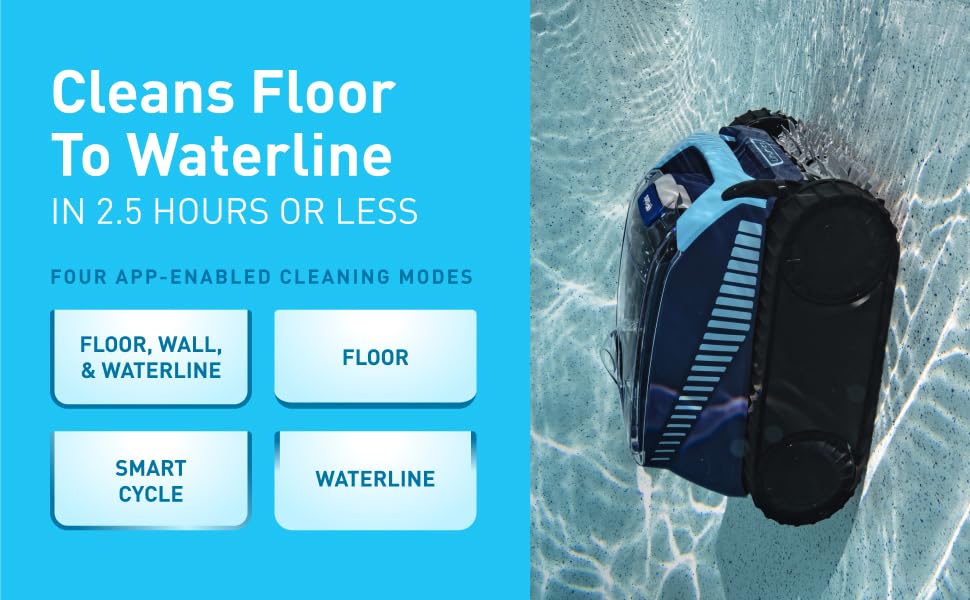
Image 3.2: The Polaris Freedom cleaner actively cleaning a pool, illustrating the various cleaning modes available for selection.
4. Maintenance and Retrieval
Adfer y Glanhawr
Upon completion of a cleaning cycle, the Polaris Freedom cleaner offers two convenient retrieval methods:
- Waterline Retrieval (Tap & Lift): The cleaner is designed to automatically climb to the waterline at the end of its cycle. You can then gently tap the cleaner lid with a pool pole. It will drive to the waterline, allowing for easy, lightweight removal as water quickly evacuates.
- Manual Retrieval Hook: If the cleaner is not at the waterline, use the included manual retrieval hook attached to a standard pool pole to lift the cleaner from the pool.

Image 4.1: Illustration of the Tap & Lift removal system, demonstrating how to retrieve the cleaner at the waterline.
Filter Canister Cleaning
Regular cleaning of the filter canister is essential for maintaining optimal cleaning performance.
- After each cleaning cycle, remove the cleaner from the pool.
- Open the cleaner's lid to access the filter canister.
- Remove the filter canister and empty any collected debris.
- Rinse the filter canister thoroughly with a garden hose until all debris and fine particles are removed.
- Reinsert the clean filter canister into the cleaner and close the lid securely.
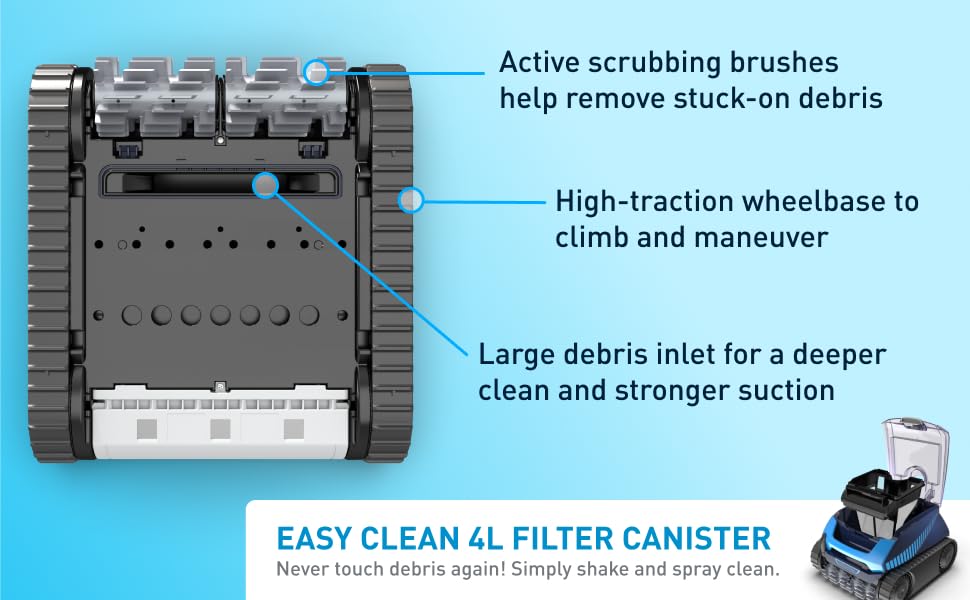
Image 4.2: Underside features of the cleaner, including active scrubbing brushes and the large debris inlet leading to the filter canister.
5. Datrys Problemau
This section addresses common issues you might encounter with your Polaris Freedom cleaner.
| Problem | Achos Posibl | Ateb |
|---|---|---|
| Cleaner does not turn on or operate. | Low battery charge; improper charging station connection. | Ensure the cleaner is fully charged on the Easy-Charge Station. Verify the 'Beep' sound confirms proper connection. Check power outlet. |
| Poor cleaning performance or missed areas. | Clogged filter canister; incorrect cleaning mode selected; debris obstruction. | Clean the filter canister thoroughly. Select an appropriate cleaning mode (e.g., Floor, Walls, & Waterline). Remove any large debris from the pool. |
| Cleaner does not climb walls or reach waterline. | Low battery charge; excessive algae buildup on pool surfaces; water chemistry imbalance. | Ensure the battery is fully charged. Brush pool walls to remove algae. Check and balance pool water chemistry. |
| iAquaLink app connection issues. | Wi-Fi signal interference; incorrect pairing procedure. | Ensure the cleaner is within Wi-Fi range. Restart the app and cleaner. Re-attempt the pairing process as per app instructions. |
6. Manylebau Cynnyrch
| Nodwedd | Manylyn |
|---|---|
| Enw Model | FREEDOM (FFREEDOM) |
| Brand | Polaris |
| Ffynhonnell Pwer | Wedi'i Bweru â Batri (Ion Lithiwm) |
| Batri Lithiwm Voltage | 18 folt (DC) |
| Amser Codi Tâl | Tua 4.5 Awr |
| Effeithlonrwydd Glanhau | Cleans pools in approximately 2.5 hours |
| Dull Rheoli | App (iAquaLink) |
| Capacity (Debris) | 4 litr |
| Dimensiynau Cynnyrch | 22"H x 22"L x 14"U |
| Pwysau Eitem | 32 Bunt |
| Deunydd | Plastig |
| Lliw | Glas |
| UPC | 052337291811 |
7. Gwarant a Chefnogaeth
Gwybodaeth Gwarant
The Polaris Freedom Cordless Robotic Pool Cleaner comes with a Gwarant Cyfyngedig. Please refer to the warranty card included with your product packaging for specific terms, conditions, and duration of coverage. Keep your proof of purchase for warranty claims.
Cefnogaeth i Gwsmeriaid
For technical assistance, troubleshooting beyond this manual, or warranty inquiries, please contact Polaris customer support. Contact information can typically be found on the manufacturer's official websafle neu yn y pecyn cynnyrch.
Manufacturer: Fluidra