
1. Rhagymadrodd
Diolch am brynuasing the LFF LDR113-EU Kitchen Radio. This manual provides essential information for the safe and efficient operation of your device. Please read it thoroughly before use and retain it for future reference.
The LFF LDR113-EU is a versatile kitchen radio featuring DAB+, FM, and Bluetooth connectivity. It includes dual alarms, a sleep timer, and 60 station presets, designed for both tabletop use and under-cabinet mounting.
2. Gwybodaeth Diogelwch
- Ffynhonnell Pwer: Defnyddiwch yr addasydd pŵer a ddarperir yn unig. Sicrhewch fod y cyfainttage yn cyfateb i'ch cyflenwad pŵer lleol.
- Dŵr a lleithder: Do not expose the device to water, rain, or excessive moisture. Avoid placing liquids near the radio.
- Awyru: Sicrhewch fod digon o awyru o amgylch y ddyfais. Peidiwch â rhwystro agoriadau awyru.
- Gwres: Cadwch y ddyfais i ffwrdd o ffynonellau gwres fel rheiddiaduron, cofrestri gwres, stofiau, neu offer eraill sy'n cynhyrchu gwres.
- Glanhau: Disconnect from power before cleaning. Use a soft, dry cloth. Do not use liquid cleaners or aerosol cleaners.
- Gwasanaethu: Peidiwch â cheisio gwasanaethu'r cynnyrch hwn eich hun. Cyfeiriwch yr holl wasanaethu at bersonél gwasanaeth cymwys.
- Lleoliad: Place the radio on a stable, level surface or mount it securely according to the instructions.
3. Cynnwys Pecyn
Gwiriwch fod yr holl eitemau yn bresennol yn y pecyn:
- LFF LDR113-EU Kitchen Radio
- Addasydd Pŵer
- Mounting Kit (screws, spacers, mounting template)
- Llawlyfr Defnyddiwr (y ddogfen hon)
4. Cynnyrch Drosview
Familiarize yourself with the radio's components and controls.

Ffigur 4.1: Blaen view of the LFF LDR113-EU Kitchen Radio, showing the LCD display on the left, control buttons in the center, and a large rotary knob on the right. The buttons include power, mode, menu, info, preset, timer/sleep, and navigation arrows. The rotary knob is for volume and selection.

Ffigur 4.2: Diagram illustrating the key features of the LFF Kitchen Radio, including DAB/DAB+ radio, FM radio, two alarms, sleep timer, Bluetooth connectivity, and 60 station presets.
4.1. Rheolyddion ac Arddangosfa
- Arddangosfa lliw LCD: Shows current mode, station information, time, and settings.
- Botwm Pŵer: Yn troi'r radio ymlaen / i ffwrdd.
- Botwm Modd: Switches between DAB+, FM, and Bluetooth modes.
- Botwm Dewislen/Gwybodaeth: Accesses menu options or displays station information.
- Botymau Rhagosodedig (1-5): Quick access to saved stations.
- Timer/Sleep Button: Sets sleep timer or alarm functions.
- Botymau Llywio (I Fyny/I Lawr/Chwith/Dde): Navigates through menus and station lists.
- Rotary Knob (Volume/Enter): Adjusts volume, scrolls through options, and confirms selections.
5. Gosod
5.1. Cysylltiad Pwer
- Connect the power adapter to the DC IN port on the back of the radio.
- Plygiwch yr addasydd pŵer i mewn i allfa wal.
- Bydd y radio yn troi ymlaen neu'n mynd i mewn i'r modd wrth gefn.
5.2. Initial Scan (DAB+ and FM)
Upon first power-on, the radio will typically perform an automatic scan for DAB+ and FM stations. If not, follow these steps:
- Gwasgwch y Modd button to select DAB+ or FM mode.
- For DAB+, the radio will usually initiate a full scan automatically. If not, navigate to the 'Full Scan' option in the DAB+ menu and press the rotary knob to confirm.
- For FM, navigate to the 'Auto Scan' option in the FM menu and press the rotary knob to confirm.
- The radio will search for available stations and store them.

Ffigur 5.1: The LFF Kitchen Radio's LCD color screen displaying the main menu with icons for Digital Radio (DAB+), FM Radio, and Bluetooth, indicating available modes.
6. Cyfarwyddiadau Gweithredu
6.1. Pŵer Ymlaen / I ffwrdd
Gwasgwch y Grym button to turn the radio on or off (standby mode).
6.2. Dewis Modd
Gwasgwch y Modd botwm dro ar ôl tro i gylchu trwy'r moddau DAB+, FM, a Bluetooth.
6.3. Gweithrediad Radio DAB+
- In DAB+ mode, use the Fyny / Lawr navigation buttons or the rotary knob to browse available stations.
- Press the rotary knob to select a station.
- Gwasgwch Dewislen / Gwybodaeth i view station information (e.g., program type, signal strength).
6.4. Gweithrediad Radio FM
- Yn y modd FM, defnyddiwch y Fyny / Lawr navigation buttons to tune to stations manually.
- Pwyswch a dal y Fyny / Lawr buttons for automatic station seeking.
- Gwasgwch Dewislen / Gwybodaeth i view gwybodaeth am yr orsaf.
6.5. Cysylltedd Bluetooth
Connect your smartphone or other Bluetooth-enabled device to the radio.
- Gwasgwch y Modd button to select Bluetooth mode. The display will show 'Bluetooth Pairing'.
- Ar eich dyfais symudol, galluogwch Bluetooth a chwiliwch am y dyfeisiau sydd ar gael.
- Select 'LFF LDR113-EU' from the list of devices.
- Once connected, the radio display will show 'Bluetooth Connected'. You can now play audio from your device through the radio.
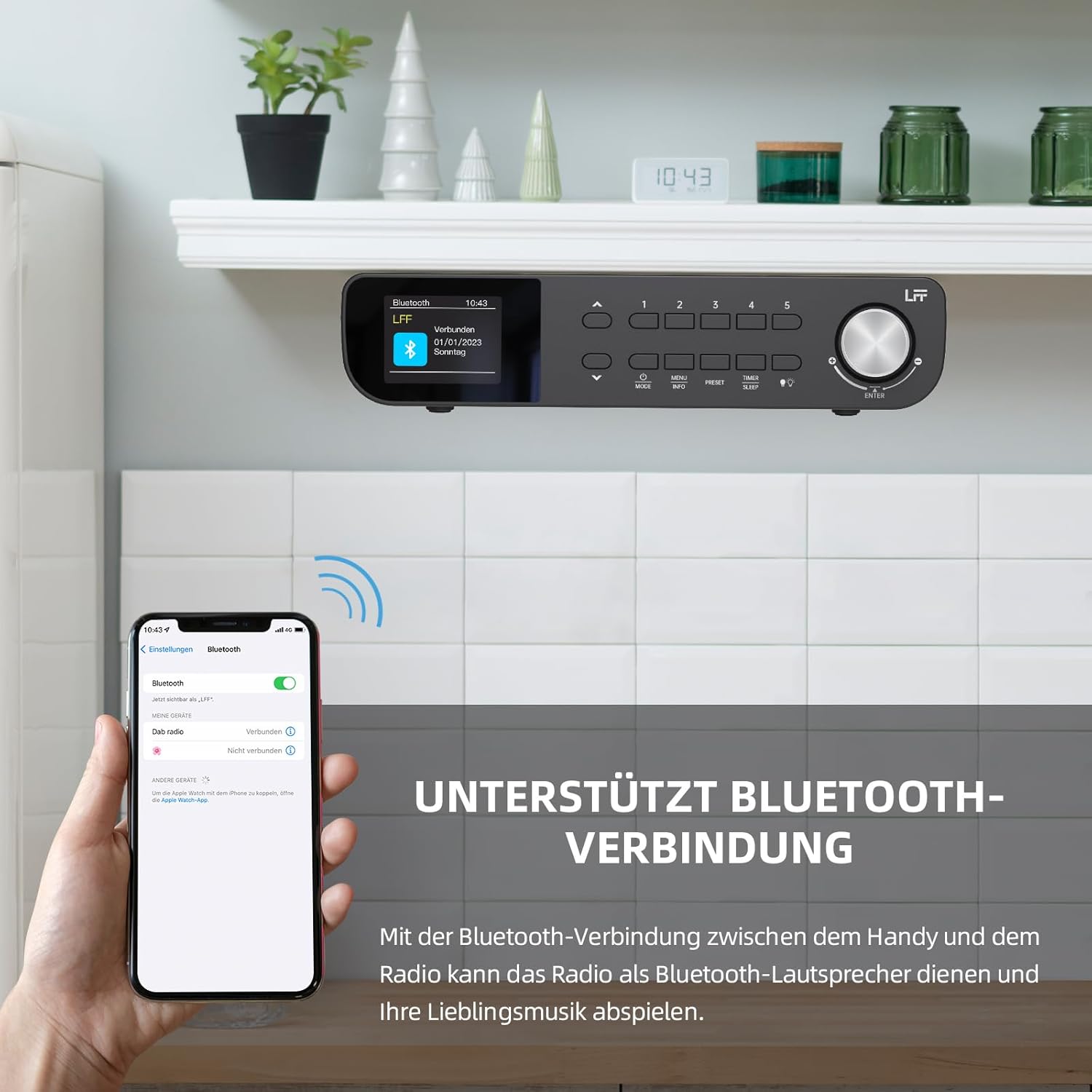
Ffigur 6.1: The LFF Kitchen Radio displaying a successful Bluetooth connection, with a smartphone screen showing the radio as a connected device.

Ffigur 6.2: Yn agos view of the radio's display indicating 'LFF' and 'Connected' under the Bluetooth menu, confirming a successful pairing.
6.6. Gosod Larymau
The radio features two independent alarms.
- Gwasgwch y Amserydd/Cwsg button repeatedly until 'Alarm 1' or 'Alarm 2' appears.
- Use the navigation buttons and rotary knob to set the alarm time, source (DAB+, FM, or Buzzer), and frequency (daily, weekdays, weekends, once).
- Confirm settings by pressing the rotary knob.

Ffigur 6.3: Close-up of the radio's display showing the current time and options to activate or deactivate Alarm 1 and Alarm 2.
6.7. Amserydd Cwsg
The sleep timer allows the radio to turn off automatically after a set period.
- Gwasgwch y Amserydd/Cwsg button repeatedly until 'Sleep Timer' appears.
- Use the navigation buttons or rotary knob to select the desired sleep duration (e.g., 15, 30, 60 minutes).
- Cadarnhewch trwy wasgu'r bwlyn cylchdro.

Ffigur 6.4: Close-up of the radio's display showing the 'Sleep Timer' setting, with an option to set the duration, for example, to 30 minutes.
6.8. Rhagosodiadau
Arbedwch hyd at 60 o orsafoedd ffefryn ar gyfer mynediad cyflym.
- I Arbed Rhagosodiad: Tiwniwch i'r orsaf a ddymunir. Pwyswch a daliwch un o'r Rhagosodiad (1-5) buttons until 'Preset Saved' appears. For additional presets, use the 'Preset Store' option in the menu.
- I gofio rhagosodiad: Pwyswch yn fyr ar un o'r Rhagosodiad (1-5) buttons. For other presets, navigate to 'Preset Recall' in the menu.
6.9. Golau LED
The radio includes an integrated LED light, useful for illuminating the area below if mounted under a cabinet.
- Gwasgwch y Ysgafn button (if available, or navigate through menu) to turn the LED light on or off.

Ffigur 6.5: The LFF Kitchen Radio mounted under a kitchen cabinet, with its integrated LED light providing illumination to the countertop below.
6.10. Disgleirdeb Arddangos
Adjust the display backlight brightness to suit your environment.
- Access the 'Display' or 'Settings' menu.
- Select 'Brightness' and choose from High, Medium, or Low settings.

Ffigur 6.6: A visual comparison of the LFF Kitchen Radio's display at three different backlight brightness levels: High, Medium, and Low, demonstrating the adjustable visibility.
7. Cyfarwyddiadau Mowntio
The LFF LDR113-EU Kitchen Radio offers flexible placement options: tabletop or under-cabinet mounting.
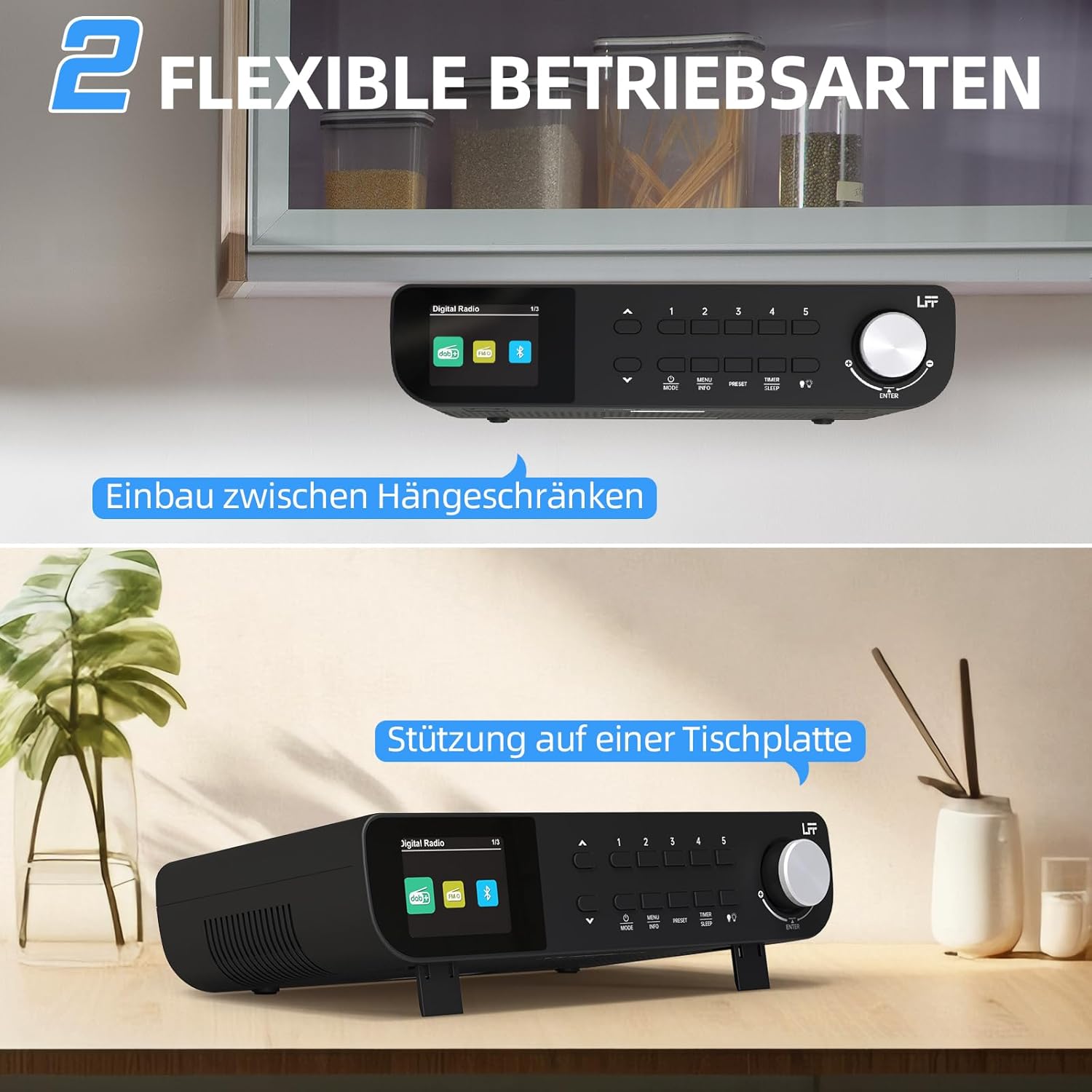
Ffigur 7.1: The LFF Kitchen Radio displayed in two common installation scenarios: mounted underneath a kitchen cabinet and placed freestanding on a tabletop.
7.1. Tabletop Placement
Simply place the radio on a stable, flat surface. Ensure it is not near the edge to prevent accidental falls.
7.2. Under-Cabinet Mounting
For under-cabinet installation, use the provided mounting kit.
- Paratowch y Lleoliad: Choose a suitable location under a kitchen cabinet, ensuring there is enough space and access to a power outlet.
- Mark Drill Holes: Use the provided mounting template to mark the drill holes on the underside of the cabinet.
- Tyllau Peilot Drilio: Drilio tyllau peilot yn y safleoedd sydd wedi'u marcio.
- Attach Mounting Plate (if applicable): Some models may include a separate mounting plate. Attach this to the cabinet using the screws.
- Diogelu'r Radio: Align the radio with the mounting holes or plate and secure it using the provided screws. Ensure it is firmly attached.
- Pwer Cysylltu: Plygiwch yr addasydd pŵer i mewn.

Ffigur 7.2: Detailed diagram showing the steps for under-cabinet mounting, including measuring distances (e.g., 58mm) and securing the radio with screws.
8. cynnal
- Glanhau: To clean the radio, disconnect it from the power supply. Use a soft, dry, lint-free cloth. Do not use abrasive cleaners, waxes, or solvents.
- Antena: Ensure the antenna is extended for optimal reception in DAB+ and FM modes. Handle it gently to avoid damage.
- Storio: Os ydych chi'n storio'r radio am gyfnod hir, datgysylltwch ef o'r pŵer a'i storio mewn lle oer, sych.
9. Datrys Problemau
| Problem | Achos Posibl | Ateb |
|---|---|---|
| Dim pŵer | Addasydd pŵer heb ei gysylltu neu soced diffygiol. | Gwiriwch y cysylltiad pŵer. Rhowch gynnig ar soced gwahanol. |
| Derbyniad DAB+/FM gwael | Antena heb ei hymestyn, signal gwan, neu ymyrraeth. | Fully extend the antenna. Reposition the radio. Perform a full scan. |
| Bluetooth ddim yn cysylltu | Radio not in pairing mode, device too far, or already connected to another device. | Ensure radio is in Bluetooth mode. Move device closer. Disconnect from other devices. |
| Dim sain | Volume too low, mute activated, or incorrect mode. | Increase volume. Check if mute is active. Ensure correct mode (DAB+, FM, Bluetooth). |
| Arddangos ddim yn gweithio | Brightness too low or device malfunction. | Adjust display brightness. If problem persists, contact support. |
10. manylebau

Ffigur 10.1: Diagram showing the dimensions of the LFF Kitchen Radio: 250mm length, 146mm width, and 55mm height.
| Nodwedd | Manylyn |
|---|---|
| Brand | LFF |
| Rhif Model | LDR113-EU |
| Lliw | Du |
| Cysylltedd | Bluetooth |
| Technoleg Tiwnio | DAB Plus, FM |
| Ffynhonnell Pwer | Cebl Trydan |
| Amlder | 108 MHz (FM max) |
| Dimensiynau (L x W x H) | 250mm x 146mm x 55mm |
| Rhagosodiadau | 60 |
| Arddangos | Sgrin Lliw LCD |
| Nodweddion Arbennig | Dual Alarms, Sleep Timer, Under-cabinet mounting option, LED Light |
11. Gwarant a Chefnogaeth
This product comes with a standard manufacturer's warranty. Please refer to the warranty card included in your package for specific terms and conditions. For technical support, troubleshooting assistance, or warranty claims, please contact your retailer or the LFF customer service department.