
Rhagymadrodd
This manual provides essential information for the safe and efficient use of your ONN 42-Inch Full HD LED Smart TV, Model 100018254. Please read these instructions thoroughly before operating your television and retain them for future reference.
Beth Sydd yn y Bocs
Gwiriwch fod yr holl gydrannau yn bresennol cyn bwrw ymlaen â'r gosodiad.
- ONN 42-Inch Full HD LED Smart TV
- Rheolaeth Anghysbell
- Stand Teledu (2 ddarn)
- Sgriwiau ar gyfer Stand Teledu
- Cord Pŵer
- Canllaw Cychwyn Cyflym (heb ei gynnwys yn y llawlyfr hwn)

Delwedd: Blaen view of the ONN 42-inch Smart TV displaying the Roku TV home screen with various streaming app icons like Netflix, Disney+, Apple TV, Hulu, Peacock, and Roku Channel. The TV is black with slim bezels and two stand feet.
Gosod
1. Cysylltu'r stondin deledu
- Rhowch y teledu yn ofalus gyda sgrin i lawr ar arwyneb meddal, glân i atal difrod.
- Aliniwch bob darn stondin â'r tyllau sgriw cyfatebol ar waelod y teledu.
- Sicrhewch bob darn stondin gyda'r sgriwiau a ddarperir. Gwnewch yn siŵr eu bod wedi'u tynhau'n gadarn.

Image: A diagram illustrating the dimensions of the ONN 42-inch TV, showing its width as 43 inches and height as 37 inches when placed on its stand.
2. Gosod Wal (Dewisol)
This TV is compatible with VESA standard wall mounts. Refer to your wall mount's instructions for proper installation. Ensure the wall mount can support the weight of the television.

Delwedd: Cefn view of the ONN 42-inch TV, highlighting the VESA mounting screw holes in a square pattern and various input ports on the side and bottom right.
3. Cysylltu Dyfeisiau
Cysylltwch eich dyfeisiau allanol fel blychau cebl, consolau gemau, neu chwaraewyr Blu-ray â phorthladdoedd mewnbwn y teledu.
- HDMI: For high-definition audio and video. Use an HDMI cable to connect devices like set-top boxes, game consoles, or streaming sticks.
- USB: Ar gyfer cysylltu dyfeisiau storio USB i chwarae cyfryngau files.
- Wi-Fi: For internet connectivity to access smart TV features and streaming services.
4. Dewin Pŵer Ymlaen a Gosod Cychwynnol
- Plygiwch y llinyn pŵer i'r teledu ac yna i mewn i soced wal.
- Pwyswch y botwm pŵer ar y teclyn rheoli o bell neu ar y teledu ei hun.
- Follow the on-screen instructions to complete the initial setup, including language selection, network connection (Wi-Fi), channel scanning, and linking to your Roku account (if applicable).
Gweithredu'r teledu
1. Rheolaeth Anghysbell Drosview
The remote control allows you to navigate the TV's interface and control various functions.
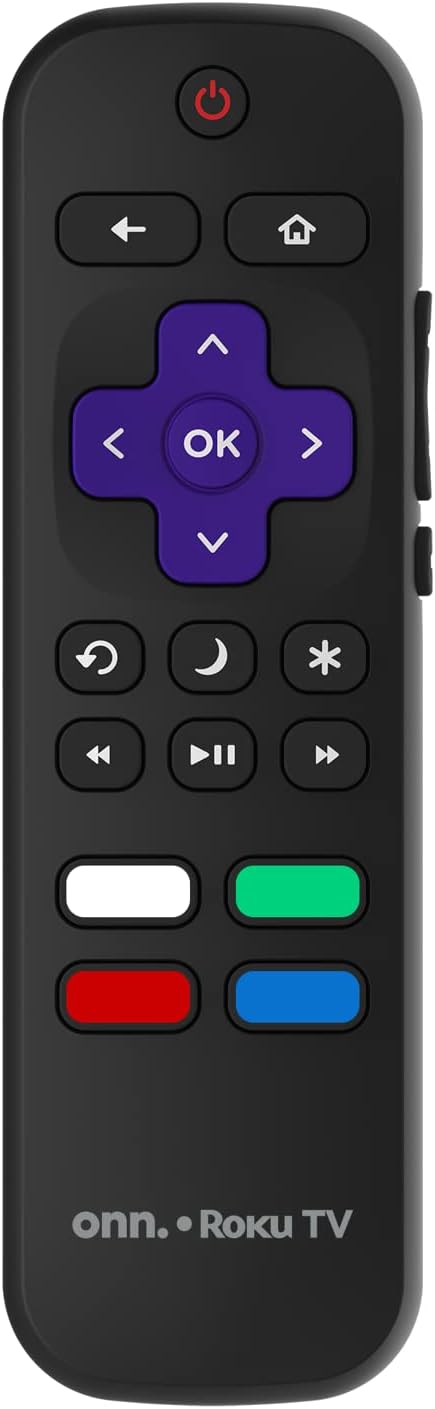
Image: The ONN Roku TV remote control, featuring a power button, directional pad, OK button, home button, back button, volume controls, and dedicated buttons for popular streaming services.
- Botwm Pŵer: Yn troi'r teledu ymlaen neu i ffwrdd.
- Directional Pad (D-Pad) & OK: Yn llywio bwydlenni ac yn cadarnhau dewisiadau.
- Botwm Cartref: Yn dychwelyd i sgrin gartref Roku TV.
- Botwm Cefn: Yn dychwelyd i'r sgrin neu'r ddewislen flaenorol.
- Cyfrol i fyny/i lawr: Yn addasu'r cyfaint sain.
- Botwm Munud: Yn tewi neu'n dad-dewi'r sain.
- Sianel i fyny/i lawr: Changes channels (for antenna/cable inputs).
- Botymau Ap Pwrpasol: Quick access to popular streaming services like Netflix, Hulu, etc.
2. Nodweddion Teledu Clyfar
Your ONN Smart TV provides access to a wide range of streaming content and smart functionalities.
- Gwasanaethau Ffrydio: Access pre-installed apps like Netflix, YouTube, and many more through the Roku Channel Store.
- Rheoli llais: Compatible with Alexa and Google Assistant for hands-free control (requires a separate compatible voice assistant device).
- Diweddariadau Meddalwedd Awtomatig: The TV will automatically update its software when connected to the internet, ensuring you have the latest features and security.
3. Dewis Mewnbwn
To switch between connected devices (e.g., cable box, game console), use the Mewnbwn button on your remote or select the desired input from the Roku TV home screen.
4. Gosodiadau Llun a Sain
Access the TV's settings menu to customize picture and sound preferences. Navigate to Gosodiadau > Gosodiadau llun teledu or Gosodiadau> Sain to adjust options like brightness, contrast, color, sound mode, and equalizer settings.
Cynnal a chadw
1. Glanhau'r Sgrin
- Always turn off the TV and unplug it before cleaning.
- Defnyddiwch frethyn meddal, di-flwff, wedi'i liwio ychydigampwedi'i lanhau â dŵr neu lanhawr sgrin arbenigol.
- Peidiwch â chwistrellu glanhawr yn uniongyrchol ar y sgrin. Rhowch ef ar y brethyn yn gyntaf.
- Avoid using abrasive cleaners, alcohol, benzene, or thinners, as these can damage the screen.
2. Diweddariadau Meddalwedd
Ensure your TV is connected to the internet to receive automatic software updates. These updates improve performance, add features, and enhance security. You can manually check for updates in the Gosodiadau > System > Diweddariad system bwydlen.
Datrys problemau
Os byddwch chi'n dod ar draws problemau gyda'ch teledu, cyfeiriwch at yr atebion cyffredin canlynol:
Dim Pwer
- Gwiriwch a yw'r llinyn pŵer wedi'i blygio'n ddiogel i'r teledu a'r soced wal.
- Gwiriwch fod y soced wal yn gweithio trwy blygio dyfais arall i mewn.
- Rhowch gynnig ar wasgu'r botwm pŵer ar y teledu ei hun, nid y teclyn rheoli o bell yn unig.
Dim Llun / Llun Gwyrdroëdig
- Ensure the correct input source is selected (e.g., HDMI 1, HDMI 2).
- Gwiriwch yr holl gysylltiadau cebl rhwng y teledu a dyfeisiau allanol.
- Rhowch gynnig ar gebl HDMI gwahanol os yn bosibl.
- Addaswch osodiadau'r llun (disgleirdeb, cyferbyniad) yn y ddewislen deledu.
Dim Sŵn / Sŵn Isel
- Check if the TV is muted or if the volume is turned down.
- Ensure external audio devices (soundbars, receivers) are properly connected and powered on.
- Check audio settings in the TV menu.
Materion Cysylltiad Rhwydwaith
- Verify your Wi-Fi router is powered on and functioning.
- Ailgychwynwch eich llwybrydd a'ch modem.
- Ewch i Gosodiadau > Rhwydwaith > Gwirio'r cysylltiad on your TV to diagnose the issue.
- Sicrhewch eich bod yn nodi'r cyfrinair Wi-Fi cywir.
Manylebau
| Nodwedd | Manylyn |
|---|---|
| Rhif Model | 100018254 |
| Maint Sgrin | 42 modfedd |
| Technoleg Arddangos | LED |
| Datrysiad | 1080p (HD Llawn) |
| Cyfradd Adnewyddu | 60 Hz |
| Cysylltedd | USB, Wi-Fi |
| Gwasanaethau Rhyngrwyd â Chymorth | Netflix, YouTube (and others via Roku platform) |
| Dull Rheoli | Voice (via Alexa & Google Assistant compatible devices), Remote Control |
| Math Mowntio | Mowntiad Wal (cydnaws â VESA) |
| Lliw | Du |
| UPC | 671227025567 |

Image: Energy Guide label for Television Model 100018254, indicating an estimated yearly energy cost of $11 based on 12 cents per kWh and 5 hours use per day.
Gwarant a Chefnogaeth
For warranty information and technical support, please refer to the documentation included with your purchase or visit the official ONN support websafle. Cadwch eich derbynneb prynu ar gyfer hawliadau gwarant.