
Boxlight P8 WX35NXT
Boxlight P8 WX35NXT DLP Projector User Manual
Model: P8 WX35NXT
Rhagymadrodd
This manual provides essential information for the safe and efficient operation of your Boxlight P8 WX35NXT DLP Projector. Please read this manual thoroughly before using the projector and retain it for future reference. The Boxlight P8 WX35NXT is an Ultra Short Throw DLP projector designed for various applications, offering WXGA resolution and 3500 ANSI lumens brightness.
Gwybodaeth Ddiogelwch Bwysig
- Do not block ventilation openings: Ensure proper airflow around the projector to prevent overheating.
- Avoid direct eye exposure to the lens: The projector emits a bright light that can cause eye damage.
- Do not place near water or moisture: This can lead to electric shock or fire.
- Use only specified power supply: Refer to the product label for correct voltage a gofynion cyfredol.
- Trin gyda gofal: Avoid dropping or subjecting the projector to strong impacts.
- Gwasanaethu: Cyfeirio pob gwasanaeth i bersonél gwasanaeth cymwys.
Cynnwys Pecyn
Gwiriwch fod yr holl eitemau yn bresennol yn y pecyn:
- Boxlight P8 WX35NXT DLP Projector
- Cord Pŵer
- Rheolaeth Anghysbell (gyda batris)
- Cebl VGA
- Llawlyfr Defnyddiwr (y ddogfen hon)
Cynnyrch Drosview
Cydrannau Taflunydd

Ffigur 1: Brig view of the Boxlight P8 WX35NXT projector. This image displays the main lens assembly, the integrated control panel with navigation buttons, and the overall casing design. The projector features an ultra-short throw lens positioned at the top front, allowing for projection from a very short distance.
- Lens Tafluniad: Located at the front-top, designed for ultra-short throw projection.
- Panel Rheoli: Buttons for power, menu navigation, source selection, and keystone correction.
- Rhwyllau Awyru: Located on the sides and front for heat dissipation.
- Modrwy Ffocws: Manual adjustment for image sharpness.
Porthladdoedd Cysylltedd
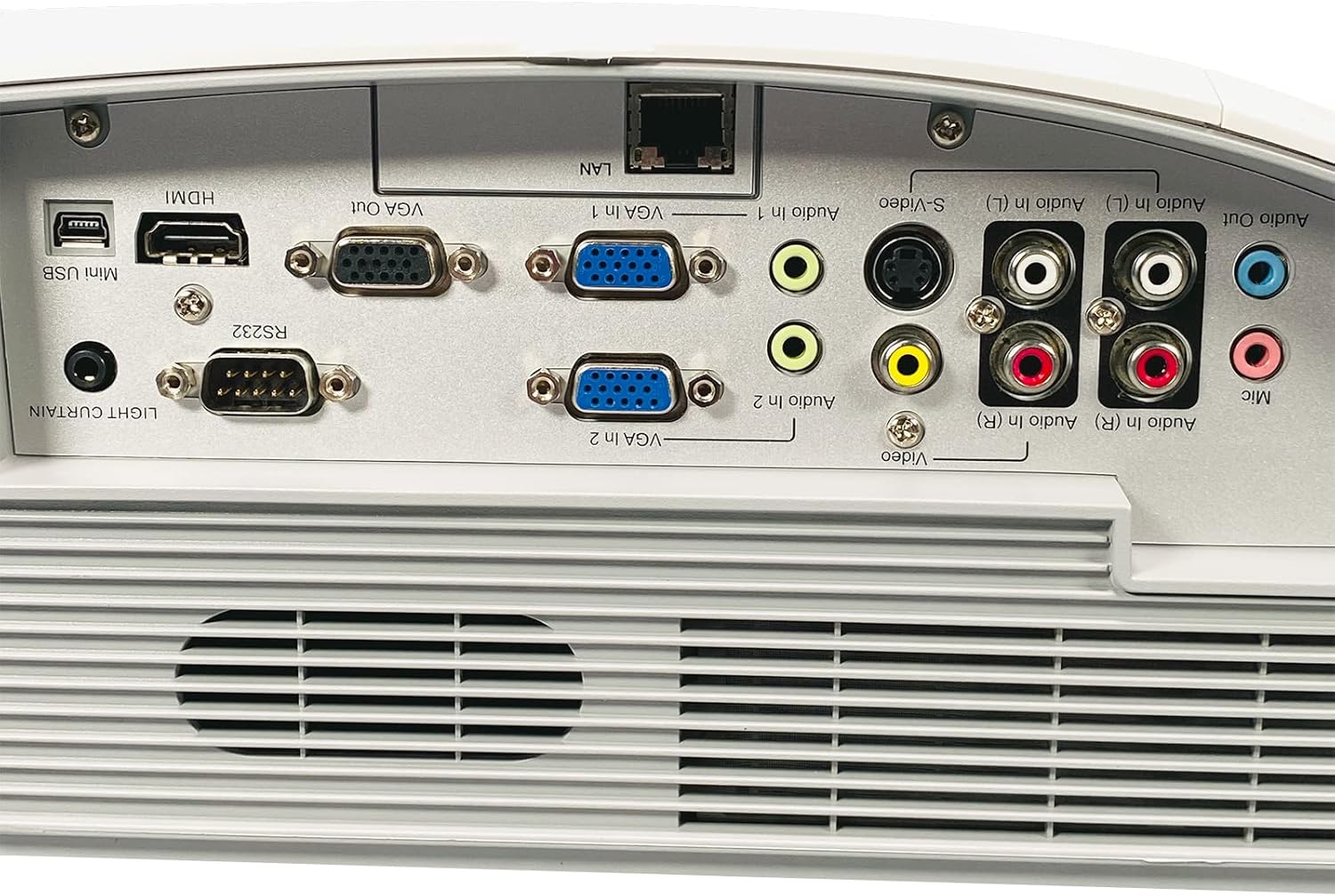
Ffigur 2: Rear panel of the Boxlight P8 WX35NXT projector, detailing the various input and output ports. From left to right, ports include Mini USB, HDMI, RS232, VGA Out, VGA In (x2), LAN, S-Video, Composite Video (RCA), Audio In (L/R), Audio Out, and Microphone input.
- HDMI: Digital video and audio input.
- VGA In (x2): Analog video input for computers.
- VGA Out: Analog video output for a monitor.
- LAN (RJ-45): Network connection for control and monitoring.
- Mini-USB: For service or interactive features.
- RS232 (DB-9pin): Serial port for projector control.
- S-Fideo: Mewnbwn fideo analog.
- Fideo Cyfansawdd (RCA): Mewnbwn fideo analog.
- Audio In (L/R): RCA audio inputs.
- Sain Allan: Allbwn sain.
- meic: Mewnbwn meicroffon.
Canllaw Gosod
1. Lleoliad y Taflunydd
As an ultra-short throw projector, the P8 WX35NXT is designed to be placed very close to the projection surface (screen or wall). Position the projector on a stable, flat surface directly in front of the screen. Ensure there are no obstructions to the projection path or ventilation openings.
2. Cysylltiad Pwer
- Cysylltwch y llinyn pŵer â mewnfa pŵer y taflunydd.
- Plygiwch ben arall y llinyn pŵer i mewn i allfa drydanol wedi'i seilio.
3. Cysylltu Ffynonellau Mewnbwn
Connect your video source (e.g., computer, Blu-ray player) to the appropriate input port on the projector's rear panel (refer to Figure 2).
- HDMI: For digital video and audio.
- VGA: For analog computer video. Connect an audio cable separately if needed.
- S-Video/Composite: Ar gyfer ffynonellau fideo diffiniad safonol.
4. Troi ymlaen yn gychwynnol
- Gwasgwch y Grym button on the projector's control panel or remote control.
- The power indicator light will change, and the projector will begin its startup sequence.
5. Addasiad Ffocws
Adjust the focus ring located near the lens until the projected image is clear and sharp.
Cyfarwyddiadau Gweithredu
Pŵer Ymlaen / Diffodd
- I Bweru Ymlaen: Gwasgwch y Grym botwm unwaith.
- I Bweru i ffwrdd: Gwasgwch y Grym button twice. The projector will display a shutdown confirmation. Confirm to power off.
Dewis Ffynhonnell Mewnbwn
Gwasgwch y Ffynhonnell button on the control panel or remote control to cycle through available input sources (HDMI, VGA1, VGA2, S-Video, Video).
Llywio Dewislen
Defnyddiwch y Bwydlen button to open the On-Screen Display (OSD) menu. Use the arrow buttons to navigate and the Ewch i mewn botwm i ddewis opsiynau. Pwyswch Bwydlen eto i adael.
Addasiadau Delwedd
- Disgleirdeb/Cyferbyniad: Adjust these settings in the OSD menu to optimize image quality for your viewing amgylchedd.
- Cymhareb Agwedd: Select the appropriate aspect ratio (e.g., 16:10, 4:3) from the OSD menu to match your content.
- Cywiriad Keystone: If the image appears trapezoidal, use the keystone correction function (often a dedicated button or in the OSD) to square the image.
Cynnal a chadw
Glanhau'r Taflunydd
- Casing: Defnyddiwch frethyn meddal, sych i sychu'r taflunydd casing. Ar gyfer staeniau ystyfnig, dampgolchwch y brethyn ychydig gyda dŵr a glanedydd ysgafn, yna sychwch yn sych.
- Lens: Use a professional lens cleaning cloth and lens cleaning solution. Avoid abrasive materials or excessive pressure.
- Awyru: Periodically check and clean the ventilation grilles to ensure proper airflow. Use a soft brush or compressed air to remove dust.
Lamp Amnewid
The Boxlight P8 WX35NXT uses a DLP light source, which typically has a very long lifespan and does not require frequent lamp replacement like traditional projectors. If a light source issue occurs, contact technical support.
Datrys problemau
| Problem | Achos Posibl | Ateb |
|---|---|---|
| Dim delwedd yn cael ei harddangos |
|
|
| Mae'r ddelwedd yn aneglur |
|
|
| Mae'r ddelwedd yn drapesoidaidd |
|
|
| Dim sain |
|
|
Manylebau
| Brand | Golau bocs |
| Model | P8 WX35NXT |
| Technoleg Arddangos | CLLD |
| Datrysiad Brodorol | 1280x800 (WXGA) |
| Cydraniad Uchaf | 1080p (FHD) |
| Disgleirdeb | 3500 ANSI Lumens |
| Cymhareb Cyferbyniad | 3000:1 |
| Cymhareb Agwedd | 16: 10 (Brodorol) |
| Cymhareb Taflu | Ultra-short Throw |
| Cysylltedd | HDMI, VGA In (x2), VGA Out, LAN (RJ-45), Mini USB, RS232, S-Video, Composite Video, Audio In (L/R), Audio Out, Mic |
| Siaradwyr Cynwysedig | Mono 10.0 Wat |
| Pwysau Eitem | 17.7 pwys (8.03 kg) |
| Mewnbwn Pwer | AC 100-240V~ 50/60 Hz 3.6A |
Gwarant a Chefnogaeth
For technical support or warranty inquiries, please contact Boxlight directly. Refer to the product label for specific contact information.

Ffigur 3: Product label on the underside of the projector. This label provides essential information including the manufacturer's address, technical support contact details, model number (P8 WX35NXT), input power specifications, and regulatory compliance marks (CE, UL, FC).
- Gwneuthurwr: Golau bocs
- Cymorth Technegol: International +1 360-464-2119, USA and Canada 1-866-972-1549
- Websafle: www.boxlight.com
- Model: P8 WX35NXT
- Rhif Cyfresol: 330901135450075 (example, actual serial number varies per unit)
Please register your product on the Boxlight website to activate your warranty and receive product updates.
Ask a question about this manual
Ask about setup, troubleshooting, compatibility, parts, safety, or missing instructions. Manuals+ will review the question and use this page’s manual context to help answer it.