
Rhagymadrodd
Welcome to the Ducky One 3 Mini Aura 60% Mechanical Keyboard. This manual provides essential information for setting up, operating, and maintaining your new keyboard. The Ducky One 3 series incorporates the innovative QUACK Mechanics design philosophy, focusing on enhanced aesthetics, hot-swappable functionality, superior sound dampening, and improved stabilizers.
Your Ducky One 3 Mini Aura features a low-profile case with a unique 3-layer design, allowing for vibrant RGB lighting. It includes a silicone plate dampener and EVA foam case dampener for optimal acoustics. The keyboard is equipped with hot-swappable Kailh Yellow Sockets, Ducky's V2 stabilizers for improved stability, and 3-level adjustable feet. The keycaps are Double Shot Pudding style PBT, offering durability and enhanced RGB illumination.
Cynnwys Pecyn
Gwnewch yn siŵr bod yr holl eitemau yn bresennol yn eich pecyn:
- Ducky One 3 Mini Aura 60% Mechanical Keyboard
- Cebl USB-C
Gosod
Cysylltu'r Bysellfwrdd
- Lleolwch y porthladd USB-C ar gefn y bysellfwrdd.
- Cysylltwch y cebl USB-C a ddarperir â'r bysellfwrdd.
- Connect the other end of the USB-A connector to an available USB port on your computer.
- Bydd eich system weithredu yn adnabod y bysellfwrdd yn awtomatig.

Image: The Ducky One 3 Mini Aura keyboard connected to its detachable USB-C cable.
Adjusting Keyboard Height
The keyboard features 3-level adjustable feet on the underside. Flip out the desired feet to achieve your preferred typing angle.
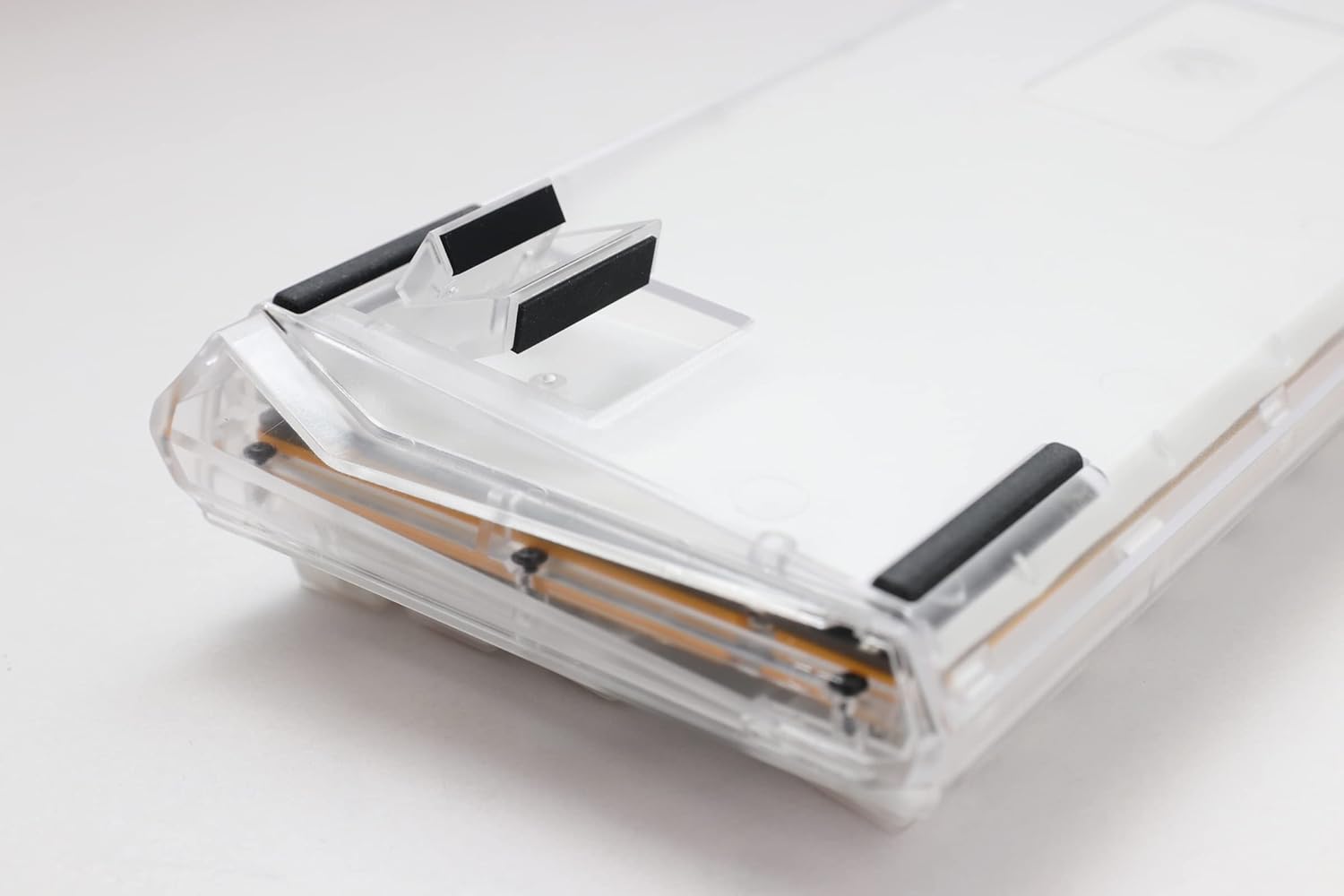
Image: The underside of the Ducky One 3 Mini Aura keyboard, highlighting the adjustable feet for ergonomic positioning.
Cyfarwyddiadau Gweithredu
Swyddogaethau Bysellfwrdd Sylfaenol
The Ducky One 3 Mini Aura functions as a standard 60% mechanical keyboard. Refer to the keycap legends for primary functions. Secondary functions are typically accessed via the Fn key combination.

Delwedd: O'r brig i lawr view of the Ducky One 3 Mini Aura 60% mechanical keyboard, showcasing its compact layout and white keycaps.
Goleuadau RGB
The keyboard features per-key programmable RGB lighting. Various lighting modes and customization options are available directly on the keyboard. Consult the official Ducky website or included quick guide for detailed instructions on changing lighting effects and colors.
Swyddogaethau Macro
The Ducky One 3 Mini Aura supports a remapped macro layout, allowing users to program custom key sequences. Specific instructions for macro recording and assignment can be found in the comprehensive user guide available on the Ducky support page.
Switshis Cyfnewid Poeth
Your Ducky One 3 Mini Aura is equipped with a hot-swappable PCB and Kailh Yellow Sockets, allowing you to change mechanical switches without soldering. This feature enables customization of typing feel and sound.
- Pwer i ffwrdd: Disconnect the keyboard from your computer before attempting to remove or install switches.
- Tynnwch y Cap Allwedd: Use a keycap puller to gently remove the desired keycap.
- Tynnu'r Switsh: Use a switch puller to carefully grip the top and bottom clips of the switch and pull it straight up.
- Gosod Switsh Newydd: Aliniwch binnau'r switsh newydd gyda'r tyllau ar y PCB. Pwyswch y switsh i lawr yn ysgafn nes iddo glicio i'w le. Gwnewch yn siŵr nad yw'r pinnau wedi plygu.
- Amnewid y Cap Allwedd: Rhowch y cap allwedd yn ôl ar goesyn y switsh newydd.
Fideo: Dros benview of the Ducky One 3 series, demonstrating features like hot-swappable switches and the QUACK Mechanics design philosophy.
Cynnal a chadw
Glanhau Eich Bysellfwrdd
- Datgysylltwch y bysellfwrdd o'ch cyfrifiadur.
- Defnyddiwch frwsh meddal neu aer cywasgedig i gael gwared ar lwch a malurion o rhwng y capiau bysellau.
- For stubborn dirt, gently remove keycaps using a keycap puller and clean the exposed switches and plate with a damp cloth (ensure it's not dripping wet).
- Clean keycaps with mild soap and water, then dry thoroughly before reattaching.
Gofal Cyffredinol
Avoid exposing the keyboard to extreme temperatures, direct sunlight, or liquids. Do not attempt to disassemble the keyboard beyond switch and keycap removal, as this may void your warranty.
Datrys problemau
Bysellfwrdd Ddim yn Ymateb
- Gwnewch yn siŵr bod y cebl USB-C wedi'i gysylltu'n ddiogel â'r bysellfwrdd a'ch cyfrifiadur.
- Rhowch gynnig ar gysylltu'r bysellfwrdd â phorthladd USB gwahanol ar eich cyfrifiadur.
- Profwch y bysellfwrdd ar gyfrifiadur arall i ddiystyru problemau penodol i'r system.
- Os ydych chi'n defnyddio hwb USB, ceisiwch gysylltu'n uniongyrchol â'r cyfrifiadur.
Incorrect Key Input or RGB Issues
- Perform a factory reset (refer to the official Ducky manual for specific key combinations).
- Ensure no switches are bent or improperly seated if you have recently hot-swapped them.
- Update your computer's USB drivers if necessary.
Manylebau
| Brand | Hwyaden |
| Rhif Model | DKON2161ST-BUSPDAWWWWC1 |
| Dimensiynau Cynnyrch | 12.2 x 4.33 x 1.57 modfedd |
| Pwysau Eitem | 2.09 pwys |
| Disgrifiad Bysellfwrdd | Mecanyddol |
| Technoleg Cysylltedd | USB-C |
| Dyfeisiau Cydnaws | PC |
| Nodwedd Arbennig | Goleuadau Cefn (RGB) |
| Newid Math | Cherry MX Brown (Hot-Swappable) |
| Deunydd Keycap | Tereffthalad polybutylen (PBT) |
| Arddull | 60% Gwyn |
| Iaith | Saesneg |
Gwarant a Chefnogaeth
Gwarant Cynnyrch
This Ducky keyboard comes with a manufacturer's warranty. Please refer to the warranty card included with your product for specific terms, conditions, and duration. Keep your proof of purchase for warranty claims.
Cynlluniau Diogelu Dewisol
Efallai y bydd cynlluniau amddiffyn estynedig ar gael i'w prynu ar wahân:
- Cynllun Diogelu 3 Flynedd
- Cynllun Diogelu 4 Flynedd
- Asurion Complete Protect (monthly billing)
These plans offer additional coverage beyond the standard manufacturer's warranty. Review the terms of each plan for details.
Cefnogaeth i Gwsmeriaid
For technical assistance, troubleshooting, or warranty inquiries, please visit the official Ducky website or contact their customer support. You can often find FAQs, driver downloads, and detailed manuals on their support pages.