
Rhagymadrodd
This manual provides detailed instructions for the installation, operation, and maintenance of your THINKWARE X700 Dual Dash Cam. Please read this manual thoroughly before using the product to ensure proper functionality and to prevent damage.
Cynnwys Pecyn
Gwiriwch fod yr holl eitemau yn bresennol yn y pecyn:
- Front X700 Dash Cam
- Camera Cefn
- Cerdyn MicroSD 32GB
- Gwefrydd Car 12V
- Cebl gwifrau caled
- Mount Windshield
- Cebl Camera Cefn
- Canllaw Cychwyn Cyflym
Cynnyrch Drosview
The THINKWARE X700 is a dual dash cam system designed to record both front and rear views of your vehicle in Full HD 1080p resolution. It features a 2.7-inch LCD touchscreen for easy control and playback, a G-Sensor for incident detection, and night vision capabilities for clear recordings in low light.

Ffigur 1: Blaen view of the THINKWARE X700 Dash Cam, showing the main lens and "FHD RECORDER" label.

Ffigur 2: Ongl view of the THINKWARE X700 Dash Cam, highlighting the power (PWR) and MicroSD card slots on the side.
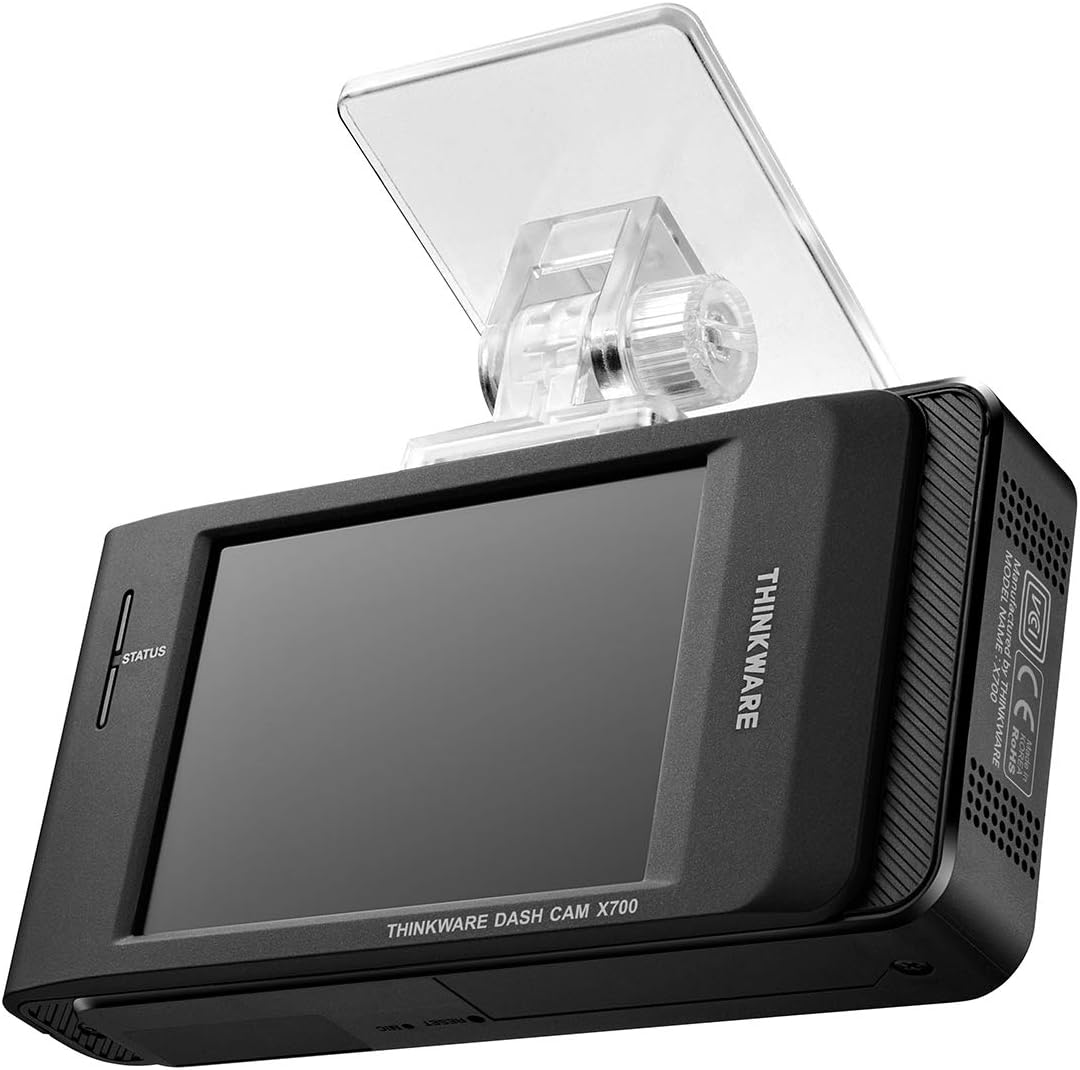
Ffigur 3: Cefn view of the THINKWARE X700 Dash Cam, displaying the LCD screen and the attached windshield mount.
Gosod
1. Mewnosod y Cerdyn MicroSD
- Gwnewch yn siŵr bod y camera dangosfwrdd wedi'i ddiffodd.
- Locate the MicroSD card slot on the side of the main unit.
- Insert the provided 32GB MicroSD card into the slot until it clicks into place.
- I'w dynnu allan, gwthiwch y cerdyn yn ysgafn i mewn nes iddo neidio allan.
2. Mounting the Front Dash Cam
- Glanhewch yr ardal ffenestr flaen lle bydd y camera dangosfwrdd yn cael ei osod.
- Attach the windshield mount to the main dash cam unit.
- Remove the protective film from the adhesive pad on the mount.
- Press the mount firmly onto the windshield, ensuring the camera has a clear view of the road and does not obstruct the driver's vision.
- Addaswch ongl y camera yn ôl yr angen.

Ffigur 4: The THINKWARE X700 Dash Cam installed on the windshield, positioned to capture the road ahead.
3. Connecting the Rear Camera
- Gosodwch y camera cefn ar y ffenestr flaen gefn, gan sicrhau bod golau clir view.
- Connect the rear camera cable to the rear camera and route the cable neatly to the front dash cam.
- Plug the other end of the rear camera cable into the designated port on the main X700 unit.
4. Cysylltiad Pwer
Choose one of the following power options:
- 12V Car Charger: Connect the 12V car charger to your vehicle's cigarette lighter socket and the other end to the dash cam's power input. The camera will power on and off with your vehicle's ignition.
- Hardwiring Cable (for Parking Mode): For continuous recording in Parking Mode, connect the hardwiring cable to your vehicle's fuse box according to the instructions provided with the hardwiring kit (sold separately or included in some packages). Professional installation is recommended for hardwiring.
Gweithredu'r Cam Dash
1. Pweru Ymlaen / I ffwrdd
- The dash cam automatically powers on when connected to power and the vehicle ignition is on.
- It powers off automatically when the ignition is turned off (unless hardwired for Parking Mode).
- To manually power off, disconnect the power cable.
2. Moddau Recordio
- Cofnodi Parhaus: Records continuously while driving. Older files are overwritten by newer ones when the MicroSD card is full.
- Cofnodi Digwyddiad: Automatically records and saves footage when an impact is detected by the G-Sensor. These files yn cael eu hamddiffyn rhag cael eu trosysgrifo.
- Recordio â Llaw: Press the manual record button to save a segment of footage â llaw.
- Modd Parcio (Dewisol): If hardwired, the dash cam can record events while the vehicle is parked, including motion detection and impact detection.

Ffigur 5: The X700's LCD screen displaying recording status and menu options.
3. Using the LCD Touchscreen
The 2.7-inch LCD touchscreen allows you to:
- View byw footage from the front and rear cameras.
- Chwarae fideos wedi'u recordio.
- Access and adjust camera settings (e.g., resolution, G-Sensor sensitivity, time zone).
- Fformatiwch y cerdyn MicroSD.
4. Viewing Recorded Footage
- On the Dash Cam: Use the touchscreen to navigate to the playback menu and select desired videos.
- On a Computer: Remove the MicroSD card from the dash cam and insert it into a computer's card reader. Use the THINKWARE PC Viewer software (available for download from the THINKWARE website) for optimal viewing and analysis of footage, including GPS data (if applicable).
Cynnal a chadw
1. MicroSD Card Management
- Fformatio: Regularly format the MicroSD card (at least once a month) using the dash cam's menu or the THINKWARE PC Viewer to ensure optimal performance and prevent recording errors.
- Amnewid: MicroSD cards have a limited lifespan. Replace the card if you experience frequent recording errors or data corruption. Use high-endurance MicroSD cards designed for dash cam use.
2. Cleaning the Dash Cam
- Use a soft, dry cloth to clean the camera lens and the LCD screen.
- Do not use chemical cleaners or abrasive materials, as they may damage the surfaces.
3. Diweddariadau Firmware
Periodically check the official THINKWARE website for firmware updates. Updating the firmware can improve performance, add new features, and resolve potential issues. Follow the instructions provided on the websafle ar gyfer gweithdrefnau diweddaru cadarnwedd.
Datrys problemau
| Problem | Achos Posibl | Ateb |
|---|---|---|
| Nid yw'r camera dangosfwrdd yn troi ymlaen. | No power supply; faulty cable; vehicle power outlet issue. | Check power cable connection. Test the 12V car charger in another vehicle or outlet. Ensure vehicle ignition is on. |
| Gwallau cofnodi neu wedi'u llygru files. | MicroSD card error; card needs formatting; card lifespan expired. | Format the MicroSD card. Try a different, high-endurance MicroSD card. |
| Ansawdd fideo gwael. | Dirty lens; protective film still on lens; incorrect settings. | Clean the camera lens. Ensure protective film is removed. Check video resolution settings. |
| G-Sensor not detecting incidents or too sensitive. | Incorrect G-Sensor sensitivity setting. | Adjust G-Sensor sensitivity in the dash cam settings menu. |
| Rear camera not recording. | Loose connection; faulty cable or camera. | Check the rear camera cable connection to both the rear and front units. |
Manylebau
| Nodwedd | Manylyn |
|---|---|
| Enw Model | X700 |
| Datrysiad Dal Fideo | 1080p Full HD (Front and Rear) |
| Maes o View | 142 gradd |
| Cyfradd Ffrâm | 30 FPS |
| Nodweddion Arbennig | Automatic Incident Detection, Night Vision, G-Sensor |
| Maint Sgrin | 2.7 modfedd |
| Math Arddangos | LCD |
| Dull Rheoli | Cyffwrdd |
| Math Cof Fflach | MicroSD (32GB included) |
| Math Mowntio | Mount Windshield |
| Dimensiynau Cynnyrch | 10 x 5.4 x 2.9 cm |
| Pwysau | 610 g |
Gwarant a Chefnogaeth
THINKWARE products are covered by a limited warranty. For specific warranty terms and conditions, please refer to the warranty card included in your package or visit the official THINKWARE websafle.
For technical support, frequently asked questions, and driver/firmware downloads, please visit the official THINKWARE support page: