
UGREEN Bluetooth 5.0 Transmitter/Receiver & Bluetooth 5.3 Car Adapter Bundle
UGREEN Bluetooth Audio Adapters User Manual
Model: Bluetooth 5.0 Transmitter/Receiver & Bluetooth 5.3 Car Adapter Bundle
1. Cynnyrch Drosview
This manual provides instructions for the UGREEN Bluetooth 5.0 Transmitter and Receiver Bundle, which includes a versatile 2-in-1 Bluetooth 5.0 adapter and a dedicated Bluetooth 5.3 Car Adapter. These devices enable wireless audio transmission and reception, enhancing your audio experience across various non-Bluetooth devices.

Image 1.1: UGREEN Bluetooth 5.0 Transmitter and Receiver (TX/RX) adapter. This compact device features a 3.5mm audio jack and control buttons.

Image 1.2: UGREEN Bluetooth 5.3 Car Adapter. This adapter is designed for in-car use, featuring a built-in microphone for hands-free calling.
2. Gwybodaeth Diogelwch
For safe use of your UGREEN Bluetooth audio adapters, please observe the following guidelines:
- Keep the device away from water, moisture, and extreme temperatures (both hot and cold) to prevent damage and ensure proper operation.
- Do not attempt to disassemble, modify, or repair the product yourself. Unauthorized modifications may void the warranty and pose safety risks.
- When disposing of the device, follow all local regulations and ordinances for electronic waste recycling. Do not dispose of with household waste.
- Exercise caution when handling devices with built-in batteries. Avoid short-circuits, punctures, or exposing the battery to excessive heat, as this may lead to fire or explosion.
- The device operates using wireless signals and may cause interference with other electronic devices. Use responsibly and in accordance with local regulations regarding radio frequency emissions.
- Ensure proper ventilation when using the device, especially during charging, to prevent overheating.
3. Gosod a Pharu
3.1. UGREEN Bluetooth 5.0 Transmitter/Receiver (2-in-1 Adapter)
This adapter can function as both a transmitter (TX) and a receiver (RX).
- Pŵer Ymlaen: Press and hold the multi-function button until the LED indicator flashes.
- Dewis Modd: Use the TX/RX switch on the side of the device to select the desired mode.

Image 3.1: Toggle the switch to select TX (Transmitter) or RX (Receiver) mode.
- Connect to Audio Source/Device:
- Modd TX (Trosglwyddydd): Connect the 3.5mm audio jack of the adapter to the audio output port of your non-Bluetooth device (e.g., TV, PC, MP3 player). The adapter will then transmit audio wirelessly to Bluetooth headphones or speakers.
- Modd RX (Derbynnydd): Connect the 3.5mm audio jack of the adapter to the audio input port of your non-Bluetooth audio system (e.g., car stereo, home theater, wired headphones). The adapter will receive audio wirelessly from your Bluetooth-enabled phone or tablet.
- Paru:
- Ensure the adapter is in pairing mode (LED flashing rapidly).
- On your Bluetooth device (headphones/speakers in TX mode, phone/tablet in RX mode), search for "UGREEN-XXXX" (or similar) in the Bluetooth settings and connect.

Image 3.2: The 2-in-1 adapter can be used to connect Bluetooth headphones to in-flight entertainment systems.
3.2. UGREEN Bluetooth 5.3 Car Adapter
This adapter is specifically designed for car audio systems, enabling Bluetooth connectivity and hands-free calling.
- Connect to Car Audio: Plug the 3.5mm audio jack of the car adapter into your car's AUX input port.
- Pŵer Ymlaen: Connect the USB-C charging port of the adapter to a USB power source in your car (e.g., USB car charger, car's USB port). The adapter will power on automatically.
- Paru:
- The adapter will automatically enter pairing mode (LED indicator flashing).
- On your smartphone or other Bluetooth-enabled device, search for "UGREEN-XXXX" (or similar) in the Bluetooth settings and connect.

Image 3.3: Visual guide for pairing the UGREEN Bluetooth Car Adapter with a smartphone.
4. Cyfarwyddiadau Gweithredu
4.1. UGREEN Bluetooth 5.0 Transmitter/Receiver (2-in-1 Adapter)
- Modd TX (Trosglwyddydd): Transmits audio from non-Bluetooth devices (e.g., TV, PC) to Bluetooth headphones or speakers. Ideal for watching TV with private audio or connecting older audio sources to modern wireless speakers.
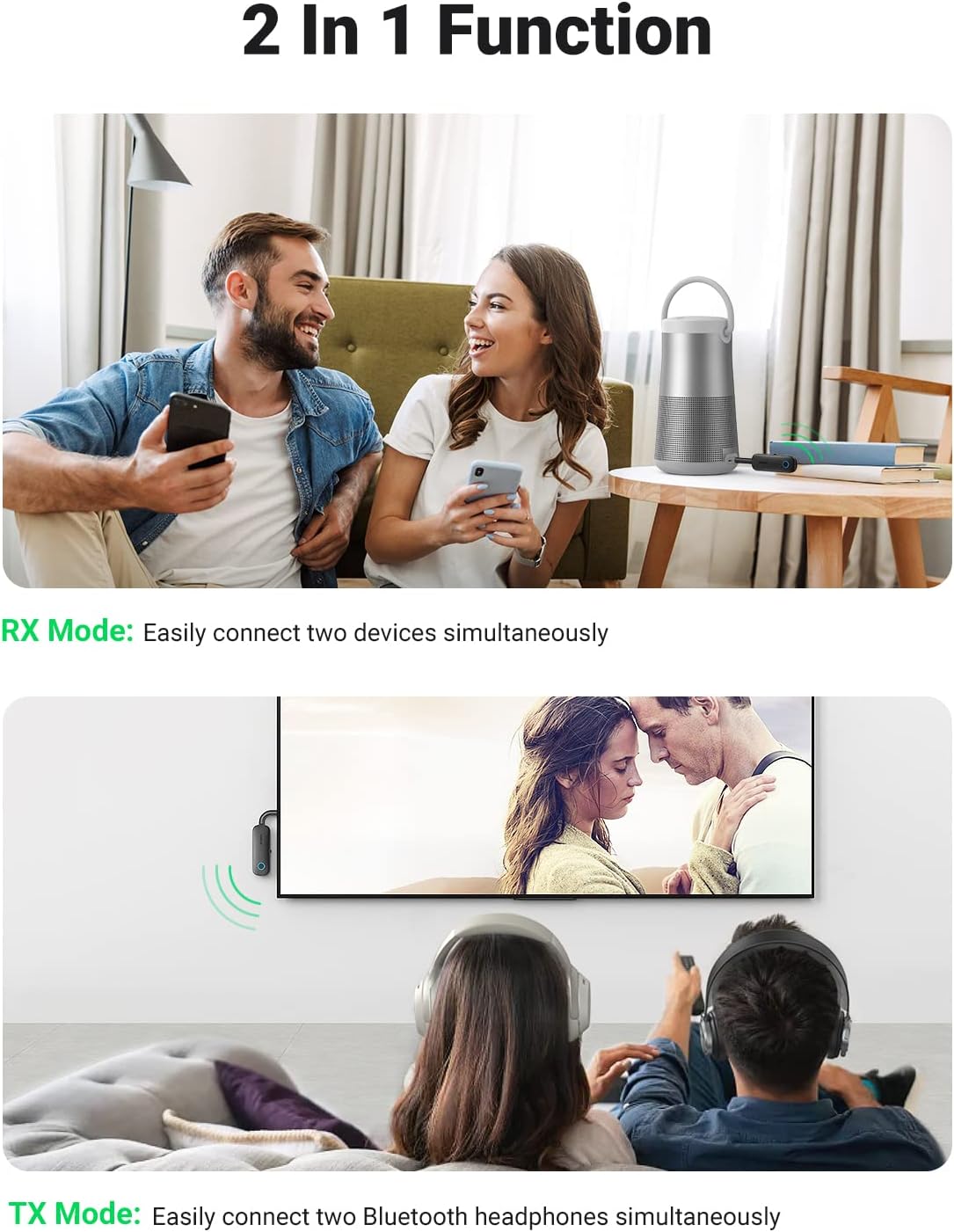
Image 4.1: Illustration of the 2-in-1 adapter's functionality in both RX (receiving from phone to speaker) and TX (transmitting from TV to headphones) modes.
- Modd RX (Derbynnydd): Receives audio from Bluetooth-enabled devices (e.g., smartphone, tablet) and outputs it to non-Bluetooth audio systems (e.g., car stereo, home stereo, wired headphones). Transforms traditional audio systems into Bluetooth-enabled ones.
- Cysylltiad Dyfais Ddeuol: The adapter can be paired with two Bluetooth devices simultaneously in both TX and RX modes. This allows for sharing audio or switching between devices without re-pairing.
- Rheolaethau: Use the multi-function button for power on/off and pairing. Volume and track controls may be available on the connected Bluetooth device or the audio source.
4.2. UGREEN Bluetooth 5.3 Car Adapter
- Chwarae Cerddoriaeth: Once paired, audio from your smartphone will stream wirelessly to your car's speakers via the AUX input.

Image 4.2: The car adapter facilitates both music streaming and hands-free calls while driving.
- Galwad Di-Ddwylo: The adapter features a built-in microphone and a large one-touch button for call management.
- Ateb / Diwedd Galwad: Press the large button once.
- Gwrthod Galwad: Press and hold the large button for 2 seconds.
Image 4.3: The car adapter's design with a built-in microphone and large button for easy call management.
- Cysylltiad Dyfais Ddeuol: This adapter can also connect to two Bluetooth devices simultaneously, allowing you to switch between calls and music freely from different phones.

Image 4.4: The car adapter supports simultaneous connection to two Bluetooth devices, such as two smartphones.
- Battery Life (Car Adapter): The car adapter offers up to 15 hours of continuous music playback or 200 hours of standby time on a full charge. It fully charges in approximately 2 hours via USB-C.

Image 4.5: Visual representation of the car adapter's battery performance, including 15 hours runtime and 2-hour charging time.
5. cynnal
- Glanhau: Use a soft, dry, lint-free cloth to clean the surface of the adapters. Do not use liquid cleaners, aerosols, or solvents.
- Storio: Storiwch y dyfeisiau mewn lle oer, sych i ffwrdd o olau haul uniongyrchol a thymheredd eithafol pan nad ydynt yn cael eu defnyddio.
- Gofal Batri: For devices with built-in batteries, avoid fully discharging the battery frequently. Charge the device regularly, even if not in use, to maintain battery health.
- Trin: Handle the adapters with care. Avoid dropping them or subjecting them to strong impacts.
6. Datrys Problemau
| Problem | Achos / Ateb Posibl |
|---|---|
| Nid yw'r ddyfais yn pweru ymlaen. |
|
| Methu paru â dyfais Bluetooth. |
|
| Dim sain neu ansawdd sain gwael. |
|
| Hands-free calling not working (Car Adapter). |
|
7. manylebau
| Nodwedd | Manylyn |
|---|---|
| Brand | UGREEN |
| Enw Cynnyrch | Bluetooth 5.0 Transmitter and Receiver Bundle with Bluetooth 5.3 Car Adapter |
| Technoleg Cysylltedd | Cynorthwyol, Bluetooth |
| Safon Cyfathrebu Di-wifr | Bluetooth |
| Bluetooth Version (2-in-1 Adapter) | Bluetooth 5.0 |
| Bluetooth Version (Car Adapter) | Bluetooth 5.3 |
| Ffynhonnell Pwer | Battery Powered (internal rechargeable) |
| Playtime (2-in-1 Adapter RX Mode) | Hyd at 5.5 awr |
| Playtime (2-in-1 Adapter TX Mode) | Hyd at 8 awr |
| Playtime (Car Adapter) | Hyd at 15 awr |
| Standby Time (Car Adapter) | Hyd at 200 awr |
| Charging Port (Car Adapter) | USB-C |
| Charging Time (Car Adapter) | Tua. 2 awr |
| Nodweddion Arbennig | 2-in-1 (TX/RX), Hands-Free Calling, Built-in Microphone, Dual Device Connection, Bluetooth 5.3, Bluetooth 5.0 |
8. Gwarant a Chefnogaeth
Mae cynhyrchion UGREEN wedi'u cynllunio a'u cynhyrchu i'r safonau ansawdd uchaf. Am wybodaeth ynghylch gwarant, cymorth technegol, neu wasanaeth cwsmeriaid, cyfeiriwch at wefan swyddogol UGREEN. websafle neu cysylltwch â'u cymorth cwsmeriaid yn uniongyrchol.
You can visit the official UGREEN store on Amazon for more information and support: Siop Swyddogol UGREEN
Dogfennau Cysylltiedig - Bluetooth 5.0 Transmitter/Receiver & Bluetooth 5.3 Car Adapter Bundle
 |
Llawlyfr Defnyddiwr Addasydd Derbynnydd Bluetooth 5.0 UGREEN Llawlyfr defnyddiwr manwl ar gyfer Addasydd Derbynnydd Bluetooth 5.0 UGREEN (Modelau CM122, CM123). Dysgwch am fanylebau, gweithrediad, paru, datrys problemau, a chanllawiau diogelwch. |
 |
Llawlyfr Defnyddiwr Trosglwyddydd Derbynnydd Sain Bluetooth UGREEN CM403 80893 Mae Derbynnydd/Trosglwyddydd Sain Bluetooth UGREEN CM403 80893 yn ddyfais amlbwrpas sy'n caniatáu ffrydio sain yn ddi-dor. Mae'n gweithredu fel derbynnydd ar gyfer cysylltu siaradwyr/clustffonau nad ydynt yn Bluetooth â dyfeisiau sydd wedi'u galluogi gan Bluetooth a throsglwyddydd ar gyfer ychwanegu galluoedd Bluetooth at ffynonellau sain nad ydynt yn Bluetooth fel setiau teledu neu gyfrifiaduron personol. Mae'r addasydd cryno hwn yn cefnogi cysylltedd deuol, galwadau di-law, a rheoli cerddoriaeth, gan ei wneud yn ddelfrydol ar gyfer gwella profiadau sain mewn amrywiol leoliadau. |
 |
Canllaw Cychwyn Cyflym Addasydd Bluetooth UGREEN CM591 Canllaw cychwyn cyflym ar gyfer yr Addasydd Bluetooth UGREEN CM591, sy'n darparu cyfarwyddiadau ar analluogi Bluetooth adeiledig a chysylltu dyfeisiau Bluetooth ar Windows 10. |
 |
Llawlyfr Defnyddiwr Derbynnydd/Addasydd Sain Bluetooth 5.0 UGREEN Llawlyfr defnyddiwr ar gyfer Derbynnydd/Addasydd Sain Bluetooth 5.0 UGREEN (Modelau CM105, CM106, 40758, 40759). Yn darparu cyfarwyddiadau ar osod, cysylltu, gweithredu, rhagofalon diogelwch, a chynnwys y pecyn. Yn cynnwys technoleg Bluetooth 5.0 ar gyfer ffrydio sain diwifr. |
 |
Llawlyfr Defnyddiwr Transceiver Sain UGREEN CM523 Bluetooth Llawlyfr defnyddiwr ar gyfer y Trawsyrrydd Sain Bluetooth UGREEN CM523, yn darparu cyfarwyddiadau ar gyfer moddau TX ac RX, cysylltu, datrys problemau, manylebau, gwarant, a gwybodaeth am gydymffurfiaeth. |
 |
Addasydd Bluetooth 5.3 UGREEN CM591: Canllaw Defnyddiwr a Manylebau Canllaw cynhwysfawr i Addasydd Bluetooth 5.3 UGREEN (Model CM591), sy'n cwmpasu cynnwys y pecyn, cynnyrch drosoddview, manylebau technegol, cyfarwyddiadau gosod, datrys problemau, a nodiadau pwysig. |