

1. Rhagymadrodd
This manual provides essential information for the safe and efficient operation of your Sygonix Built-in Thermostat SY-5044424. This device is designed as a built-in solution for regulating and monitoring heat generators within heating, climate, and ventilation technology systems. Please read these instructions thoroughly before installation and use, and retain them for future reference.
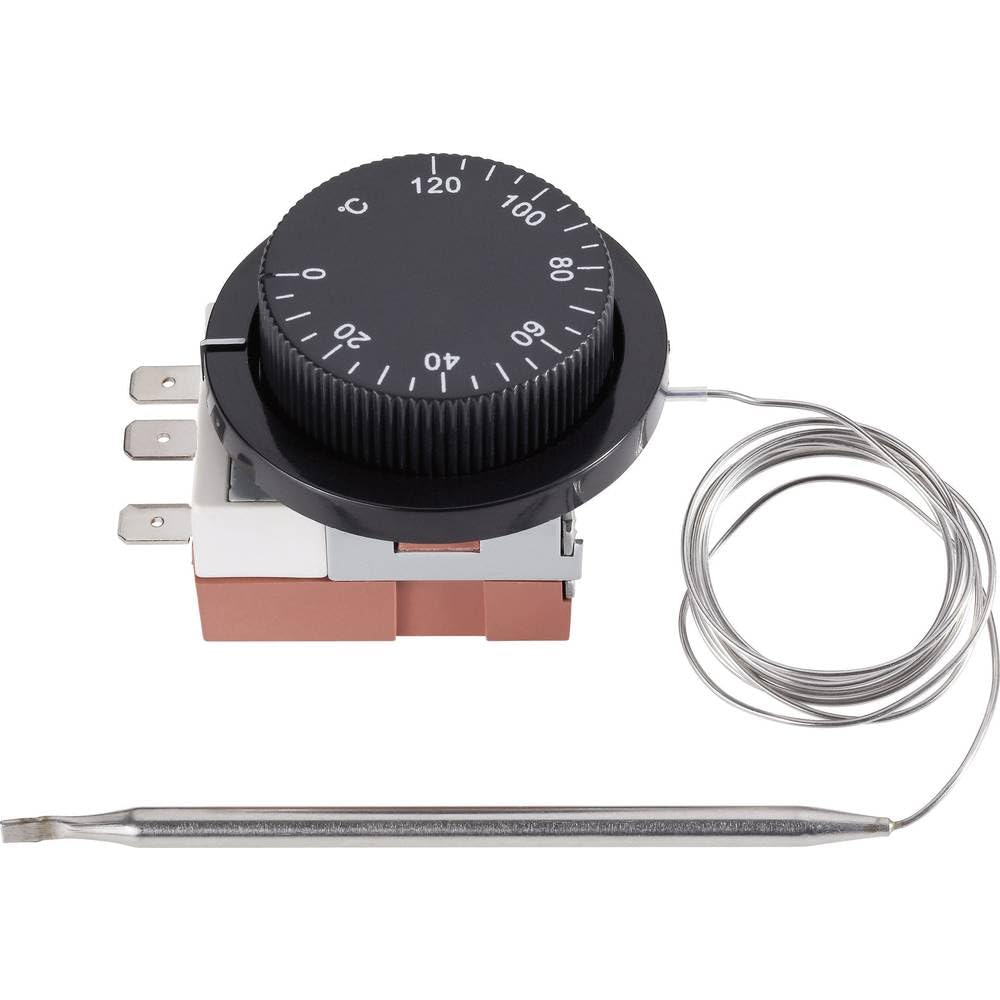
Image 1.1: The Sygonix Built-in Thermostat SY-5044424. This image shows the compact design of the thermostat, ready for integration into a control panel or wall unit.
2. Cyfarwyddiadau Diogelwch
Rhybudd: Gall methu â dilyn y cyfarwyddiadau diogelwch hyn arwain at dân, sioc drydanol, anaf, neu ddifrod i'r cynnyrch neu'r eiddo.
- Rhaid i drydanwr cymwys gyflawni'r gosodiad yn unol â'r holl godau trydanol lleol a chenedlaethol.
- Ensure the power supply is disconnected before installation, maintenance, or troubleshooting.
- Peidiwch ag amlygu'r ddyfais i leithder, tymereddau eithafol, na golau haul uniongyrchol.
- Do not attempt to modify or repair the device yourself. Contact qualified service personnel.
- Cadwch ddeunyddiau pecynnu i ffwrdd oddi wrth blant.
3. Nodweddion Cynnyrch
- Setting range: 0 - 120 °C
- Switching differential: 3 ± 1.5 °C
- Dyluniad adeiledig ar gyfer integreiddio di-dor
- Suitable for heating, climate, and ventilation systems
- Remote control capability (via RF connectivity)
4. Gosod a Gosod
The Sygonix Built-in Thermostat is designed for integration into existing control systems or panels. Professional installation is highly recommended.
4.1. Gwiriadau Cyn-osod
- Verify that the power supply matches the thermostat's requirements (230V).
- Ensure the installation location is free from excessive vibration, moisture, and direct heat sources.
- Confirm that all necessary mounting hardware is available.
4.2. Gwifrau
- Pŵer Datgysylltu: Turn off the main power supply to the circuit where the thermostat will be installed. Use a voltage tester to confirm that power is off.
- Mowntio: Secure the thermostat in its designated built-in location using the provided mounting hardware.
- Cysylltu Gwifrau: Follow the wiring diagram provided with the product packaging. Connect the power input, load output, and sensor wires to the appropriate terminals. Ensure all connections are secure.
- Lleoliad Synhwyrydd: Position the temperature sensor in an area that accurately reflects the ambient temperature to be controlled, away from drafts or direct heat sources.
- Adfer Pwer: Unwaith y bydd yr holl gysylltiadau wedi'u diogelu ac wedi'u gwirio, adferwch y pŵer i'r gylched.
5. Cyfarwyddiadau Gweithredu
The Sygonix Built-in Thermostat is designed for straightforward temperature control. Specific operation details may vary based on the integrated system and any connected remote control unit.
5.1. Troi ymlaen yn gychwynnol
- Upon first power-on, the thermostat may display a default temperature or enter a calibration mode. Refer to the specific display indicators in your product packaging.
5.2. Tymheredd Gosod
- Use the integrated controls (if any) or a compatible remote control unit to adjust the desired temperature. The setting range is 0 to 120 °C.
- The thermostat will activate or deactivate the connected heating/cooling device to maintain the set temperature within the specified switching differential.
5.3. Swyddogaeth Rheoli o Bell
- The thermostat supports RF connectivity for remote control. Pair your compatible remote control or smart system according to its specific instructions.
- Ensure the remote control unit is within the effective range and has fresh batteries (if applicable).
6. cynnal
The Sygonix Built-in Thermostat requires minimal maintenance.
- Glanhau: Gently wipe the surface of the thermostat with a soft, dry cloth. Do not use abrasive cleaners, solvents, or excessive moisture.
- Gwiriadau Rheolaidd: Periodically inspect the wiring connections for any signs of wear or damage. Ensure the temperature sensor is clean and unobstructed.
- Cylchred Pwer: If the device behaves unexpectedly, try disconnecting and reconnecting the power supply for a few minutes.
7. Datrys Problemau
Os byddwch chi'n dod ar draws problemau gyda'ch thermostat, cyfeiriwch at y problemau a'r atebion cyffredin canlynol:
| Problem | Achos Posibl | Ateb |
|---|---|---|
| Nid yw'r thermostat yn troi ymlaen | Dim cyflenwad pŵer; gwifrau anghywir | Check circuit breaker; verify wiring connections (ensure power is off first). |
| Darlleniadau tymheredd anghywir | Sensor obstructed or misplaced; faulty sensor | Ensure sensor is clean and in an appropriate location; contact support if suspected faulty. |
| Heating/cooling device not responding | Incorrect wiring; thermostat setting issue; device malfunction | Verify wiring; check thermostat settings; test the heating/cooling device independently. |
| Rheolaeth bell ddim yn gweithio | Remote not paired; batteries low; out of range | Pair remote as per its instructions; replace batteries; ensure remote is within RF range. |
Os yw'r broblem yn parhau ar ôl rhoi cynnig ar yr atebion hyn, cysylltwch â chymorth cwsmeriaid.
8. manylebau
| Nodwedd | Manylyn |
|---|---|
| Brand | Sygonix |
| Rhif Model | SY-5044424 |
| Lliw | Du |
| Dimensiynau Cynnyrch | 7 x 5 x 18 cm; 14 kg (or 17D x 6W x 5H cm) |
| Gallu | 10 litr |
| Pwer / Cyftage | 280 |
| Cyftage | 230 V |
| Lefel Sŵn | 1 Decibel |
| Nodweddion Arbennig | Rheolaeth Anghysbell |
| Gwneuthurwr | Sygonix |
| Rhif yr Eitem | SY-5044424 |
| ASIN | B0BPX282HB |
| Math o Reolwr | Rheolydd Llaw |
| Defnyddiau Cynnyrch Penodol | Building heating and air conditioning |
| Math Rheoli Tymheredd | Smart/Remote Control |
| Technoleg Cysylltedd | RF |
| Cydrannau wedi'u Cynnwys | Mowntio Caledwedd |
| Ystod Gosod | 0 - 120°C |
| Newid Gwahaniaethol | 3 ± 1.5 °C |
9. Gwarant a Chefnogaeth
For warranty information and technical support, please refer to the documentation included with your purchase or visit the official Sygonix websafle. Cadwch eich prawf prynu ar gyfer hawliadau gwarant.