
Nexxt Solutions NHC-I710
NEXXT Indoor Smart Camera
Model: NHC-I710
1080p HD Fixed Room Camera with Night Vision and Two-Way Talk
1. Rhagymadrodd
Thank you for choosing the Nexxt Indoor Smart Camera. This manual provides essential information for the safe and efficient use of your new device. Please read it thoroughly before installation and operation, and retain it for future reference.
This 1080p HD fixed room camera is designed to provide reliable indoor surveillance with features such as night vision, two-way audio communication, motion detection, and seamless integration with smart home ecosystems like Amazon Alexa and Google Assistant.
2. Gwybodaeth Diogelwch
- Ensure the camera is powered by the provided power adapter. Using unauthorized adapters may damage the device and void the warranty.
- Do not expose the camera to water, moisture, or extreme temperatures. It is designed for indoor use only.
- Osgowch osod y camera mewn golau haul uniongyrchol neu ger ffynonellau gwres.
- Do not attempt to disassemble or repair the camera yourself. Refer all servicing to qualified personnel.
- Keep the camera and its accessories out of reach of children and pets.
- Ensure stable Wi-Fi connectivity for optimal performance.
3. Cynnwys Pecyn
Gwiriwch fod yr holl eitemau yn bresennol yn y pecyn:
- NEXXT Indoor Smart Camera (NHC-I710)
- Addasydd Pŵer
- Sefwch
- Llawlyfr Defnyddiwr (y ddogfen hon)

Image: The retail packaging of the NEXXT Indoor Smart Camera, showing the camera and key features.
4. Cynnyrch Drosview
The Nexxt Indoor Smart Camera offers a range of features for comprehensive home monitoring:
- Cydraniad HD Llawn 1080p: Yn darparu foo fideo clir a manwltage.
- Gweledigaeth Nos Awtomatig: Integrated infrared LEDs enable clear monitoring in low-light conditions up to 30 feet.
- Cyfathrebu Dwy Ffordd: Built-in microphone and speaker allow for real-time audio interaction.
- Canfod Cynnig: Alerts you to detected movement within the camera's field of view.
- Storio Lleol a Chwmwl: Supports microSD cards (sold separately) and Microsoft Azure cloud storage (subscription sold separately) for recording.
- Integreiddio Cartref Clyfar: Compatible with Amazon Alexa and Google Assistant for voice control and integration into smart routines.
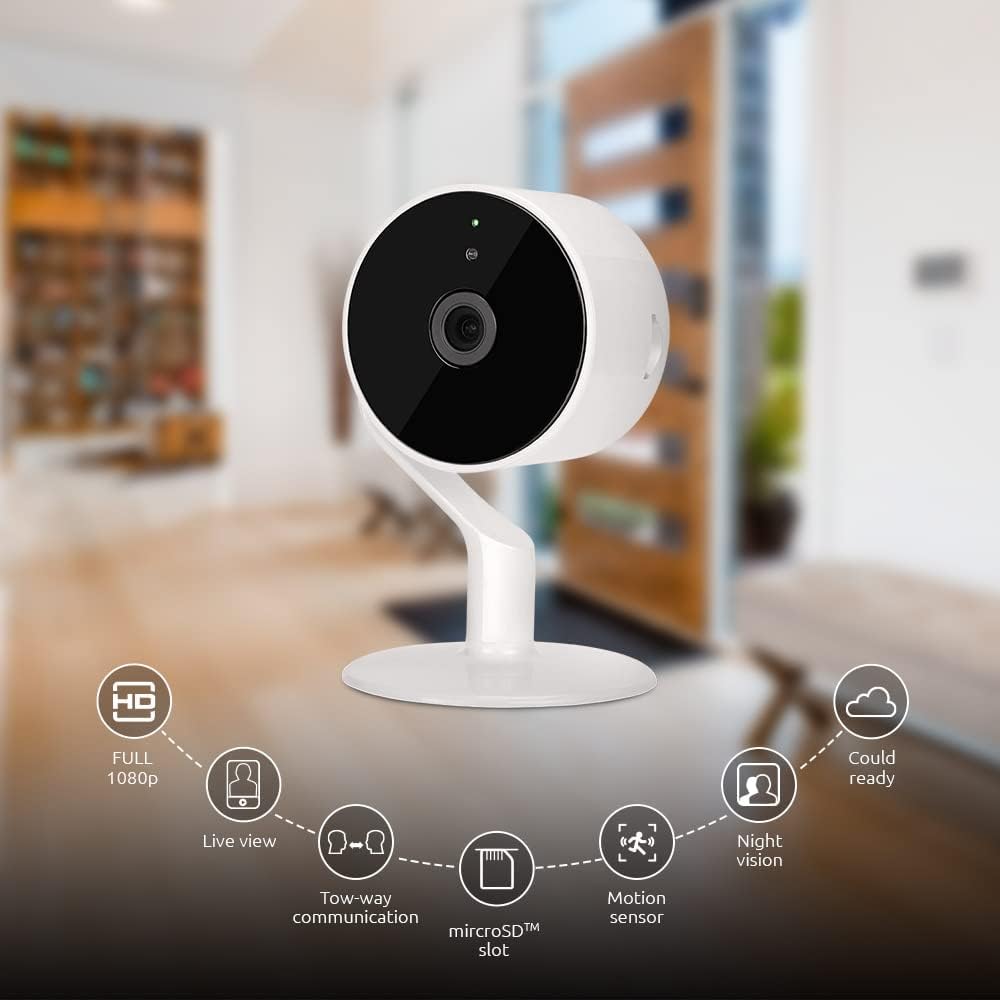
Image: The NEXXT Indoor Smart Camera highlighting its key features: Full HD 1080p, Live View, Two-way communication, microSD slot, Motion sensor, Night vision, and Cloud ready.
5. Gosod
5.1 Pweru Ymlaen
- Place the camera on a stable, flat surface or mount it using appropriate hardware (not included).
- Cysylltwch yr addasydd pŵer â phorthladd mewnbwn pŵer y camera.
- Plug the power adapter into a standard electrical outlet. The camera will power on and its indicator light will begin to flash, indicating it's ready for pairing.
5.2 Gosod a Pharu Apiau
To control and monitor your camera, you need to download the Nexxt Home App:
- Lawrlwythwch y Ap Cartref Nesaf oddi wrth y Google Play Store (for Android devices) or the Apple App Store (for iOS devices).
- Open the Nexxt Home App and create a new account or log in if you already have one.
- Tap the "+" icon or "Add Device" to begin the pairing process.
- Select "Camera" or the specific camera model from the list of devices.
- Follow the on-screen instructions in the app to connect the camera to your home Wi-Fi network. This typically involves scanning a QR code displayed on your phone with the camera.
- Once connected, the camera's indicator light will turn solid, and you will see the camera added to your app.

Image: Illustration showing the NEXXT Indoor Smart Camera being set up to function as a webcam, connecting to a laptop.
6. Cyfarwyddiadau Gweithredu
6.1 Byw View
From the Nexxt Home App, tap on your camera's name to access the live video feed. You can view foo amser realtage of your monitored area.

Image: The NEXXT Indoor Smart Camera on a desk, with text indicating "Full HD resolution" and its ability to provide 1080p high-quality video day or night.
6.2 Sgwrs Dwyffordd
Tra yn fyw view, tap the microphone icon in the app to enable two-way audio. You can speak through your phone, and your voice will be projected through the camera's speaker. Tap the icon again to end communication.

Image: An illustration depicting communication between a person using a phone and another person near the camera, symbolizing the two-way talk feature.
6.3 Gweledigaeth Nos
The camera automatically switches to night vision mode in low-light conditions. You can also manually toggle night vision on/off within the app settings for the camera.

Image: A split image showing a room in daylight on one side and the same room in night vision on the other, demonstrating the camera's night vision capability.

Image: A smartphone screen displaying the Nexxt Home app interface with a night vision toggle switch, overlaid on a room scene, indicating active night vision monitoring.
6.4 Motion Detection & Alerts
Configure motion detection sensitivity and alert preferences in the app. When motion is detected, you will receive notifications on your smartphone.

Image: A person sleeping in bed with a motion detection icon overlaid, indicating advanced motion detection with an effective range of up to 30 feet.

Image: A woman holding a smartphone displaying the Nexxt Home app, with text indicating that advanced human identification technology helps reduce false alarms and unwanted notifications.
6.5 Recordio a Storio
The camera supports local storage via a microSD card (up to 128GB, not included) and cloud storage via Microsoft Azure (subscription required, sold separately). Insert the microSD card into the designated slot on the camera. Manage recording settings and view foo wedi'i recordiotage through the Nexxt Home App.
6.6 Sharing Access
You can securely share your camera's security feed with multiple approved devices, allowing family members or trusted individuals to also monitor your home.

Image: Two smartphones displaying the Nexxt Home app, with text stating "Everyone Can Keep Watch" and explaining that the security feed can be securely shared with multiple approved devices.
6.7 Integreiddio Cartref Clyfar
The Nexxt Indoor Smart Camera is compatible with Amazon Alexa and Google Assistant. Follow the instructions in your Alexa or Google Home app to link your Nexxt Home account and enable voice commands for your camera.
7. cynnal
- Glanhau: Defnyddiwch frethyn meddal, sych i lanhau lens a chorff y camera. Peidiwch â defnyddio glanhawyr hylif na aerosolau.
- Storio: Os ydych chi'n storio'r camera am gyfnod hir, datgysylltwch hi o'r pŵer a'i storio mewn lle oer, sych.
- Diweddariadau Cadarnwedd: Regularly check the Nexxt Home App for available firmware updates to ensure optimal performance and security.
8. Datrys Problemau
- Camera ddim yn cysylltu â Wi-Fi:
- Ensure your Wi-Fi network is 2.4GHz. The camera does not support 5GHz Wi-Fi.
- Gwiriwch eich cyfrinair Wi-Fi am gywirdeb.
- Symudwch y camera yn agosach at eich llwybrydd Wi-Fi.
- Ailgychwynwch eich llwybrydd a'r camera.
- Dim yn fyw view or choppy video:
- Gwiriwch gyflymder eich cysylltiad rhyngrwyd.
- Ensure the camera has a strong Wi-Fi signal.
- Close and reopen the Nexxt Home App.
- Motion alerts not received:
- Verify that motion detection is enabled in the app settings.
- Check your phone's notification settings for the Nexxt Home App.
- Addasu sensitifrwydd canfod symudiad.
- Sain dwyffordd ddim yn gweithio:
- Ensure your phone's microphone is enabled for the Nexxt Home App.
- Gwiriwch y gosodiadau cyfaint ar eich ffôn ac o fewn yr ap.
9. manylebau
| Nodwedd | Manyleb |
|---|---|
| Enw Model | NHC-I710 |
| Datrysiad Dal Fideo | 1080p HD |
| Defnydd Dan Do / Awyr Agored | Dan do |
| Technoleg Cysylltedd | Diwifr (Wi-Fi) |
| Protocol Cysylltedd | Wi-Fi (2.4GHz) |
| Ffynhonnell Pwer | Trydan Corded |
| Ystod Golwg Nos | 30 Traed |
| Math o Reolwr | Amazon Alexa, Cynorthwyydd Google |
| Math Mowntio | Mynydd Pen bwrdd |
| Dimensiynau Eitem (L x W x H) | 3 x 7 x 3 modfedd |
| Pwysau Eitem | 6.7 owns (0.19 cilogram) |
| UPC | 798302056152 |
| Sgôr Diogelu Rhyngwladol | IP65 |
10. Gwarant a Chefnogaeth
The Nexxt Indoor Smart Camera comes with a Gwarant 2 mlynedd o ddyddiad y pryniant. Cadwch eich prawf prynu ar gyfer hawliadau gwarant.
For technical support, troubleshooting assistance, or warranty inquiries, please visit the official Nexxt Solutions website or contact their customer support through the Nexxt Home App.
Atebion Nesaf Websafle: www.nexxtsolutions.com
Dogfennau cysylltiedigNHC-I710


Ask a question about this manual
Ask about setup, troubleshooting, compatibility, parts, safety, or missing instructions. Manuals+ will review the question and use this page’s manual context to help answer it.