
1. Rhagymadrodd
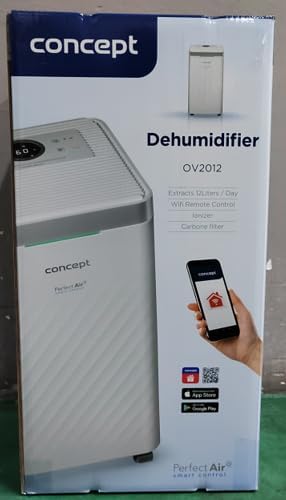
The Concept OV2012 is a versatile appliance designed to improve indoor air quality by combining dehumidification with air purification. This device effectively reduces excess humidity, which can contribute to mold growth and discomfort, while simultaneously filtering airborne pollutants. It features a triple filtration system, intuitive touch controls, and smart app connectivity for convenient operation.

Ffigur 1: Blaen view of the Concept OV2012 Dehumidifier.
2. Gwybodaeth Diogelwch
Darllenwch yr holl gyfarwyddiadau diogelwch yn ofalus cyn defnyddio'r offer. Gall methu â dilyn y cyfarwyddiadau hyn arwain at sioc drydanol, tân neu anaf difrifol.
- Sicrhewch y cyflenwad pŵer cyftagmae e yn cyfateb i'r label sgôr ar yr offer.
- Peidiwch â gweithredu'r uned gyda llinyn pŵer neu blwg wedi'i ddifrodi.
- Keep the appliance away from water and other liquids. Do not immerse it.
- Peidiwch â rhwystro mewnfeydd na hallfeydd aer. Sicrhewch fod digon o le o amgylch yr uned ar gyfer llif aer priodol.
- Datgysylltwch y plwg o'r uned cyn glanhau, cynnal a chadw, neu pan nad yw'n cael ei defnyddio am gyfnodau hir.
- Ni fwriedir i'r teclyn hwn gael ei ddefnyddio gan bobl (gan gynnwys plant) sydd â galluoedd corfforol, synhwyraidd neu feddyliol is, neu sydd â diffyg profiad a gwybodaeth, oni bai eu bod wedi cael goruchwyliaeth neu gyfarwyddyd.
- Do not use the appliance in areas where flammable gases or vapors are present.
3. Cydrannau Cynnyrch
Familiarize yourself with the main parts of your Concept OV2012 dehumidifier.
- Panel Rheoli: Touch-sensitive interface for setting modes and functions.
- Allfa Awyr: Where processed air is released.
- Mewnfa Aer/Gorchudd Hidlo: Located at the rear, provides access to the air filters.
- Tanc Dŵr: Collects condensed water.
- Allfa Draenio Parhaus: Port for attaching a hose for continuous water drainage.
- 360° Rolling Wheels: Er mwyn symud yr uned yn hawdd.

Ffigur 2: Cefn view of the dehumidifier, showing air intake and water tank.
4. Panel Rheoli ac Arddangos
The OV2012 features an intuitive touch control panel with a digital display and LED indicators.
Ffigur 3: Manwl view of the touch control panel.
- Botwm Pŵer: Yn troi'r uned ymlaen neu i ffwrdd.
- Dewis Modd: Cycles through operating modes (Automatic, Continuous, Laundry Drying, Fan).
- Humidity Slider/Buttons: Yn addasu'r lefel lleithder a ddymunir.
- Botwm Amserydd: Sets the delayed on/off time (up to 24 hours).
- Cyflymder Fan: Adjusts fan speed (usually two levels).
- Ionizer Button: Activates or deactivates the ionizer function.
- LED Humidity Indicator: Changes color based on current room humidity:
- Coch: High humidity (RH > 70%)
- Gwyrdd: Satisfactory humidity (70% ≥ RH ≥ 50%)
- Glas: Low humidity (RH < 50%)
5. Gosodiad Cychwynnol
- Dadbacio: Tynnwch y dadleithydd yn ofalus o'i becynnu. Cadwch y pecynnu ar gyfer storio neu gludo yn y dyfodol.
- Lleoliad: Place the unit on a firm, level surface. Ensure there is at least 20 cm of clear space around all sides for optimal airflow. The 360° rolling wheels allow for easy positioning.
- Cysylltiad Pwer: Plygiwch y llinyn pŵer i mewn i allfa drydan wedi'i seilio.
- Tanc Dŵr: Gwnewch yn siŵr bod y tanc dŵr wedi'i fewnosod yn gywir yn yr uned.
6. Dulliau Gweithredu
The OV2012 offers four distinct operating modes to suit various needs:
- Modd Awtomatig: The dehumidifier automatically maintains the humidity level you select. The unit will cycle on and off to achieve and sustain the target humidity.
- Gweithrediad Parhaus: Ideal for long-term drying of very wet areas. In this mode, the unit runs continuously regardless of the ambient humidity. It is recommended to use the continuous drainage hose in this mode.
- Modd Sychu Golchdy: Accelerates the drying of laundry and helps prevent moisture buildup in the room, reducing the risk of mold.
- Fan Mode (Air Purification without Dehumidification): In this mode, the compressor is off, and only the fan and filtration system operate to purify the air without removing moisture.
Using the Concept Home Mobile Application
The OV2012 can be controlled remotely via the Concept Home mobile application, available for iOS and Android devices. This app allows you to:
- Trowch yr uned ymlaen neu i ffwrdd.
- Select desired operating modes.
- Check the current air status in the room.
- Create a precise operating schedule for the dehumidifier.

Figure 4: The Concept Home mobile application for remote control.
7. Draeniad Dŵr
Draenio Tanc Dŵr
When the 2.2-liter water tank is full, the unit will automatically shut off, and an indicator light will illuminate. Carefully remove the water tank, empty it, and reinsert it securely to resume operation.
Draeniad Parhaus
For continuous operation without needing to empty the water tank, attach the included hose to the continuous drainage outlet. Direct the hose to a suitable drain, ensuring it is sloped downwards for proper water flow. This allows the unit to operate uninterrupted.
8. Cynnal a Chadw a Glanhau
Mae cynnal a chadw rheolaidd yn sicrhau perfformiad a hirhoedledd gorau posibl eich dadleithydd.
System Hidlo
The OV2012 features a triple filter system:
- Hidlydd Llwch: Captures coarse impurities like dust particles, hair, fur, and pollen. This filter should be cleaned regularly.
- Hidlo Carbon Actifedig: Absorbs toxic, suffocating, and foul-smelling gases and vapors, such as formaldehyde, benzene, and cigarette smoke. This filter requires periodic replacement (Optional accessory: Carbon filter - 42394390).
- Ionizer: Refreshes and purifies the air by increasing negatively charged ions, neutralizing odors and absorbing positively charged particles, viruses, and bacteria.
To clean the dust filter, remove the rear filter cover, gently remove the filter, and clean it with a vacuum cleaner or rinse it with water. Ensure it is completely dry before reinserting. Replace the activated carbon filter as recommended by the manufacturer or when you notice a decrease in odor removal effectiveness.

Figure 5: Illustration of the triple filtration system.
Glanhau'r Tanc Dŵr
Periodically clean the water tank with mild detergent and warm water to prevent mold and bacterial growth. Rinse thoroughly and dry before reinserting.
Glanhau Allanol
Sychwch y tu allan i'r uned gyda meddal, damp brethyn. Peidiwch â defnyddio glanhawyr neu doddyddion sgraffiniol.
9. Canllaw Datrys Problemau
Os byddwch chi'n dod ar draws problemau gyda'ch dadleithydd, cyfeiriwch at y problemau a'r atebion cyffredin canlynol:
| Problem | Achos Posibl | Ateb |
|---|---|---|
| Nid yw'r uned yn troi ymlaen | Dim cyflenwad pŵer; Tanc dŵr yn llawn neu wedi'i fewnosod yn anghywir. | Check power cord connection; Empty and reinsert water tank correctly. |
| Dim dadleithiad | Room temperature too low; Air filters clogged; Humidity setting too high. | Ensure room temperature is above 5°C; Clean or replace filters; Lower the desired humidity setting. |
| Mae'r uned yn swnllyd | Nid yw'r uned ar arwyneb gwastad; Mae'r hidlydd aer wedi'i rwystro. | Place unit on a flat, stable surface; Clean or replace air filters. |
| Water tank full indicator remains on after emptying | Water tank not fully inserted; Sensor malfunction. | Push the water tank firmly into place; If problem persists, contact customer support. |
Os yw'r broblem yn parhau ar ôl rhoi cynnig ar yr atebion hyn, cysylltwch â chymorth cwsmeriaid.
10. Manylebau Technegol
| Nodwedd | Manyleb |
|---|---|
| Rhif Model | OV2012 |
| Dehumidification Performance (max) | 12 liters/day (at 30°C, 80% RH) |
| Cyfrol Tanc Dŵr | 2.2 o litrau |
| Defnydd Pŵer | 210 W (Note: Product description also mentions 245W, refer to product label for exact value) |
| Lefel Sŵn | ≤ 45 dB |
| Dimensiynau (W x D x H) | 250 x 250 x 460 mm (25 x 25 x 46 cm) |
| Pwysau Eitem | 10.82 kg |
| Hyd Cebl | 1.8 m |
| Dulliau Gweithredu | 4 (Automatic, Continuous, Laundry Drying, Fan) |
| System Hidlo | Dust filter, Activated Carbon filter, Ionizer |
| Rheolaeth | Touch control, Mobile App (Concept Home) |
| Nodweddion Arbennig | Automatic Shut-off, Timer, 360° wheels, LED Humidity Indicator |

Ffigur 6: Dimensiynau'r cynnyrch.
11. Gwarant a Chymorth i Gwsmeriaid
For warranty information, please refer to the warranty card included with your product or contact your local Concept distributor. For technical support, spare parts, or service inquiries, please contact Concept customer service. Contact details may be found on the product packaging or the official Concept websafle.
Example contact information from product packaging (may vary by region):
- CZ: Zavolejte nám +420 465 471 400, www.my-concept.cz
- SK: Zavolajte nám +421 326 583 465, www.my-concept.sk
- PL: Zadzwoń do nas +48 71 339 04 44, www.my-cysyniad.pl