
Sharp RP-TT70
Sharp RP-TT70 Vinyl Record Player Turntable User Manual
Model: RP-TT70
1. Cynnyrch Drosview
The Sharp RP-TT70 is a 12-inch vinyl record player turntable designed to deliver a rich audio experience with modern convenience. It features a classic wooden cabinet and comes with stereo bookshelf speakers. This belt-drive turntable supports multiple playback speeds and offers versatile connectivity options, including dual Bluetooth functionality.

Figure 1.1: Sharp RP-TT70 Turntable and Speakers. The turntable features a stylish wooden finish and a clear dust cover, flanked by two matching stereo bookshelf speakers.
2. Beth sydd wedi'i gynnwys
Gwiriwch gynnwys y pecyn i sicrhau bod yr holl eitemau yn bresennol:
- Sharp RP-TT70 Turntable Unit
- Stereo Bookshelf Speakers (2 units)
- Gorchudd Llwch
- Addasydd Pŵer
- Llawlyfr Defnyddiwr (y ddogfen hon)
3. Cyfarwyddiadau Gosod
Follow these steps to set up your Sharp RP-TT70 turntable:
- Lleoliad: Place the turntable on a stable, level surface away from direct sunlight, heat sources, and excessive dust. Ensure adequate ventilation around the unit.
- Cysylltiad Siaradwr: Connect the included stereo bookshelf speakers to the "SPEAKER OUT" terminals on the rear of the turntable. Ensure correct polarity (positive to positive, negative to negative).
- Cysylltiad Pwer: Connect the power adapter to the "POWER IN DC 12V" port on the rear of the turntable, then plug the adapter into a wall outlet.
- Gorchudd Llwch: Carefully attach the dust cover to the hinges on the back of the turntable.

Figure 3.1: Rear Panel Connections. This image highlights the AUX-IN Jack, RCL (R&L) Speaker Out, Pitch (+)(-) Speed Calibration, and Power In DC 12V ports, crucial for proper setup.
4. Cyfarwyddiadau Gweithredu
4.1 Playing a Vinyl Record
- Pŵer Ymlaen: Trowch y botwm pŵer i actifadu'r trofwrdd.
- Dewiswch Cyflymder: Adjust the speed selector to match the record's RPM (33 1/3, 45, or 78 RPM). For 45 RPM records, place the included 45 RPM adapter on the spindle.
- Cofnod Lle: Rhowch eich record finyl yn ofalus ar y plât trofwrdd.
- Codi braich y tôn: Codwch y fraich dôn yn ysgafn gan ddefnyddio'r lifer ciwio.
- Steilws Safle: Symudwch y fraich dôn dros y rhigol gychwynnol a ddymunir ar y record.
- Braich Tôn Isaf: Slowly lower the tonearm using the cueing lever. The stylus will make contact with the record, and playback will begin.
- Addasiad Cyfaint: Adjust the volume using the volume knob on the turntable.
- Nodwedd Auto-Stop: The turntable features an auto-stop function that will automatically stop the platter rotation when the record reaches its end.
4.2 Cysylltedd Bluetooth
The Sharp RP-TT70 supports dual Bluetooth connectivity, allowing you to stream music in two ways:
- Streaming Vinyl to External Bluetooth Device:
- Sicrhewch fod y trofwrdd wedi'i bweru ymlaen.
- Activate Bluetooth pairing mode on your external Bluetooth speaker or headphones.
- The turntable will automatically search for and connect to nearby Bluetooth devices. The Bluetooth indicator light will illuminate when connected.
- Once connected, audio from your vinyl record will play through the external Bluetooth device.
- Streaming Music from Your Phone to Turntable Speakers:
- Sicrhewch fod y trofwrdd wedi'i bweru ymlaen.
- On your smartphone or other Bluetooth-enabled device, search for "Sharp RP-TT70" in the Bluetooth settings.
- Select the turntable to pair. The Bluetooth indicator light will illuminate when connected.
- Once connected, audio from your phone will play through the turntable's included stereo speakers.
4.3 Auxiliary Input (AUX-IN)
Connect external audio devices such as smartphones, tablets, or MP3 players using a 3.5mm audio cable (not included) to the AUX-IN jack on the rear of the turntable. Switch the input mode to AUX to play audio through the turntable's speakers.
4.4 Jack Clustffon
For private listening, connect headphones to the headphone jack located on the front panel of the turntable.
5. cynnal
Proper maintenance ensures the longevity and optimal performance of your turntable:
- Gorchudd Llwch: Always keep the dust cover closed when the turntable is not in use to prevent dust accumulation on the platter and stylus.
- Glanhau'r Stylus: Gently clean the stylus regularly using a soft brush designed for turntable styli. Brush from back to front.
- Glanhau'r Trofwrdd: Wipe the turntable and speakers with a soft, dry cloth. Do not use abrasive cleaners or solvents.
- Cartridge and Stylus Replacement: The RP-TT70 uses a changeable ceramic cartridge and stylus. If sound quality degrades or the stylus is damaged, replace it with a compatible Sharp replacement part.
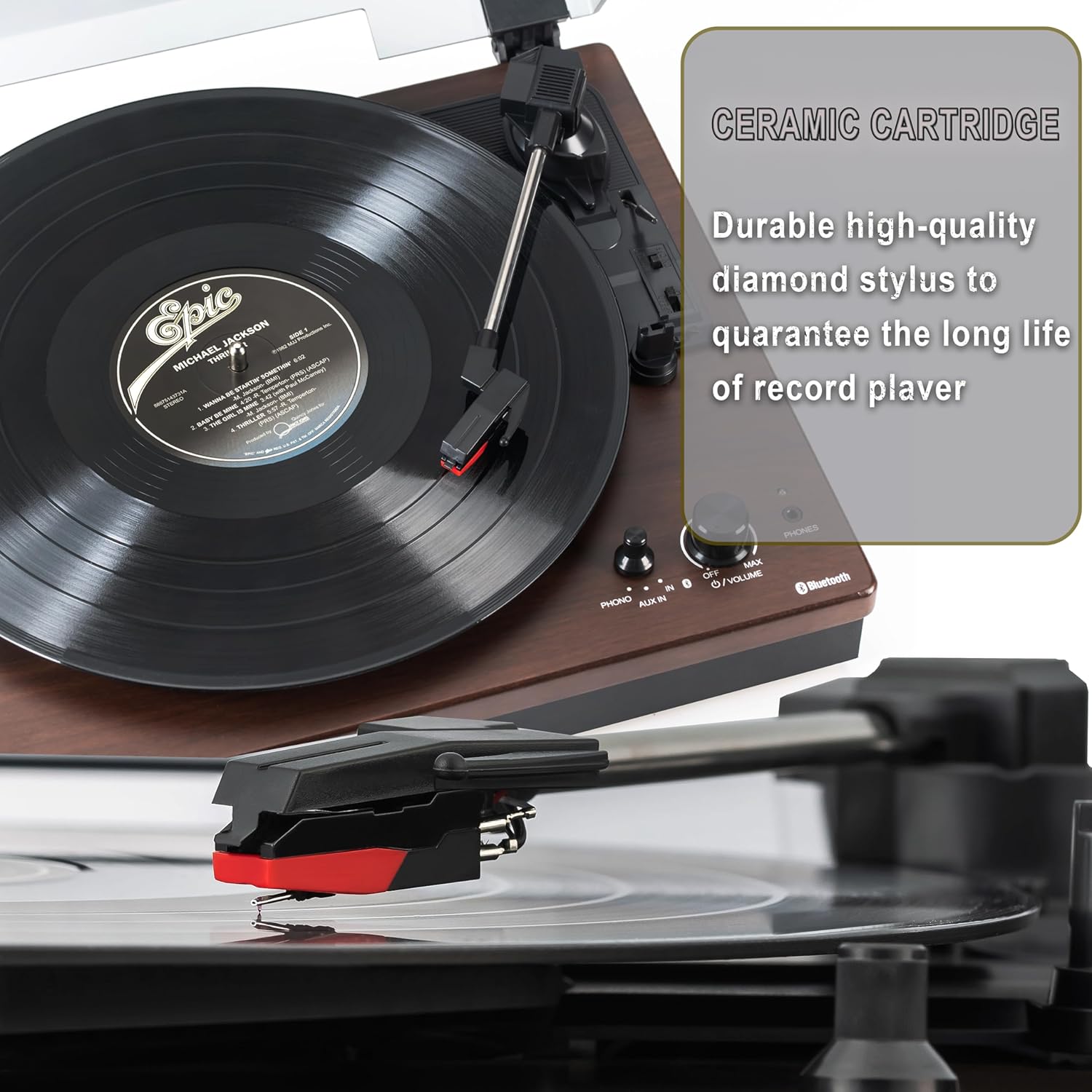
Figure 5.1: Ceramic Cartridge. The turntable is equipped with a durable high-quality diamond stylus designed for extended record playback life.
6. Datrys Problemau
If you encounter issues with your Sharp RP-TT70, refer to the following common problems and solutions:
| Problem | Achos Posibl | Ateb |
|---|---|---|
| Dim Pwer | Power adapter not connected or outlet not active. | Ensure power adapter is securely plugged into the turntable and a working wall outlet. |
| Dim Sain gan Siaradwyr | Speakers not connected correctly; Volume too low; Incorrect input mode. | Check speaker cable connections and polarity. Increase volume. Ensure turntable is in PHONO or AUX mode as appropriate. |
| Poor Sound Quality / Skipping | Dirty or worn stylus; Dirty record; Turntable not level. | Clean the stylus and record. Ensure the turntable is on a stable, level surface. Consider replacing the stylus if worn. |
| Materion Paru Bluetooth | Device too far; Bluetooth not enabled on external device; Interference. | Ensure devices are within range (approx. 30 ft). Confirm Bluetooth is enabled on the external device. Try restarting both devices. |
| Plater Ddim yn Troelli | Belt dislodged; Auto-stop engaged prematurely. | Check if the drive belt is properly seated around the platter and motor pulley. If auto-stop is causing issues, ensure the record is placed correctly. |
7. manylebau
| Nodwedd | Manylyn |
|---|---|
| Rhif Model | RP-TT70 |
| Brand | miniog |
| Dimensiynau Cynnyrch | 16.8 x 13.5 x 2.8 modfedd |
| Pwysau Eitem | 18.6 pwys |
| Technoleg Cysylltedd | Bluetooth (Bi-directional) |
| Cyflymder a Gefnogir | 33 1/3, 45, 78 RPM |
| Cydrannau wedi'u Cynnwys | Turntable, Stereo Bookshelf Speakers |
| Deunydd | Plastig, Pren |
| Lliw | Black (with wooden finish) |
| Math cetris | Changeable Ceramic Cartridge and Stylus |
| Nodweddion | Belt-drive, Auto-return, Pitch control, Dust cover |
8. Gwarant a Chefnogaeth
Am wybodaeth am warant a chymorth technegol, cyfeiriwch at wefan swyddogol Sharp websafle neu cysylltwch â'u gwasanaeth cwsmeriaid yn uniongyrchol. Cadwch eich derbynneb prynu fel prawf o brynu ar gyfer hawliadau gwarant.
Ask a question about this manual
Ask about setup, troubleshooting, compatibility, parts, safety, or missing instructions. Manuals+ will review the question and use this page’s manual context to help answer it.