
1. Rhagymadrodd
This manual provides detailed instructions for the setup, operation, and maintenance of your Graflsoa PG-9078 Bluetooth Wireless Gamepad. Please read this manual thoroughly before using the product to ensure proper functionality and to maximize your gaming experience. This gamepad is compatible with iOS, Android, Tablet, Phone, PC, Smart TV, and Set Top Box devices.
2. Gwybodaeth Diogelwch
- Do not expose the gamepad to extreme temperatures, humidity, or direct sunlight.
- Avoid dropping or subjecting the gamepad to strong impacts.
- Do not attempt to disassemble or modify the gamepad. This will void the warranty.
- Keep the gamepad away from water and other liquids.
- Defnyddiwch y cebl gwefru a ddarperir neu gyfwerth ardystiedig yn unig.
- Store the gamepad in a clean, dry place when not in use.
3. Cynnwys Pecyn
Gwiriwch gynnwys y pecyn wrth ddadbocsio:
- Graflsoa PG-9078 Wireless Gamepad
- Cebl Codi Tâl USB
- Llawlyfr Defnyddiwr (y ddogfen hon)
4. Cynnyrch Drosview
Familiarize yourself with the components and features of your PG-9078 gamepad.
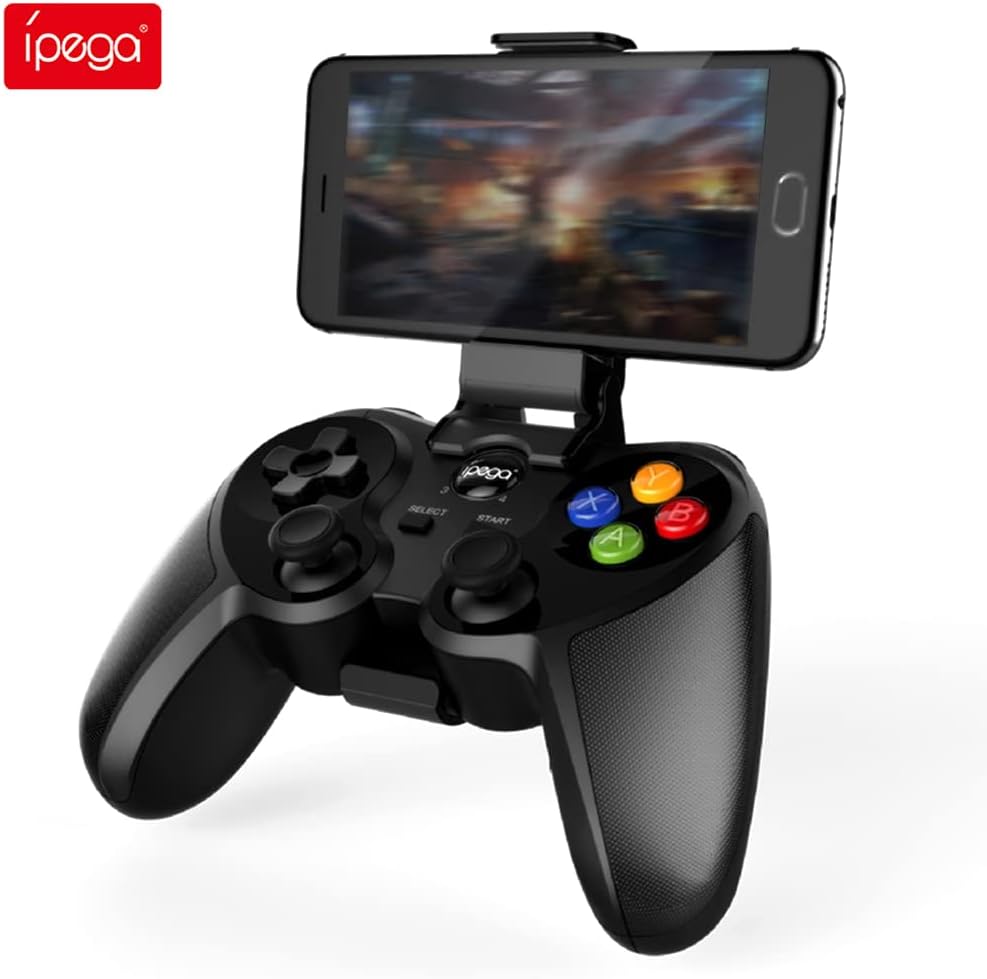
Figure 4.1: Graflsoa PG-9078 Wireless Gamepad with a smartphone mounted in the integrated holder.
The Graflsoa PG-9078 is a versatile Bluetooth gamepad designed for various gaming platforms. It features a comfortable ergonomic design, precise controls, and an integrated phone holder.
4.1 Nodweddion Allweddol
- Deiliad Ffôn Integredig: Supports smartphones from 4 to 5.5 inches, with an adjustable angle for optimal viewing.
- Hall Effect Sensor Switches: Provides durable and responsive trigger input.
- High Accuracy Joysticks: 360-degree precision joysticks with anti-slip texture to prevent operational errors.
- Botymau Ymatebol: Fast response time for all face buttons and shoulder buttons.
- Analog L2/R2 Triggers: Offers precise control for racing and other games requiring nuanced input.
- Cysylltedd Bluetooth: Stable wireless connection with a transmission distance of up to 8 meters.

Figure 4.2: The adjustable phone holder, designed to securely hold smartphones between 4 and 5.5 inches. The angle can be freely adjusted for user comfort.

Figure 4.3: The high-accuracy joystick, featuring 360-degree movement and an anti-slip texture for enhanced control.

Figure 4.4: The highly sensitive and responsive face buttons and shoulder buttons, designed for quick input.
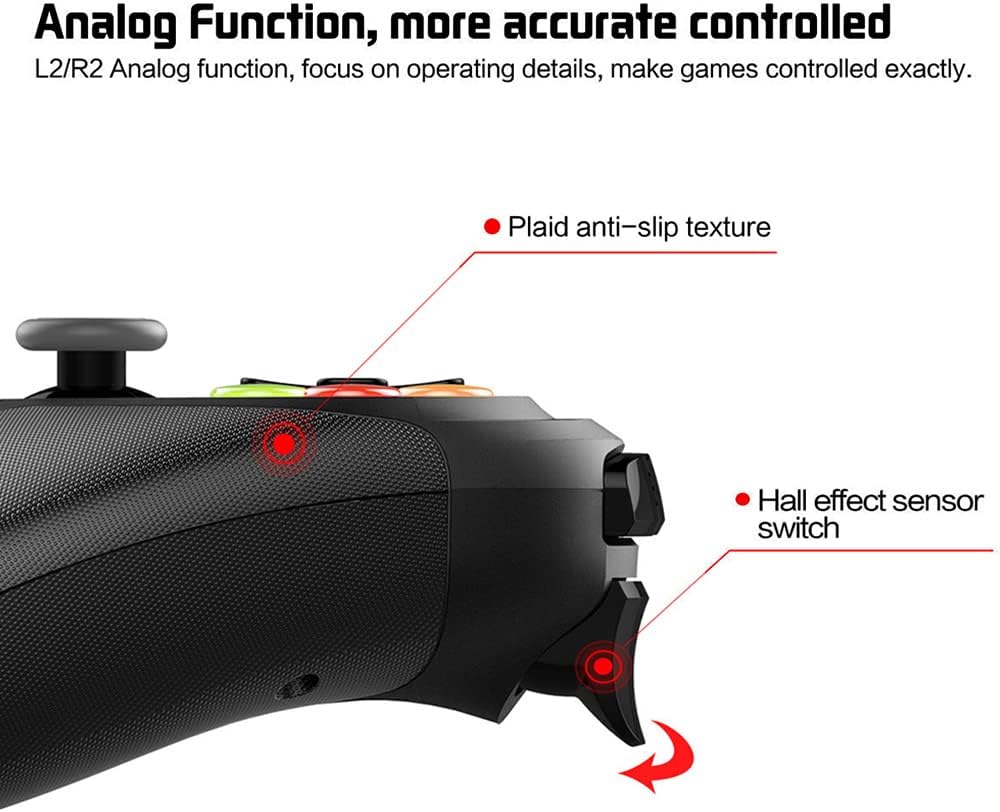
Figure 4.5: The L2/R2 analog triggers, providing accurate and detailed control for various in-game actions.

Figure 4.6: The gamepad utilizes Bluetooth technology for wireless connectivity, offering a stable connection up to 8 meters.
5. Cyfarwyddiadau Gosod
5.1 Gwefru'r Gamepad
- Connect the small end of the USB charging cable to the charging port on the gamepad.
- Cysylltwch ben mwy y cebl gwefru USB â ffynhonnell pŵer USB (e.e., porthladd USB cyfrifiadur, addasydd wal USB).
- The charging indicator light on the gamepad will illuminate during charging and turn off or change color when fully charged.
- Mae gwefr lawn fel arfer yn cymryd tua 2-3 awr.
5.2 Attaching the Phone Holder
- Locate the phone holder attachment point on the top of the gamepad.
- Carefully slide the phone holder into the designated slot until it clicks securely into place.
- Adjust the angle of the holder to your preferred viewing sefyllfa.
- Gently place your smartphone (4-5.5 inches) into the holder, ensuring it is securely gripped.
5.3 Pâr Bluetooth
The PG-9078 supports multiple connection modes. Select the appropriate mode for your device.
5.3.1 Android Standard Mode
- Ensure the gamepad is powered off.
- Pwyswch a dal y "X" button + HOME button simultaneously until the indicator light flashes rapidly.
- On your Android device, enable Bluetooth and search for available devices.
- Select "PG-9078" from the list to pair. The indicator light will become solid once connected.
5.3.2 iOS Standard Mode
- Ensure the gamepad is powered off.
- Pwyswch a dal y "Y" button + HOME button simultaneously until the indicator light flashes rapidly.
- On your iOS device, enable Bluetooth and search for available devices.
- Select "PG-9078" from the list to pair. The indicator light will become solid once connected.
5.3.3 PC/Smart TV Mode (Direct Play)
- Ensure the gamepad is powered off.
- Pwyswch a dal y "A" button + HOME button simultaneously until the indicator light flashes rapidly.
- On your PC or Smart TV, enable Bluetooth and search for available devices.
- Select "PG-9078" from the list to pair. The indicator light will become solid once connected.
Note: After successful pairing, the gamepad will automatically connect to the last paired device when powered on in the same mode.
6. Cyfarwyddiadau Gweithredu
6.1 Pŵer Ymlaen/Diffodd
- Pŵer Ymlaen: Gwasgwch y CARTREF botwm for 1 second. The indicator light will flash, then connect to the last paired device.
- Pwer i ffwrdd: Pwyswch a dal y CARTREF botwm for 5 seconds until the indicator light turns off. The gamepad will also automatically power off after 5 minutes of inactivity.
6.2 Gamepad Modes
The PG-9078 supports different modes for optimal compatibility:
- Android Standard Mode (X + HOME): For most Android games and emulators.
- iOS Standard Mode (Y + HOME): For iOS games that support MFi controllers or specific gamepad protocols.
- PC/Smart TV Mode (A + HOME): For direct play on Windows PCs (requires Bluetooth adapter) and compatible Smart TVs.
Note: Game compatibility varies by platform and game title. Some games may require specific mapping or may not support external controllers.
6.3 Defnyddio'r Rheolyddion
The gamepad features standard controls:
- Pad Cyfeiriadol (D-Pad): Ar gyfer mewnbwn cyfeiriadol manwl gywir.
- Ffonau Analog Chwith/Dde: Ar gyfer symudiad 360 gradd a rheolaeth camera.
- Botymau Wyneb (A, B, X, Y): Ar gyfer gweithredoedd yn y gêm.
- Shoulder Buttons (L1, R1): For quick actions.
- Analog Triggers (L2, R2): For pressure-sensitive input, ideal for acceleration/braking in racing games.
- SELECT/START Buttons: For menu navigation and game functions.
- Botwm CARTREF: For power on/off and mode switching.

Figure 6.1: Proper grip and button access on the Graflsoa PG-9078 gamepad, highlighting its ergonomic design and Hall effect sensor switches.
7. cynnal
- Glanhau: Use a soft, dry cloth to wipe the surface of the gamepad. Do not use harsh chemicals or abrasive cleaners.
- Storio: Storiwch y gamepad mewn lle oer, sych i ffwrdd o olau haul uniongyrchol a thymheredd eithafol.
- Gofal Batri: To prolong battery life, avoid fully discharging the gamepad frequently. Charge it regularly, even if not in constant use. If storing for an extended period, charge it to about 50% every few months.
8. Datrys Problemau
8.1 Gamepad Does Not Power On
- Ensure the gamepad is charged. Connect it to a power source using the USB cable and allow it to charge for at least 30 minutes before attempting to power on again.
- Pwyswch a dal y botwm CARTREF am 1 eiliad i bweru ymlaen.
8.2 Unable to Pair via Bluetooth
- Ensure the gamepad is in the correct pairing mode for your device (Android: X+HOME, iOS: Y+HOME, PC/Smart TV: A+HOME).
- Gwnewch yn siŵr bod Bluetooth wedi'i alluogi ar eich dyfais a'i fod yn ganfyddadwy.
- Move the gamepad closer to your device (within 8 meters).
- Forget/remove "PG-9078" from your device's Bluetooth list and attempt to pair again.
- Restart both your device and the gamepad.
8.3 Botymau/Joysticks Ddim yn Ymateb
- Verify that the gamepad is successfully connected to your device.
- Check game settings to ensure controller support is enabled and controls are mapped correctly.
- Some games may not fully support external gamepads.
- Try restarting the gamepad and your device.
9. manylebau
| Model | PG-9078 |
| Cysylltedd | Di-wifr Bluetooth |
| Amrediad Bluetooth | Hyd at 8 metr |
| Cydweddoldeb | iOS, Android, Tablet, Phone, PC, Smart TV, Set Top Box |
| Phone Holder Support | 4 - 5.5 inch smartphones |
| Nodweddion Arbennig | Hall Effect Sensor Switches, 360-degree High Accuracy Joysticks, Analog L2/R2 Triggers |
| Ffynhonnell Pwer | Rechargeable Battery (Internal) |
10. Gwarant a Chefnogaeth
For warranty information and technical support, please refer to the documentation provided with your purchase or contact your retailer. Keep your proof of purchase for any warranty claims.