
Sharp 32FG6EA
Sharp 32FG6EA 32-inch HD Android TV User Manual
Model: 32FG6EA
1. Rhagymadrodd
This manual provides essential information for the proper setup, operation, and maintenance of your Sharp 32FG6EA 32-inch HD Android TV. The Sharp 32FG6EA offers a wide range of connection options and features the Android TV operating system, providing a modern and intuitive television experience. It functions as an all-in-one entertainment hub, integrating Google Assistant for a smarter viewing experience. Users can quickly access entertainment, control smart devices, and obtain on-screen information using voice commands.
2. Gwybodaeth Diogelwch
Please read all safety instructions carefully before using the television. Keep this manual for future reference.
- Cyflenwad Pŵer: Gwnewch yn siŵr bod y teledu wedi'i gysylltu â ffynhonnell bŵer gyda'r gyfaint cywirtage. Peidiwch â gorlwytho socedi pŵer.
- Awyru: Peidiwch â rhwystro agoriadau awyru. Gadewch ddigon o le o amgylch y teledu ar gyfer llif aer priodol i atal gorboethi.
- Dŵr a lleithder: Do not expose the TV to rain, moisture, or excessive humidity. Avoid placing objects filled with liquids on or near the TV.
- Glanhau: Unplug the TV before cleaning. Use a soft, dry cloth. Do not use liquid cleaners or aerosol sprays.
- Lleoliad: Rhowch y teledu ar arwyneb sefydlog, gwastad. Os ydych chi'n ei osod ar y wal, gwnewch yn siŵr bod y mownt wedi'i osod yn ddiogel a'i fod yn gallu cynnal pwysau'r teledu.
- Gwasanaethu: Peidiwch â cheisio cynnal a chadw'r teledu eich hun. Cyfeiriwch bob gwaith cynnal a chadw at bersonél gwasanaeth cymwys.
3. Cynnwys Pecyn
Gwiriwch fod yr holl eitemau yn bresennol yn y pecynnu:
- Sharp 32FG6EA 32-inch HD Android TV
- Rheolydd o Bell (gyda 2 fatri AAA)
- Stand Type Base
- Llawlyfr Cyfarwyddiadau
- Cebl Pŵer
4. Gosod
4.1 Dadbacio
Carefully remove the TV and all accessories from the packaging. Retain the packaging materials for future transport or servicing.
4.2 Atodi'r Stondin
If you are not wall-mounting the TV, attach the included stand base:
- Rhowch sgrin y teledu i lawr ar arwyneb meddal, gwastad i atal difrod.
- Aliniwch sylfaen y stondin â'r tyllau mowntio ar waelod y teledu.
- Sicrhewch y stondin gan ddefnyddio'r sgriwiau a ddarperir. Gwnewch yn siŵr bod y stondin wedi'i gosod yn gadarn.
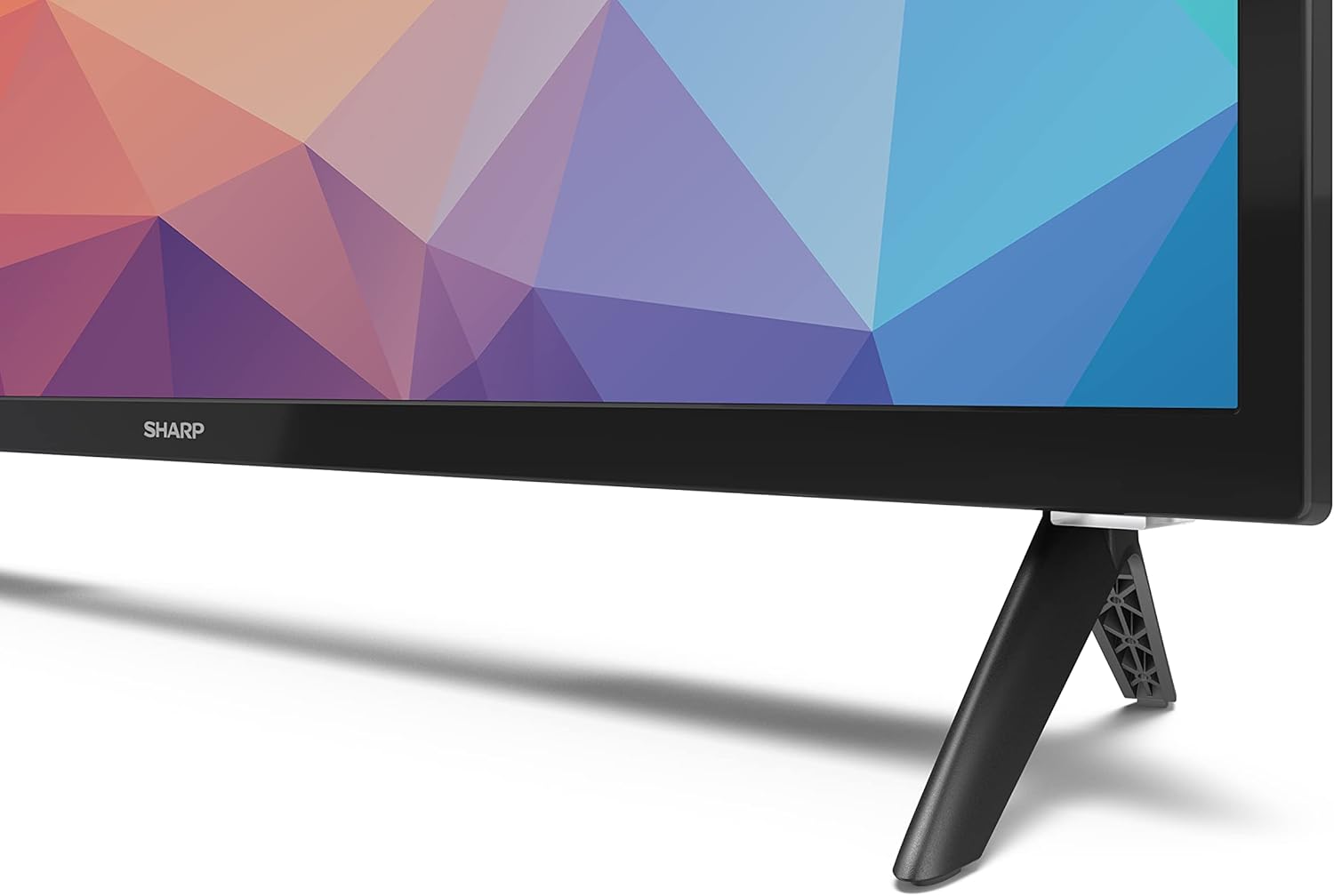
Image: Close-up of the TV stand attachment.
4.3 Mowntio Wal
The Sharp 32FG6EA supports VESA wall mounts with dimensions of 75 x 75 mm. Wall mount hardware is not included. Follow the instructions provided with your wall mount kit.
4.4 Cysylltu Dyfeisiau Allanol
Your TV features multiple ports for connecting various devices:
- HDMI: Connect Blu-ray players, game consoles, or set-top boxes to the 2 HDMI ports.
- USB: Connect USB storage devices for media playback to the 2 USB ports.
- Antena/Cable: Cysylltwch antena neu ffynhonnell teledu cebl ar gyfer sianeli darlledu.
- Ethernet: Ar gyfer cysylltiad rhyngrwyd gwifrau.
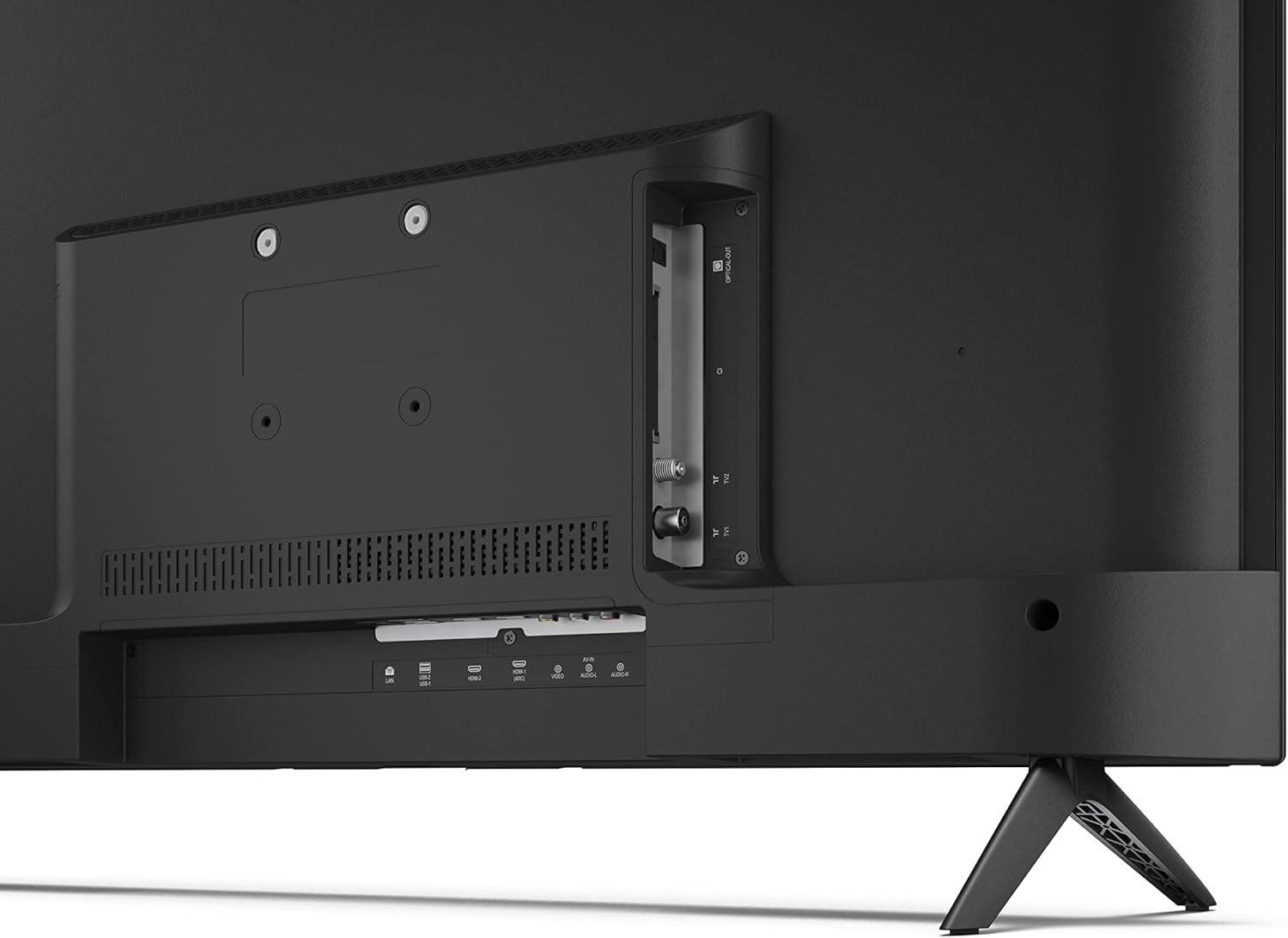
Delwedd: Cefn view y teledu gyda phorthladdoedd cysylltu.
4.5 Cysylltiad Pwer
After connecting all necessary devices, plug the power cable into the TV and then into a wall outlet.
4.6 Dewin Gosod Cychwynnol
Ar ôl ei droi ymlaen am y tro cyntaf, bydd y teledu yn eich tywys trwy broses sefydlu gychwynnol. Mae hyn yn cynnwys:
- Dewis iaith.
- Cysylltiad rhwydwaith (Wi-Fi neu Ethernet).
- Google account sign-in (required for full Android TV features).
- Sganio sianel.
5. Gweithredu
5.1 Rheolaeth o Bell Drosview
The included remote control allows you to navigate the TV's features. Insert the 2 AAA batteries into the remote control before use.
- Botwm Pŵer: Yn troi'r teledu ymlaen neu i ffwrdd.
- Directional Pad (D-Pad) & OK Button: Llywio bwydlenni a chadarnhau dewisiadau.
- Botwm Cefn: Yn dychwelyd i'r sgrin flaenorol.
- Botwm Cartref: Yn cyrchu sgrin gartref Android TV.
- Cyfrol i fyny/i lawr: Yn addasu'r cyfaint sain.
- Sianel i fyny/i lawr: Yn newid sianeli teledu.
- Botwm Cynorthwyydd Google: Yn actifadu rheolaeth llais.
- Botymau Llwybrau Byr Ap: Dedicated buttons for popular streaming services like Netflix, Prime Video, and YouTube.
5.2 Android TV Interface Navigation
The Android TV home screen provides access to your installed apps, recommended content, and settings. Use the directional pad on your remote to navigate through the interface.
5.3 Cynorthwyydd Google
Press the Google Assistant button on your remote and speak into the microphone to:
- Chwiliwch am movies, shows, or information.
- Rheoli dyfeisiau cartref clyfar.
- Agor ceisiadau.
- Addasu gosodiadau teledu.
5.4 Chromecast Built-in
The TV includes Chromecast built-in, allowing you to cast content from compatible apps on your smartphone, tablet, or computer directly to the TV screen.
5.5 Cysylltedd Bluetooth
Connect Bluetooth devices such as headphones or speakers to your TV for a personalized audio experience. Navigate to the TV's settings menu to pair new Bluetooth devices.
5.6 Gosodiadau Sain
The TV supports Dolby Audio with 2 x 6 W RMS speakers. You can adjust audio settings, including sound modes and equalizer, through the TV's settings menu.
6. cynnal
6.1 Glanhau'r teledu
To clean the TV screen and cabinet:
- Tynnwch y plwg y llinyn pŵer o'r allfa wal.
- Use a soft, lint-free cloth to gently wipe the screen and surfaces.
- Ar gyfer marciau ystyfnig, ychydig yn damprhowch y brethyn gyda dŵr neu lanhawr sgrin arbenigol (rhowch ef ar y brethyn, nid yn uniongyrchol ar y sgrin).
- Peidiwch â defnyddio glanhawyr sgraffiniol, cwyrau na thoddyddion.
6.2 Diweddariadau Meddalwedd
Your Android TV may receive periodic software updates to improve performance and add new features. Ensure your TV is connected to the internet to receive these updates. You can check for updates manually in the TV's settings menu.
7. Datrys Problemau
Os byddwch chi'n dod ar draws problemau gyda'ch teledu, cyfeiriwch at y problemau a'r atebion cyffredin canlynol:
- Dim pŵer: Ensure the power cable is securely plugged into both the TV and a working wall outlet. Try a different outlet.
- Dim Llun/Sain: Check that the correct input source is selected. Verify all cables (HDMI, antenna) are properly connected.
- Rheolaeth Anghysbell Ddim yn Gweithio: Gwiriwch y batris a gwnewch yn siŵr eu bod wedi'u mewnosod yn gywir. Pwyntiwch y teclyn rheoli o bell yn uniongyrchol at synhwyrydd IR y teledu.
- Ansawdd Llun Gwael: Check antenna/cable connections. Adjust picture settings in the TV menu. For streaming content, ensure a stable internet connection.
- Dim Cysylltiad Rhyngrwyd: Verify Wi-Fi password or Ethernet cable connection. Restart your router and the TV.
- Apiau Ddim yn Gweithio: Ensure the TV's software is up to date. Try clearing the app's cache or reinstalling the app.
If problems persist, consult the Sharp support websafle neu cysylltwch â gwasanaeth cwsmeriaid.
8. manylebau
| Nodwedd | Manyleb |
|---|---|
| Rhif Model | 32FG6EA |
| Brand | miniog |
| Maint Sgrin | 32 modfedd (81 cm ar groeslin) |
| Technoleg Arddangos | LED |
| Datrysiad | 720p (1366 x 768 picsel) |
| Cymhareb Agwedd | 16:9 |
| Cyfradd Adnewyddu | 50 Hz |
| System Weithredu | Teledu Android 11 |
| Nodweddion Arbennig | Android TV, Google Assistant, Chromecast built-in |
| Allbwn Sain | 2 x 6 W RMS, Dolby Audio |
| Porthladdoedd HDMI | 2 |
| Porthladdoedd USB | 2 |
| Cysylltedd | Wi-Fi, Bluetooth, Ethernet |
| Mynydd Wal VESA | 75 x 75 mm |
| Dimensiynau gyda Stand (W x H x D) | 731 x 486 x 177 mm |
| Dimensiynau heb Stand (W x H x D) | 731 x 433 x 68 mm |
| Dimensiynau Cynnyrch (D x W x H) | 16 x 73 x 46.4 cm (approximate, with stand) |
| Pwysau | 3.9 kg |
| Dosbarth Effeithlonrwydd Ynni | E |

Image: TV dimensions diagram.

Image: Energy Label. For more details, visit Cronfa Ddata EPREL.
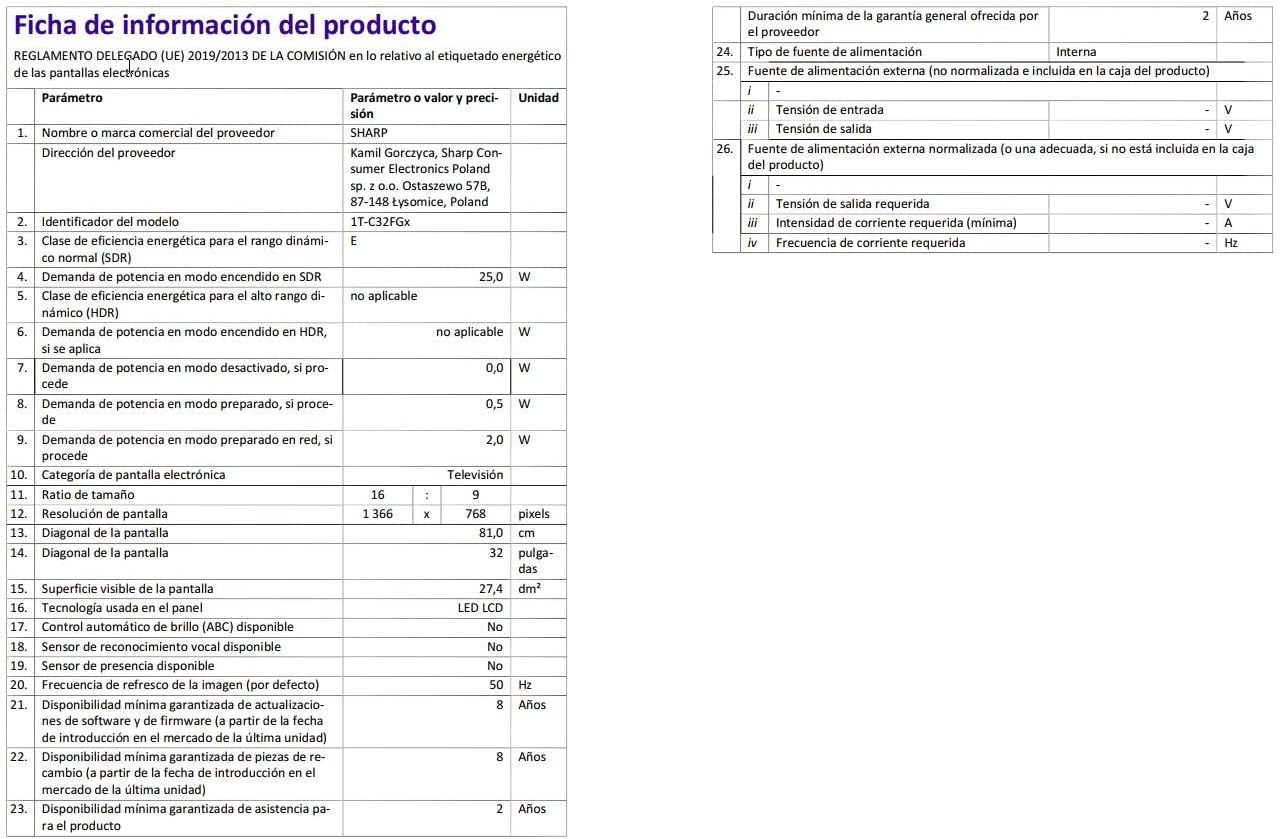
Image: Detailed product information sheet.
9. Gwarant a Chefnogaeth
The Sharp 32FG6EA television comes with a minimum general warranty duration of 2 years from the provider.
For technical support, warranty claims, or further assistance, please refer to the contact information provided with your purchase documentation or visit the official Sharp support websafle ar gyfer eich rhanbarth.
Ask a question about this manual
Ask about setup, troubleshooting, compatibility, parts, safety, or missing instructions. Manuals+ will review the question and use this page’s manual context to help answer it.