
NEEWER RT-08
NEEWER RT-08 2.4G Remote Control User Manual
Model: RT-08 | Brand: NEEWER
1. Rhagymadrodd
The NEEWER RT-08 2.4G Remote Control is designed to provide enhanced wireless control for NEEWER Motorized Camera Sliders. This upgraded remote offers compatibility with both older generation (VS-80WC/VS-100WC) and newer generation (ER1-120/100/80) sliders, enabling precise control over video recording and time-lapse photography functions. Its ergonomic design and rechargeable battery ensure convenience and reliability for professional and amateur photographers alike.

Figure 1.1: NEEWER RT-08 Remote Control with a compatible camera slider.
2. Cydrannau Cynnyrch a Throsoddview
Familiarize yourself with the various parts of your RT-08 remote control:

Ffigur 2.1: Blaen a chefn view of the RT-08 remote control with labeled components.
- Sgrin: Displays operational modes, settings, and battery status.
- Four-way Joystick: Used for navigation and adjusting parameters.
- Confirmation Button: Selects options and confirms settings.
- Botwm Pŵer: Yn troi'r teclyn rheoli o bell ymlaen/i ffwrdd.
- Botwm Llun: Triggers photo capture or initiates time-lapse.
- Botwm Dychwelyd: Navigates back to previous menus.
- Porthladd codi tâl Math-C: For recharging the remote's internal battery.
3. Gosod
3.1 Codi Tâl ar y Rheolydd o Bell
The RT-08 remote control features a built-in rechargeable battery. To charge:
- Connect a USB Type-C cable to the charging port on the remote.
- Connect the other end of the cable to a DC5V/1A USB wall charger or a portable charger.
- The charging indicator on the remote will show charging status.
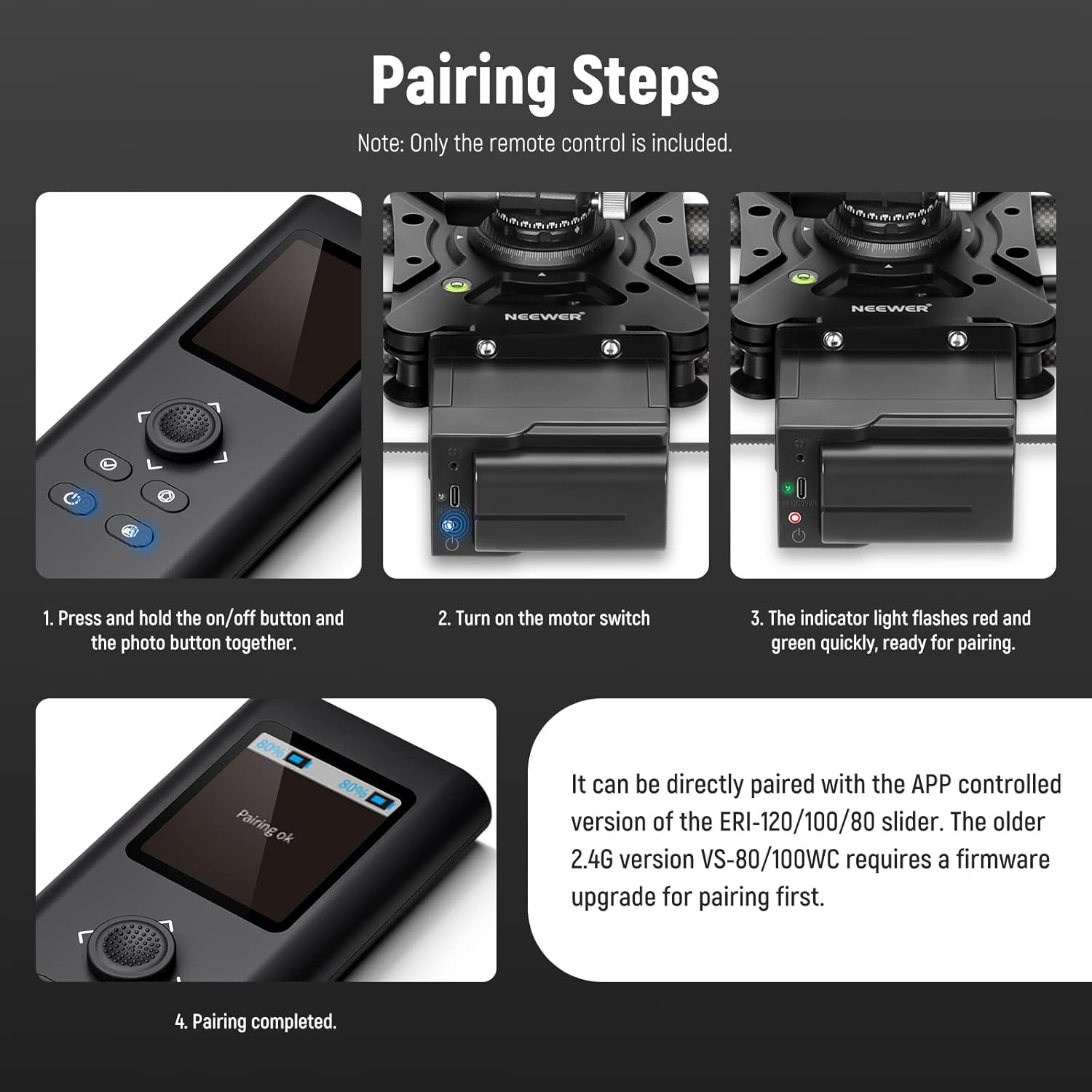
Figure 3.1: Charging the RT-08 remote control via USB Type-C.
3.2 Pairing with NEEWER Motorized Camera Sliders
The RT-08 remote can be paired with different NEEWER motorized camera sliders. The pairing process varies slightly depending on your slider model.
3.2.1 Pairing with APP Controlled Sliders (ER1-120, ER1-100, ER1-80) and Newest 2.4G Sliders (VS-80WC/VS-100WC)
No firmware upgrade is required for these models. Follow these steps:
- On the RT-08 remote, long press the Allwedd ymlaen/i ffwrdd a'r Allwedd camera yr un pryd.
- Turn on the motor switch of your camera slider.
- Observe the indicator light on the slider; it should flash rapidly in red and green.
- Once the indicator light stops flashing and pairing is confirmed on the remote's screen, the pairing is complete.

Figure 3.2: Visual guide for the pairing process.

Figure 3.3: RT-08 compatibility with APP controlled NEEWER sliders.
3.2.2 Upgrading Older Generation 2.4G Sliders (VS-80WC/VS-100WC) for Remote Use
For older versions of the VS-80WC/VS-100WC sliders, a firmware update is required before pairing with the RT-08 remote. Please refer to the official NEEWER website for detailed instructions and to download the necessary firmware:
- Visit the NEEWER official websafle.
- Navigate to the "Upgrade Firmware and Software" section.
- Select "NEEWER 2.4G Wireless Motorized Camera Slider VS-80WC/VS-100WC" to download the firmware.
- Follow the provided upgrade instructions carefully.
Once the firmware update is complete, proceed with the pairing steps outlined in Section 3.2.1.

Figure 3.4: RT-08 compatibility with 2.4G version NEEWER sliders.
4. Gweithredu'r Rheolaeth Anghysbell
The RT-08 remote control offers various modes and settings for precise slider operation.
4.1 Swyddogaethau Cyffredinol
The remote supports the following core functions:
- Modd Fideo: For continuous video recording with smooth slider movement.
- Ffotograffiaeth Aeth Amser: Configures the slider for interval shooting to create time-lapse sequences.
- A/B Point Setting: Allows you to define start and end points for precise, repeatable movements.
- Adjustable Interval: Sets the time between shots for time-lapse.
- Amser cysylltiad: Controls the duration of exposure for each shot.
- Fixed Shots: For specific, pre-defined movements.
- Nifer o ergydion: Specifies the total number of photos for time-lapse.
- Oedi: Introduces a delay before the sequence begins.

Figure 4.1: Remote control in use with a motorized camera slider.
4.2 Manual Mode (for APP Controlled Sliders)
When paired with APP controlled sliders (ER1 series), the remote also supports a manual mode, allowing for real-time adjustments:
- Adjustable interval.
- Adjustable exposure time.
- Adjustable frame rate.
- Adjustable video length.
5. cynnal
To ensure the longevity and optimal performance of your NEEWER RT-08 remote control, follow these maintenance guidelines:
- Glanhau: Use a soft, dry cloth to clean the remote's surface. Avoid using liquid cleaners or solvents, which may damage the finish or internal components.
- Storio: Storiwch y teclyn rheoli o bell mewn lle oer, sych i ffwrdd o olau haul uniongyrchol, tymereddau eithafol, a lleithder uchel.
- Gofal Batri: Recharge the remote regularly, even if not in frequent use, to maintain battery health. Avoid fully discharging the battery for extended periods.
- Diogelu: Protect the remote from drops and impacts. Consider using a protective case if available.
6. Datrys Problemau
If you encounter issues with your RT-08 remote control, refer to the following common troubleshooting steps:
| Problem | Achos Posibl | Ateb |
|---|---|---|
| Remote not turning on. | Batri isel. | Charge the remote control using the provided USB Type-C cable and a DC5V/1A power source. |
| Unable to pair with slider. | Incorrect pairing procedure; Older slider firmware; Interference. |
|
| Remote functions are unresponsive. | Loss of connection; Software glitch. |
|
7. manylebau
| Nodwedd | Manylyn |
|---|---|
| Rhif Model | RT-08 (10101168) |
| Dimensiynau Cynnyrch | 5 x 2.1 x 0.63 modfedd |
| Pwysau Eitem | 10.6 owns |
| Brand | NEWYDD |
| Nodwedd Arbennig | Ergonomig |
| Lliw | Du |
| Uchafswm Nifer y Dyfeisiau â Chymorth | 1 |
| Dyfeisiau Cydnaws | NEEWER Motorized Camera Sliders (VS-80WC/100WC, ER1-120/100/80) |
| Mewnbwn Pwer | DC5V/1A (USB Type-C) |
8. Gwarant a Chefnogaeth
For warranty information, technical support, or service inquiries, please contact NEEWER customer support through their official websafle neu'r manwerthwr y gwnaethoch brynu'r cynnyrch ganddo. Cadwch eich derbynneb prynu fel prawf o brynu ar gyfer hawliadau gwarant.
Dogfennau Cysylltiedig - RT-08
 |
Llawlyfr Cyfarwyddiadau Sleid Modur SmallRig MS-10 Llawlyfr cyfarwyddiadau cynhwysfawr ar gyfer y Sleidiwr Modur SmallRig MS-10, sy'n cwmpasu'r cynnyrch drosoddview, manylebau, gosodiad, dulliau gweithredu fel fideo ac amser-dreigl, cyflenwad pŵer, cysylltedd ap, a gwybodaeth am warant. |
 |
NEEWER VS-80CC/VS-100CC Electronic Video Slider: Instruction Manual Detailed instruction manual for the NEEWER VS-80CC and VS-100CC electronic video sliders, covering package contents, assembly, operation, specifications, and safety guidelines. |
 |
TOPRIG S40 Motorized Video Slider User Manual This user manual provides comprehensive instructions for the TOPRIG S40 motorized video slider, covering its features, installation, operation via buttons and the mobile app, calibration, time-lapse functions, and technical specifications. |
 |
GVM Slider-80/120 User Manual and Operation Guide Detailed instructions for setting up and operating the GVM Slider-80 and GVM Slider-120 camera sliders, including packing lists, installation, functional operations, manual mode, automatic modes, time-lapse shooting, and various photography methods. |
 |
YC Onion Hot Dog 3 Motorized Slider User Manual & Specifications Comprehensive user manual for the YC Onion Hot Dog 3 motorized camera slider. Includes setup, operation, specifications, and troubleshooting for models MHDB60_B, MHDB80_B, MHDB100_B, MHDB120_B. |
 |
GVM GT-60D Camera Slider: User Manual and Operation Guide Comprehensive user manual for the GVM GT-60D camera slider. Learn how to set up, operate in manual, time-lapse, and auto modes, and troubleshoot common issues. |
Ask a question about this manual
Ask about setup, troubleshooting, compatibility, parts, safety, or missing instructions. Manuals+ will review the question and use this page’s manual context to help answer it.