
1. Rhagymadrodd
This manual provides comprehensive instructions for the installation, operation, and maintenance of your Hoco CA104 Telescopic Gravity Car Phone Holder. Please read this manual carefully before use to ensure proper functionality and safety.
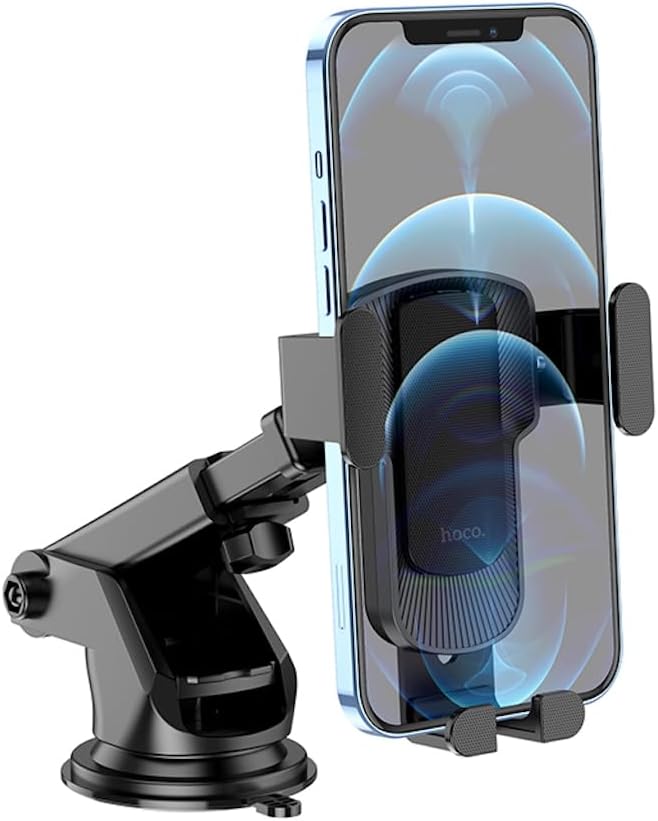
Image 1.1: The Hoco CA104 car phone holder with a smartphone securely held in place, demonstrating its gravity linkage mechanism and adjustable arm.
2. Cydrannau Cynnyrch
The Hoco CA104 holder consists of the following main parts:
- Gravity Linkage Clamp: Automatically adjusts to hold the phone when inserted.
- Telescopic Arm: Allows for extension and retraction to adjust distance.
- Adjustable Ball Joint: Enables 360-degree rotation and angle adjustment of the phone.
- Sylfaen cwpan sugno: Provides secure attachment to flat surfaces like dashboards or windshields.
- Lefer Cloi: Activates the suction cup for firm adhesion.

Delwedd 2.1: View of the Hoco CA104 holder, highlighting the suction cup base and the adjustable telescopic arm before phone insertion.
3. Cyfarwyddiadau Gosod
The Hoco CA104 can be installed on either the car dashboard or windshield.
3.1 Dashboard Installation
- Glanhewch yr Arwyneb: Ensure the dashboard surface is clean and dry.
- Lleoli'r Deiliad: Place the suction cup base on the desired flat area of your dashboard.
- Sicrhewch y Cwpan Sugno: Press down firmly on the suction cup while pushing the locking lever downwards to create a vacuum seal.
- Addasu Ongl: Use the telescopic arm and ball joint to adjust the holder to your preferred viewing angle. Tighten any adjustment knobs to secure the position.

Image 3.1: The Hoco CA104 holder securely mounted on a car dashboard, providing a stable platform for a smartphone running a navigation application.
3.2 Windshield Installation
- Glanhewch yr Arwyneb: Ensure the windshield surface is clean and dry.
- Lleoli'r Deiliad: Place the suction cup base on the desired area of your windshield.
- Sicrhewch y Cwpan Sugno: Press down firmly on the suction cup while pushing the locking lever downwards to create a vacuum seal.
- Addasu Ongl: Use the telescopic arm and ball joint to adjust the holder to your preferred viewing angle. Tighten any adjustment knobs to secure the position.

Image 3.2: The Hoco CA104 holder mounted on a car windshield, offering an alternative placement for optimal viewing of a smartphone's display.
4. Cyfarwyddiadau Gweithredu
4.1 Mewnosod Eich Ffôn
- Ensure the gravity linkage arms are open.
- Place your phone into the bottom support arms of the holder.
- As the phone's weight presses down, the side arms will automatically close and secure the phone.

Image 4.1: The Hoco CA104 holder with its gravity linkage arms in the open position, illustrating the mechanism before a phone is placed inside.
4.2 Tynnu Eich Ffôn
- Gently lift your phone upwards from the holder.
- The gravity linkage arms will automatically release and open, allowing you to remove the phone.
4.3 Addasu Viewongl ing
- Loosen the knob on the ball joint to adjust the phone's angle (horizontal or vertical) and rotation.
- Loosen the knob on the telescopic arm to extend or retract the arm for optimal distance.
- Tighten all knobs after adjustment to secure the holder's position.
5. Gofal a Chynnal a Chadw
- Glanhau: Sychwch y deiliad gyda lliain meddal, damp brethyn. Peidiwch â defnyddio glanhawyr neu doddyddion sgraffiniol.
- Cwpan Sugno: If the suction cup loses adhesion, rinse it with warm water and let it air dry. This can restore its stickiness.
- Storio: When not in use for extended periods, detach the holder and store it in a cool, dry place away from direct sunlight.
- Tymheredd: Avoid exposing the holder to extreme temperatures, as this may affect the material integrity.
6. Datrys Problemau
| Problem | Achos Posibl | Ateb |
|---|---|---|
| Holder does not stick to surface. | Mae'r wyneb yn fudr neu'n anwastad; mae'r cwpan sugno yn fudr neu'n sych. | Clean the surface and the suction cup. Ensure the locking lever is fully engaged. Try a different, smoother surface. |
| Nid yw'r ffôn yn cael ei ddal yn ddiogel. | Phone size is outside the supported range (4.5-7 inches); phone not fully inserted. | Ensure your phone fits within the 60-85mm clamp range. Push the phone down fully into the holder to activate the gravity linkage. |
| Holder wobbles or moves. | Adjustment knobs are loose; suction cup is not fully sealed. | Tighten all adjustment knobs. Re-engage the suction cup by pressing firmly and locking the lever. |
7. Manylebau Cynnyrch
- Model: CA104
- Deunydd: ABS, silicôn
- Surface Technology: Sun pattern oil spray
- Dimensiynau: 100 x 95 x 170 mm
- Pwysau: 151 g
- Maint ffôn sy'n gydnaws: 4.5 - 7.0 modfedd
- Clamp Amrediad: 60 - 85 mm
- Golygfeydd Perthnasol: Car dashboard, windshield
- Nodweddion arbennig: Telescopic arm, vertical and horizontal adjustment, gravity linkage