
1. Rhagymadrodd
Thank you for choosing the SOVMIKU 5MP Wireless Security Camera System. This system provides comprehensive surveillance with high-resolution cameras, two-way audio, and AI motion detection, designed for both indoor and outdoor use. This manual will guide you through the setup, operation, and maintenance of your new security system.
Please read this manual carefully before installation and use, and keep it for future reference.
2. Gwybodaeth Diogelwch
- Sicrhewch fod yr holl gysylltiadau pŵer yn ddiogel ac yn bodloni'r cyfaint penodedigtage gofynion.
- Do not expose the NVR or cameras to extreme temperatures, humidity, or corrosive environments.
- Osgowch osod yr NVR mewn golau haul uniongyrchol neu ger ffynonellau gwres.
- Peidiwch â cheisio dadosod na newid y cynnyrch. Bydd hyn yn gwneud y warant yn ddi-rym.
- Cadwch y cynnyrch i ffwrdd oddi wrth blant ac anifeiliaid anwes.
- For outdoor cameras, ensure proper sealing of all cable connections to maintain IP66 waterproof rating.
3. Cynnwys Pecyn
The SOVMIKU 5MP Wireless Security Camera System (Two Camera Set) includes the following components:
- 1 x Small NVR Main Unit (with 1TB HDD built-in)
- 2 x 5MP PTZ Wireless Cameras
- Addasyddion Pŵer ar gyfer NVR a Chamerâu
- Sgriwiau a Phlygiau Mowntio
- Llawlyfr Defnyddiwr (y ddogfen hon)

Delwedd: Drosoddview of the SOVMIKU 5MP Wireless Security Camera System, showing the NVR, two cameras, and the included 1TB HDD.
4. Cynnyrch Drosview a Chydrannau
Familiarize yourself with the main components of your SOVMIKU security system:

Image: Detailed diagram illustrating the various parts of the SOVMIKU camera (waterproof housing, WiFi antenna, microphone, IR lens, HD lens, spotlight, sensor) and the NVR (10-inch monitor, speaker, HDD box, bracket, power button, DC 12V 2A input, USB port, HDMI input, network port).
Nodweddion Camera:
- 5MP Ultra-High Resolution: Yn darparu delweddau clir a manwl.
- PTZ Functionality: Pan (horizontal 320°), Tilt (vertical 90°) for 360° coverage with no blind spots.
- IR-CUT Function: Enhances night vision clarity.
- Lens Ongl Eang 110°: Yn cipio maes eang o view.
- Sain Dwyffordd: Meicroffon a siaradwr adeiledig ar gyfer cyfathrebu amser real.
- Sgôr gwrth-ddŵr IP66: Gwydn ar gyfer defnydd awyr agored mewn amrywiol amodau tywydd.
- Advanced 7DB Antenna: Ensures stable Wi-Fi signal for reliable communication.
NVR Features:
- Dyluniad Compact: Dewisiadau lleoli hyblyg.
- 1TB HDD Built-in: Supports 24/7 continuous recording with automatic overwrite.
- 10-Channel Support: Expandable up to 10 cameras.
- Cysylltedd Lluosog: USB, HDMI, Network Port.
5. Canllaw Gosod
The SOVMIKU wireless security camera system is pre-configured at the factory for easy setup. No complicated initial setup or LAN cable wiring is required for basic operation.
Gosod Cam wrth Gam:
- Cysylltiad Pwer: Connect the power adapters to the NVR and each camera. Ensure they are plugged into a stable power source.

Image: Illustrates connecting the power cables to both the NVR and the camera units.
- Camera and NVR Connection: Once powered on, the cameras will automatically connect to the NVR. The live view should appear on the NVR monitor.

Image: A visual guide to the four main setup steps: connecting power, automatic camera-NVR pairing, network connection, and mobile app configuration.
- Network Connection (Optional for Remote Access): Ar gyfer anghysbell viewing and app functionality, connect the NVR to your router using an Ethernet cable.
- Mobile App Setup (EseeCloud):
- Download the "EseeCloud" app from Google Play Store or Apple App Store.
- Cofrestrwch gyfrif a mewngofnodi.
- Add your NVR by scanning the QR code on the NVR or manually entering its ID.
- Ar ôl ei ychwanegu, gallwch view byw footage, playback recordings, and manage settings from your smartphone or PC (using EseeCloud software).
6. Cyfarwyddiadau Gweithredu
Byw View a Chofnodi:
- The NVR automatically displays live feeds from connected cameras.
- The system supports 24/7 continuous recording to the built-in 1TB HDD. When the storage is full, older data will be automatically overwritten.
- Canfod Cynnig: The system features AI motion detection. When motion is detected, the camera will trigger recording, and you will receive instant notifications via the mobile app or email. This helps in quickly identifying and reviewing relevant events.
Rheoli PTZ:
The cameras support Pan-Tilt-Zoom (PTZ) functionality, allowing you to adjust the camera's viewing ongl o bell.

Image: Illustration of the camera's 360° PTZ capabilities, showing horizontal rotation of approximately 355° and vertical rotation of 90°.
- Use the NVR interface or the EseeCloud app to control the camera's pan (horizontal 320°) and tilt (vertical 90°) movements.
- The system also supports 5x digital zoom for closer inspection of details.

Image: Demonstrates the 5x digital zoom feature, allowing users to magnify specific areas of the surveillance feed.
Sain Dwyffordd:
The cameras are equipped with an omnidirectional microphone and speaker, enabling two-way communication.

Image: Illustrates the two-way audio function, allowing communication between the NVR user and someone at the camera's location.
- Speak through the EseeCloud app or NVR to communicate with people near the camera.
- The clear audio quality ensures effective communication.
Dulliau Gweledigaeth Nos:
The cameras offer three night vision modes to suit different lighting conditions:
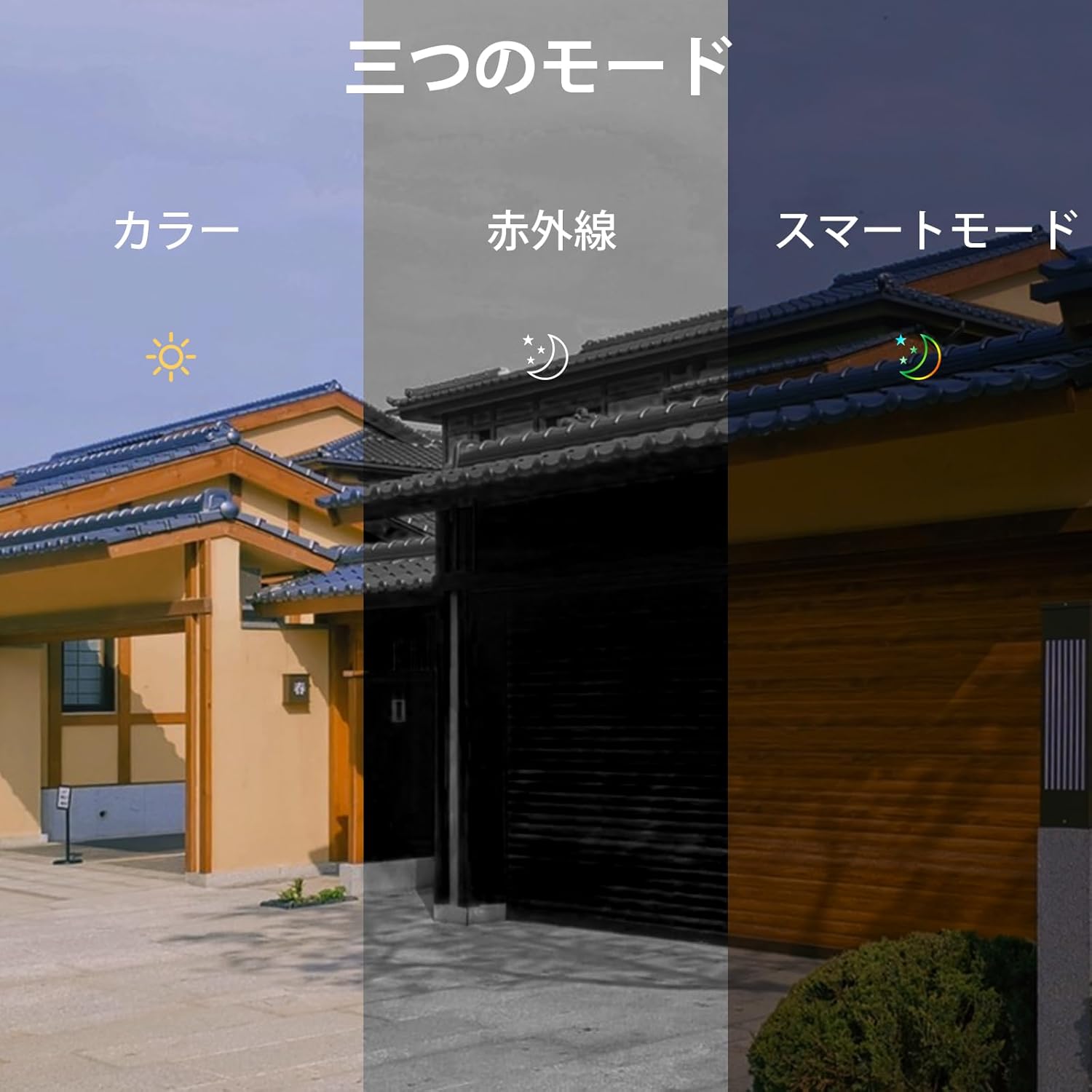
Image: Depicts the three available night vision modes: Full Color, Infrared, and Smart Mode, adapting to various low-light scenarios.
- Modd Lliw Llawn: Provides color images even in low light.
- Modd Is-goch: Standard black and white night vision for clear visibility in complete darkness (up to 20 meters).
- Modd Smart: Automatically switches between infrared and color mode based on detected motion or light conditions.
7. cynnal
- Glanhau: Regularly wipe the camera lens and NVR screen with a soft, dry cloth. Do not use harsh chemicals or abrasive materials.
- Rheoli Storio: The 1TB HDD automatically overwrites old data when full. No manual intervention is typically required for continuous recording.
- Diweddariadau Cadarnwedd: Check the EseeCloud app or SOVMIKU's official website periodically for firmware updates to ensure optimal performance and security.
8. Datrys Problemau
If you encounter any issues with your SOVMIKU security camera system, please refer to the following common problems and solutions:
| Problem | Achos / Ateb Posibl |
|---|---|
| No image on NVR screen. |
|
| Cannot access system via mobile app. |
|
| Poor image quality or screen issues. |
|
| Canfod symudiad ddim yn gweithio neu larymau ffug. |
|
For issues not covered here, or if problems persist, please contact SOVMIKU customer support.
9. manylebau
| Nodwedd | Manylyn |
|---|---|
| Brand | SOVMIKU |
| Rhif Model | SFWK-2HD403-1T |
| Dimensiynau Cynnyrch | 20 x 22 x 14 cm |
| Pwysau Eitem | 2.79 Cilogram |
| Lliw | Two Camera Set |
| Ffynhonnell Pwer | Trydan Corded |
| Technoleg Cysylltedd | Wired (for NVR network), Wireless (for cameras) |
| Datrysiad Dal Fideo | 1536p (5MP) |
| Nodweddion Arbennig | Wireless, Waterproof (IP66), Two-Way Audio, AI Motion Detection, PTZ (Pan/Tilt/Zoom) |
| Cynhwysedd Storio Cof | 1 TB (HDD built-in) |
| Expandability | Up to 10 channels/cameras |
10. Gwarant a Chefnogaeth
Gwarant:
SOVMIKU provides a Gwarant 12 mis from the date of product delivery. If you encounter any issues with the product, please contact our support team immediately.
Cefnogaeth i Gwsmeriaid:
Our professional staff is dedicated to providing prompt and courteous support for product usage, troubleshooting, expansion, and installation inquiries.
- Cefnogaeth E-bost: sovmiku_JP@163.com
- LINE Service: Scan the QR code below or click the link to access SOVMIKU's official LINE account for easy support.

Image: QR code for quick access to SOVMIKU's official LINE support.


