
Geekee CG6
Llawlyfr Defnyddiwr Camera Diogelwch Awyr Agored Di-wifr Geekee CG6
Model: CG6
Rhagymadrodd
This manual provides detailed instructions for the installation, operation, and maintenance of your Geekee CG6 Wireless Outdoor Security Camera. Please read this manual thoroughly before using the product to ensure proper function and safety. Keep this manual for future reference.

The Geekee CG6 camera, designed for outdoor use, featuring a robust, weatherproof casing.
Beth Sydd yn y Bocs
- Geekee CG6 Wireless Security Camera
- Braced Mowntio
- Cebl Codi Tâl USB
- Sgriwiau Mowntio ac Angorau Wal
- Pin Ailosod
- Llawlyfr Defnyddiwr (y ddogfen hon)
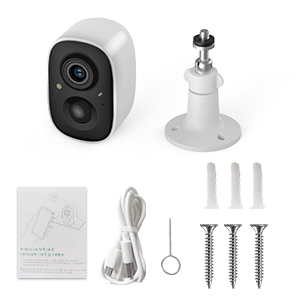
A visual guide detailing the simple setup process: downloading the VicoHome app, fully charging the device, and connecting the camera to your phone.
Cynnyrch Drosview
The Geekee CG6 is a 100% wireless, battery-powered security camera designed for both indoor and outdoor surveillance. It features 2K HD video, full-color night vision, AI motion detection, two-way audio, and an IP65 weatherproof rating.
Nodweddion Allweddol:
- Fideo 2K HD: Captures clear, high-resolution footage.
- Gweledigaeth Nos Lliw Llawn: Provides detailed color images even in low-light conditions.
- Canfod Symudiad AI: Intelligently identifies humans, pets, packages, and vehicles.
- Sgwrs Ddwyffordd: Communicate with visitors or deter intruders remotely.
- Spotlight & Siren Alarm: Active deterrence features.
- IP65 Gwrth-dywydd: Durable design for outdoor use in various weather conditions.
- Batri y gellir ei ailwefru 5200mAh: Long-lasting power for wireless operation.

A manwl view of the camera's internal battery, emphasizing its wireless operation and long-lasting power.

This image showcases the camera's versatility, suitable for monitoring both outdoor areas like driveways and indoor spaces such as living rooms.
Cyfarwyddiadau Gosod
1. Gwefru'r Camera
Before initial use, fully charge the camera using the provided USB cable. Connect the cable to the camera's charging port and a standard 5V/1A USB power adapter (not included). The indicator light will show charging status.
2. Download the VicoHome App
Chwiliwch am 'VicoHome' in the Apple App Store (for iOS devices) or Google Play Store (for Android devices) and download the application. Register for a new account or log in if you already have one.
3. Cysylltu â Wi-Fi
- Open the VicoHome app and tap 'Add Device' or the '+' icon.
- Follow the on-screen prompts to select your camera model.
- Gwnewch yn siŵr bod eich ffôn clyfar wedi'i gysylltu â Rhwydwaith Wi-Fi 2.4GHz. This camera does not support 5GHz Wi-Fi.
- The app will generate a QR code. Position your camera approximately 6-8 inches (15-20 cm) in front of your phone screen so the camera can scan the QR code.
- Once connected, the camera will indicate successful pairing, and you can name your device in the app.
4. Mowntio'r Camera
Choose a suitable location for your camera, ensuring it has a clear field of view and good Wi-Fi signal strength. Use the provided mounting bracket, screws, and wall anchors to securely attach the camera to a wall or ceiling. Adjust the camera angle as needed.

The camera is shown functioning reliably in various weather conditions, including rain and snow, confirming its IP65 weatherproof construction.
Cyfarwyddiadau Gweithredu
1. Fideo Byw Viewing
Open the VicoHome app and select your camera from the device list to view live 2K HD video. You can switch between day and night vision modes, and zoom in for more detail.

This image illustrates the superior clarity and full-color detail provided by the camera's 2K HD night vision, compared to traditional black and white infrared.
2. Sgwrs Ddwyffordd
Tra viewing foo bywtage, tap the microphone icon in the app to activate two-way audio. You can speak through the camera's built-in speaker and hear audio from the camera's microphone.
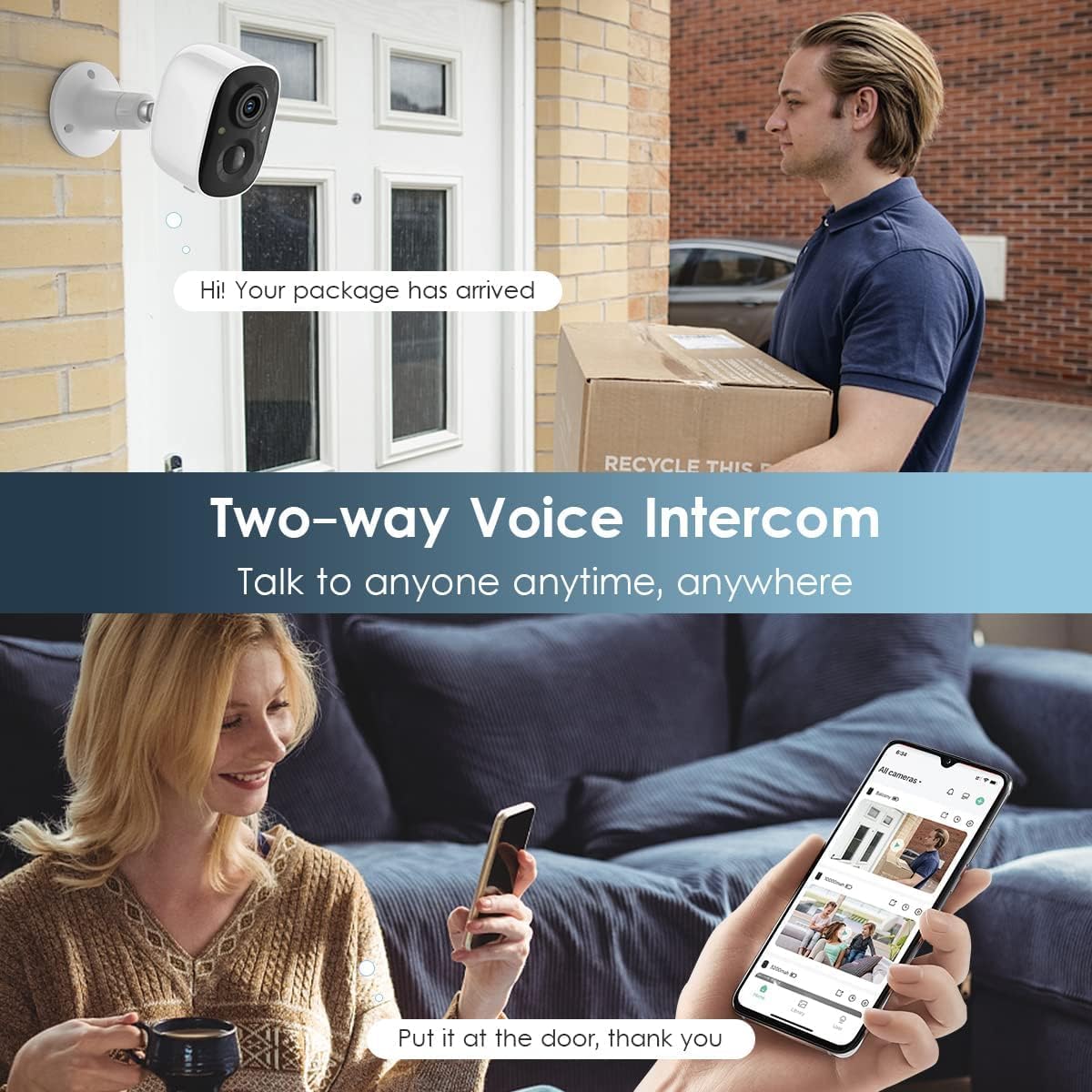
The image depicts the two-way audio function, allowing users to speak with visitors or delivery personnel remotely through the camera.
3. Canfod Symudiad a Rhybuddion
The camera features a PIR motion sensor for accurate detection. When motion is detected, you will receive instant notifications on your smartphone via the VicoHome app. You can customize the monitoring range and sensitivity settings within the app.

This graphic demonstrates how the camera detects motion, activates a flashlight, and sounds a siren to deter intruders, providing comprehensive coverage.
4. Spotlight and Siren Alarm
In response to detected motion, the camera can automatically activate its built-in spotlight and siren alarm to deter unwanted visitors. These features can also be manually triggered through the VicoHome app.
5. Opsiynau Storio
The camera supports dual storage modes:
- Storio cerdyn SD: Insert a Micro SD card (up to 128GB, not included) into the camera's SD card slot to store recorded video locally.
- Storio Cwmwl: Enjoy free rolling 3-day cloud storage for video history. Advanced cloud memory and AI recognition features are available with a subscription after a 30-day free trial.
6. AI Intelligent Recognition and Activity Zones
Utilize the VicoHome app to define custom activity zones, focusing motion detection on specific areas. The camera's AI can differentiate between humans, pets, packages, and vehicles, reducing false alerts.

This image highlights the advanced AI capabilities of the camera, which can differentiate between various objects and events for more precise alerts and playback.
Cynnal a chadw
1. Codi Tâl Batri
Monitor the battery level through the VicoHome app. When the battery is low, remove the camera and recharge it using the USB cable. Battery life varies based on usage and environmental factors.
2. Glanhau'r Lens
Periodically clean the camera lens with a soft, dry cloth to ensure optimal image clarity. Avoid using abrasive cleaners or solvents.
3. Gwrthsefyll tywydd
While the camera is IP65 weatherproof, ensure all ports and covers are securely closed to maintain its water and dust resistance, especially after charging or accessing the SD card slot.
Datrys problemau
- Camera ddim yn cysylltu â Wi-Fi: Ensure your router is broadcasting a 2.4GHz Wi-Fi signal. Check Wi-Fi signal strength at the camera's location. Restart your router and the camera.
- Ansawdd fideo gwael: Ensure the lens is clean. Check your Wi-Fi connection speed. Adjust video resolution settings in the app if necessary.
- Motion detection not working or too sensitive: Adjust PIR sensitivity settings in the VicoHome app. Define custom activity zones to reduce unwanted alerts. Ensure there are no obstructions blocking the sensor.
- Bywyd batri byr: Digwyddiadau canfod symudiadau mynych, yn fyw viewing, or use of spotlight/siren will consume more battery. Reduce sensitivity, limit live viewing, or consider a solar panel accessory (if available for your model).
- Problemau sain dwyffordd: Ensure your phone's microphone and speaker are enabled for the VicoHome app. Check camera's microphone and speaker for obstructions.
Manylebau
| Nodwedd | Manyleb |
|---|---|
| Rhif Model | CG6 |
| Datrysiad Dal Fideo | 2K |
| Datrysiad Fideo Effeithiol | 1080 picsel |
| Viewongl ing | 110 Gradd |
| Technoleg Cysylltedd | Di-wifr (Wi-Fi 2.4GHz yn unig) |
| Ffynhonnell Pwer | Wedi'i Bweru â Batri |
| Gallu Batri | Polymer Lithiwm 5200 mAh |
| Defnydd Dan Do / Awyr Agored | Dan Do, Awyr Agored |
| Sgôr Diogelu Rhyngwladol | IP65 |
| Nodweddion Arbennig | Motion Sensor, Night Vision (Full Color/Infrared), Two-Way Talk, Spotlight, Siren Alarm |
| Dyfeisiau Cydnaws | Ffôn clyfar (Android, iOS) |
| Dimensiynau (L x W x H) | 5.9 x 3.9 x 4.72 modfedd |
| Pwysau Eitem | 11.2 owns |
Gwybodaeth Gwarant
Geekee products are designed for reliability and performance. For specific warranty terms and conditions, please refer to the warranty card included with your product or visit the official Geekee websafle. Cadwch eich prawf prynu ar gyfer hawliadau gwarant.
Cefnogaeth
For technical assistance, troubleshooting, or any product-related inquiries, please contact Geekee customer support:
- E-bost: cefnogaeth@getgeekee.com
- Our support team aims to reply within 24 hours.

Details about the available technical support, emphasizing professional assistance and a direct email contact for inquiries.
Ask a question about this manual
Ask about setup, troubleshooting, compatibility, parts, safety, or missing instructions. Manuals+ will review the question and use this page’s manual context to help answer it.