
javiscam B7
javiscam Wireless Indoor Security Camera User Manual
Model: B7
Brand: javiscam
1. Cynnyrch Drosview
The javiscam Wireless Indoor Security Camera (Model B7) is a compact and versatile device designed for indoor surveillance. It features 2K enhanced clarity, 1080p effective resolution, AI motion detection, night vision, and flexible storage options, providing comprehensive monitoring for your home or office.

Image: The javiscam B7 camera, showcasing its compact size when held in hand. A smartphone screen displays a live feed, demonstrating its monitoring capabilities. Another camera unit with a stand is also visible, indicating mounting options.
Nodweddion Allweddol:
- 2K Enhanced Clarity & 1080p Effective Resolution: Provides clear and detailed video streaming.
- Gweledigaeth Nos Uwch: Yn sicrhau gwelededd mewn amodau golau isel.
- Canfod Symudiad AI: Intelligent alerts for detected movement.
- Lens Ongl Eang 150°: Offers a broad field of view ar gyfer sylw cynhwysfawr.
- Cloud & SD Card Storage: Supports up to 128GB SD card for local storage and cloud storage options.
- Long Standby Battery Life: Up to 100 days standby with a 2800mAh rechargeable battery.
- Cysylltedd Di-wifr: Connects via 2.4G Wi-Fi (does not support 5G Wi-Fi).

Image: A detailed diagram illustrating the multifunctionality of the javiscam B7 camera, highlighting features such as 2K resolution, 12 Megapixel image capture, night vision, motion detection, a 150-degree wide-angle lens, the ability to record while charging, loop recording, and support for up to 128GB storage.
2. Dechrau Arni: Gosod
2.1 Beth sydd yn y Bocs
- javiscam B7 Camera Body (1 unit)
- Charging Cable (not explicitly listed but implied for battery)
- Mounting Accessories (implied by "Wall Mount" and images)
- Llawlyfr Defnyddiwr (y ddogfen hon)
2.2 Gwefru'r Camera
Before initial use, fully charge the camera. The camera is equipped with a 2800mAh rechargeable Lithium Polymer battery. Connect the camera to a power source using the provided charging cable. A full charge ensures optimal performance and standby time of up to 100 days.

Image: The javiscam B7 camera positioned near a large 2800mAh battery, visually representing its extended battery life and low power consumption technology.
2.3 Gosod Ap a Chreu Cyfrif
To operate the camera and access its features, you need to download the dedicated mobile application. The app is compatible with Android smartphones.
- Chwiliwch am the "javiscam" app (or specified app name in product packaging) on your smartphone's app store (Google Play Store for Android).
- Dadlwythwch a gosodwch y cais.
- Agorwch yr ap a dilynwch y cyfarwyddiadau ar y sgrin i greu cyfrif newydd neu fewngofnodwch os oes gennych chi un eisoes.
2.4 Cysylltu â Wi-Fi
The javiscam B7 camera connects to your home network via 2.4G Wi-Fi. Please note that it does not support 5G Wi-Fi networks.
- Sicrhewch fod eich ffôn clyfar wedi'i gysylltu â rhwydwaith Wi-Fi 2.4G.
- Open the javiscam app and select "Add Device" or similar option.
- Follow the in-app instructions to pair the camera with your Wi-Fi network. This typically involves scanning a QR code generated by the app with the camera, or entering your Wi-Fi credentials.
- Once connected, the camera's indicator light will change, and you will receive a confirmation in the app.

Image: A visual representation of the app and Wi-Fi connection process, showing users interacting with the javiscam app on a smartphone to access live streaming and real-time motion alerts.
2.5 Mowntio'r Camera
The camera is designed for indoor use and can be wall-mounted or placed on a flat surface. Its compact dimensions (1.5 x 2 x 1.5 inches) allow for discreet placement.
- Mount Mount: Use the provided mounting accessories to securely attach the camera to a wall or ceiling. Ensure the camera has a clear line of sight to the area you wish to monitor.
- Lleoliad Arwyneb: The camera can also be placed on shelves, desks, or other flat surfaces.

Image: Various indoor mounting scenarios for the javiscam B7 camera, including ceiling, shelf, and wall placements, demonstrating its versatility. The image also reiterates support for 2.4G Wi-Fi and non-support for 5G Wi-Fi.
3. Gweithredu'r Camera
3.1 Byw View a Monitro
Once connected, you can access the live video feed from your camera anytime, anywhere, through the javiscam app. The camera provides 2K enhanced clarity for detailed viewing.
- Open the javiscam app on your smartphone.
- Select your camera from the device list to view y llif byw.
- You can pan, tilt, and zoom (digital) within the app to adjust your view, though the camera itself has a fixed 150° wide-angle lens.
3.2 Canfod Symudiad a Rhybuddion
The camera features intelligent AI motion detection with a PIR sensor for human detection, providing 24-hour protection. When motion is detected, the camera can automatically record video and send alerts to your app.
- Galluogi Canfod Symudiad: Navigate to the camera settings within the app and ensure motion detection is enabled.
- Addasu Sensitifrwydd: You can typically adjust the motion detection sensitivity to minimize false alarms.
- Derbyn Rhybuddion: When motion is detected, you will receive a push notification on your smartphone.
- Review Recordiadau: Detected motion events are recorded and can be reviewed in the app's playback section.
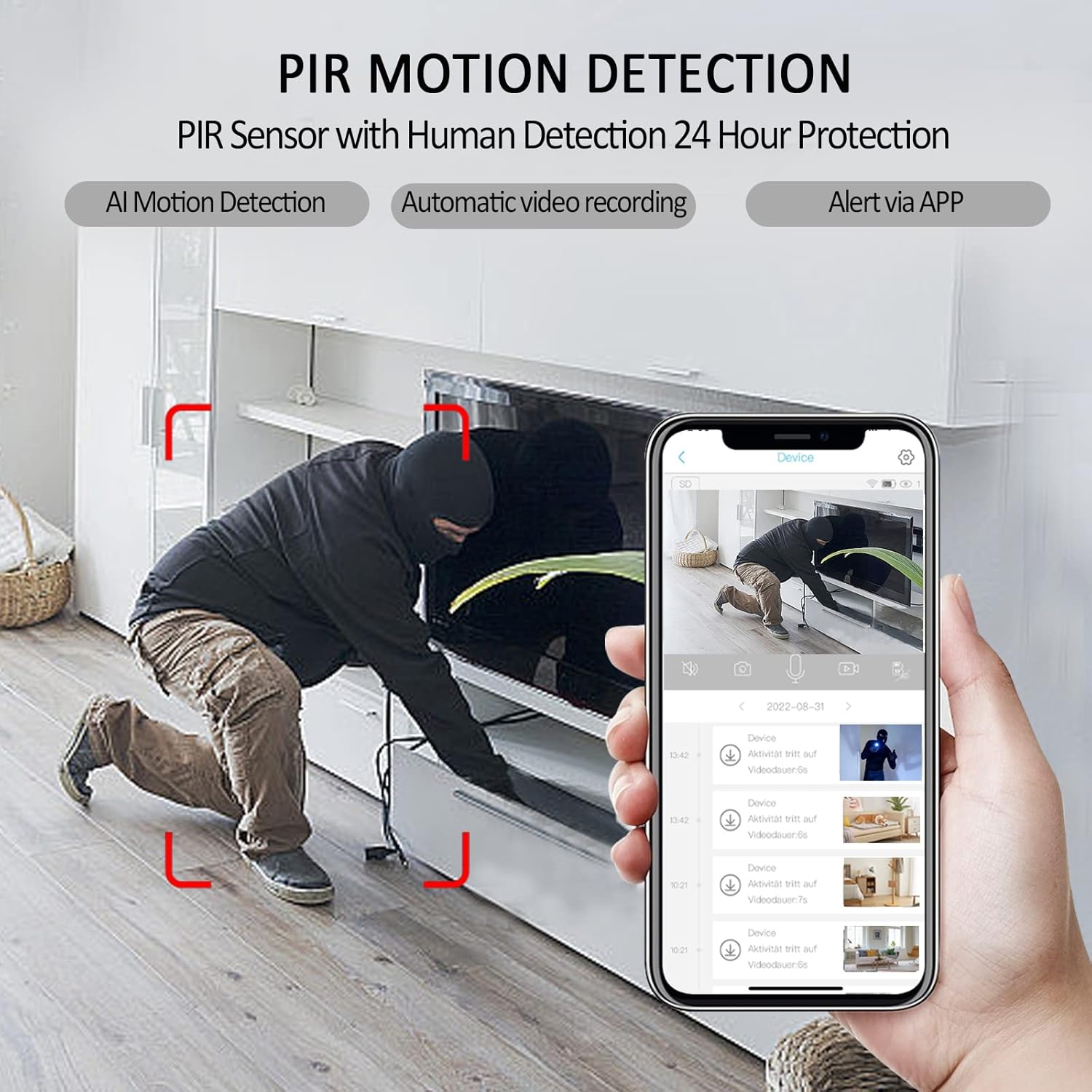
Image: A smartphone displaying the javiscam app interface, illustrating how PIR motion detection works with human detection. The image shows a person in a room with red boxes indicating detected motion, alongside a list of video recordings triggered by alerts.
3.3 Gweledigaeth Nos
The camera is equipped with advanced night vision technology, allowing it to capture clear video even in complete darkness. The night vision mode activates automatically in low-light conditions.
3.4 Recordio a Storio Fideo
The javiscam B7 camera supports both local storage via an SD card and cloud storage options.
- Storio cerdyn SD: Insert a microSD card (up to 128GB, not included) into the camera's designated slot. The camera supports loop recording, meaning older footage will be overwritten when the card is full. Video is recorded in AVI format at 1080 pixels effective resolution and 30 frames per second.
- Storio Cwmwl: Refer to the app for available cloud storage plans and subscription details. Cloud storage provides off-site backup of your recordings.
- Record While Charging: The camera can continue to record video even while it is connected to a power source and charging.
3.5 Camera Sharing
You can share access to your camera's live feed and recordings with other users through the app, allowing multiple family members or authorized individuals to monitor the same location simultaneously.
- In the app, navigate to the camera settings and look for a "Share Device" or "User Management" option.
- Follow the instructions to invite other users, typically by entering their account ID or scanning a QR code.
- Bydd defnyddwyr a rennir yn gallu view the camera feed and access certain features based on the permissions you grant.
4. cynnal
4.1 Glanhau'r Camera
To ensure optimal performance and image clarity, periodically clean the camera lens and body.
- Use a soft, dry, lint-free cloth to wipe the camera body.
- For the lens, use a lens cleaning cloth or a microfiber cloth specifically designed for optics. Avoid abrasive materials or harsh chemicals.
- Gwnewch yn siŵr bod y camera wedi'i ddiffodd cyn ei lanhau.
4.2 Gofal Batri
The camera's built-in Lithium Polymer battery is designed for long life. To maximize battery longevity:
- Avoid exposing the camera to extreme temperatures (very hot or very cold).
- If storing the camera for an extended period, charge it to about 50% before storage.
- Defnyddiwch y cebl gwefru a'r addasydd pŵer a argymhellir yn unig.
5. Datrys Problemau
Problemau ac Atebion Cyffredin:
| Problem | Achos Posibl | Ateb |
|---|---|---|
| Ni fydd y camera yn troi ymlaen. | Low battery or faulty charging cable. | Ensure the camera is fully charged. Try a different charging cable and power adapter. |
| Methu cysylltu â Wi-Fi. | Incorrect Wi-Fi password, 5G Wi-Fi network, or camera too far from router. | Verify Wi-Fi password. Ensure you are connecting to a 2.4G Wi-Fi network. Move the camera closer to the router. Reset the camera and try pairing again. |
| No motion detection alerts. | Motion detection disabled, sensitivity too low, or app notifications blocked. | Check app settings to ensure motion detection is enabled and sensitivity is appropriate. Verify app notification permissions on your smartphone. |
| Ansawdd fideo gwael. | Dirty lens, poor Wi-Fi signal, or low light conditions. | Clean the camera lens. Ensure strong Wi-Fi signal. Night vision should activate automatically in low light. |
| SD card not recording. | SD card full, corrupted, or not inserted correctly. | Check SD card status in the app. Format the SD card (this will erase data). Reinsert the SD card. Ensure it's a compatible card (up to 128GB). |
6. manylebau
| Nodwedd | Manylyn |
|---|---|
| Rhif Model | B7 |
| Brand | javiscam |
| Defnydd Dan Do / Awyr Agored | Indoor (Note: IP65 rating indicates some dust and water resistance, but primarily designed for indoor environments.) |
| Technoleg Cysylltedd | Diwifr (Wi-Fi) |
| Amlder Wi-Fi | 2.4G Wi-Fi (Does not support 5G Wi-Fi) |
| Ffynhonnell Pwer | Wedi'i Bweru â Batri (1 batri Polymer Lithiwm wedi'i gynnwys) |
| Gallu Batri | 2800mAh (approximate, based on image) |
| Bywyd Batri Wrth Gefn | Hyd at 100 Diwrnod |
| Datrysiad Dal Fideo | 1080p (Effective Pixels), 2K Enhanced Clarity |
| Cyfradd Ffrâm | 30 fps |
| Fformat Dal Fideo | AVI |
| Maes Of View | 150 Gradd |
| Gweledigaeth y Nos | Yes (Low light technology: Night Color) |
| Canfod Cynnig | AI Motion Detection, PIR Sensor with Human Detection (Alert Type: Motion Only) |
| Opsiynau Storio | Cloud Storage, MicroSD Card (up to 128GB Flash Memory Installed Size) |
| Dyfeisiau Cydnaws | Smartphone (Controller Type: Android) |
| Math Mowntio | Wal Mount |
| Dimensiynau (L x W x H) | 1.5 x 2 x 1.5 modfedd |
| Pwysau Eitem | 7.4 owns |
| Lliw | Du |
| Cydrannau wedi'u Cynnwys | Corff camera |
| Sgôr Diogelu Rhyngwladol | IP65 |
| UPC | 607535889003 |
7. Gwarant a Chefnogaeth
7.1 Gwybodaeth Gwarant
Specific warranty details for the javiscam B7 camera are not provided in this manual. Please refer to the product packaging, the official javiscam websafle, neu'ch man prynu am delerau ac amodau gwarant cynhwysfawr.
7.2 Cefnogaeth i Gwsmeriaid
For technical assistance, troubleshooting, or any inquiries regarding your javiscam B7 camera, please contact javiscam customer support through their official channels. You may find contact information on the javiscam brand store on Amazon or their official websafle.
Visit the javiscam Store: https://www.amazon.com/stores/Javiscam/page/1636DFA1-B903-4A72-86FD-5075537A55E2
Ask a question about this manual
Ask about setup, troubleshooting, compatibility, parts, safety, or missing instructions. Manuals+ will review the question and use this page’s manual context to help answer it.