
Rhagymadrodd
Thank you for choosing the ARROWMAX SDS MINI PLUS Mini Electric Drill with Benchtop Drill Press. This precision tool is designed for intricate drilling tasks in various materials, offering portability and ease of use. This manual provides essential information for the safe and efficient operation and maintenance of your new device.
Nodweddion Allweddol:
- Pocket Size & Precise Power: Compact design with a 350mAh LiPo battery and 550r/min rotate speed for powerful and efficient performance.
- Industrial-grade Benchtop Drill Press: Made of precisely machined aviation aluminum alloy for high accuracy and stability.
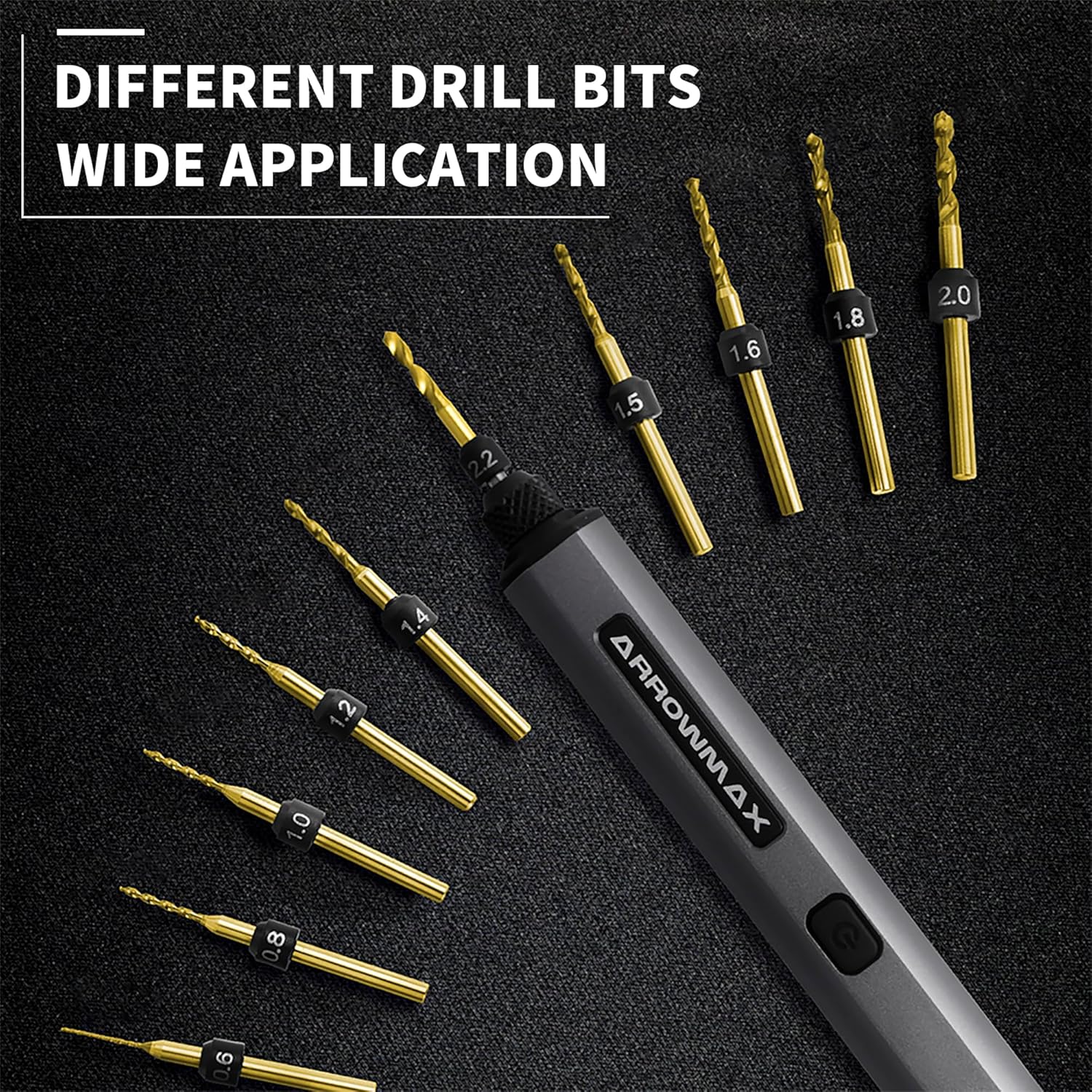
- 10 Size-Marked HSS Drill Bits: Includes 10 different bits (0.6mm to 2.2mm with 2.35mm diameter shaft) suitable for plastic, shell, wood, leather, and more. Easy to change with a keyless chuck.
- 4 Shadow-less LED Lights & Indicators: Illuminates the work area and provides battery status.
- One-Key Operation: Simple control for clockwise, counter-clockwise rotation, and power off.
Gwybodaeth Diogelwch
Always follow basic safety precautions when using this product to reduce the risk of fire, electric shock, or personal injury. Read all instructions carefully before use.
- Wear appropriate safety glasses to protect your eyes from debris.
- Sicrhewch fod y darn gwaith yn ddiogel clamped or held to prevent movement during drilling.
- Cadwch ddwylo a dillad rhydd i ffwrdd o rannau sy'n cylchdroi.
- Do not force the drill; let the tool do the work.
- Cadwch yr ardal waith yn lân ac wedi'i goleuo'n dda.
- Store the tool and accessories in a dry, secure place away from children.
Cynnwys Pecyn
Gwiriwch fod yr holl eitemau yn bresennol wrth agor y pecyn:
- ARROWMAX SDS MINI PLUS Mini Electric Drill
- Gwasg Benchtop Drill
- 10 HSS Drill Bits (0.6mm to 2.2mm)
- Cebl Codi Tâl USB-C
- Llawlyfr Cyfarwyddiadau
- Allen Key and extra screws for assembly
Cynnyrch Drosview
Familiarize yourself with the components of your ARROWMAX SDS MINI PLUS.


Gosod
1. Charging the Electric Drill
Before first use, fully charge the electric drill. The drill supports USB-A to USB-C charging. The LED indicators will show the charging status.
- Connect the provided USB-C cable to the drill's charging port.
- Connect the other end to a compatible USB-A power source.
- The LED indicators will illuminate to show charging progress.
- Press the button while charging to check the current charging status.
2. Attaching Drill Bits
The SDS MINI PLUS features a keyless chuck for easy bit changes.
- Twist the chuck counter-clockwise to loosen it.
- Insert the desired drill bit (0.6mm to 2.2mm, 2.35mm shaft diameter) into the chuck.
- Twist the chuck clockwise to tighten and secure the drill bit.
3. Assembling the Benchtop Drill Press
The benchtop drill press provides enhanced precision for your drilling tasks.
- Attach the main frame of the drill press to the base using the provided screws and Allen key.
- Slide the electric drill into the holder on the press. Secure it with the side screw.
- Ensure the drill is firmly seated and aligned.
Cyfarwyddiadau Gweithredu
1. Power On/Off and Direction Control
The drill features a single button for all operations:
- Wasg Cyntaf: Activates clockwise rotation.
- Ail Wasg: Activates counter-clockwise rotation.
- Trydydd Wasg: Turns the drill off.
You do not need to continuously press the button during operation.
2. Drilling with the Electric Drill
For handheld use:
- Hold the drill firmly and position the drill bit over the desired spot.
- Press the button to start drilling in the desired direction.
- The 4 shadow-less LED lights will illuminate the work area for better visibility.
For use with the Benchtop Drill Press:
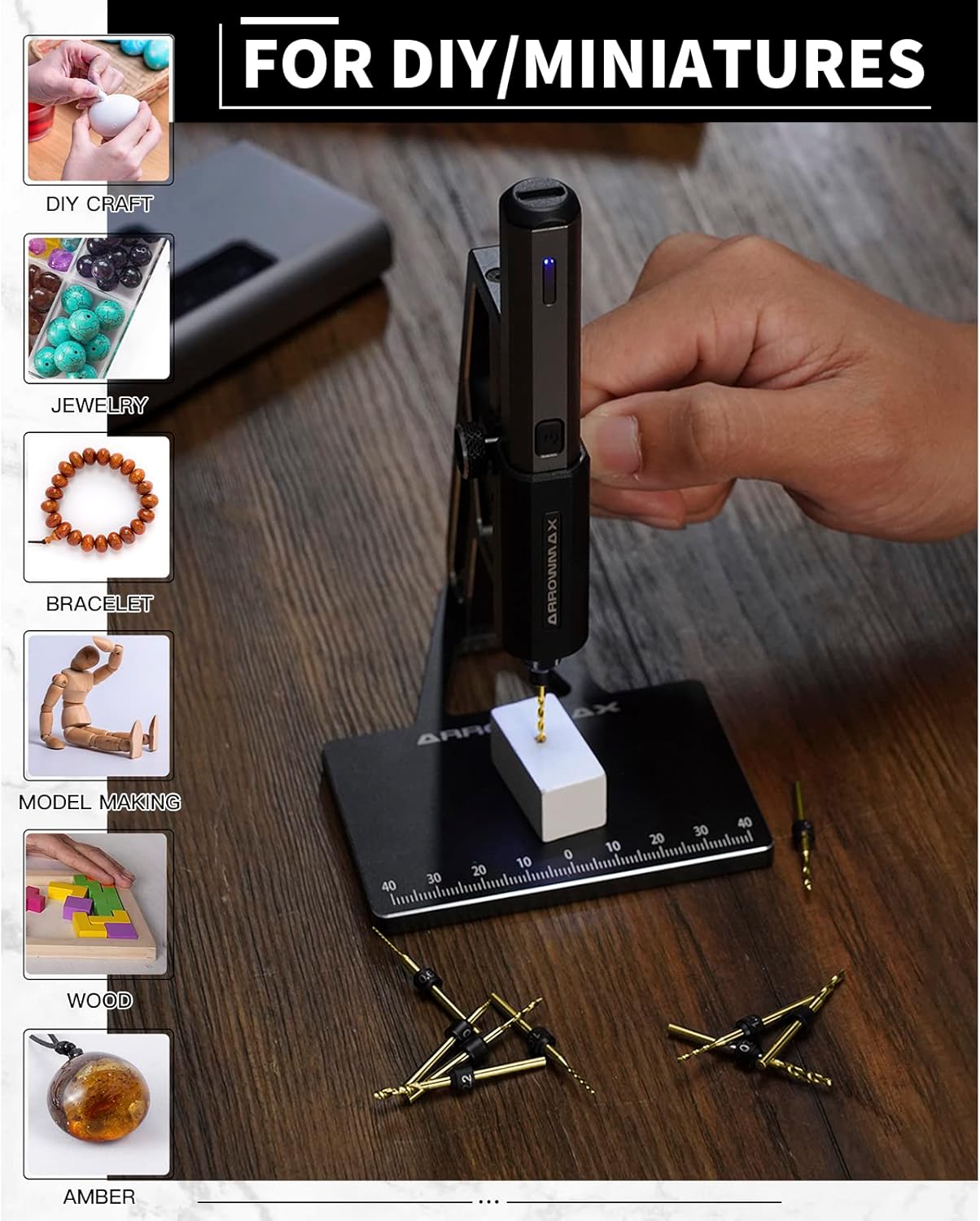
- Place the workpiece on the base of the drill press. The base has measurements for precise positioning.
- Adjust the workpiece to align with the drill bit.
- Press the drill's button to start rotation.
- Use the lever on the side of the press to gently lower the drill bit into the material. The spring mechanism assists in smooth operation.

Cynnal a chadw
1. Gofal Cyffredinol a Glanhau
- Wipe the drill and drill press with a clean, dry cloth after each use to remove dust and debris.
- Peidiwch â defnyddio cemegolion llym na glanhawyr sgraffiniol.
- Keep the drill bits clean and sharp for optimal performance.
2. Cynnal a Chadw Batri
- To ensure the best user experience, fully charge the drill before first use.
- Always ensure the electric drill is fully charged before storing it for extended periods.
- Osgowch ddraenio'r batri'n llwyr yn aml er mwyn ymestyn ei oes.
3. Drill Bit Storage
The included aluminum case features magnetic holders to keep the drill bits securely in place, preventing loss and damage.
Datrys problemau
1. Drill Bit Not Lining Up with Benchtop Press Hole
If the drill bit does not align perfectly with the hole in the benchtop press base, check the assembly of the press. Ensure all screws are tightened correctly and the drill is seated properly in its holder. If the issue persists, it may indicate a manufacturing variation; contact customer support for assistance.
2. Drill Not Charging
Ensure you are using a USB-A to USB-C charging cable. The drill does not support USB-C PD chargers. Verify the cable and power source are functioning correctly.
3. Lack of Power or Precision
The ARROWMAX SDS MINI PLUS is designed for precision work on small materials. It is not intended for heavy-duty drilling tasks. Ensure the drill bit is sharp and appropriate for the material being drilled. For optimal precision, use the benchtop drill press.
Manylebau
| Nodwedd | Manyleb |
|---|---|
| Brand | ARROWMAX |
| Rhif Model | AM-199972 |
| Ffynhonnell Pwer | Wedi'i Bweru â Batri |
| Math Batri | 1 Polymer Lithiwm (wedi'i gynnwys) |
| Gallu Batri | 350 Miliamp Oriau |
| Cyftage | 4 folt |
| Ampdileu | 2 Amps |
| Cyflymder Cylchdro Uchaf | 550 RPM |
| Maint Chuck Uchaf | 0.09 modfedd (2.35mm) |
| Capasiti Drilio (Pren) | 0.09 modfedd |
| Deunydd | Metal (Aviation Aluminum Alloy for Press) |
| Pwysau Eitem | 4.6 owns (130 gram) |
| Dimensiynau Cynnyrch | 10.75"H x 4.75"L x 2.03"U |
| Nodwedd Arbennig | Reverse Rotation, LED Lights |
Gwarant a Chefnogaeth
For warranty information, technical support, or any inquiries regarding your ARROWMAX SDS MINI PLUS, please refer to the contact details provided in your product packaging or visit the official ARROWMAX website. Our customer service team is available to assist you with any issues or questions you may have.