1. Rhagymadrodd
The innomaker Industrial USB 2.0 to RS485 Converter Adapter is designed for reliable and robust serial communication in demanding environments. Featuring an FTDI chipset, this adapter provides signal and power isolation, along with ESD protection, ensuring stable data transfer between your computer and RS485 devices. It is compatible with a wide range of operating systems and hardware platforms, making it suitable for various industrial and embedded applications.
2. Nodweddion Cynnyrch
- Cydnawsedd Uchel: Supports Windows XP/7/8/10/11, Mac OS, Linux 3.2 and greater, Ubuntu 11.10 and greater, and Android systems. Compatible with Raspberry Pi, Jetson Nano, ARM Boards, PLCs, notebooks, and all computers.
- Plug and Play USB Device: USB 2.0 full-speed compatible. Supports RS485 data transfer rates from 300 bps to 3 Mbps.
- Excellent Chipset: Integrates an FTDI FT230X chip and a semi-duplex enhanced RS485 isolated transceiver for reliable performance.
- Dylunio Diwydiannol: Features isolated power supply and isolation signal design. Provides Bus-Pin ESD protection up to 15kV (HBM) and greater than 25kV/us CMTI.
- Ffurfweddiad Hyblyg: Includes a 120 Ohm resistor jumper for selectable termination. Designed with 1/8 unit load, supporting up to 256 nodes on a bus.

Figure 2.1: Internal components of the converter, showing the FTDI FT230X chip and isolated RS485 transceiver.
3. Cynnwys Pecyn
Gwiriwch fod yr holl eitemau yn bresennol yn eich pecyn:
- 1x innomaker Industrial USB 2.0 to RS485 Converter Adapter
- 1x Terminal Block (for RS485 wiring)
- 1x Driver CD (drivers also available online)
4. Canllaw Gosod
4.1. Gosod Gyrwyr
The innomaker USB to RS485 converter utilizes an FTDI chipset. Most modern operating systems, including Windows 10/11, macOS, and recent Linux distributions, will automatically detect and install the necessary drivers upon connecting the device. If automatic installation does not occur, or if you are using an older operating system, drivers can be manually installed:
- Insert the provided driver CD into your computer's optical drive.
- Alternatively, download the latest FTDI VCP (Virtual COM Port) drivers directly from the official FTDI websafle (www.ftdichip.com/Drivers/VCP.htm).
- Dilynwch y cyfarwyddiadau ar y sgrin i gwblhau gosod y gyrrwr.
- After installation, connect the USB adapter to your computer. The device should appear as a new COM port in your system's Device Manager (Windows) or equivalent system information utility (macOS/Linux).
4.2. Cysylltiad Caledwedd
Connect the converter to your computer and RS485 device as follows:
- Connect the USB end of the adapter to an available USB 2.0 port on your computer.
- Identify the RS485 terminal block. This block typically has screw terminals for Signal A, Signal B, and Ground (GND).
- Connect your RS485 device's A, B, and GND lines to the corresponding terminals on the converter's terminal block. Ensure correct polarity (A to A, B to B).

Figure 4.1: USB to RS485 converter with detachable terminal block.
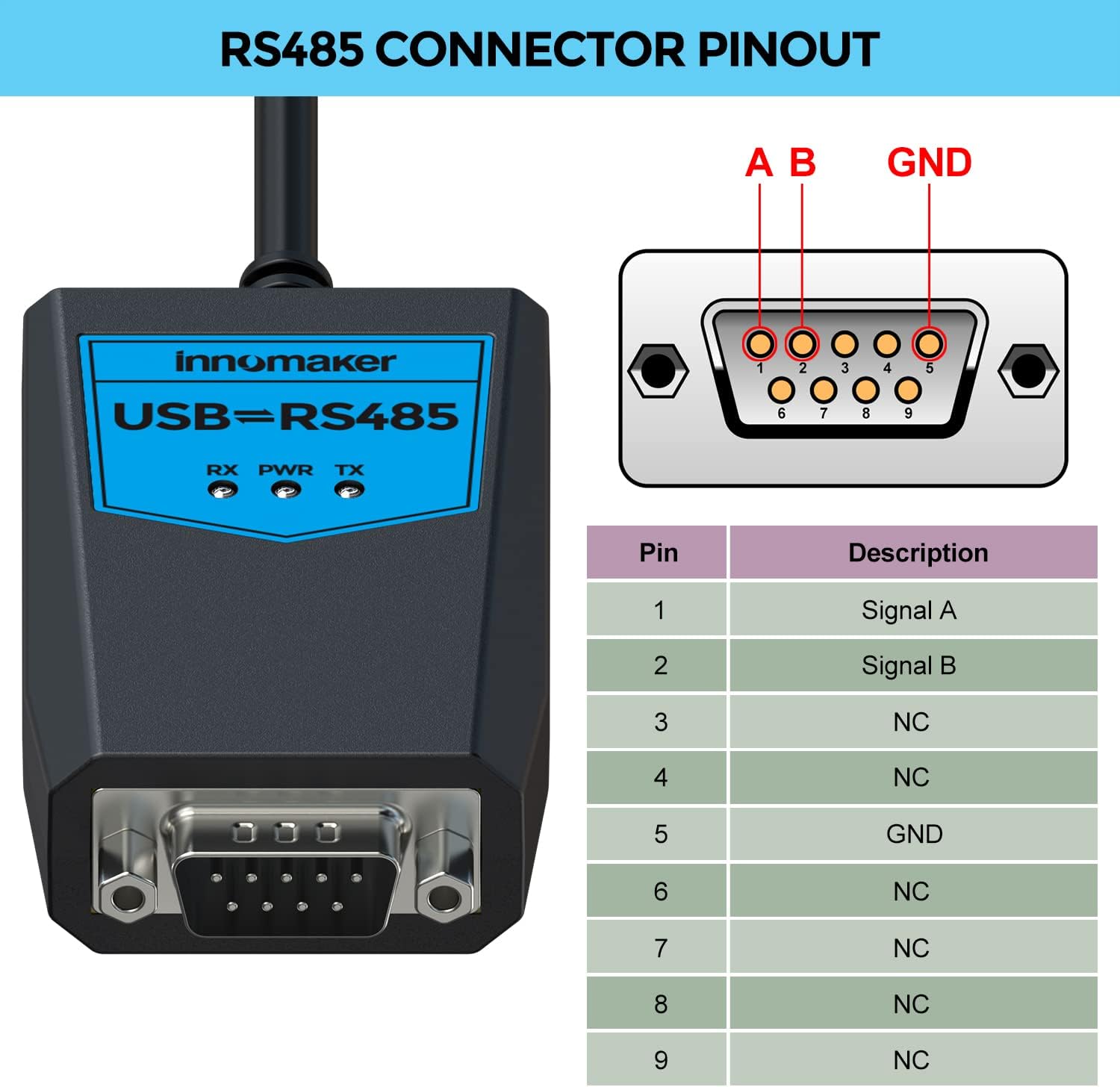
Figure 4.2: RS485 Connector Pinout Diagram.
4.3. Termination Resistor
The adapter includes a selectable 120 Ohm termination resistor. For optimal signal integrity in RS485 networks, especially over longer distances or at higher baud rates, termination resistors are often required at both ends of the bus. Consult your RS485 network documentation to determine if termination is needed and how to enable it on the adapter via the jumper setting.
5. Cyfarwyddiadau Gweithredu
Once the drivers are installed and the hardware is connected, the converter will function as a standard serial COM port on your computer. You can interact with your RS485 device using any serial communication software (e.g., PuTTY, RealTerm, custom applications).
- Nodwch Borthladd COM: Check your system's Device Manager (Windows) or equivalent to find the assigned COM port number for the FTDI USB Serial Port.
- Ffurfweddu Meddalwedd: In your serial communication software, select the identified COM port and configure the communication parameters (baud rate, data bits, parity, stop bits) to match those of your RS485 device.
- Dangosyddion LED: The adapter features LED indicators for Power (PWR), Transmit (TX), and Receive (RX). These LEDs provide visual feedback on the device's status and data activity.
6. Cydweddoldeb
This adapter offers broad compatibility with various operating systems and hardware platforms:
- Systemau Gweithredu: Windows XP, Windows 7, Windows 8, Windows 10, Windows 11, Mac OS, Linux (kernel 3.2 and greater), Ubuntu (11.10 and greater), Android.
- Hardware Platforms: Raspberry Pi, Jetson Nano, ARM Boards, Programmable Logic Controllers (PLCs), Notebooks, Desktop Computers.

Figure 6.1: Wide Operating System Compatibility.

Figure 6.2: Wide Application Scenarios.
7. Manylebau Technegol
| Nodwedd | Manyleb |
|---|---|
| Connector Type (RS485) | D-SUB, 9 pins |
| Connector Type (USB) | USB 2.0 Full-Speed, Micro USB |
| Cyfradd Data | 300 bps i 3 Mbps |
| Bus-Pin ESD Protection | 15kV (HBM) |
| Nodes Supported | Up to 256 nodes on a bus |
| Terfynu | 120 Ohm resistor jumper selectable |
| Tymheredd Gwaith | -40 ° C i 85 ° C |
| Lleithder Cymharol | 15-90%, nad yw'n cyddwyso |
| PCBA Size (L*W*H) | 56.50mm * 31.20mm * 14.20mm |
| Pwysau | 15.5 g |

Figure 7.1: Technical Specification Table.
8. cynnal
To ensure the longevity and optimal performance of your innomaker USB to RS485 Converter Adapter, please follow these maintenance guidelines:
- Glanhau: Use a soft, dry cloth to clean the exterior of the adapter. Avoid using liquid cleaners or solvents, which can damage the device.
- Storio: Storiwch yr addasydd mewn lle oer, sych i ffwrdd o olau haul uniongyrchol a thymheredd eithafol.
- Trin: Handle the device with care. Avoid dropping it or subjecting it to strong impacts. Do not pull on the cable to disconnect it; always grasp the USB connector.
- Amodau Amgylcheddol: Operate the device within the specified temperature and humidity ranges to prevent damage.
9. Datrys Problemau
If you encounter issues with your innomaker USB to RS485 Converter Adapter, refer to the following troubleshooting steps:
9.1. Device Not Recognized by Computer
- Gwiriwch Cysylltiad USB: Ensure the USB cable is securely connected to both the adapter and your computer. Try a different USB port.
- Gosod Gyrrwr: Verify that the FTDI drivers are correctly installed. Check your system's Device Manager (Windows) or equivalent for any unknown devices or driver errors. Reinstall drivers if necessary, following the steps in Section 4.1.
- Try Another Computer: Test the adapter on a different computer to rule out computer-specific issues.
9.2. Communication Errors with RS485 Device
- Gwiriad Gwifrau: Double-check the RS485 wiring (A, B, GND) between the adapter and your device for correct polarity and secure connections.
- Paramedrau Cyfathrebu: Ensure that the baud rate, data bits, parity, and stop bits configured in your serial communication software exactly match those of your RS485 device.
- Gwrthydd Terfynu: Verify the 120 Ohm termination resistor setting. Incorrect termination can cause signal reflections and communication failures.
- RS485 Device Functionality: Confirm that your RS485 device is powered on and functioning correctly independently of the converter.
- Dangosyddion LED: Observe the TX and RX LEDs on the adapter. If they are not flashing during data transmission/reception, it indicates a lack of communication.
9.3. Power LED Not Lighting Up
- Pŵer USB: Ensure the USB port on your computer is providing power. Try a different USB port or a powered USB hub.
- Uniondeb Cebl: Inspect the USB cable for any visible damage.
10. Gwarant a Chefnogaeth
innomaker products are manufactured to high-quality standards and are covered by a manufacturer's warranty against defects in materials and workmanship. For specific warranty terms and conditions, please refer to the documentation included with your purchase or visit the official innomaker websafle.
For technical support, troubleshooting assistance beyond this manual, or warranty claims, please contact innomaker customer service through their official channels. Provide your product model number (ISOLATEDFT232RL-485-2) and a detailed description of the issue to facilitate a quicker resolution.