
SteelSeries 61631
SteelSeries Arctis Nova 3 Multi-Platform Gaming Headset
Llawlyfr Cyfarwyddiadau
1. Rhagymadrodd
This manual provides comprehensive instructions for the setup, operation, maintenance, and troubleshooting of your SteelSeries Arctis Nova 3 Multi-Platform Gaming Headset. Please read this manual thoroughly before using the product to ensure optimal performance and longevity.
The Arctis Nova 3 headset features the custom-designed Nova Acoustic System with High Fidelity Drivers, 360° Spatial Audio, and a 10-band Parametric EQ. It includes an AI-powered noise-cancelling ClearCast Gen 2 microphone and dynamic RGB lighting. Designed for multi-platform compatibility, it connects via USB-C to PC, PlayStation, Xbox Series X|S, Switch, and mobile devices.
2. Cynnyrch Drosview
2.1 Cynnwys Pecyn
- Clustffon Hapchwarae SteelSeries Arctis Nova 3
- Cebl USB-C i USB-C
- Cebl Addasydd USB-C i USB-A
- Cebl Sain USB-C i 3.5mm
- Dogfennaeth (y llawlyfr hwn)
2.2 Cydrannau Clustffonau
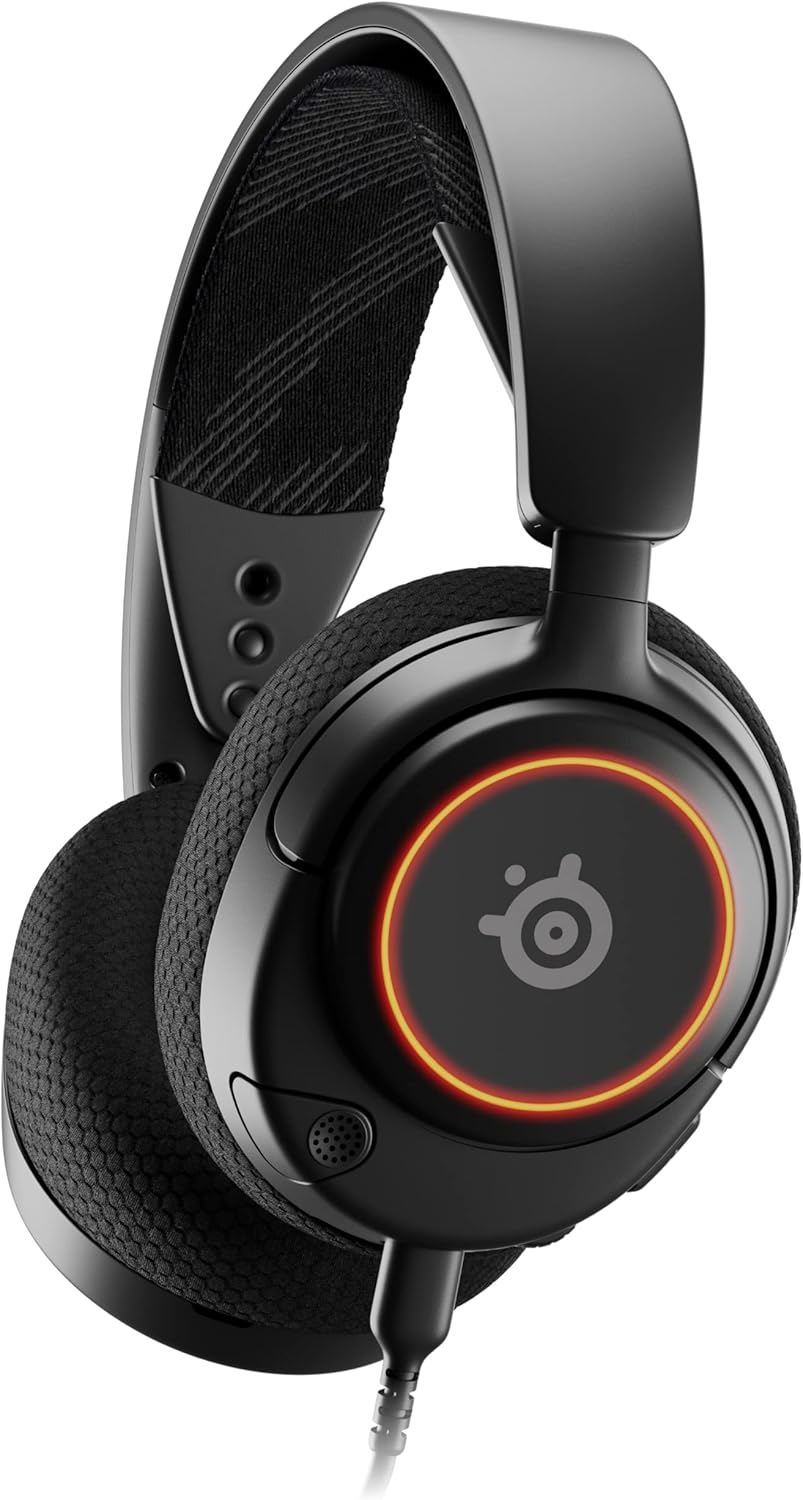
Ffigur 1: Blaen view of the Arctis Nova 3 headset.

Ffigur 2: Key features of the Arctis Nova 3, including ComfortMAX System, 360° Spatial Audio, Dual-Zone RGB, Nova Acoustic System, ClearCast Gen 2 AI-Powered Noise-Cancelling Mic, and Multi-Platform Support.
- System ComfortMAX: Features height-adjusting, rotating earcups with AirWeave Memory Foam cushions and a stretchy band for comfortable wear.
- ClearCast Gen 2 Mic: AI-powered noise-cancelling microphone, fully retractable into the earcup.
- Dual-Zone RGB Lighting: Customizable 16.8 million color options on the earcups.
- Nova Acoustic System: Custom-designed with High Fidelity Drivers for superior sound.
- Rheolaethau: Volume wheel and microphone mute switch located on the earcup.
- Connectivity Port: USB-C port for various cable connections.
3. Gosod
3.1 Cysylltu'r Clustffonau
The Arctis Nova 3 offers versatile connectivity options:
- Cysylltiad USB-C: Use the provided USB-C to USB-C cable to connect directly to devices with a USB-C port (e.g., PC, PlayStation 5, Nintendo Switch, mobile devices).
- Cysylltiad USB-A: For devices with only USB-A ports, use the USB-C to USB-A adapter cable. Connect the USB-C end to the headset and the USB-A end to your device.
- Cysylltiad Sain 3.5mm: For devices requiring a 3.5mm audio jack (e.g., Xbox controllers, older consoles, some mobile devices), use the USB-C to 3.5mm audio cable. Connect the USB-C end to the headset and the 3.5mm jack to your device.
Fideo 1: Cynnyrch Drosview demonstrating various connectivity options and features of the Arctis Nova 3 headset.
Fideo 2: Tro 360 gradd view of the Arctis Nova 3 Black headset, showcasinei ddyluniad a'i nodweddion o bob ongl.
3.2 Addasu'r Ffit
The ComfortMAX System allows for personalized fit:
- Addasiad Band Pen: The elastic suspension band can be adjusted to different lengths using the three holes on each side of the headband, ensuring a comfortable fit that distributes weight evenly.
- Cylchdroi Clustffonau: The earcups can rotate 90 degrees, allowing the headset to lay flat for storage or comfortable resting around the neck.

Ffigur 3: The adjustable headband and rotating earcups of the Arctis Nova 3 for a personalized and comfortable fit.

Ffigur 4: The super lightweight design (253g) of the Arctis Nova 3 with memory foam earcup cushions for extended comfort.
4. Cyfarwyddiadau Gweithredu
4.1 Rheolyddion Sain
- Olwyn Gyfrol: Rotate the wheel on the left earcup up or down to adjust the headset's audio volume.
- Switsh Tewi meicroffon: Slide the switch on the left earcup to mute or unmute the ClearCast Gen 2 microphone. An orange indicator will be visible when muted.
4.2 Defnyddio Meicroffon
- Ymestyn/Tynnu'n ôl: The ClearCast Gen 2 microphone is fully retractable. Gently pull it out from the left earcup for use and push it back in for storage.
- Lleoliad: Position the microphone approximately 1-2 inches from your mouth for optimal voice clarity.

Ffigur 5: The ClearCast Gen 2 mic, which silences background noise and fully retracts into the earcup.
4.3 RGB Lighting Customization (PC Only)
Dynamic RGB lighting can be customized via the SteelSeries Engine software on PC. This allows for 16.8 million color options and reactive lighting effects.

Ffigur 6: Customizable PrismSync RGB lighting with 16.8 million colors on the Arctis Nova 3 headset.
5. cynnal
- Glanhau: Defnyddiwch frethyn meddal, sych i lanhau'r clustffonau. Osgowch lanhawyr neu doddyddion sgraffiniol.
- Storio: Storiwch y clustffon mewn lle oer, sych i ffwrdd o olau haul uniongyrchol a thymheredd eithafol.
- Gofal Cebl: Osgowch blygiadau miniog neu dynnu gormod ar y ceblau i atal difrod.
6. Datrys Problemau
| Problem | Achos Posibl | Ateb |
|---|---|---|
| Dim sain o'r clustffonau | Incorrect connection, low volume, muted device. | Ensure cables are securely connected. Check headset volume wheel and device audio settings. Confirm device is not muted. |
| Meicroffon ddim yn gweithio | Microphone muted, incorrect input device selected, mic not extended. | Check microphone mute switch (orange indicator means muted). Ensure microphone is fully extended. Verify correct input device is selected in your system's sound settings. |
| RGB lighting not working (PC) | Software issue, incorrect USB connection. | Ensure SteelSeries Engine software is installed and updated. Confirm headset is connected via USB-C or USB-A (RGB not supported via 3.5mm). |
| Anesmwythder yn ystod y defnydd | Ffit amhriodol. | Adjust the elastic headband and earcup positions for optimal comfort. |
7. manylebau
| Nodwedd | Manylyn |
|---|---|
| Enw Model | SteelSeries Arctis Nova 3 Multi-Platform Gaming Headset |
| Rhif Model | 61631 |
| Technoleg Cysylltedd | USB-C (includes USB-A and 3.5mm adapters) |
| Math Gyrrwr Sain | Dynamic Driver (Nova Acoustic System) |
| Ymateb Amlder | 20-22000 Hz |
| rhwystriant | 36 Ohm |
| Meicroffon | ClearCast Gen 2 AI-Powered Noise-Cancelling, Retractable |
| Sain Gofodol | 360° Spatial Audio (compatible with Tempest 3D Audio for PS5 / Microsoft Spatial Sound) |
| Pwysau | 8.3 owns (tua 235g) |
| Dimensiynau (LxWxH) | 7.32 x 6.82 x 3.47 modfedd |
| Deunydd | Foam, Aluminum |
| Goleuadau RGB | Dynamic 16.8 million color options (PrismSync RGB) |
| Dyfeisiau Cydnaws | PC, PlayStation 5|4, Xbox Series X|S, Switch, Mobile |
8. Gwarant a Chefnogaeth
For warranty information and technical support, please visit the official SteelSeries websafle neu cysylltwch â'u gwasanaeth cwsmeriaid. Cadwch eich prawf prynu ar gyfer hawliadau gwarant.
Official SteelSeries Websafle: SteelSeries Store on Amazon
Ask a question about this manual
Ask about setup, troubleshooting, compatibility, parts, safety, or missing instructions. Manuals+ will review the question and use this page’s manual context to help answer it.