Rhagymadrodd
This manual provides comprehensive instructions for the FALWEDI 14-in-1 USB C Laptop Docking Station. This versatile hub is designed to expand the connectivity of your USB-C enabled laptop, offering a wide array of ports for various peripherals, external displays, and network connections. Please read this manual carefully to ensure proper installation and operation.
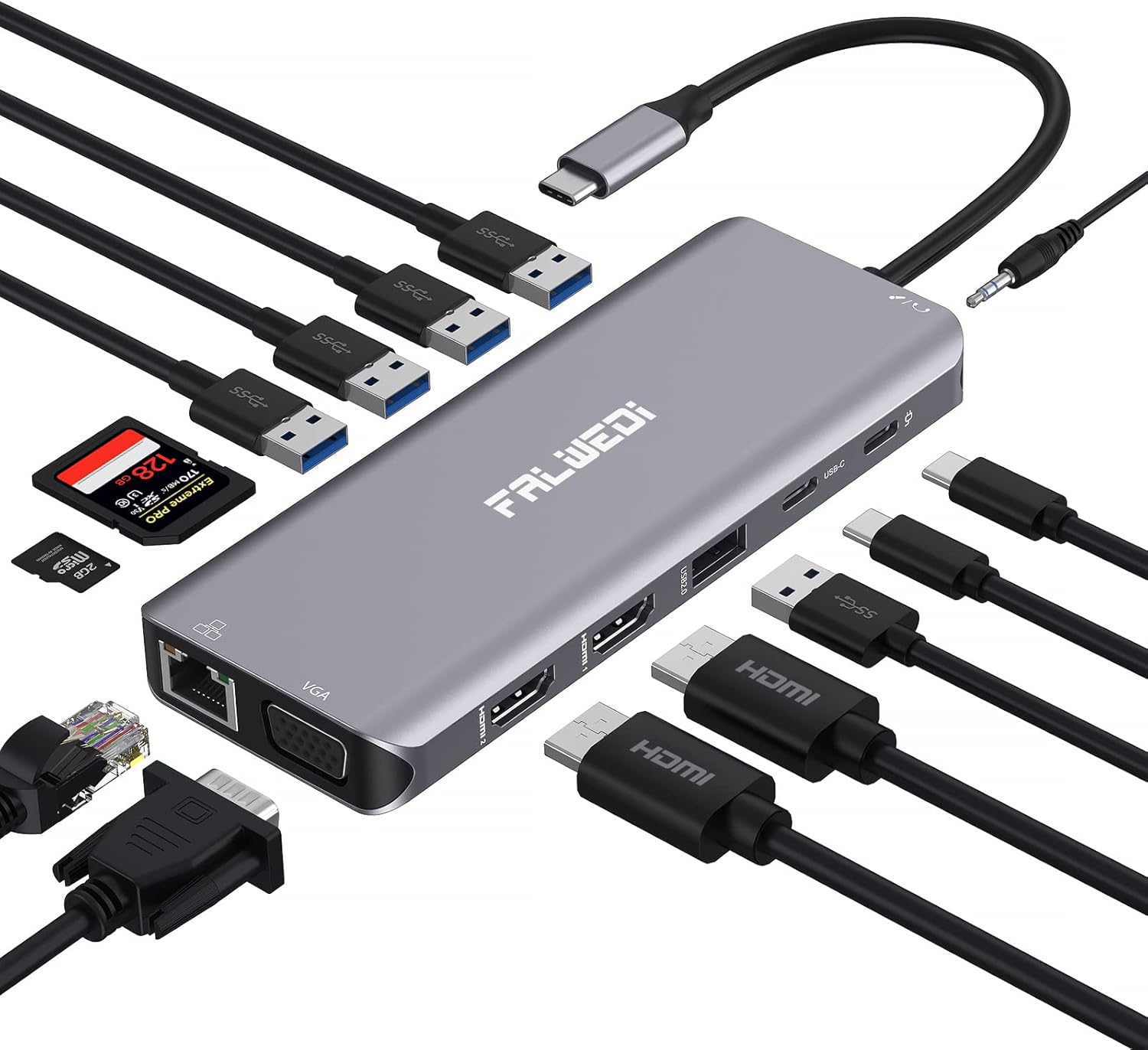
Image: The FALWEDI 14-in-1 USB C Laptop Docking Station, showcasing its compact design and multiple ports, including USB-A, USB-C, HDMI, VGA, Ethernet, and card reader slots, with various cables and devices connected.
Cynnyrch Drosview
The FALWEDI 14-in-1 USB C Docking Station integrates multiple essential ports into a single compact device, enhancing your laptop's capabilities. It features a comprehensive selection of ports to meet diverse connectivity needs.
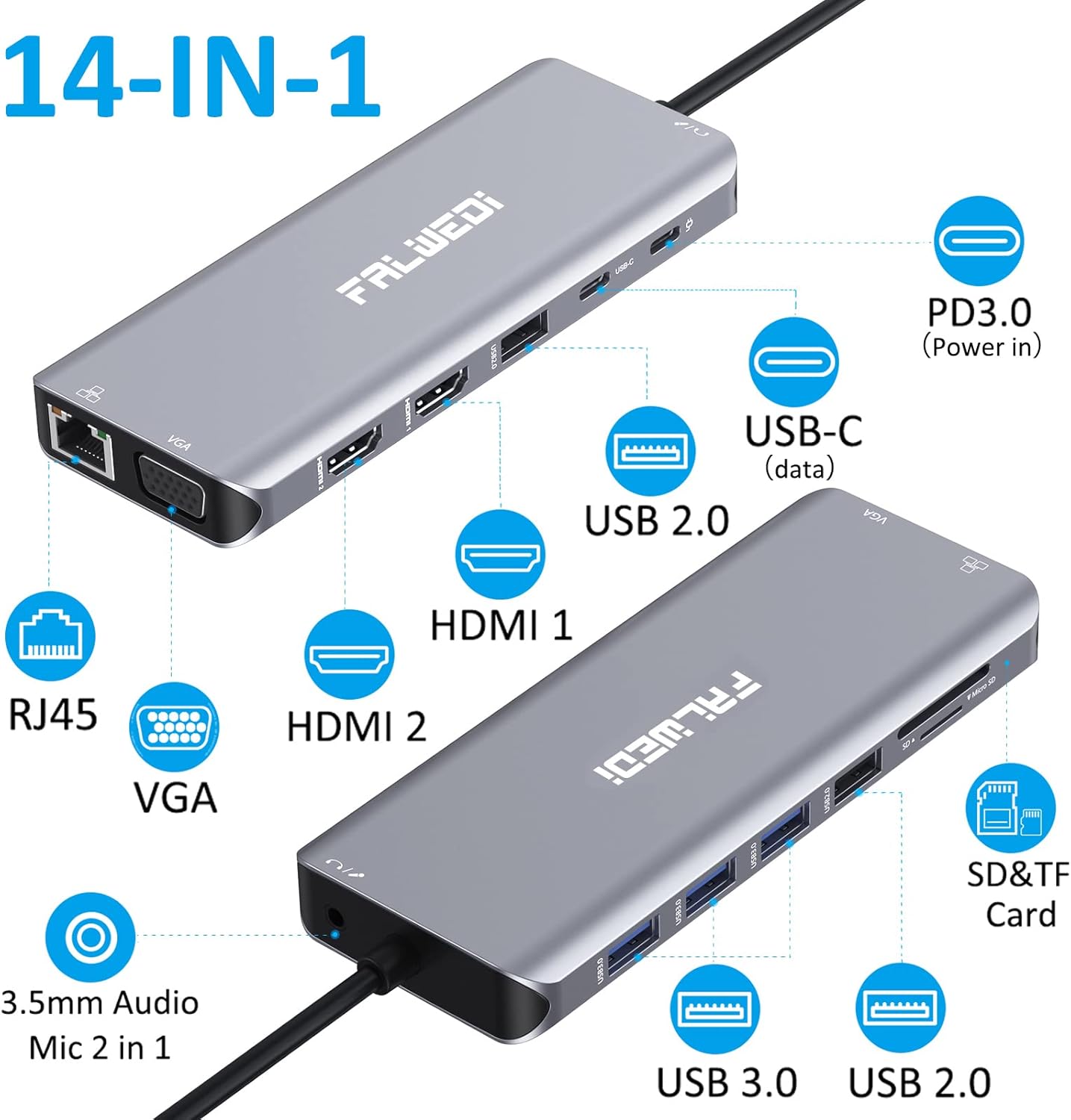
Image: A detailed diagram illustrating the FALWEDI 14-in-1 docking station from two angles, with callouts for each port: PD3.0 (Power in), USB-C (data), USB 2.0, HDMI 1, HDMI 2, RJ45, VGA, 3.5mm Audio/Mic 2 in 1, USB 3.0, and SD/TF Card slots.
Ffurfweddu Porthladd:
- 2 x Porthladd HDMI: For high-definition video output, supporting up to 4K resolution.
- 1 x Porthladd VGA: For video output, supporting up to 1080p resolution.
- 1 x PD 3.0 USB-C Port: For power delivery to your laptop, supporting up to 100W input.
- 1 x USB-C Data Port: For high-speed data transfer (up to 5Gbps).
- 3 x Porthladd USB 3.0: For high-speed data transfer (up to 5Gbps) and connecting peripherals.
- 2 x Porthladd USB 2.0: For connecting low-bandwidth devices like keyboards and mice.
- 1 x RJ45 Gigabit Ethernet Port: For stable and fast wired network connection (up to 1000Mbps).
- 1 x 3.5mm Audio/Mic Port: Ar gyfer cysylltu clustffonau neu feicroffonau.
- 1 x Slot Cerdyn SD: Ar gyfer darllen cardiau cof SD.
- 1 x Slot Cerdyn TF (Micro SD): Ar gyfer darllen cardiau cof Micro SD.
Cyfarwyddiadau Gosod
Follow these steps to set up your FALWEDI docking station:
- Verify Laptop USB-C Port: Ensure your laptop's USB-C port is a "full function Type C" port that supports data transfer, video output (DisplayPort Alt Mode), and power delivery. Refer to your laptop's specifications or the compatibility section of this manual.

Image: An illustration detailing different types of USB-C ports on laptops, distinguishing between "Full Function," "Data Video Output," and "Data+Displayport Alt" (compatible) versus "Only Data Transfer," "Only Charging," and "M1 Chip" (potentially incompatible or limited functionality).
- Connect Docking Station to Laptop: Plug the integrated USB-C cable from the docking station into the compatible USB-C port on your laptop.
- Connect Power Adapter (Recommended): For optimal performance and to ensure stable power to all connected devices, connect your laptop's original USB-C power adapter to the PD 3.0 USB-C port on the docking station. This is especially important when connecting multiple power-consuming peripherals or external displays.
- Cysylltu Perifferolion:
- Arddangosfeydd Allanol: Connect your HDMI and/or VGA monitors to the corresponding ports on the docking station.
- Dyfeisiau USB: Plug in your USB devices (e.g., keyboard, mouse, external hard drives, USB drives) into the available USB 3.0 or USB 2.0 ports. For devices like keyboards and mice, using USB 2.0 ports is recommended to avoid potential interference with high-speed data transfers.
- Cebl Ethernet: Connect an Ethernet cable from your router or modem to the RJ45 Gigabit Ethernet port for a wired network connection.
- Dyfeisiau Sain: Plug in your headphones or speakers into the 3.5mm audio/mic port.
- Cardiau Cof: Mewnosodwch gardiau SD neu TF yn eu slotiau priodol.
- Plygiwch a Chwarae: The docking station is designed for plug-and-play operation. No drivers or software installation are typically required. Your operating system should automatically detect and configure the connected devices.
Cyfarwyddiadau Gweithredu
Display Configuration (Windows OS)
For Windows laptops, the docking station supports triple display configurations, allowing for extended or mirrored modes across multiple monitors.
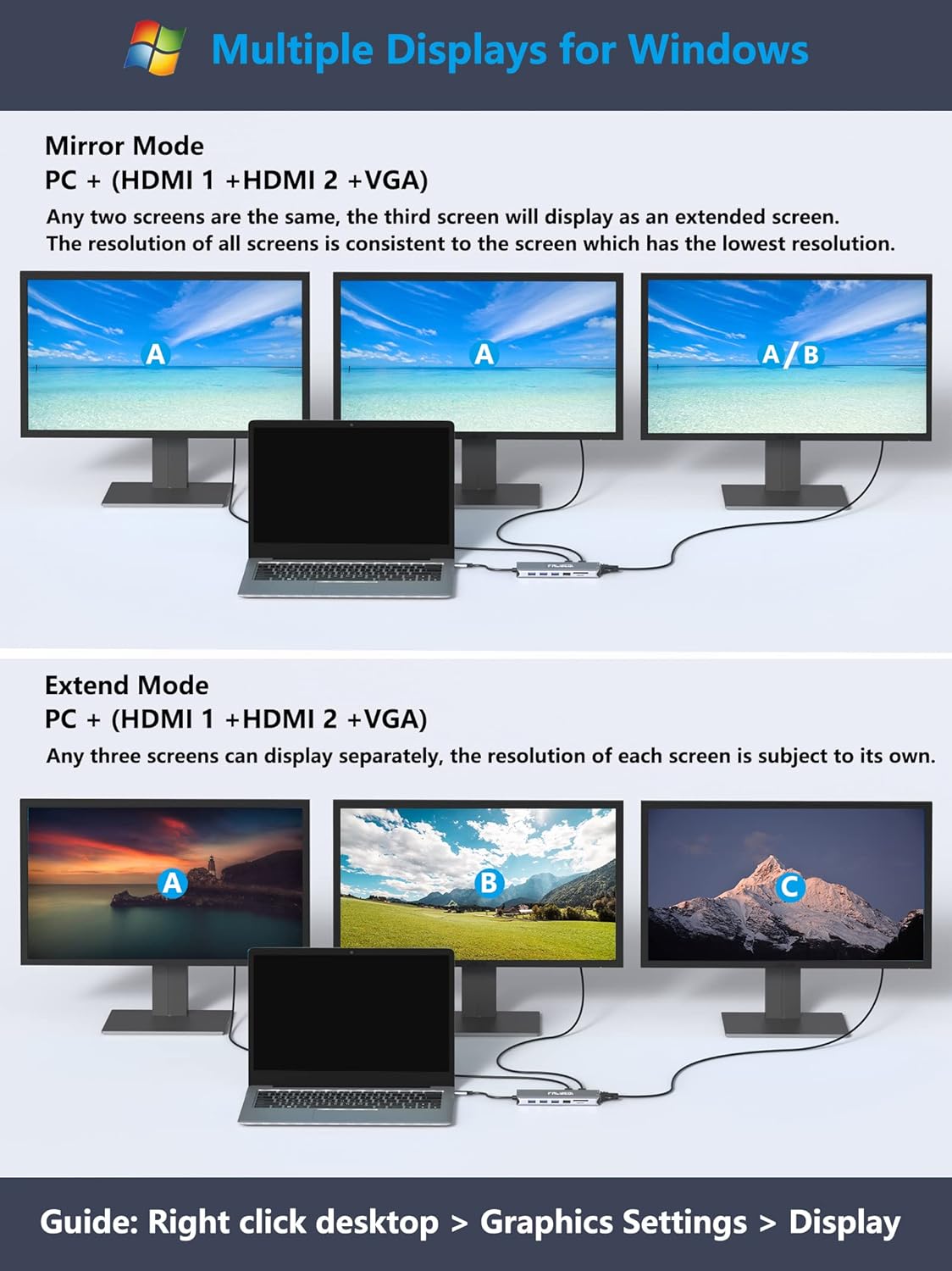
Image: An illustration demonstrating display configurations for Windows OS. It shows "Mirror Mode" where the laptop and two external monitors display the same content (A, A, A/B), and "Extend Mode" where the laptop and three external monitors display different content (A, B, C).
- Modd drych: All connected screens (laptop + external monitors) display the same content. If using two HDMI and one VGA, any two screens can be mirrored, and the third will display as an extended screen. The resolution will be limited by the lowest resolution screen.
- Ymestyn Modd: Each connected screen can display different content, allowing for an expanded desktop workspace. The resolution of each screen is independent.
- Penderfyniad: HDMI ports support up to 3840x2160@30Hz. VGA supports up to 1920x1080@60Hz. When connecting two HDMI displays, the resolution can reach 4K (DP1.4).
To configure displays on Windows: Right-click on your desktop > Graphics Settings > Display.
Display Configuration (Mac OS)
Mac OS does not natively support Multi-Stream Transport (MST) for extended displays across multiple external monitors. However, the docking station can achieve two different contents for your MacBook and monitors.

Image: An illustration demonstrating display configurations for Mac OS. It shows "Mirror Mode" where the MacBook and all external monitors display the same content (A, A, A), and "Clone Mode" where the MacBook displays content A, and all external monitors clone content B.
- Modd drych: All connected screens (MacBook + external monitors) will mirror the same content.
- Modd clôn: The MacBook displays one content, and all connected external monitors will clone a second content.
To configure displays on Mac OS: Apple logo > System Preferences > Display.

Image: A visual comparison showing that Windows supports 4K@60Hz resolution and triple extended displays, while Mac OS does not support triple extended displays, only mirrored or cloned modes.

Image: A graphic detailing display notes for Mac OS and Windows. For Mac OS, it states "Not Support Different Screen of Multi Monitors" and that under partial connection (no VGA), the highest resolution of all monitors can reach 4K@30Hz. For Windows, it notes that only one monitor's resolution will be up to 4K@30Hz while another will be 1080p under MST mode without connecting VGA port, and all monitor's resolution will be 1920x1080P@60Hz if VGA works simultaneously.
Trosglwyddo Data
The docking station provides high-speed data transfer capabilities:
- USB 3.0 Ports (3x) & USB-C Data Port (1x): Offer super-speed data transfer rates of up to 5Gbps, ideal for transferring large files yn gyflym.
- Porthladdoedd USB 2.0 (2x): Provide data transfer rates of up to 480Mbps, suitable for connecting peripherals like keyboards, mice, and printers without lag.
- Slotiau Cerdyn SD a TF: Support data transfer at 5Gbps, allowing for quick access to media files ar yr un pryd.

Image: A visual representation of the docking station's data transfer capabilities, showing 5Gbps speed for USB-C data and USB 3.0 ports, and indicating compatibility with thumb drives, keyboards, speakers, phones, hard disks, and printers. It also highlights 100W Power Delivery.
Cyflenwi Pŵer (PD 3.0)
The dedicated PD 3.0 USB-C port allows you to charge your laptop through the docking station. It supports up to 100W power input, ensuring your laptop remains charged while using the hub. This feature is applicable only to devices that support the PD protocol.
Gigabit Ethernet
The RJ45 port provides a stable and fast wired internet connection up to 1000Mbps (1 Gigabit per second). This is an excellent alternative for laptops without an Ethernet port or when a wireless network is unstable.

Image: The docking station connected to a laptop, with an Ethernet cable plugged into the RJ45 port showing 1000Mbps speed, and headphones connected to the 3.5mm audio/mic port, indicating HD lossless sound quality.
Sain/Mic Port
The 3.5mm audio/mic port provides high-definition lossless sound quality, allowing you to connect headphones, speakers, or a microphone for audio input and output.
Cydweddoldeb
The FALWEDI docking station offers broad compatibility with most Type-C laptops featuring Thunderbolt 3 or a full-function USB-C port. No drivers are needed for operation.

Image: A graphic titled "BROAD COMPATIBILITY" listing compatible brands and models including Apple (MacBook/Pro 2016-2021, MacBook Air/Mac mini 2018-2020, iPad Pro 2018-Newest), Lenovo (Yoga, ThinkPad, IdeaPad), HP (Spectre, Elitebook, Zbook), Dell (Latitude, XPS, Precision, Inspiron), and Others (Asus Zenbook, Huawei MateBook, Samsung Galaxy). It also lists supported Operating Systems: Windows, Mac OS X 10.6 or later, Chrome, and Linux 2.6.14 or later.
Dyfeisiau Cydnaws (Rhestr Rhannol):
| Brand | Modelau |
|---|---|
| Lenovo | Yoga (900/910/920/930/940/C740/C930), IdeaPad Chromebook Flex 5, ThinkPad (P72/E590/T470s/T480s/T490s) |
| Dell | Latitude (5310/5400/5480/5490), Inspiron (14 or 15 7000 series 2-in-1), XPS (9380/13-9300/13-9365), Precision (7520/7730/7750) |
| HP | Spectre (X369/13T-AK000CTO/13T-AF001TU), Elitebook (800 G4/840 G5 series/850 C5/745/830 C6/X2), Zbook/Probook |
| Asus | Zenbook (Flip Q529ZA/UX435/UX434F/UX433FA/UX425EA/S-UX390), Rog GX501 |
| Samsung | Note (20/10/9/8+), Galaxy (S20 ultra/S10+/S10/S9/S8+/Tablet S5e/Tablet New S7/Chromebook/Flex alpha 2-in-1) |
| Huawei | MateBook (X Pro/E/X/Mate 10/Mate 10Pro/Mate 20/Mate 20 Pro/Mate 30/Mate 30 Pro/P20/P20 Pro/P30 Pro) |
| Acer | Aspire 5/Aspire C24-865/Swift 1/Swift 3/Swift 7/Swift X/SPIN 5/SPIN 7/Predator Helios 300 |
| Llyfr Chrome Google | Pixel 2016/Pixel 2017/C340-15 |
| Arwyneb Microsoft | Book 2/Go-1943/Laptop 3/Laptop 4/Pro 8/Pro 7 |
Note: This is not a full list. Please refer to the product page or contact support for more detailed compatibility information.

Image: A comprehensive table listing compatible laptop models from various brands like Lenovo, Dell, HP, Asus, Samsung, Huawei, Acer, Google Chromebook, and Microsoft Surface.
Incompatibility (Partial List):
| Brand | Modelau |
|---|---|
| Afal | MacBook Air (before 2018), MacBook Pro 2015, iMac 2021 |
| Asus | Vivobook series (Q547/Q503U/Q526F/L203MA), TUF 17.3 Gaming Laptop, Zenbook (UX333FN/UX330UA-AH55/Flip 14 UX463FL/Flip 14 UX461FN-DH74T/Q407I) |
| Acer | Aspire E5-575/R5-571T/E5-576G/R15/G3-571, Predator Helios 300/Swift X 14 |
| MSI | GF63/GF65 THIN 9SD-252/GERVR 7RF Apache Pro GS73VR 7RG Stealth Pro/GE73 Raider RGB 8RF |
| Microsoft | Surface Pro 3/Surface Pro 4/Surface Pro 6/Book 3 |
| HP | Spectre X360 13/14/15T, Elitebook (840 G3/840 G4/820 G4/745 C6/800 G2), Probook 600/640/650 G2/Folio 1020 B&O, Earlier Pavilion series/340S C7/Envy 15/EVGA SC15/7265NGW |
| Dell | Inspiron (17-5000 series/15-5000 series/14-5410/15-3000/15-3583/17-3793 Business), Latitude (E7270/E7470/E7440/E7450/3520) |
| Lenovo | V330/T570/Y520/Yoga 520/Yoga 710, Thinkpad (L490/E580), IdeaPad (3/5/330/L340/S340/130S/Flex-15IWL/Flex-6 14IKB) |
| Arall | High-power equipment/USB Super Drive/CD/DVD player |
Note: This is not a full list. Please refer to the product page or contact support for more detailed incompatibility information.

Image: A comprehensive table listing incompatible laptop models from various brands like Apple, Asus, Acer, MSI, Microsoft, HP, Dell, and Lenovo, along with a note about high-power equipment.
Datrys problemau
If you encounter issues with your FALWEDI docking station, consider the following common solutions:

Image: A graphic titled "WARM TIPS" with icons and short descriptions for troubleshooting: Suggestions on power supply, About 4 Screens, About Resolution, Need Help?, Logitech Bluetooth Products, About M1 Chip.
- Cyflenwad Pŵer: The docking station consumes power. To avoid insufficient power supply to the dock, especially when connecting multiple devices, it is highly recommended to connect a 100W power supply to the dock's PD port. This ensures stable performance and prevents issues caused by the laptop's power output limitations.
- Display Issues (4 Screens): Only DP1.4 and AMD processor computers or Apple models listed after 2018 with dual systems installed can achieve 4 screens when using the Windows system.
- Cyfyngiadau Datrysiad: The final resolution of HDMI output depends on your host device. Only when your devices support 4K resolution (AMD + DP1.4), will the video output be 4K.
- Logitech Bluetooth Products: This product is not compatible with Logitech Bluetooth wireless products. When used together, it may cause Bluetooth signal interference, leading to cursor delay or flicker.
- M1 Chip Compatibility: For unstable performance with the latest 2020 Mac processor M1 chip, the video output may fail to display properly in parts of the devices.
- General Connectivity: If a device is not recognized, try unplugging and re-plugging it. Ensure all cables are securely connected.
- Gorboethi: The aluminum enclosure is designed for faster heat dissipation. If the device feels warm, it is normal during operation, especially under heavy load. Ensure adequate ventilation around the docking station.
- Using Other Converters: We do not recommend using any converter to connect the computer or an external monitor to the dock. It is hard to confirm whether the converter is compatible, and it may affect the function of the docking station.
Manylebau
| Nodwedd | Manylyn |
|---|---|
| Dimensiynau Cynnyrch | 6.3 x 3.94 x 71 modfedd |
| Pwysau Eitem | 5.3 owns |
| ASIN | B09YV2DTPL |
| Dyddiad Ar Gael Cyntaf | Ebrill 26, 2022 |
| Gwneuthurwr | FALWEDI |
| Gwlad Tarddiad | Tsieina |
| Brand | FALWEDI |
| Lliw | Llwyd |
| Rhyngwyneb Caledwedd | USB Math C, Thunderbolt |
| Nodwedd Arbennig | Plygiwch a Chwarae |
Cynnal a chadw
Er mwyn sicrhau hirhoedledd a pherfformiad gorau posibl eich gorsaf docio, dilynwch y canllawiau cynnal a chadw hyn:
- Glanhau: Use a soft, dry cloth to clean the exterior of the docking station. Avoid using liquid cleaners, aerosols, or abrasive solvents.
- Storio: Pan nad yw'n cael ei ddefnyddio am gyfnodau hir, storiwch yr orsaf docio mewn lle oer, sych i ffwrdd o olau haul uniongyrchol a thymheredd eithafol.
- Trin: Trin y ddyfais yn ofalus. Osgowch ei gollwng na'i rhoi dan ddylanwad effeithiau cryf.
- Awyru: Ensure the docking station has adequate airflow around it, especially during prolonged use, to prevent overheating.
Gwarant a Chefnogaeth
FALWEDI is committed to providing high-quality products and customer satisfaction. If you have any questions, operational problems, or require assistance, please contact FALWEDI customer support.
- Cymorth Cyswllt: Refer to the contact information provided on the product packaging or the official FALWEDI websafle.
- Canllawiau Cynnyrch: Additional product guides and documents may be available on the product listing page where you purchased the item.
- Gwiriad Cydnawsedd: If your laptop model is not explicitly listed in the compatibility section, please contact customer support to verify compatibility before use.
Cadwch eich prawf prynu at ddibenion gwarant.