
1. Rhagymadrodd
This manual provides essential information for the safe and efficient operation of your Vamvo Mini Projector. Designed for portability and versatility, this projector supports native 1080P resolution with 4K compatibility, features WiFi 6 and Bluetooth 5.4 connectivity, and includes a 180° adjustable stand for flexible projection. Please read this manual thoroughly before use and retain it for future reference.

Figure 1: Vamvo Mini Projector highlighting key features.
2. Beth sydd yn y Bocs
Gwiriwch fod yr holl eitemau canlynol wedi'u cynnwys yn eich pecyn:
- Vamvo Mini Projector
- Rheolaeth Anghysbell
- Cebl HDMI
- Addasydd Pŵer
- Llawlyfr Defnyddiwr
- Cerdyn Gwarant
3. Cynnyrch Drosview
The Vamvo Mini Projector is designed for ease of use and high-quality projection. Its compact form factor includes an integrated 180° adjustable stand, allowing for versatile placement and projection angles.
3.1 Nodweddion Allweddol
- Native 1080P Resolution with 4K Support: Delivers crisp and clear visuals.
- High Brightness & Contrast: Features 15,000 lumens brightness and a 10,000:1 contrast ratio for vivid colors and sharp details.
- Stand Addasadwy 180°: Provides flexible positioning for projection on walls, ceilings, or other surfaces.
- WiFi 6 a Bluetooth 5.4: Ensures fast and stable wireless connectivity for streaming and audio.
- Siaradwyr Adeiledig: Integrated speakers provide audio output.
- Auto Keystone & Motorized Focus: Simplifies setup by automatically correcting image distortion and allowing precise focus adjustments via remote.

Figure 2: Projector's visual performance metrics.
3.2 Porthladdoedd a Chysylltiadau
The projector offers various ports for connecting external devices:
- HDMI: For connecting TV sticks, laptops, gaming consoles (PS5, Xbox), etc.
- USB: For connecting USB drives or other USB-compatible devices.
- Math-C: For one-touch wireless mirroring with iOS/Android devices (adapters and cables not included).
- 3.5mm AUX: Ar gyfer cysylltu siaradwyr allanol neu glustffonau.
- DC Yn: Mewnbwn pŵer.
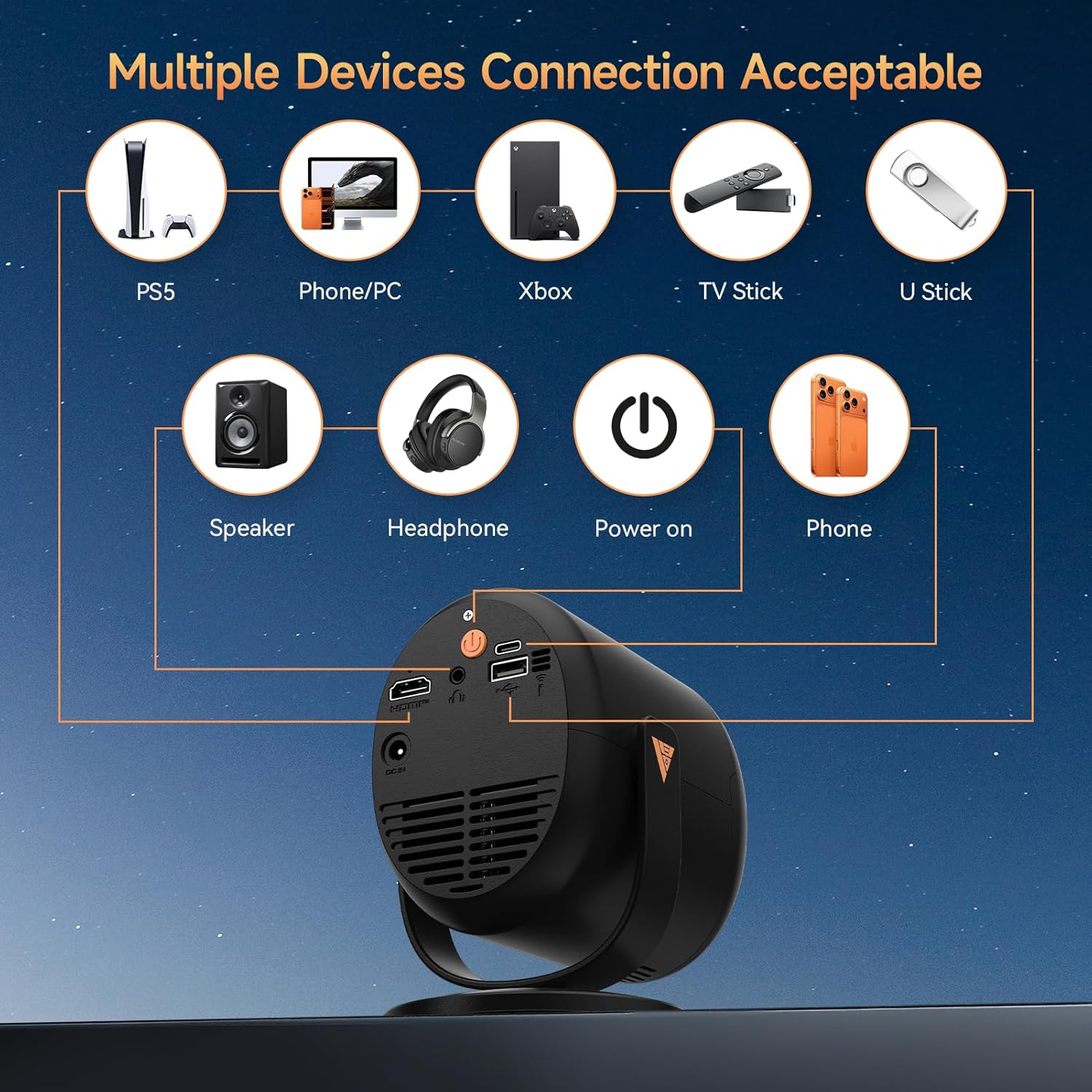
Figure 3: Available ports and compatible devices.
4. Gosod
4.1 Pŵer Cychwynnol
- Connect the provided power adapter to the projector's DC In port and then to a power outlet.
- Pwyswch y botwm pŵer ar y taflunydd neu'r teclyn rheoli o bell i'w droi ymlaen.
4.2 Lleoliad a Thafluniad
Utilize the 180° adjustable stand to position the projector for optimal viewing. The projector can project images up to 180 inches. For the best projection experience, select a distance between 5ft to 10ft from the projection surface.

Figure 4: Flexible 180° projection angles.

Ffigur 5: Example of a large 180-inch display.
4.3 Cywiro Ffocws a Chywiro Closfaen
The projector features automatic vertical keystone correction and motorized focus. Use the remote control to fine-tune the focus (F+ / F- buttons) for a clear image. The auto keystone feature will adjust the image shape to be rectangular.

Figure 6: Motorized focus and keystone adjustment via remote.
5. Cyfarwyddiadau Gweithredu
5.1 Navigation and Streaming
Use the provided remote control to navigate the projector's interface. The projector comes with pre-installed streaming platforms like Netflix, Prime Video, and YouTube. You can also access the App Store to download additional applications.
5.2 Adlewyrchu Sgrin
The projector supports screen mirroring from iOS and Android devices:
- Drych Di-wifr: Connect your smartphone or tablet via WiFi 6 for a smooth audio and video experience.
- Adlewyrchu â Gwifrau: Use a Type-C cable (not included) for one-touch mirroring with compatible devices.
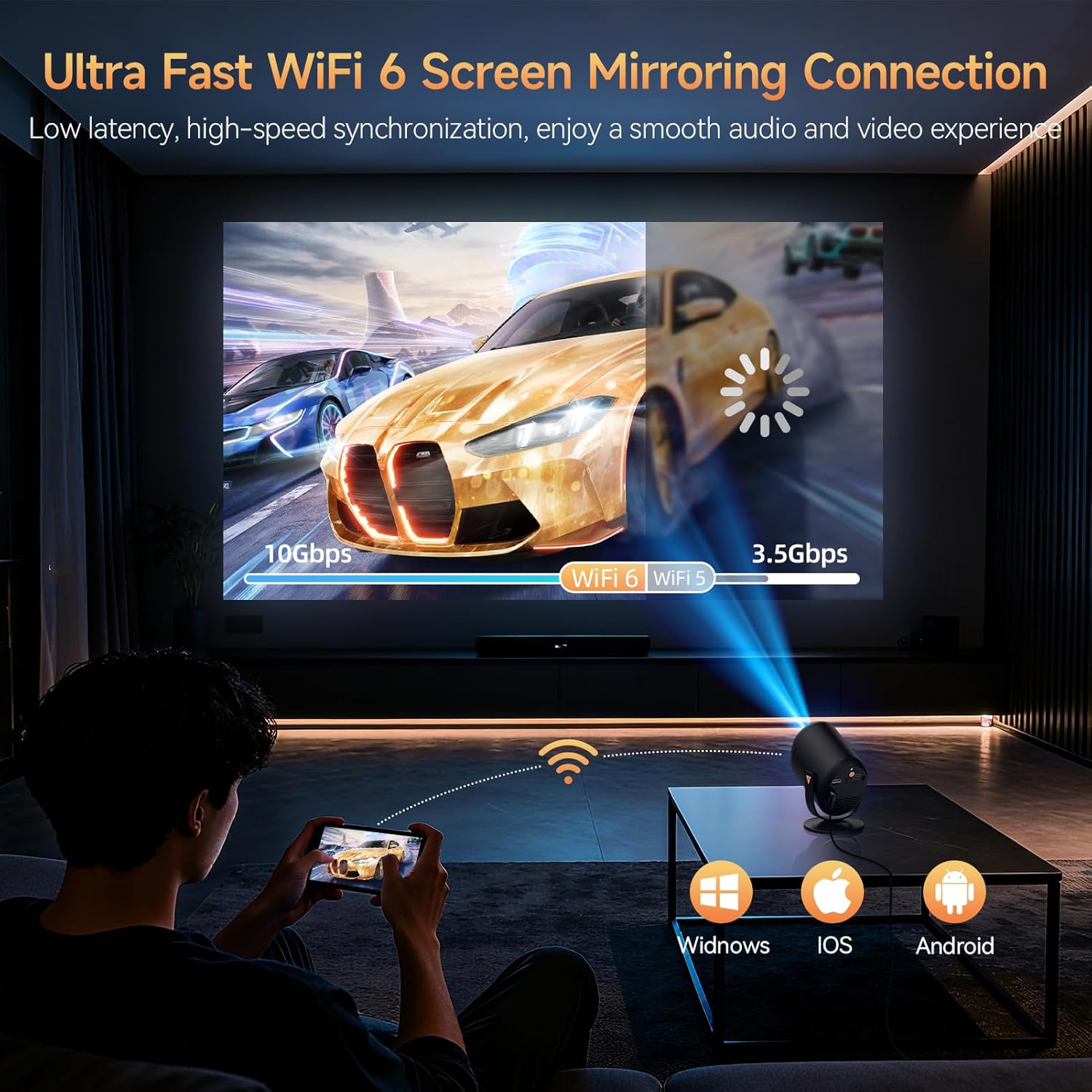
Figure 7: Ultra-fast WiFi 6 screen mirroring.
5.3 Cysylltu Dyfeisiau Allanol
You can connect various devices to the projector:
- HDMI: For TV sticks (Fire TV Stick, Roku, Chromecast), laptops, and gaming consoles.
- USB: For U-sticks or other USB storage devices.
- Bluetooth 5.4: Ar gyfer cysylltu siaradwyr allanol neu glustffonau.
- 3.5mm AUX: For wired audio output to speakers or headphones.
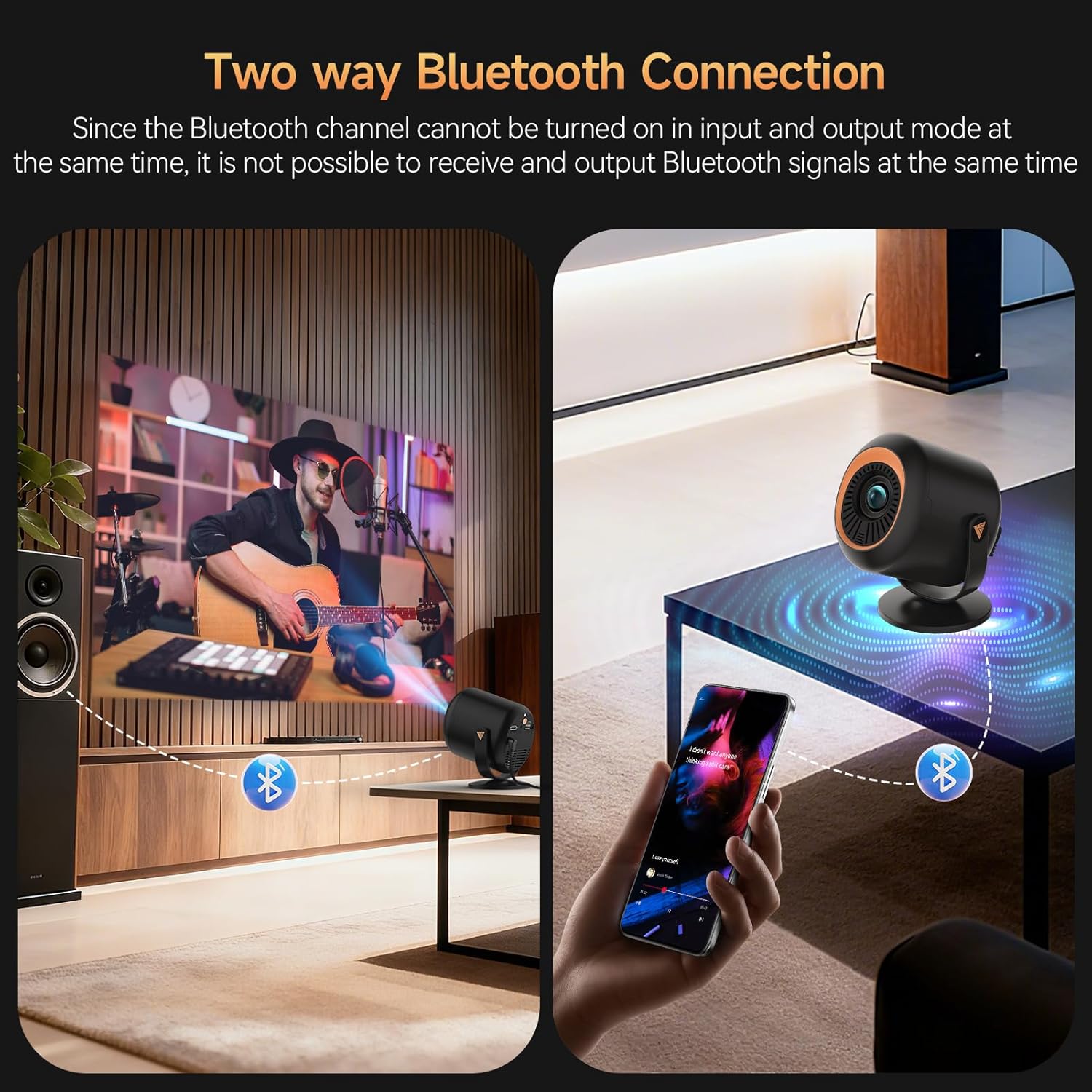
Figure 8: Two-way Bluetooth connection for audio.
Nodyn Pwysig:
Due to content protection agreements (HDCP), screen mirroring may not display video or audio for certain apps like Amazon Prime Video, Hulu, or Netflix. For these apps, connect your streaming device (e.g., Fire TV Stick, Roku, Chromecast) directly to the projector via HDMI, or use an HDMI cable from your laptop/computer.
6. Gosodiadau
The projector offers a comprehensive settings menu to customize your viewing a phrofiad sain.
6.1 Gosodiadau Lluniau
Adjust visual parameters to your preference:
- Modd Llun: Standard, Softness, Dynamic, Energy Saving, Vivid, User (customizable).
- Disgleirdeb: Addaswch ddisgleirdeb cyffredinol y ddelwedd.
- Cyferbyniad: Control the difference between light and dark areas.
- Dirlawnder: Adjust the intensity of colors.
- Sharpness: Enhance edge definition.
- Tôn Lliw: Modify the color balance.
- Tymheredd Lliw: Adjust the warmth or coolness of the colors.
- Modd Amddiffyn Llygaid: Reduces blue light for comfortable viewing.
6.2 Gosodiadau Sain
Customize audio output:
- Modd Sain: Standard, Music, Movie, News, Game, User (customizable).
- Balans: Adjust audio balance between left and right channels.
- Audio Output Devices: Select between auto (speaker) or other connected devices.
6.3 Gosodiadau Rhwydwaith
Manage your projector's connectivity:
- Wi-Fi: Connect to available Wi-Fi networks.
- Bluetooth: Chwiliwch am and connect to Bluetooth devices.
6.4 Lens Settings
Control projection display and adjustments:
- Cyfeiriad Rhagamcan: Blaen, Cefn, Nenfwd Blaen, Nenfwd Cefn.
- Gosodiadau Ffocws Auto: Enable/disable automatic refocus when moved or power-on autofocus.
- Cywiriad Keystone: Auto Keystone Correction, 4-corner correction, Obstacle Recognition, Screen Recognition.
- Chwyddo Digidol: Addaswch faint y ddelwedd ragamcanol.
6.5 Dewisiadau Dyfeisiau
General device management:
- Iaith: Dewiswch eich dewis iaith.
- Dyddiad ac Amser: Gosodwch y dyddiad a'r amser cyfredol.
- Bysellfwrdd: Configure keyboard settings.
- Arbedwr sgrin: Adjust screen saver options.
- Amserydd Cwsg: Gosodwch amserydd ar gyfer diffodd yn awtomatig.
- Gosodiadau Ffatri: Reset the projector to its original factory settings.
- Reset Projector/Restart Projector: Perform a soft or hard reset.
7. cynnal
To ensure the longevity and optimal performance of your Vamvo Mini Projector, follow these maintenance guidelines:
- Glanhau Lens: Sychwch lens y taflunydd yn ysgafn gyda lliain meddal, di-flwff. Osgowch ddeunyddiau sgraffiniol neu gemegau llym.
- Awyru: Ensure the projector's ventilation openings are clear and unobstructed to prevent overheating. Regularly clean dust from the vents using a soft brush or compressed air.
- Storio: Pan nad yw'n cael ei ddefnyddio, storiwch y taflunydd mewn lle oer, sych, i ffwrdd o olau haul uniongyrchol a thymheredd eithafol.
8. Datrys Problemau
Os byddwch chi'n dod ar draws problemau gyda'ch taflunydd, cyfeiriwch at y problemau a'r atebion cyffredin canlynol:
- Dim Arwydd:
- Ensure the HDMI cable is securely connected to both the projector and the source device.
- Verify that the correct input source (HDMI, USB, etc.) is selected on the projector.
- Check if the source device (laptop, TV stick) is powered on and outputting a signal.
- Fuzzy or Unclear Image:
- Adjust the focus using the F+ / F- buttons on the remote control.
- Ensure the projector lens is clean and free from dust or smudges.
- Check the projection distance and adjust if necessary to match the desired screen size.
- Dim Sain neu Gyfaint Isel:
- Increase the volume on both the projector and the source device.
- Gwiriwch a yw'r taflunydd wedi'i fud.
- Os ydych chi'n defnyddio siaradwyr allanol, gwnewch yn siŵr eu bod nhw wedi'u cysylltu'n iawn ac wedi'u pweru ymlaen.
- Screen Mirroring Issues (No Video/Audio):
- Some streaming apps (Netflix, Hulu, Prime Video) have HDCP content protection that prevents screen mirroring. Connect a streaming device directly via HDMI for these apps.
- Ensure your device and projector are connected to the same Wi-Fi network for wireless mirroring.
9. manylebau
| Nodwedd | Manylyn |
|---|---|
| Brand | Vamvo |
| Pwysau Eitem | 2.61 pwys |
| Dimensiynau Pecyn | 11.57 x 7.91 x 5.08 modfedd |
| Enw Lliw | Inc |
| Nodweddion Arbennig | Siaradwr Adeiledig |
| Defnyddiau a Argymhellir ar gyfer Cynnyrch | Gemau, Sinema Gartref |
| Technoleg Cysylltedd | HDMI |
| Cydraniad Arddangos | 1920 x 1080 |
10. Gwarant a Chefnogaeth
Your Vamvo Mini Projector comes with a warranty. Please refer to the included Warranty Card for detailed information regarding warranty coverage, terms, and conditions. For technical support or further assistance, please consult the contact information provided on your Warranty Card or visit the official Vamvo websafle.