
1. Rhagymadrodd
The VEDINDUST Analog Audio Extender is designed to extend stereo RCA or 3.5mm audio signals over a single Cat5e/6/7 cable. This system allows for signal transmission up to 1475 feet (450 meters), supporting PCM stereo audio. It incorporates Power over Cable (POC) technology, which simplifies installation by requiring only one power supply for both the transmitter and receiver units.
This manual provides detailed instructions for the proper setup, operation, and maintenance of your audio extender to ensure optimal performance and longevity.
2. Nodweddion Cynnyrch
- Ystod Estynedig: Extends RCA or 3.5mm stereo audio signals up to 1475 feet (450 meters) using a single Cat5e/6/7 UTP cable. For optimal performance, use oxygen-free copper CAT6 cable wired as 568B.
- Flexible Audio Output: The receiver unit provides both RCA and 3.5mm stereo audio outputs simultaneously.
- Single Audio Input: The transmitter unit supports either RCA or 3.5mm stereo audio input, but not both concurrently.
- Pure Transmission: Utilizes differential digital signals via ADC technology to minimize interference and noise, ensuring clear audio transmission over long distances.
- Power over Cable (POC): Requires only one power adapter connected to either the transmitter or receiver unit to power the entire system.
- Plygiwch a Chwarae: No driver installation is required, offering simple operation without delays or lags.
3. Cynnwys Pecyn
Gwiriwch fod yr holl eitemau yn bresennol yn eich pecyn:
- 1 x Analog Audio Extender (Sender & Receiver units)
- Addasydd Pŵer 1 x DC 12V 1A
- 1 x Llawlyfr Defnyddiwr

Image: Package contents including the extender units, power adapter, and user manual.
4. Cyfarwyddiadau Gosod
4.1 Cysylltiad Drosview

Image: Connection diagram illustrating the setup of the audio extender system.
This diagram illustrates the connection of the VEDINDUST Analog Audio Extender system. An audio input source (e.g., laptop, DVD player) connects to the Transmitter unit via RCA or 3.5mm jack. The Transmitter and Receiver units are linked by a Cat5e/6 cable. The Receiver unit connects to a stereo speaker system via RCA or 3.5mm outputs. Power is supplied to either the Transmitter or Receiver unit, which then powers the other unit via the Cat5e/6 cable (POC).
4.2 Transmitter and Receiver Panels

Delwedd: Manwl view of the Transmitter and Receiver unit ports.
The top image shows the Transmitter panel with AUX and RCA audio inputs, a DC 12V power input, and an RJ45 OUT port for the Cat5e/6 cable. The bottom image shows the Receiver panel with AUX and RCA audio outputs, a DC 12V power input, and an RJ45 IN port for the Cat5e/6 cable. Note that only one audio input (AUX or RCA) can be used on the transmitter at a time, while both AUX and RCA outputs can be used simultaneously on the receiver.
4.3 Power over Cable (POC)

Image: Demonstration of the Power over Cable (POC) feature.
This image demonstrates the Power over Cable (POC) feature. A single DC 12V power adapter is connected to the Receiver unit. This power then travels through the Cat5e/6 cable to power the Transmitter unit, simplifying installation by requiring only one power source for the entire system.
4.4 Cysylltiad Cam wrth Gam
- Connect your audio source (e.g., PC, DVD player) to the Trosglwyddydd unit's RCA L/R or 3.5mm AUX audio input. Ensure only one input type is connected at a time.
- Connect a Cat5e/6/7 cable (up to 1475ft/450m) from the Transmitter's RJ45 OUT port to the Receiver's RJ45 IN port. For best performance, use oxygen-free copper CAT6 cable wired as 568B.
- Connect your audio output device (e.g., stereo speakers, ampliifier) i'r Derbynnydd unit's RCA L/R or 3.5mm AUX audio outputs. Both outputs can be used simultaneously.
- Connect the included DC 12V 1A power adapter to either the Trosglwyddydd or Derbynnydd unit. The system will power on via POC.
5. Cyfarwyddiadau Gweithredu
Once all connections are secure and power is supplied, the audio extender will automatically begin transmitting the audio signal. No additional configuration or driver installation is required.
- Ensure that the audio source is playing and the output device is powered on and set to the correct input.
- The receiver can output both L/R RCA and 3.5mm AUX audio signals simultaneously.
- The transmitter can only accept one input source at a time (either L/R RCA or 3.5mm AUX).
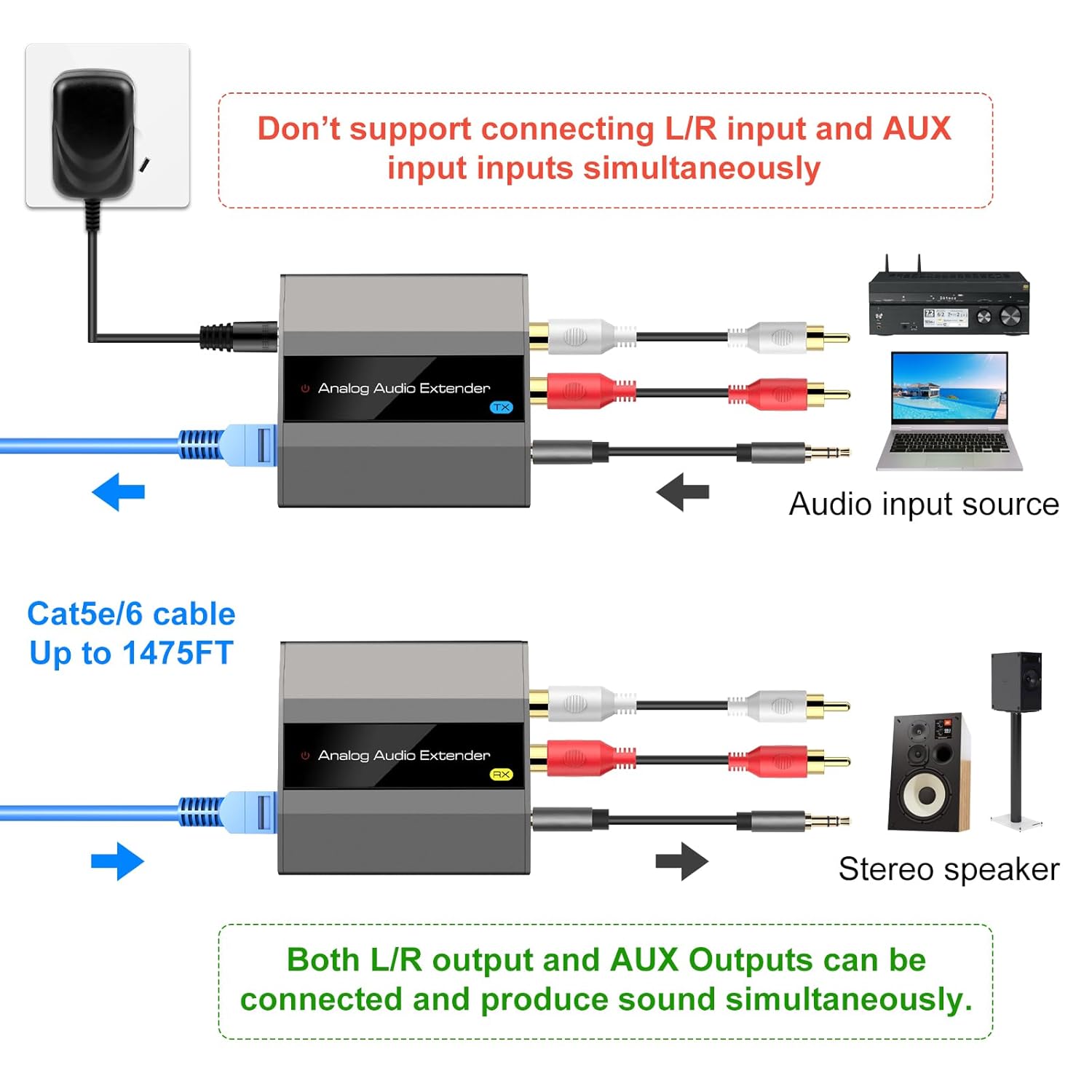
Image: Clarification on simultaneous input and output capabilities.
6. cynnal
- Cadwch y ddyfais mewn man sych, wedi'i awyru'n dda, i ffwrdd o olau haul uniongyrchol, tymereddau uchel a lleithder.
- Glanhewch y ddyfais gyda lliain meddal, sych. Peidiwch â defnyddio glanhawyr hylif na glanhawyr aerosol.
- Ensure all cable connections are secure to prevent signal loss or interference.
7. Datrys Problemau
7.1 Dim Allbwn Sain
- Verify all cables (audio, Cat5e/6/7, power) are securely connected.
- Ensure the power adapter is connected and the device is receiving power.
- Check if the audio source is playing and the output device (speakers/amplifier) is powered on and set to the correct input.
- Confirm that only one audio input (RCA or 3.5mm) is connected to the transmitter.
- Test with a shorter Cat5e/6/7 cable if possible, or ensure the cable meets specifications (oxygen-free copper CAT6, 568B wiring).
7.2 Poor Audio Quality/Interference
- Ensure you are using a high-quality Cat5e/6/7 cable, preferably oxygen-free copper CAT6 wired as 568B.
- Check for potential electromagnetic interference from other electronic devices.
- Verify the cable length does not exceed the maximum recommended 1475ft (450m).
8. manylebau
- Brand: VEDINDUST
- Model: B09XDPSW65
- Math Mowntio: Cable Mount
- Mathau o Ryngwynebau: RCA, 3.5mm AUX, RJ45
- Nifer y sianeli: 2 (Stereo)
- Pellter Estyniad: Hyd at 1475 troedfedd (450m) dros gebl Cat5e/6/7
- Sain â Chymorth: PCM Stereo (up to 96KHz sampcyfradd ling)
- Cyflenwad Pŵer: DC 12V 1A (Power over Cable - POC supported)
- UPC: 798610310731
9. Gwybodaeth Gwarant
Specific warranty details for this product may vary. Please refer to the product packaging, the official VEDINDUST website, or contact the retailer where the product was purchased for comprehensive warranty information and terms.
10. Cefnogaeth i Gwsmeriaid
For technical assistance, troubleshooting, or any questions regarding your VEDINDUST Analog Audio Extender, please contact VEDINDUST customer support directly. Contact information can typically be found on the product packaging or the official VEDINDUST websafle.