
Shargeek STM2E-1
Shargeek STORM2 Slim Portable Charger User Manual
Model: STM2E-1
Rhagymadrodd
This manual provides comprehensive instructions for the safe and efficient use of your Shargeek STORM2 Slim Portable Charger. Please read this manual thoroughly before operating the device and retain it for future reference.
The Shargeek STORM2 Slim is a high-capacity portable power bank featuring a unique transparent design and an IPS display screen. It offers 130W max output with 100W USB-C and 30W USB-A ports, suitable for charging various devices including laptops, tablets, and smartphones.

Image: The Shargeek STORM2 Slim portable charger, showcasing its transparent design that reveals internal components and the included yellow USB-C to USB-C cables.
Nodweddion Cynnyrch
- Dyluniad Tryloyw: The see-through casing reveals the internal battery and circuit layout, highlighting the device's engineering.
- IPS Display Screen: A clear screen provides real-time information on battery life, output distribution, temperature, operation hours, and active ports.
- Cynhwysedd Uchel: 20000mAh battery capacity, capable of multiple charges for various devices.
- Codi Tâl Cyflym: Features a 100W USB-C PD port and a 30W USB-A port, supporting 130W max output for rapid charging.
- Cydnawsedd Cyffredinol: Charges laptops, phones, tablets, and other devices with USB-C or USB ports.

Delwedd: Manwl view of the Shargeek STORM2 Slim's IPS LCD screen, showing various data points such as input/output wattage, cyftage, current, battery level, and temperatures.
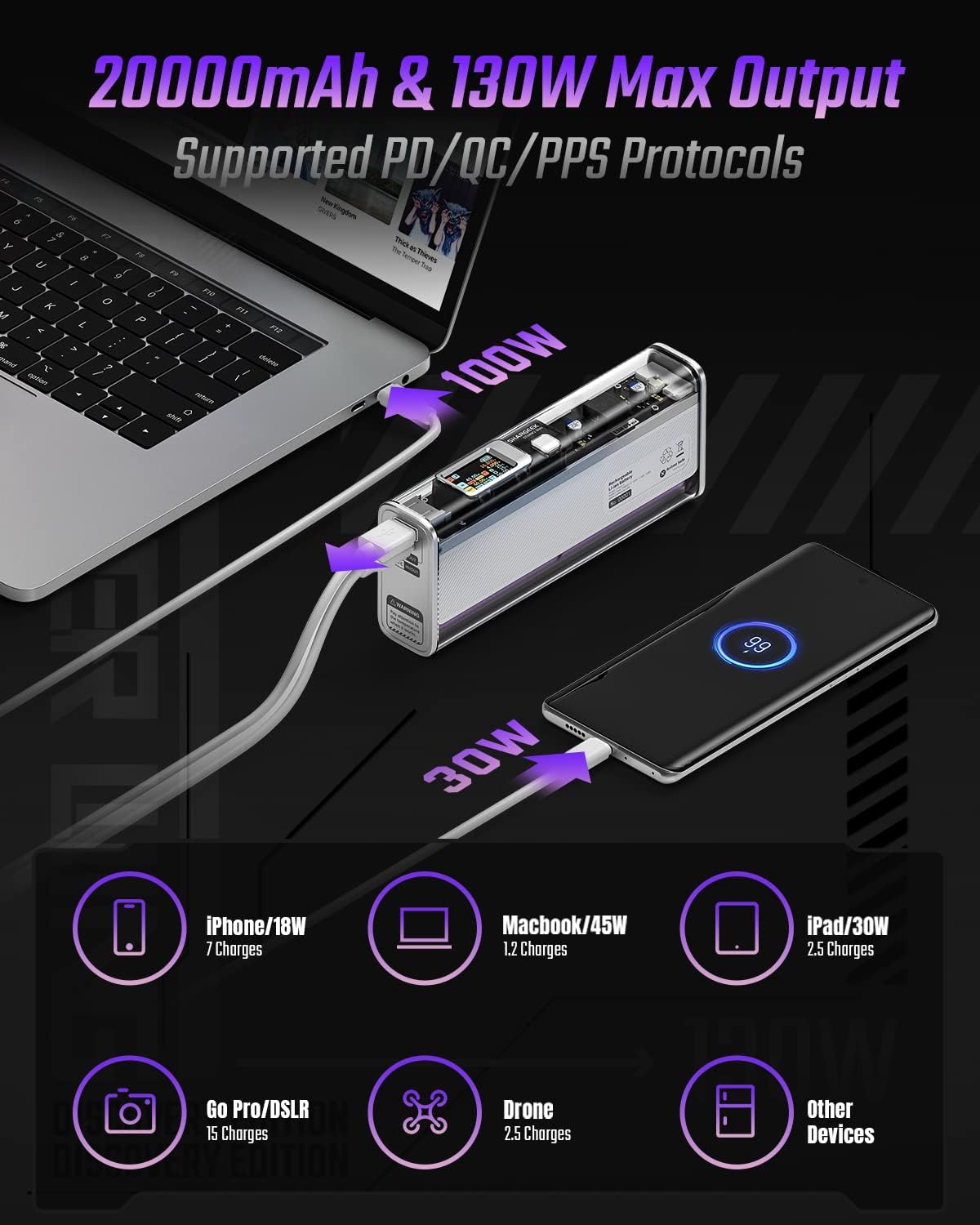
Image: The Shargeek STORM2 Slim connected via USB-C to a laptop for 100W charging and via USB-A to a smartphone for 30W charging, demonstrating its dual-port capability.
Gosod a Defnydd Cyntaf
Cynnwys y Pecyn:
- Shargeek STORM2 Slim Portable Charger
- Cebl USB-C i USB-C
- Llawlyfr Defnyddiwr (y ddogfen hon)
Tâl Cychwynnol:
- Before first use, fully charge your STORM2 Slim.
- Connect the provided USB-C to USB-C cable to the USB-C port on the STORM2 Slim.
- Connect the other end of the cable to a compatible USB-C power adapter (not included) with a minimum of 100W output for fastest charging.
- The IPS screen will display charging status and battery percentage. The device is fully charged when the screen indicates 100%.
- A full recharge typically takes approximately 90 minutes with a 100W power adapter.
Cyfarwyddiadau Gweithredu
Dyfeisiau Codi Tâl:
- Identify the appropriate charging cable for your device (USB-C to USB-C or USB-A to device-specific cable).
- Connect one end of the cable to your device and the other end to the corresponding port (USB-C or USB-A) on the STORM2 Slim.
- The IPS screen will automatically activate and display the charging output (watts, volts, amps) for the connected device(s).
- The STORM2 Slim can charge two devices simultaneously using both the USB-C and USB-A ports.
Understanding the IPS Screen:
The IPS screen provides detailed real-time information. Use the physical button on the side of the power bank to navigate through different display modes or access settings.
- Input/Output Dashboard: Shows power input (IN) when charging the power bank and power output (OUT) when charging devices, including wattage, cyftage, and current for each port.
- Lefel Batri: Yn dangos y canran batri sy'n weddilltage and a visual icon.
- Cyftage & Cyfredol: Detailed readings for the internal battery cells.
- Tymheredd: Shows the internal circuit board and battery temperatures.
- Amser rhedeg: A resettable timer indicating the duration of current operation.
To access menus: Long-press the button. I lywio: Short-press. I ddewis: Long-press.
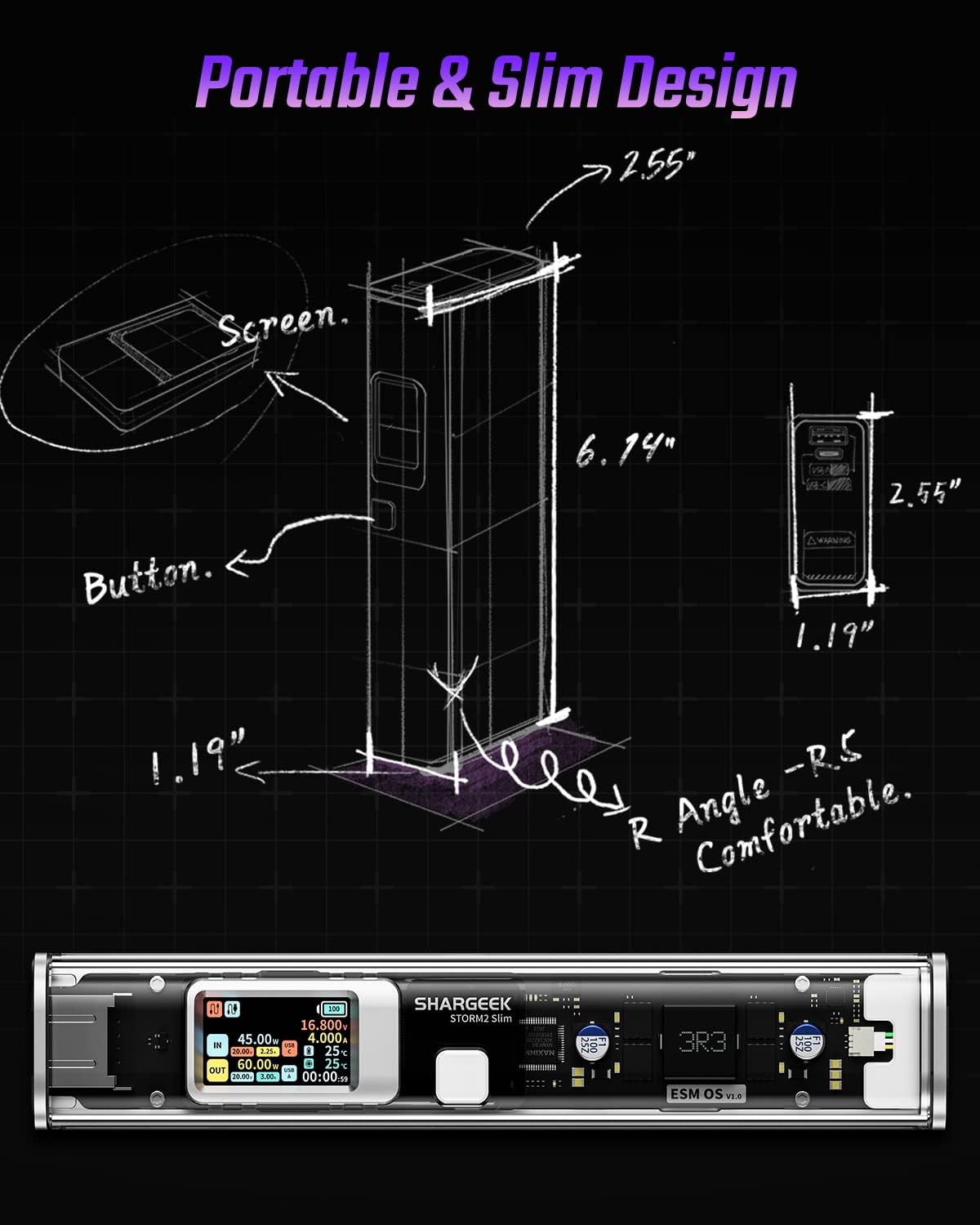
Image: A technical drawing illustrating the dimensions of the Shargeek STORM2 Slim and pointing out the screen and button locations.
Cynnal a chadw
- Glanhau: Defnyddiwch frethyn meddal, sych i lanhau tu allan y banc pŵer. Osgowch ddefnyddio cemegau llym neu ddeunyddiau sgraffiniol.
- Storio: Storiwch y ddyfais mewn lle oer, sych i ffwrdd o olau haul uniongyrchol, tymereddau eithafol, a lleithder uchel.
- Gofal Batri: To prolong battery life, avoid fully discharging the power bank frequently. Recharge it when the battery level is low. If storing for extended periods, charge it to approximately 50-70% every 3-6 months.
- Osgoi diferion: While designed with an aluminum alloy frame for durability, avoid dropping the device as it may damage internal components or the transparent casing.
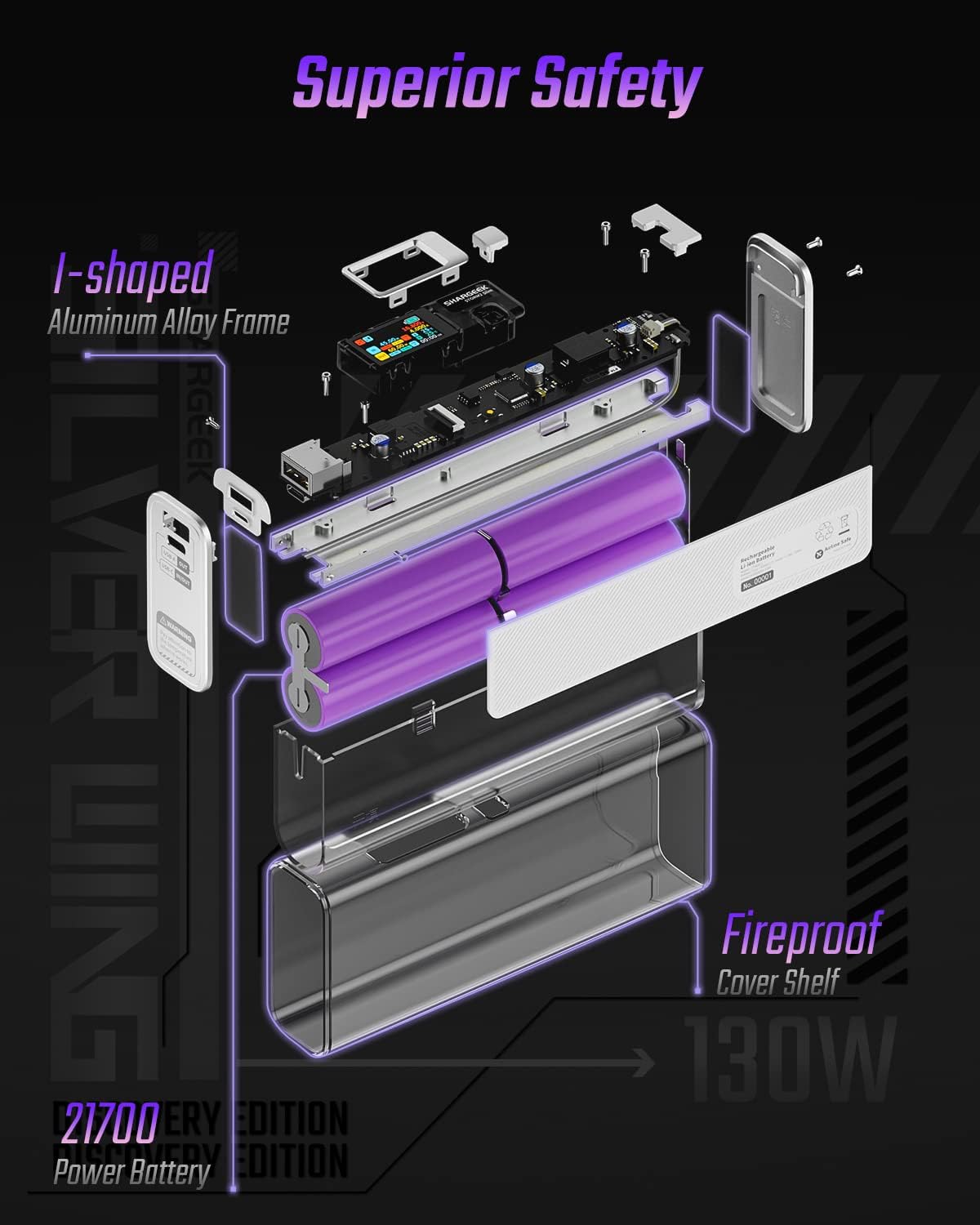
Image: An exploded diagram of the Shargeek STORM2 Slim, illustrating its internal structure including the I-shaped aluminum alloy frame, fireproof cover shelf, and 21700 power batteries, highlighting its robust construction.
Datrys problemau
| Problem | Achos Posibl | Ateb |
|---|---|---|
| Dyfais ddim yn gwefru o'r banc pŵer. | Low power bank battery; incompatible cable; device not properly connected; device requires more power than available. | Recharge the STORM2 Slim. Ensure cable is fully inserted and compatible. Check device power requirements against power bank output. Try a different cable or port. |
| Banc pŵer ddim yn gwefru. | Charging cable or adapter faulty; power bank port damaged. | Try a different USB-C cable and power adapter. Ensure the adapter meets the recommended power output (e.g., 100W). If problem persists, contact support. |
| IPS screen is blank or unresponsive. | Power bank is off; temporary software glitch. | Press the button to activate the screen. If unresponsive, try connecting a device to charge or connecting the power bank to a charger to see if it activates. If problem persists, contact support. |
| Codi tâl araf. | Cable not supporting fast charging; device not supporting fast charging; multiple devices connected. | Ensure you are using a high-quality USB-C PD cable. Verify your device supports fast charging. Charging multiple devices simultaneously may reduce individual charging speeds. |
Manylebau
- Rhif Model: STM2E-1
- Cynhwysedd Batri: 20000mAh
- Allbwn Uchaf: 130W
- Allbwn USB-C: Up to 100W Power Delivery (PD)
- Allbwn USB-A: Hyd at 30W
- Mewnbwn: USB-C (up to 100W PD)
- Arddangos: Sgrin IPS
- Dimensiynau: 3 x 6.5 x 15.59 cm (tua 1.18 x 2.56 x 6.14 modfedd)
- Pwysau: Tua 689 g (1.52 pwys)
- Math o batri: Ion Lithiwm
Gwarant a Chefnogaeth
Gwybodaeth Gwarant:
Shargeek products are covered by a limited warranty against defects in materials and workmanship. Please refer to the warranty card included with your purchase or visit the official Shargeek websafle am delerau ac amodau gwarant manwl.
Cefnogaeth i Gwsmeriaid:
For technical assistance, troubleshooting, or warranty claims, please contact Shargeek customer support through their official websafle neu'r wybodaeth gyswllt a ddarperir ar becynnu eich cynnyrch.
Official Shargeek Store Link: Shargeek Official Store
Gwybodaeth Diogelwch
- Peidiwch ag amlygu'r ddyfais i ddŵr, lleithder, na thymheredd eithafol.
- Peidiwch â dadosod, addasu na cheisio atgyweirio'r ddyfais eich hun. Bydd hyn yn gwneud y warant yn ddi-rym a gall achosi difrod neu anaf.
- Cadwch allan o gyrraedd plant.
- Defnyddiwch geblau ac addaswyr gwefru ardystiedig a chydnaws yn unig.
- Osgoi gollwng neu orfodi'r ddyfais i effeithiau cryf.
- Dispose of the device responsibly according to local regulations for electronic waste.
Ask a question about this manual
Ask about setup, troubleshooting, compatibility, parts, safety, or missing instructions. Manuals+ will review the question and use this page’s manual context to help answer it.