
LFF DAB Plus Digital FM Radio
LFF DAB Plus Digital FM Radio User Manual
Model: DAB Plus Digital FM Radio
Brand: LFF
1. Rhagymadrodd
This manual provides detailed instructions for the LFF DAB Plus Digital FM Radio. It covers setup, operation, maintenance, and troubleshooting to ensure optimal performance and user experience. Please read this manual thoroughly before using the device.

Blaen view of the LFF DAB Plus Digital FM Radio, showing the speaker grille, color display, and extended antenna.
2. Cynnwys Pecyn
Gwiriwch y pecyn am yr eitemau canlynol:
- 1 x LFF DAB Plus Digital FM Radio
- 1 x Addasydd Pwer AC
- 1 x Canllaw Cychwyn Cyflym
3. Cynnyrch Drosview
Familiarize yourself with the radio's components and controls.
3.1 Nodweddion Allweddol

This diagram illustrates the radio's key functions: DAB+ radio, 60 station presets, FM radio, sleep timer, headphone jack, Bluetooth connectivity, full-color screen, and dual alarm capability.
3.2 Rheolyddion a Phorthladdoedd

Top ac ochr view of the radio, showing control buttons and knobs on the top panel, and the 3.5mm headphone jack located on the side.
Refer to the diagram above for the location of the following:
- Botwm Pŵer: Yn troi'r radio ymlaen / i ffwrdd.
- Botwm Modd: Switches between DAB+, FM, and Bluetooth modes.
- Tune/Select Knob: Rotates to tune stations or navigate menus, press to select.
- Knob Cyfrol: Yn addasu'r cyfaint sain.
- Botymau Rhagosodedig: For saving and recalling favorite stations.
- Alarm/Sleep Timer Button: Yn cyrchu gosodiadau larwm ac amserydd cysgu.
- Arddangosfa Lliw: Yn dangos gwybodaeth am yr orsaf, yr amser, ac opsiynau'r ddewislen.
- Jack clustffon (3.5mm): Ar gyfer gwrando preifat.
- DC MEWN Porthladd: Ar gyfer cysylltu'r addasydd pŵer AC.
- Antena telesgopig: Ar gyfer derbyniad radio gwell.
4. Gosod
4.1 Pweru Ymlaen
The radio can be powered by the included AC adapter or by batteries.
- Pŵer AC: Connect the AC power adapter to the DC IN port on the back of the radio and plug it into a wall outlet.
- Pŵer Batri: Open the battery compartment on the back of the radio and insert 4 x 1.5V AA (LR6) batteries, ensuring correct polarity.
Yn ol view of the radio, detailing the battery compartment for 4x AA batteries, the AC adapter input (5V/1000mA), and the 360° rotatable antenna. Product dimensions are also indicated.
4.2 Addasiad Antena
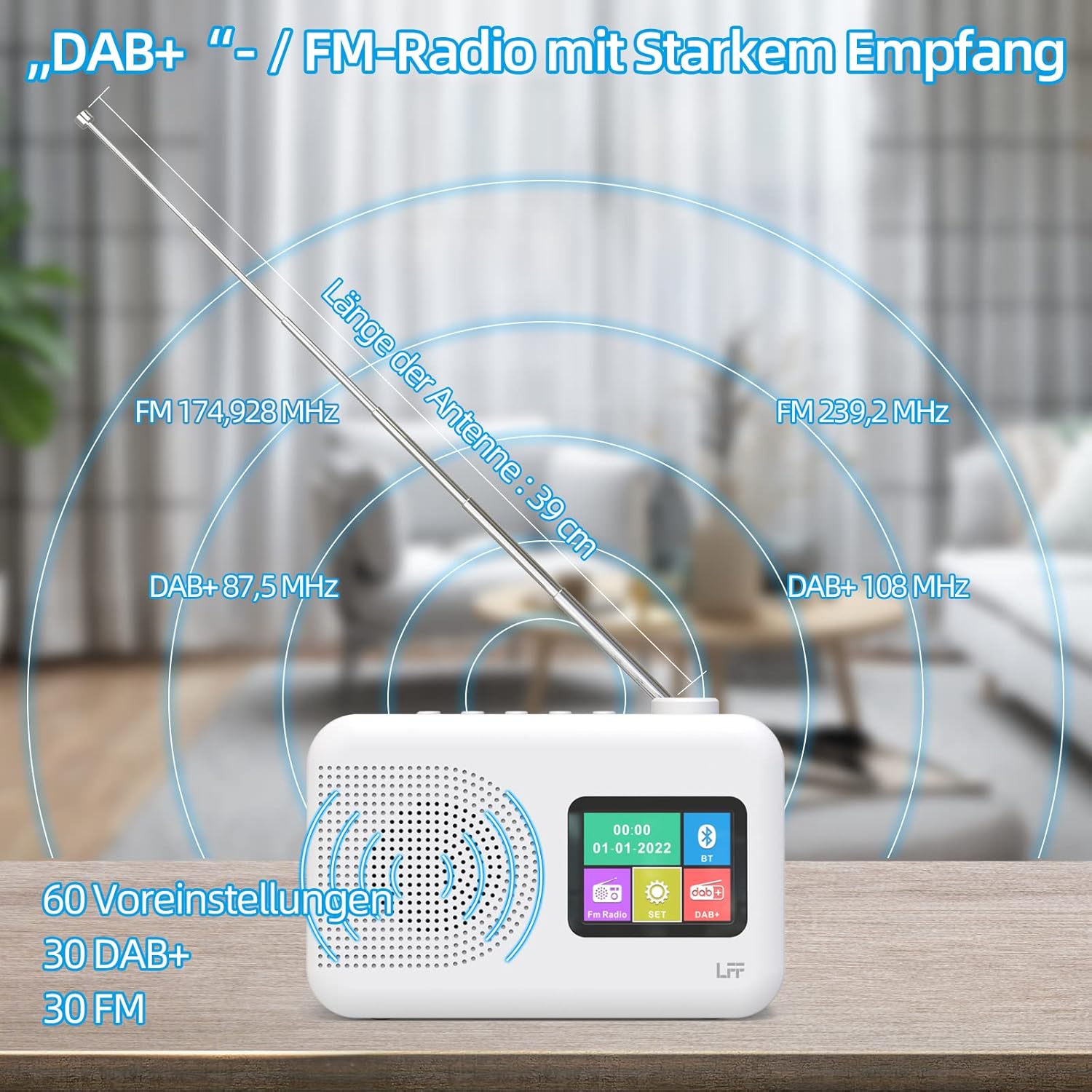
Extend the telescopic antenna fully (approximately 39 cm) and adjust its angle for optimal reception, especially for DAB+ and FM stations.

This diagram illustrates the radio's strong DAB+ and FM reception capabilities with the fully extended 39cm antenna, showing frequency ranges and the capacity for 60 total presets (30 DAB+, 30 FM).
4.3 Initial Scan (DAB+)
- Trowch y radio ymlaen.
- Ensure the mode is set to DAB+. If not, press the Modd botwm i newid.
- The radio will automatically perform a full scan for available DAB+ stations. This may take a few minutes.
- Once the scan is complete, the radio will display a list of found stations.
5. Cyfarwyddiadau Gweithredu
5.1 DAB+ Radio Mode
- Gwasgwch y Modd button to select DAB+ mode.
- Cylchdroi y Alaw/Dewis knob to browse through the available stations.
- Gwasgwch y Alaw/Dewis botwm i ddewis gorsaf.
- Rhagosodiadau Arbed: I gadw gorsaf, pwyswch a daliwch Rhagosodedig button until the display confirms. To recall, briefly press the corresponding Rhagosodedig button. Up to 30 DAB+ stations can be saved.
Modd Radio 5.2 FM
- Gwasgwch y Modd botwm i ddewis modd FM.
- Cylchdroi y Alaw/Dewis botwm i diwnio â llaw i amledd.
- Pwyswch a dal y Alaw/Dewis knob for a few seconds to auto-scan for the next available station.
- Rhagosodiadau Arbed: Similar to DAB+ mode, press and hold a Rhagosodedig button to save, and briefly press to recall. Up to 30 FM stations can be saved.
5.3 Modd Bluetooth

This diagram illustrates the three primary playback options for the radio: through its internal speaker, via Bluetooth connection to an external device, or using headphones connected to the headphone jack.
- Gwasgwch y Modd button to select Bluetooth mode. The display will show "Bluetooth Pairing" or similar.
- On your external device (e.g., smartphone), enable Bluetooth and search for available devices.
- Select "LFF Radio" (or similar name) from the list to pair.
- Ar ôl paru, gallwch chwarae sain o'ch dyfais drwy siaradwr y radio.
- Nodyn: This radio acts as a Bluetooth receiver. It does not support connecting to Bluetooth headphones or other Bluetooth speakers.
5.4 Amserydd Cwsg
The sleep timer allows the radio to automatically turn off after a set period.

This image depicts the sleep timer function, offering selectable durations of 15, 30, 45, 60, 90, and 120 minutes before the radio automatically powers off.
- Gwasgwch y Alarm/Sleep Timer button repeatedly to cycle through sleep timer options (15 min, 30 min, 45 min, 60 min, 90 min, 120 min, OFF).
- Select your desired duration. The radio will turn off automatically after this time.
5.5 Cloc Larwm
The radio features a dual alarm function.
- Pwyswch a dal y Alarm/Sleep Timer button to enter alarm settings.
- Defnyddiwch y Alaw/Dewis knob to set the alarm time, alarm source (DAB+, FM, or buzzer), and volume.
- Gwasgwch y Alaw/Dewis knob to confirm each setting.
- Repeat the process for the second alarm if needed.
5.6 Defnyddio Clustffonau
Plug 3.5mm headphones into the headphone jack on the side of the radio for private listening. The internal speaker will automatically mute.
6. cynnal
6.1 Glanhau
- Wipe the radio's surface with a soft, dry cloth.
- Peidiwch â defnyddio glanhawyr sgraffiniol, cwyrau na thoddyddion gan y gallant niweidio'r gorffeniad.
6.2 Batri Newydd
When using battery power, replace all four AA batteries when the low battery indicator appears on the display or when performance degrades.
- Ensure the radio is turned off and disconnected from AC power.
- Agorwch y clawr adran batri ar y cefn.
- Tynnwch hen fatris a'u gwaredu'n iawn.
- Insert new 4 x 1.5V AA (LR6) batteries, observing correct polarity (+/-).
- Caewch y clawr adran batri yn ddiogel.
6.3 Ffilm Amddiffyn Sgrin
The radio's display comes with a transparent protective film. For optimal clarity, gently peel off this film before first use.
7. Datrys Problemau
Os byddwch chi'n dod ar draws problemau, cyfeiriwch at y problemau a'r atebion cyffredin canlynol:
| Problem | Achos Posibl | Ateb |
|---|---|---|
| Dim pŵer | AC adapter not connected, batteries depleted or incorrectly inserted. | Check AC adapter connection. Replace batteries or ensure correct polarity. |
| Derbyniad radio gwael | Antenna not extended, weak signal area, interference. | Fully extend and adjust the telescopic antenna. Move the radio to a different location. Avoid sources of interference. |
| Bluetooth ddim yn cysylltu | Radio not in Bluetooth mode, device too far, already paired with another device. | Ensure radio is in Bluetooth mode. Keep devices within range. Disconnect from other devices. |
| Dim sain | Volume too low, headphones connected, mute activated. | Increase volume. Disconnect headphones. Check if mute is active. |
8. manylebau
- Brand: LFF
- Model: DAB Plus Digital FM Radio
- Lliw: Gwyn
- Technoleg Cysylltedd: Bluetooth
- Dimensiynau (L x W x H): 16.1 cm x 5.9 cm x 10.9 cm
- Technoleg Tiwnio: DAB
- Ffynhonnell Pwer: AC Adapter (5V/1000mA) or 4 x 1.5V AA (LR6) Batteries
- Bandiau Radio â Chymorth: DAB+, FM
- Amrediad Amrediad DAB+: 174.928 - 239.2 MHz
- Ystod Amledd FM: 87.5 - 108 MHz
- Rhagosodiadau: 30 DAB+, 30 FM
- Hyd Antena: 39 cm (extendable)
- Nodweddion arbennig: DAB Plus Radio, Sleep Timer, Dual Alarm, Headphone Jack, Color Display
- Cydrannau wedi'u Cynnwys: DAB Digital Radio, AC Power Adapter, Quick Start Guide
9. Gwarant a Chefnogaeth
For any quality-related issues or technical support, please contact the seller directly. We are committed to resolving any problems you may encounter with your LFF DAB Plus Digital FM Radio.
Ask a question about this manual
Ask about setup, troubleshooting, compatibility, parts, safety, or missing instructions. Manuals+ will review the question and use this page’s manual context to help answer it.