
1. Rhagymadrodd
The Sunshine DT-17N Digital Multimeter is a versatile and reliable tool designed for accurate electrical measurements. It is particularly suitable for phone repair technicians and general electronics work, capable of measuring various electrical parameters including voltage, current, resistance, capacitance, and temperature. Its compact design and user-friendly features make it an essential tool for diagnosing and repairing electronic devices.

Figure 1: The Sunshine DT-17N Digital Multimeter, demonstrating its compact size for portability.
2. Gwybodaeth Diogelwch
To ensure safe operation and prevent damage to the meter, please read and follow all safety instructions carefully. This multimeter features double insulation protection for enhanced user safety.
- Always ensure the test leads are in good condition and properly connected before taking measurements.
- Peidiwch â gwneud cais cyftage or current that exceeds the maximum rated values for each range.
- Never use the multimeter if it appears damaged or if the test leads are frayed.
- Be cautious when working with voltaguwchlaw 30V AC RMS, 42V brig, neu 60V DC, gan fod y rhain yn peri perygl sioc.
- Always disconnect power to the circuit and discharge high-voltagcynwysyddion e cyn mesur gwrthiant, parhad, neu ddeuodau.
- Replace the battery promptly when the low battery indicator appears to ensure accurate readings.
3. Cynnyrch Drosview
3.1. Multimeter Components

Ffigur 2: Blaen view of the DT-17N Multimeter, highlighting its main display and controls.
3.2. Nodweddion Arddangos
The DT-17N features a large LCD display with a backlight, ensuring clear readability in various lighting conditions.

Figure 3: The multimeter's LCD display with its backlight feature, improving visibility in low-light environments.
- Arddangosfa LCD fawr: Provides clear numerical readings.
- Golau cefn: Improves visibility in dark or low-light conditions. Activated by pressing and holding the HOLD button.
- Uned Fesur: Displays the appropriate unit (e.g., V, A, Ω, °C/°F).
- Statws batri: Yn dangos lefel gyfredol y batri.
- Automatic Polarity Display: Shows positive or negative polarity automatically.
3.3. Controls and Input Ports
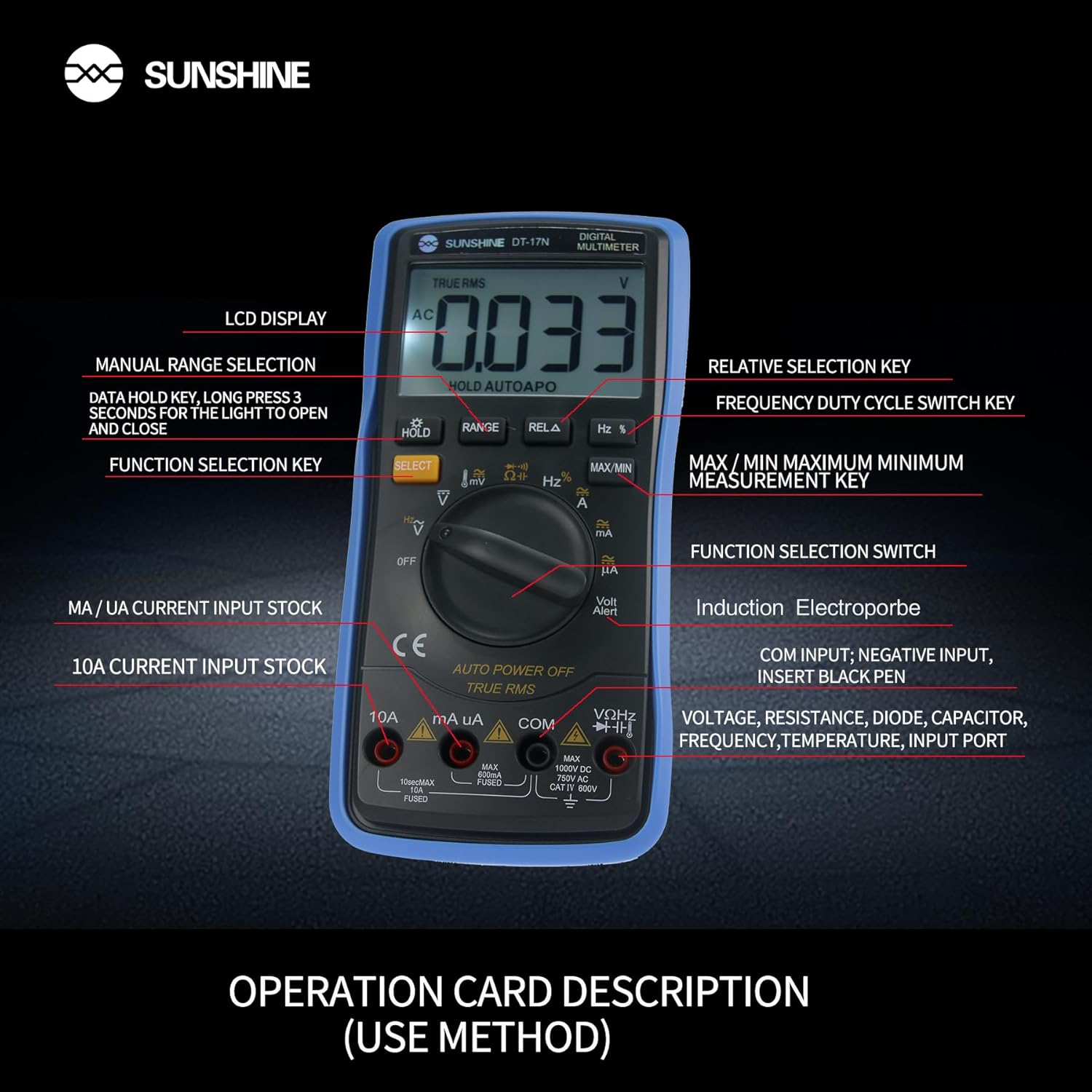
Ffigur 4: Manwl view of the multimeter's controls and input ports with their respective functions.
- Switsh Swyddogaeth Rotari: Used to select the desired measurement function (e.g., Voltage, Current, Resistance, Temperature).
- Botwm SELECT: Toggles between different measurement modes within a single rotary switch position (e.g., AC/DC voltage, Deuod/Parhad).
- Botwm DAL: Freezes the current reading on the display. Press and hold to activate/deactivate the backlight.
- Botwm YSTOD: Allows manual selection of measurement ranges, overriding the automatic ranging feature.
- RELA Button (Relative Selection Key): Measures the difference between a stored reference value and the current reading.
- Hz % Button (Frequency Duty Cycle Switch Key): Toggles between frequency and duty cycle measurements.
- Botwm MAX/MIN: Displays the maximum or minimum measured value during a measurement session.
- VΩHz Input Port: Connect the red test lead for voltage, resistance, frequency, capacitance, diode, and temperature measurements.
- COM Input Port: Connect the black test lead (common ground) for all measurements.
- mA/uA Input Port: Connect the red test lead for measuring small currents (milliamperes and microamperes).
- 10A Input Port: Connect the red test lead for measuring large currents (up to 10 Amperes).
- Volt Alert (NCV): Cyf. Di-gyswllttage detection feature.
4. Gosod
4.1. Gosod Batri
The DT-17N is battery-powered. To install or replace the battery:
- Gwnewch yn siŵr bod y multimedr wedi'i ddiffodd.
- Lleolwch glawr adran y batri ar gefn yr uned.
- Dadsgriwiwch y sgriw(iau) cadw a thynnwch y gorchudd.
- Insert the new battery, observing correct polarity (+ and -).
- Rhowch glawr adran y batri yn ôl a'i sicrhau gyda'r sgriw(iau).
4.2. Cysylltu Gwifrau Prawf
Always connect the black test lead to the COM input jack. Connect the red test lead to the appropriate input jack based on the measurement you intend to perform:
- Am Voltage, Resistance, Capacitance, Frequency, Diode, and Temperature measurements: Connect the red test lead to the VΩHz jac.
- For Current measurements (mA/uA): Connect the red test lead to the mA/uA jac.
- For High Current measurements (10A): Connect the red test lead to the 10A jac.
5. Cyfarwyddiadau Gweithredu
The Sunshine DT-17N features automatic identification for most ranges, simplifying operation. Use the rotary switch to select the primary function and the SELECT button to toggle sub-functions.
5.1. Mesur Cyfainttage (AC/DC)
- Trowch y switsh cylchdro i'r V sefyllfa.
- Os oes angen, pwyswch y DETHOL button to toggle between AC (~) and DC (—) voltage.
- Cysylltwch dennyn y prawf du â'r COM jac a'r gwifren brawf goch i'r VΩHz jac.
- Cysylltwch y chwiliedyddion prawf yn gyfochrog â'r gylched neu'r gydran rydych chi am ei mesur.
- Darllenwch y cyftage gwerth ar yr arddangosfa.

Figure 5: The multimeter showing a DC millivolt measurement on its display.
5.2. Measuring Current (AC/DC)
Rhybudd: Never connect the multimeter in parallel when measuring current, as this can damage the meter and the circuit. Always connect in series.
- Trowch y switsh cylchdro i'r mA/uA or 10A position, depending on the expected current.
- Os oes angen, pwyswch y DETHOL button to toggle between AC (~) and DC (—) current.
- Cysylltwch dennyn y prawf du â'r COM jack. Connect the red test lead to the mA/uA or 10A jack accordingly.
- Open the circuit and connect the test probes in series with the load.
- Darllenwch y gwerth cyfredol ar yr arddangosfa.
5.3. Mesur Gwrthsafiad
- Trowch y switsh cylchdro i'r Ω sefyllfa.
- Cysylltwch dennyn y prawf du â'r COM jac a'r gwifren brawf goch i'r VΩHz jac.
- Sicrhewch fod y gylched wedi'i dad-egnïo a bod yr holl gynwysyddion wedi'u rhyddhau.
- Connect the test probes across the component to measure its resistance.
- Darllenwch y gwerth gwrthiant ar yr arddangosfa.
5.4. Mesur Cynhwysedd
- Trowch y switsh cylchdro i'r Cynhwysedd symbol (often shared with diode/continuity).
- Gwasgwch y DETHOL button until the capacitance mode is active.
- Cysylltwch dennyn y prawf du â'r COM jac a'r gwifren brawf goch i'r VΩHz jac.
- Gwnewch yn siŵr bod y cynhwysydd wedi'i ryddhau'n llwyr cyn cysylltu'r stilwyr prawf.
- Cysylltwch y stilwyr prawf ar draws y cynhwysydd.
- Darllenwch y gwerth cynhwysedd ar yr arddangosfa.
5.5. Measuring Frequency / Duty Cycle
- Trowch y switsh cylchdro i'r Hz % sefyllfa.
- Gwasgwch y Hz % button to toggle between frequency (Hz) and duty cycle (%).
- Cysylltwch dennyn y prawf du â'r COM jac a'r gwifren brawf goch i'r VΩHz jac.
- Cysylltwch y stilwyr prawf yn gyfochrog â'r ffynhonnell signal.
- Darllenwch y gwerth amledd neu gylchred dyletswydd ar yr arddangosfa.
5.6. Mesur Tymheredd
The DT-17N can measure temperature using a K-type thermocouple (not always included, check package contents).

Ffigur 6: Example of temperature measurement using the DT-17N Multimeter with a thermocouple.
- Trowch y switsh cylchdro i'r ° C / ° F. sefyllfa.
- Os oes angen, pwyswch y DETHOL button to choose between Celsius or Fahrenheit.
- Connect the K-type thermocouple to the VΩHz a COM jaciau, arsylwi polaredd.
- Place the thermocouple tip on or in the object whose temperature you wish to measure.
- Darllenwch werth y tymheredd ar yr arddangosfa.
5.7. Diode Test and Continuity
- Trowch y switsh cylchdro i'r Deuod/Parhad symbol.
- Gwasgwch y DETHOL button to toggle between Diode Test and Continuity Test.
- Cysylltwch dennyn y prawf du â'r COM jac a'r gwifren brawf goch i'r VΩHz jac.
- For Diode Test: Connect the probes across the diode. The display will show the forward voltage drop. Reverse the probes to check for open circuit.
- For Continuity Test: Connect the probes across the circuit or component. A beep indicates continuity (low resistance).
5.8. Di-gyswllt Voltage (NCV) Canfod
The NCV function allows detection of AC voltage without direct contact with conductors.
- Trowch y switsh cylchdro i'r NCV position (often indicated by a Volt Alert symbol).
- Move the top part of the multimeter near the conductor.
- The meter will beep and/or flash an indicator light if AC voltage yn cael ei ganfod.
5.9. Data Hold and Backlight
- Daliad Data: Gwasgwch y DALWCH button briefly to freeze the current reading on the display. Press again to release.
- Golau cefn: Pwyswch a dal y DALWCH button for approximately 3 seconds to turn the display backlight ON or OFF.
5.10. MAX/MIN Measurement
This function records the maximum and minimum values measured during a session.
- Select the desired measurement function (e.g., Voltaga).
- Gwasgwch y MAX/MIN button. The display will show 'MAX' and the maximum value recorded.
- Gwasgwch MAX/MIN again to cycle to 'MIN' and view the minimum value.
- Pwyswch a dal MAX/MIN i adael y modd hwn.
6. cynnal
Mae cynnal a chadw priodol yn sicrhau hirhoedledd a chywirdeb eich multimedr.
6.1. Glanhau
Sychwch yr achos gyda hysbysebamp lliain a glanedydd ysgafn. Peidiwch â defnyddio sgraffinyddion na thoddyddion. Gwnewch yn siŵr bod y mesurydd yn hollol sych cyn ei ddefnyddio.
6.2. Amnewid Batri
Refer to Section 4.1 for battery replacement instructions. Always use the specified battery type.
6.3. Holster Care
The multimeter is protected by a thick rubber shockproof holster, designed for durability and a non-slip grip. Keep the holster clean and free from debris.

Figure 7: The durable rubber holster provides protection and a comfortable grip for the multimeter.
7. Datrys Problemau
If you encounter issues with your DT-17N multimeter, refer to the table below for common problems and solutions.
| Problem | Achos Posibl | Ateb |
|---|---|---|
| Dim arddangosfa neu arddangosfa dywyll | Low or dead battery; Poor battery contact | Replace battery; Check battery contacts |
| Darlleniadau anghywir | Wrong function selected; Improper test lead connection; Damaged test leads; Out of range | Select correct function; Ensure leads are in correct jacks; Replace leads; Select higher range or check specifications |
| Dim bîp parhad | Circuit resistance too high; Continuity mode not selected | Ensure resistance is below threshold; Press SELECT to enter continuity mode |
| Fuse blown (for current measurements) | Overcurrent applied | Replace fuse with specified type and rating; Ensure correct current measurement procedure |
8. manylebau
Technical specifications for the Sunshine DT-17N Digital Multimeter.
| Nodwedd | Manyleb |
|---|---|
| Model | DT-17N |
| Math Mesur | Amlfesurydd |
| Arddangos | 5999 (5 5/6) counts, Automatic Polarity Display, Backlit LCD |
| SampCyfradd ling | Tua 3 gwaith yr eiliad |
| Ffynhonnell Pwer | Wedi'i Bweru â Batri |
| Isafswm Cyfrol Weithredoltage | 3 folt (DC) |
| Amrediad Mesur Tymheredd | 0°C i 1000°C (32°F i 1832°F) |
| Induction Electroprobe Function | Yes (NCV) |
| Trosi Dwbl Integredig A / D. | Oes |
| Dimensiynau Eitem | 5.51 x 2.76 x 1.18 modfedd |
| Pwysau Eitem | 0.55 Cilogram |
| Lliw | Glas |
9. Gwarant a Chefnogaeth
9.1. Gwybodaeth Gwarant
This product comes with a warranty of 3 mis o'r dyddiad prynu. Please retain your proof of purchase for warranty claims. The warranty covers manufacturing defects under normal use.
9.2. Cefnogaeth i Gwsmeriaid
For technical assistance or inquiries regarding your Sunshine DT-17N Digital Multimeter, please contact your retailer or the manufacturer's customer service department. Refer to your purchase documentation for specific contact details.