
1. Rhagymadrodd
Diolch am brynuasing the zelotes T80 Wired Gaming Mouse. This manual provides essential information for setting up, operating, and maintaining your new gaming mouse. Please read it thoroughly to ensure optimal performance and longevity of your device.
2. Gosod
2.1 Beth sydd yn y Bocs
- 1 x T80 Gaming Mouse
- 1 x Llawlyfr Cyfarwyddiadau
2.2 Cysylltu Eich Llygoden
- Unpack the zelotes T80 Gaming Mouse and the instruction manual from the box.
- Locate an available USB port on your computer (Laptop, PC, Mac).
- Plug the USB connector of the mouse into the USB port.
- The mouse is plug-and-play and should be automatically recognized by your operating system (Windows 11/10/8/7, Mac OS). No additional drivers are typically required for basic functionality.
For advanced customization of buttons and lighting, please refer to the manufacturer's website for any available software downloads.
3. Cyfarwyddiadau Gweithredu
3.1 Swyddogaethau Botwm
The zelotes T80 Gaming Mouse features 7 programmable buttons designed for enhanced gaming and productivity.
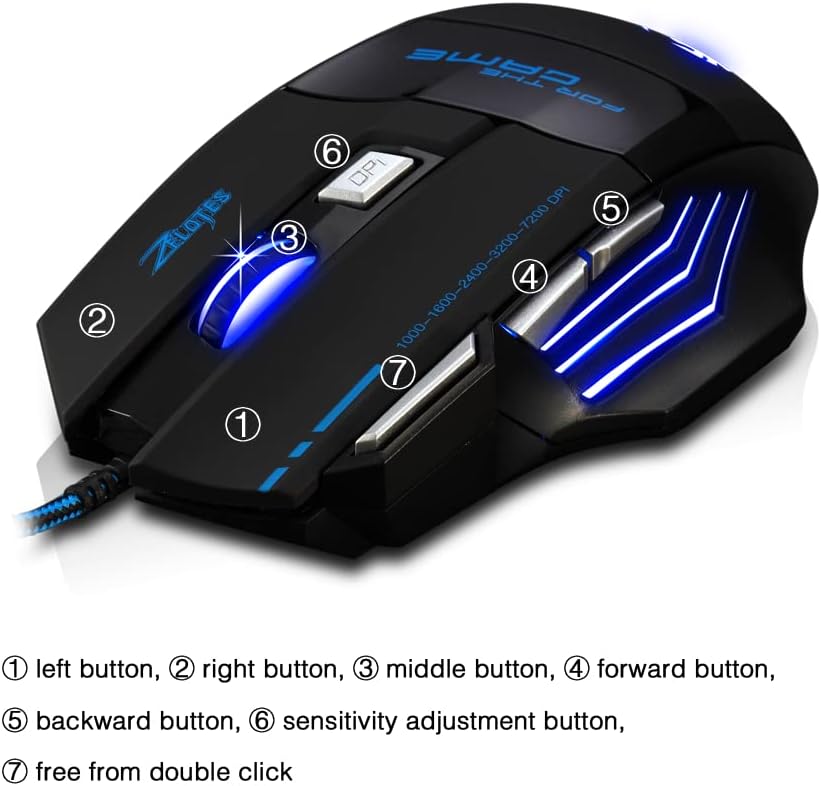
- Left Button (1): Swyddogaeth clic chwith safonol.
- Right Button (2): Swyddogaeth clic dde safonol.
- Middle Button / Scroll Wheel (3): Scrolls up/down and acts as a middle-click button.
- Forward Button (4): Yn llywio ymlaen yn web porwyr neu file fforwyr.
- Backward Button (5): Yn llywio yn ôl i mewn web porwyr neu file fforwyr.
- Sensitivity Adjustment (DPI) Button (6): Yn cylchdroi trwy osodiadau DPI.
- Quick Fire Button (7): Equipped for rapid firing, allowing continuous shooting with a single press (functions as a double-click by default).
3.2 Addasiad DPI
The mouse offers 5 adjustable DPI settings to match your preference for gaming or office work. Use the Sensitivity Adjustment (DPI) Button (6) to cycle through the following settings:
- 1000 DPI
- 1600 DPI
- 2400 DPI
- 3200 DPI
- 7200 DPI
3.3 LED Backlight Illumination
The zelotes T80 features multi-mode LED backlighting that enhances your visual experience and gaming atmosphere. The LED lights cycle through various colors, providing dynamic illumination.

3.4 Dylunio Ergonomig
The mouse is designed with an ergonomic shape and skin-friendly material for a comfortable grip and soft touch. Its sweat-resistant and anti-slip features ensure comfort during prolonged use, reducing arm fatigue.

4. cynnal
- Cadwch y llygoden yn lân trwy ei sychu â lliain meddal, sych.
- Avoid exposing the mouse to extreme temperatures, direct sunlight, or liquids.
- Do not attempt to disassemble the mouse, as this may void the warranty.
5. Datrys Problemau
- Llygoden ddim yn ymateb: Ensure the USB cable is securely plugged into the computer. Try a different USB port or restart your computer.
- Cursor movement is erratic: Clean the optical sensor on the bottom of the mouse. Ensure you are using the mouse on a suitable surface (e.g., a mouse pad).
- Goleuadau LED ddim yn gweithio: Check if the mouse is properly connected. Some operating systems or software might interfere with lighting controls.
6. manylebau
| Nodwedd | Disgrifiad |
|---|---|
| Dimensiynau Cynnyrch | 5.12 x 4.09 x 1.77 modfedd |
| Pwysau Eitem | 5.5 owns |
| Rhif Model | T80 |
| Brand | zelotes |
| Lliw | Du |
| Technoleg Cysylltedd | USB (Wired) |
| Technoleg Canfod Symudiad | Optegol |
| Gosodiadau DPI | 1000/1600/2400/3200/7200 DPI (5 adjustable levels) |
| Botymau | 7 (Programmable, including Quick Fire Button) |
| Nodwedd Arbennig | Ergonomic Design, LED Illumination, Sweat-resistant, Anti-slip |
| Cydweddoldeb | Windows 11/10/8/7, Mac OS |
7. Fideos Cynnyrch
7.1 T80 7200DPI Gaming Mouse Overview
Mae'r fideo hwn yn rhoi trosolwg byrview of the zelotes T80 Gaming Mouse, highlighting its 7200 DPI capability and overall design. It demonstrates the mouse's appearance and some features in action.
8. Gwarant a Chefnogaeth
For warranty information or technical support, please refer to the contact details provided on the product packaging or visit the official zelotes websafle. Cadwch eich derbynneb prynu fel prawf o brynu ar gyfer unrhyw hawliadau gwarant.