
1. Rhagymadrodd
This manual provides essential information for the safe and efficient installation, operation, and maintenance of the GEWISS P-COMFORT GWD6916 Wired Load Management Relay. Please read this manual thoroughly before attempting any installation or operation.
The GEWISS P-COMFORT GWD6916 is designed to manage electrical loads in an installation, optimizing energy consumption and preventing overloads. It is a wired version, ensuring reliable communication and control.
Gwybodaeth Diogelwch
- Gosodiad Proffesiynol: Installation and maintenance must be performed by qualified personnel in accordance with local electrical codes and regulations.
- Pŵer Datgysylltu: Always disconnect the main power supply before performing any installation, wiring, or maintenance procedures.
- Cyftage: Sicrhau bod y cyflenwad cyftage matches the device's specifications (250 Volt).
- Amodau Amgylcheddol: Peidiwch ag amlygu'r ddyfais i leithder, tymereddau eithafol, nac amgylcheddau cyrydol.
2. Cynnwys Pecyn
Gwiriwch fod yr holl eitemau yn bresennol ac yn ddi-ddifrod wrth agor y pecyn:
- 1 x GEWISS P-COMFORT GWD6916 Wired Load Management Relay
- 1 x Llawlyfr Cyfarwyddiadau (y ddogfen hon)
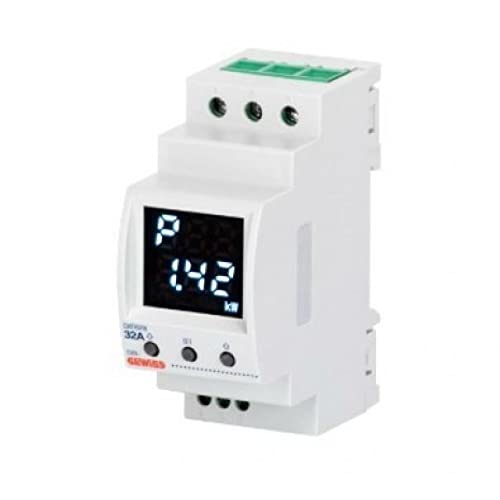
Delwedd 1: Blaen view of the GEWISS P-COMFORT GWD6916 Wired Load Management Relay. The image shows the compact housing, terminal blocks for wiring, and indicator lights.
3. Gosod
Follow these steps for proper installation of the GEWISS P-COMFORT GWD6916 relay.
3.1 Mowntio
- Dewis Lleoliad: Choose a suitable location within an electrical enclosure, ensuring adequate ventilation and protection from environmental factors.
- Mowntio: The relay is designed for DIN rail mounting. Securely attach the device to the DIN rail until it clicks into place.
3.2 Gwifrau
Rhybudd: Ensure power is disconnected before proceeding with wiring.
- Cyflenwad Pŵer: Connect the main power supply (250 Volt) to the designated input terminals as indicated on the device's wiring diagram.
- Cysylltiadau Llwytho: Connect the loads to be managed by the relay to the output terminals. Ensure correct polarity and current ratings are observed.
- Mewnbwn rheoli: Connect the control signal (e.g., from a master load management unit or energy meter) to the dedicated control input terminals. This signal dictates when loads should be shed or reconnected.
- Sylfaen: Ensure proper grounding of the device and associated electrical components.
Refer to the detailed wiring diagram printed on the device or included in the packaging for specific terminal assignments.
4. Gweithrediad
Once installed and wired correctly, the GEWISS P-COMFORT GWD6916 relay operates automatically based on the control input it receives.
4.1 Power-Up and Initial Check
- Adfer Pwer: After completing all wiring and safety checks, restore power to the installation.
- Goleuadau Dangosydd: Observe the indicator lights on the relay. A power indicator should illuminate, confirming the device is receiving power. Other indicators will show the status of the loads being managed.
4.2 Load Management Function
The relay functions by switching connected loads ON or OFF in response to a control signal. Typically, this signal originates from a central load management system that monitors total energy consumption. When the total consumption exceeds a predefined threshold, the control system signals the relay to disconnect non-essential loads (load shedding) to prevent an overload. When consumption drops, the loads are reconnected.
4.3 Dangosyddion Statws
The relay features LED indicators to provide visual feedback on its operational status:
- Pwer LED: Indicates that the device is powered ON.
- Statws LED: May indicate operational status, errors, or communication status with the control unit. Refer to the device's specific documentation for LED behavior.
- Load Status LEDs: Individual LEDs may indicate the ON/OFF status of each controlled load.
5. cynnal
The GEWISS P-COMFORT GWD6916 relay is designed for reliable, long-term operation with minimal maintenance.
- Glanhau: Periodically clean the exterior of the device with a soft, dry cloth. Do not use abrasive cleaners or solvents.
- Arolygiad: Annually, or as required by local regulations, have a qualified electrician inspect the wiring connections for tightness and signs of wear or damage.
- Dim Rhannau Defnyddiadwy i Ddefnyddwyr: The device contains no user-serviceable parts. Do not attempt to open or repair the unit.
6. Datrys Problemau
If you encounter issues with your GEWISS P-COMFORT GWD6916 relay, refer to the following common problems and solutions:
| Problem | Achos Posibl | Ateb |
|---|---|---|
| Device has no power (Power LED off) | No power supply, loose wiring, tripped circuit breaker. | Check main power supply. Verify wiring connections. Reset circuit breaker. |
| Loads are not switching ON/OFF as expected | Incorrect control signal, faulty wiring to loads, internal fault. | Verify the control signal from the master unit. Check wiring to loads. If problem persists, consult a qualified electrician. |
| Sŵn neu arogleuon anarferol | Internal component failure, overheating. | Immediately disconnect power. Do not attempt to operate. Contact a qualified electrician or Gewiss support. |
For issues not listed above or if troubleshooting steps do not resolve the problem, contact a qualified electrician or Gewiss technical support.
7. manylebau
| Nodwedd | Manylyn |
|---|---|
| Model | GWD6916 |
| Brand | Gewiss |
| Math | Wired Load Management Relay |
| Cyftage | 250 Folt |
| Dimensiynau (L x W x H) | 10 x 8 x 4 cm |
| Pwysau | 60 g |
| Mowntio | Rheilffordd DIN |
8. Gwarant a Chefnogaeth
The GEWISS P-COMFORT GWD6916 is covered by a standard manufacturer's warranty. Please refer to the warranty card included with your purchase or visit the official Gewiss websafle am delerau ac amodau gwarant manwl.
For technical assistance, product inquiries, or warranty claims, please contact Gewiss customer support through their official channels. Ensure you have your product model number (GWD6916) and purchase details available when contacting support.
Gewiss Official Websafle: www.gewiss.com