
Rhagymadrodd
Thank you for choosing the Optex 990047 Indoor/Outdoor Wireless Digital Thermometer. This device provides accurate temperature readings for both your indoor environment and an outdoor location via a wireless sensor. Please read this manual carefully before use to ensure proper operation and to maximize the lifespan of your thermometer.
Cynnwys Pecyn
- 1 x Optex 990047 Main Display Unit
- 1 x Synhwyrydd Awyr Agored Di-wifr
- 1 x Llawlyfr Defnyddiwr
- (Batteries not included, typically requires AAA or AA batteries for both units)
Cynnyrch Drosview
Familiarize yourself with the components of your Optex thermometer.
Main Display Unit (Front)

Delwedd: Blaen view of the Optex 990047 main display unit. The digital screen shows indoor and outdoor temperatures, along with high/low records and trend indicators. Below the screen are three buttons: 'CH', '°C/°F', and 'CLEAR'.
- Arddangos Digidol: Shows indoor temperature (top) and outdoor temperature (bottom), along with HI/LO records and temperature trend arrows.
- Botwm CH: Selects the wireless channel (if multiple sensors are used) or initiates sensor search.
- Botwm °C/°F: Yn newid rhwng unedau tymheredd Celsius a Fahrenheit.
- Botwm CLEAR: Clears the recorded HI/LO temperatures.
Main Display Unit (Back)

Delwedd: Yn ol view of the Optex 990047 main display unit. It features a battery compartment cover and an integrated kickstand for tabletop placement, as well as a hanging hole.
- Adran Batri: Houses the batteries for the main unit.
- Kickstand: Allows the unit to stand upright on a flat surface.
- Twll Mowntio Wal: For hanging the unit on a wall.
Synhwyrydd Awyr Agored Di-wifr
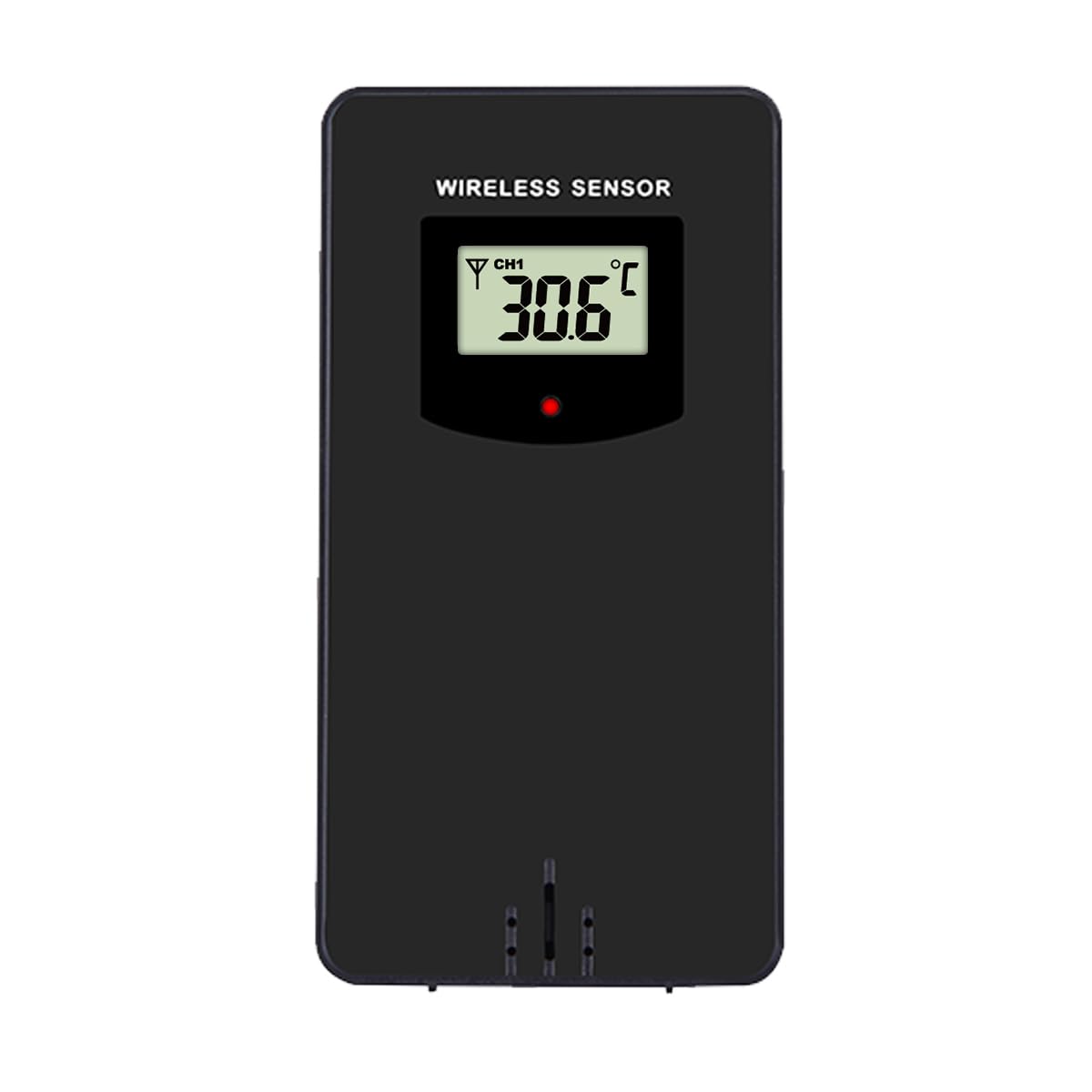
Delwedd: Blaen view of the Optex wireless outdoor temperature sensor. It has a small digital display showing the current temperature and channel, along with a red indicator light and a battery compartment on the back.
- Synhwyrydd Tymheredd: Measures the outdoor temperature.
- Dangosydd Trosglwyddo: A small LED light that flashes when data is transmitted.
- Adran Batri: Houses the batteries for the outdoor sensor.
- Newid sianel: (Typically inside the battery compartment) Allows selection of a specific channel (1, 2, or 3) if using multiple sensors.
Gosod
- Install Batteries in the Outdoor Sensor:
- Agorwch yr adran batri ar gefn y synhwyrydd diwifr.
- Mewnosodwch 2 x batris AAA (heb eu cynnwys) yn ôl y marciau polaredd (+/-).
- Caewch yr adran batri.
- Note: If there is a channel switch inside the compartment, ensure it is set to Channel 1 for initial setup.
- Install Batteries in the Main Display Unit:
- Agorwch yr adran batri ar gefn yr uned arddangos brif.
- Mewnosodwch 2 x batris AAA (heb eu cynnwys) yn ôl y marciau polaredd (+/-).
- Caewch yr adran batri.
- The display will light up and begin searching for the outdoor sensor.
- Paru'r Synhwyrydd:
- Place the outdoor sensor and the main display unit close to each other during the initial setup.
- The main unit should automatically detect and connect to the outdoor sensor within a few minutes. The outdoor temperature will appear on the display.
- If the outdoor temperature does not appear, press and hold the "CH" button on the main unit for 3 seconds to initiate a manual search for the sensor.
- Lleoliad y Synhwyrydd Awyr Agored:
- Choose a shaded location for the outdoor sensor, away from direct sunlight and rain, to ensure accurate readings.
- Avoid placing it near heat sources (e.g., vents, appliances) or metal objects that could interfere with the wireless signal.
- The maximum wireless range is approximately 30 meters (100 feet) in open air. Walls and obstacles will reduce this range.
Gweithrediad
Reading Temperatures
The main display unit shows the indoor temperature at the top and the outdoor temperature (from the wireless sensor) at the bottom. Both displays show the current temperature, along with the recorded high (HI) and low (LO) temperatures for the day, and a trend indicator.
Unedau Tymheredd Newid (°C/°F)
Gwasgwch y ° C / ° F. button once to switch between Celsius and Fahrenheit temperature units.
Clearing HI/LO Records
The thermometer automatically records the highest and lowest temperatures since the last reset. To clear these records and start new ones, press the CLIR button once. The HI/LO values will reset to the current temperature.
Channel Selection (for multiple sensors)
If you are using multiple outdoor sensors (sold separately), you can switch between their readings by pressing the CH button. Each press will cycle through the available channels (e.g., CH1, CH2, CH3). Ensure each sensor is set to a unique channel via its internal switch.
Cynnal a chadw
- Glanhau: Sychwch yr unedau gyda lliain meddal, damp brethyn. Peidiwch â defnyddio glanhawyr neu doddyddion sgraffiniol.
- Amnewid Batri: Amnewidiwch y batris yn y prif uned a'r synhwyrydd awyr agored pan fydd y dangosydd batri isel yn ymddangos ar yr arddangosfa. Amnewidiwch yr holl fatris ar yr un pryd bob amser gyda rhai newydd o'r un math.
- Storio: If storing the thermometer for an extended period, remove all batteries to prevent leakage. Store in a cool, dry place.
Datrys problemau
| Problem | Ateb |
|---|---|
| No outdoor temperature reading / "---" displayed. |
|
| Darlleniadau tymheredd anghywir. |
|
| Mae'r arddangosfa'n dywyll neu'n wag. |
|
Manylebau
- Model: Optex 990047
- Math Arddangos: LCD digidol
- Amrediad Tymheredd Dan Do: -10°C i 50°C (14°F i 122°F) (Estimated, based on typical indoor thermometers)
- Amrediad Tymheredd Awyr Agored: -40°C i 60°C (-40°F i 140°F) (Estimated, based on typical outdoor sensors)
- Cywirdeb Tymheredd: +/- 1°C (+/- 2°F) (Amcangyfrif)
- Ystod Diwifr: Hyd at 30 metr (100 troedfedd) yn yr awyr agored (Amcangyfrif)
- Power Source (Main Unit): 2 x Batris AAA 1.5V (heb eu cynnwys)
- Power Source (Outdoor Sensor): 2 x Batris AAA 1.5V (heb eu cynnwys)
- Deunydd: Plastig
- Lliw: Du
Gwybodaeth Diogelwch
- Peidiwch ag amlygu'r prif uned na'r synhwyrydd i dymheredd eithafol, golau haul uniongyrchol, na lleithder gormodol.
- Do not immerse the units in water. The outdoor sensor is weather-resistant but not waterproof.
- Do not attempt to disassemble or repair the units. This will void the warranty.
- Gwaredwch hen fatris yn gyfrifol yn unol â rheoliadau lleol.
- Cadwch fatris allan o gyrraedd plant.
Gwarant a Chefnogaeth
Optex products are designed for reliability and performance. For warranty information or technical support, please refer to the contact details provided with your purchase or visit the official Optex website. Please have your model number (990047) ready when contacting support.


