
LifeProof 840262370455
LifeProof Watch Bumper Series 7 45mm Instruction Manual
Model: 840262370455 | Brand: LifeProof
Rhagymadrodd
This manual provides essential information for the proper installation, use, and maintenance of your LifeProof Watch Bumper for Apple Watch Series 7 (45mm). Designed for edge-to-edge protection, this bumper ensures your device remains functional while offering robust defense against daily wear and tear. It is sustainably made from over 85% ocean-based recycled plastic, reflecting a commitment to environmental responsibility.
Cynnyrch Drosview
The LifeProof Watch Bumper is a protective accessory specifically designed for the Apple Watch Series 7 (45mm). It features a durable, form-fitting design that hugs the corners of your watch, providing comprehensive edge-to-edge protection without impeding any of the watch's features.

Ffigur 1: Blaen view of the LifeProof Watch Bumper on an Apple Watch.

Ffigur 2: Yn ôl view of the LifeProof Watch Bumper on an Apple Watch, highlighting sensor access.
Nodweddion Allweddol:
- Edge-to-Edge Protection: Shields the watch display and edges from impacts and scratches.
- Corner-Hugging Form Fit: Designed to precisely fit the contours of the Apple Watch Series 7 (45mm).
- Ymarferoldeb Llawn: Allows access to all buttons, the Digital Crown, speakers, microphone, and charging port.
- Sustainable Material: Constructed from over 85% ocean-based recycled plastic.
Gosod a Gosod
Follow these steps to properly install the LifeProof Watch Bumper onto your Apple Watch Series 7 (45mm).
- Paratowch Eich Oriawr: Ensure your Apple Watch is clean and free of dust or debris.
- Orient the Bumper: Identify the top and bottom of the bumper. The side with the opening for the Digital Crown and side button should align with the corresponding side of your watch.
- Insert the Watch: Gently push your Apple Watch into the bumper, starting with the side opposite the Digital Crown. Ensure the watch aligns perfectly within the bumper's frame.
- Sicrhau'r Ffit: Apply gentle, even pressure around the edges until the bumper fully snaps into place around the watch. Verify that all edges are flush and the watch is securely seated.
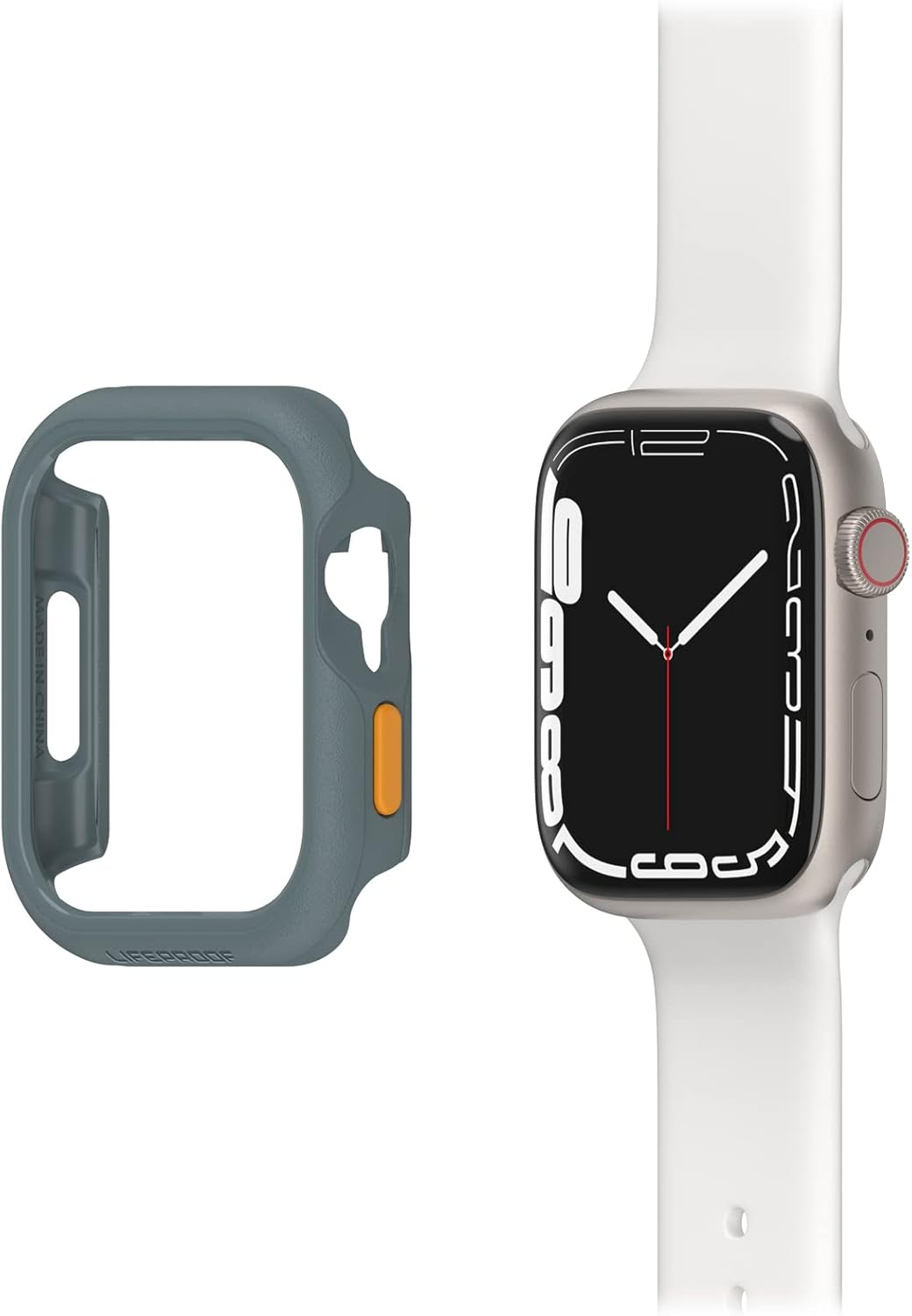
Figure 3: Bumper orientation relative to the Apple Watch.

Figure 4: Secure fit of the bumper on the Apple Watch.
To remove the bumper, gently peel back one corner and work your way around the edges until the watch can be safely extracted.
Operating with the Bumper
The LifeProof Watch Bumper is designed to allow full access to all Apple Watch functions.
- Digital Crown and Side Button: The bumper features precise cutouts and integrated button covers that allow for unhindered use of the Digital Crown and side button.
- Speakers and Microphone: Openings are provided for the speakers and microphone to ensure audio quality is not compromised.
- Codi tâl: The bumper does not interfere with wireless charging. You can charge your Apple Watch normally with the bumper installed.
- Rhyngweithio Sgrin: The bumper provides edge protection without covering the screen, allowing for full touch screen functionality.

Figure 5: Access to Digital Crown and side button.

Figure 6: Apple Watch with bumper on charger.
Cynnal a chadw
To ensure the longevity and effectiveness of your LifeProof Watch Bumper, follow these simple maintenance guidelines:
- Glanhau: Wipe the bumper regularly with a soft, damp cloth to remove dust, dirt, and smudges. For stubborn grime, a mild soap solution can be used, followed by rinsing with clean water and drying thoroughly.
- Osgoi Cemegau llym: Do not use abrasive cleaners, solvents, or strong chemicals, as these can damage the material and finish of the bumper.
- Archwiliwch yn Rheolaidd: Periodically inspect the bumper for any signs of wear or damage. If the bumper is significantly damaged, consider replacing it to ensure continued protection for your watch.
Datrys problemau
This section addresses common issues you might encounter with your LifeProof Watch Bumper.
| Mater | Achos Posibl | Ateb |
|---|---|---|
| Bumper does not fit correctly. | Incorrect orientation or not fully seated. | Ensure the bumper is oriented correctly for the Apple Watch Series 7 (45mm). Apply even pressure to snap it fully into place. |
| Mae'r botymau'n stiff neu'n anymatebol. | Bumper not aligned properly with watch buttons. | Remove the bumper and re-install, ensuring precise alignment over the Digital Crown and side button. |
| Materion codi tâl. | Watch not centered on charging puck. | Ensure the watch is properly centered on the charging puck. The bumper is designed not to interfere with charging. |
Manylebau
Detailed specifications for the LifeProof Watch Bumper:
- Rhif Model: 840262370455
- Cydnawsedd: Apple Watch Series 7 (45mm)
- Deunydd: Plastic (over 85% ocean-based recycled plastic)
- Lliw: Grau (Grey)
- Dimensiynau (L x W x H): 1.94-in x 1.68-in x 0.47-in / 49.3mm x 42.6mm x 11.9mm
- Pwysau: 0.01 pwys / 2g
- Nodweddion: Edge-to-edge protection, Corner-hugging form fit, Shockproof
Gwarant a Chefnogaeth
LifeProof products are designed for durability and performance. For information regarding warranty coverage, product registration, or technical support, please refer to the official LifeProof websafle neu cysylltwch â'u gwasanaeth cwsmeriaid yn uniongyrchol.
Adnoddau Ar-lein: Ymwelwch www.lifeproof.com for FAQs, support articles, and contact information.
Gwasanaeth Cwsmer: Contact details for customer support can typically be found on the brand's official website under a "Support" or "Contact Us" section.
Ask a question about this manual
Ask about setup, troubleshooting, compatibility, parts, safety, or missing instructions. Manuals+ will review the question and use this page’s manual context to help answer it.