
1. Rhagymadrodd
This manual provides detailed instructions for the safe and efficient operation of your InFocus P120 INL412 Multimedia Projector (Model INL4128). Please read this manual thoroughly before using the projector and keep it for future reference. This projector is designed for high-quality image projection, suitable for various applications including presentations, home entertainment, and gaming.
2. Gwybodaeth Diogelwch
Observe the following safety precautions to prevent damage to the projector and ensure user safety:
- Awyru: Ensure adequate ventilation around the projector. Do not block ventilation openings. Maintain a minimum distance of 30 cm (12 inches) from walls or other objects.
- Ffynhonnell Pwer: Defnyddiwch y cyflenwad pŵer a'r cyfaint penodedig yn unigtage. Cysylltwch y llinyn pŵer yn ddiogel.
- Gwres: The projector generates heat during operation. Do not touch the projector's vents or exhaust areas directly after use.
- Allbwn Ysgafn: Peidiwch ag edrych yn uniongyrchol i lens y taflunydd pan fydd y lamp is on, as the intense light can cause eye damage.
- Lleoliad: Place the projector on a stable, level surface. Avoid placing it in direct sunlight, near heat sources, or in areas with high humidity or dust.
- Glanhau: Datgysylltwch y llinyn pŵer cyn glanhau. Defnyddiwch frethyn meddal, sych. Peidiwch â defnyddio glanhawyr hylif na glanhawyr aerosol.
- Gwasanaethu: Peidiwch â cheisio cynnal a chadw'r taflunydd eich hun. Cyfeiriwch bob gwaith cynnal a chadw at bersonél gwasanaeth cymwys.
3. Cynnyrch Drosview
3.1 Top Panel and Lens Area
The top panel features the control buttons for basic operation and the lens area with focus and zoom adjustments.

Ffigur 3.1: Uchaf view of the InFocus P120 INL412 projector, highlighting the control panel on the right and the lens adjustment area on the left. The InFocus logo is visible on the top surface.
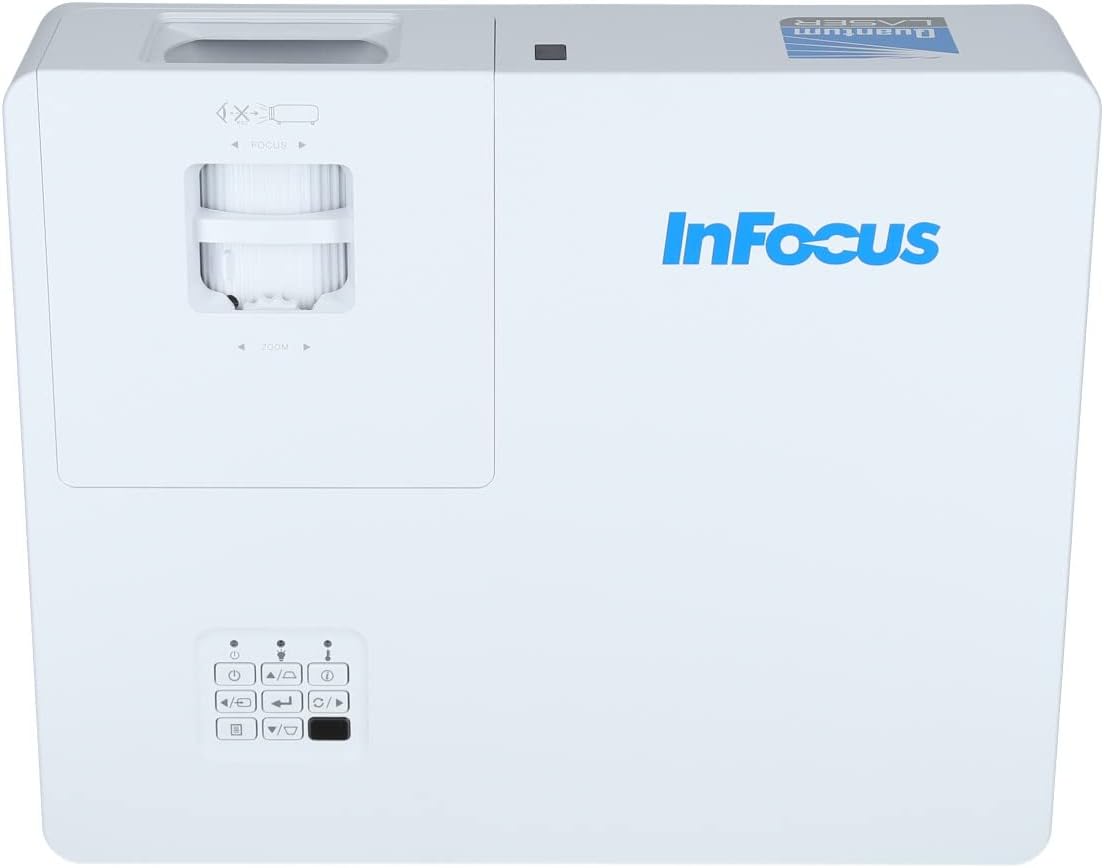
Ffigur 3.2: Caewr view of the projector's top panel, showing the focus and zoom rings near the lens opening and the array of control buttons for power, menu, source selection, and navigation.
3.2 Cysylltiadau Panel Cefn
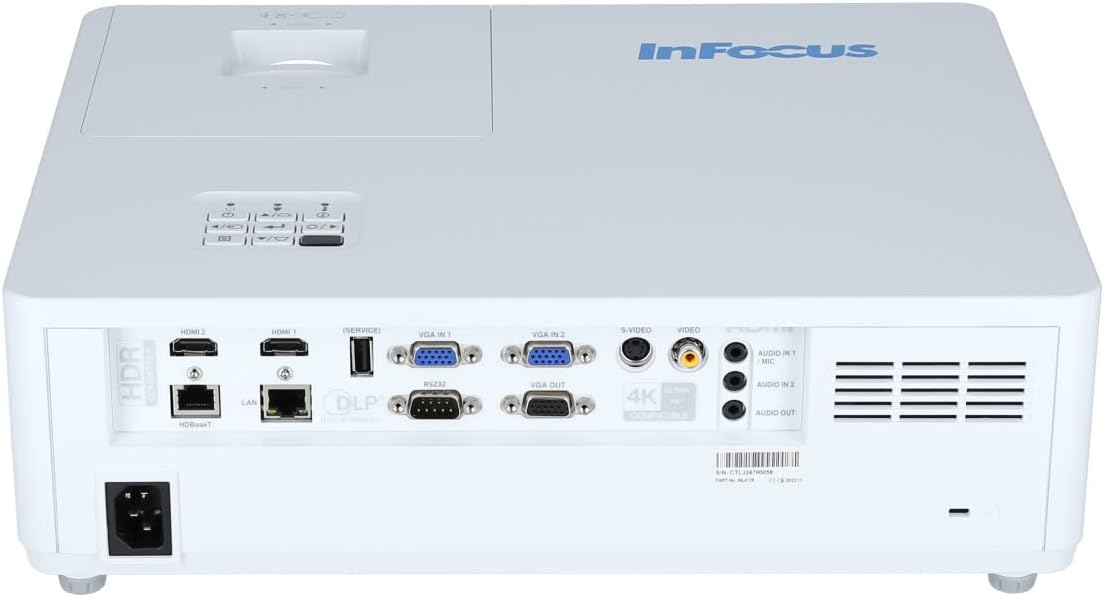
Mae'r panel cefn yn darparu amrywiol borthladdoedd mewnbwn ac allbwn ar gyfer cysylltu dyfeisiau allanol.

Figure 3.3: Rear panel of the InFocus P120 INL412 projector, displaying a comprehensive array of connectivity options including HDMI (x2), USB, S-Video, Ethernet (LAN), VGA In (x2), VGA Out, RS232, and Audio In/Out ports. The power input is located on the bottom left.
Key ports include:
- HDMI 1 a 2: For connecting high-definition digital video and audio sources.
- USB: For connecting USB devices, potentially for media playback or firmware updates.
- S-Fideo: For connecting older video sources.
- VGA IN 1 & 2: For connecting computers or other devices with VGA output.
- ALLBWN VGA: For connecting to an external monitor.
- Ethernet (LAN): Ar gyfer cysylltedd a rheolaeth rhwydwaith.
- Audio IN 1 & 2 / Audio OUT: Ar gyfer cysylltiadau sain analog.
- RS232: Ar gyfer rheolaeth gyfresol.
- Mewnbwn pŵer: Ar gyfer cysylltu'r cebl pŵer AC.
3.3 Front and Side Panels
The front panel houses the projection lens and front ventilation, while the side panels feature additional ventilation grilles.

Ffigur 3.4: Blaen view of the InFocus P120 INL412 projector, displaying the main projection lens on the right and the extensive front ventilation grille on the left, crucial for heat dissipation.
Ffigur 3.5: Ochr view of the InFocus P120 INL412 projector, illustrating the side ventilation grilles that contribute to maintaining optimal operating temperature.
4. Gosod
4.1 Lleoliad y Taflunydd
Position the projector on a stable, flat surface or mount it securely. Ensure the projector is within the optimal projection distance for your screen size. Maintain clear space around the projector for proper ventilation.
4.2 Cysylltu Dyfeisiau
Before connecting any cables, ensure the projector and all source devices are powered off.
- Cysylltiad HDMI: Connect an HDMI cable from your source device (e.g., laptop, Blu-ray player, gaming console) to either the HDMI 1 or HDMI 2 port on the projector.
- Cysylltiad VGA: Connect a VGA cable from your computer to either VGA IN 1 or VGA IN 2. For audio, connect a separate audio cable from your computer's audio output to the corresponding Audio IN port on the projector.
- Cysylltiad USB: Insert a USB drive into the USB port for media playback (if supported by firmware) or service functions.
- Cysylltiad Ethernet (LAN): Connect an Ethernet cable to the LAN port for network control or updates.
- Allbwn sain: If using external speakers, connect an audio cable from the Audio OUT port on the projector to your audio system.
4.3 Cysylltiad Pwer
Connect the power cord to the projector's power input and then plug the other end into a grounded electrical outlet.
5. Cyfarwyddiadau Gweithredu
5.1 Pweru Ymlaen/Diffodd
- Pŵer Ymlaen: Gwasgwch y Grym button on the projector's control panel or the remote control. The power indicator light will change.
- Pwer i ffwrdd: Gwasgwch y Grym button again. A confirmation message may appear. Press the button a second time to confirm shutdown. Allow the projector to cool down before unplugging it.
5.2 Addasu Ffocws a Chwyddo
Rotate the focus ring around the lens until the image appears sharp and clear. Use the zoom ring to adjust the image size to fit your screen.
5.3 Selecting Input Source
Gwasgwch y Ffynhonnell button on the control panel or remote control to cycle through available input sources (HDMI 1, HDMI 2, VGA 1, VGA 2, S-Video, USB). Select the input corresponding to your connected device.
5.4 Llywio Dewislen
Defnyddiwch y Bwydlen button to access the on-screen display (OSD) menu. Use the arrow buttons to navigate through menu options and the Ewch i mewn button to select. Press Bwydlen eto i adael.
6. cynnal
6.1 Glanhau'r Lens
Gently wipe the lens with a soft, lint-free cloth specifically designed for optical surfaces. Do not use abrasive cleaners or excessive force, as this can scratch the lens.
6.2 Cleaning the Projector Exterior
Use a soft, dry cloth to clean the projector's casing. For stubborn dirt, dampen the cloth slightly with water, then wipe dry immediately. Avoid getting liquids into the projector's openings.
6.3 Ventilation Care
Regularly check the projector's ventilation grilles for dust accumulation. Use a soft brush or a vacuum cleaner with a brush attachment to gently remove dust from the vents to ensure proper airflow and prevent overheating.
7. Datrys Problemau
7.1 Dim Delwedd yn cael ei Dangos
- Ensure the projector is powered on and the power indicator light is solid.
- Verify that the video cable (HDMI, VGA, etc.) is securely connected to both the projector and the source device.
- Check that the correct input source is selected on the projector.
- Confirm that the source device (laptop, player) is powered on and outputting a signal.
7.2 Image is Blurry or Out of Focus
- Addaswch y cylch ffocws ar lens y taflunydd nes bod y ddelwedd yn finiog.
- Ensure the projector is at the correct distance from the screen.
- Clean the projector lens if it appears dirty.
7.3 Dim Sain
- If using HDMI, ensure the source device's audio output is set to HDMI.
- If using VGA, ensure a separate audio cable is connected from the source to the projector's Audio IN port.
- Gwiriwch y gosodiadau cyfaint ar y taflunydd a'r ddyfais ffynhonnell.
- If using external speakers, ensure they are properly connected to the Audio OUT port and powered on.
8. manylebau
| Nodwedd | Manylyn |
|---|---|
| Brand | Ffocws |
| Gwneuthurwr | Mewn Ffocws |
| Enw Model | P120 INL412 |
| Rhif Model | INL4128 |
| Blwyddyn | 2023 |
| Rhyngwyneb Caledwedd | Ethernet, HDMI, S-Video, USB |
| Nifer yr Eitemau | 1 |
| Cymhareb Agwedd | 16:9 |
| Wattage | 341 wat |
| Batris wedi'u Cynnwys | Nac ydw |
| Batris Angenrheidiol | Nac ydw |
| Ffactor Ffurf | Penbwrdd |
| Math Mowntio | Mownt bwrdd |
| Rheolaeth Anghysbell Wedi'i chynnwys | Oes |
| Dimensiynau Cynnyrch | 56.13 x 46.48 x 25.15 cm |
| Pwysau Eitem | 5.5 kg |
| Maint Delwedd Uchaf | 308.28 modfedd |
| Maint Delwedd Lleiaf | 910.63 Milimetrau |
| Dyddiad Cyntaf Ar Gael | Ionawr 5, 2022 |
9. Gwarant a Chefnogaeth
For warranty information and technical support, please refer to the documentation included with your purchase or visit the official InFocus websafle. Cadwch eich prawf prynu ar gyfer hawliadau gwarant.