
1. Rhagymadrodd
Thank you for choosing the LEICKE DJ Roxxx Portable Bluetooth Speaker. This manual provides essential information for setting up, operating, and maintaining your speaker. Please read it carefully before use to ensure optimal performance and longevity of your device.
2. Cyfarwyddiadau Diogelwch
- Peidiwch ag amlygu'r siaradwr i dymheredd eithafol, golau haul uniongyrchol, na lleithder uchel.
- Osgoi gollwng neu orfodi'r siaradwr i effeithiau cryf.
- Peidiwch â dadosod na cheisio atgyweirio'r siaradwr eich hun. Bydd hyn yn gwneud y warant yn ddi-rym.
- Keep the speaker away from water and liquids. While splashproof, it is not waterproof and should not be submerged.
- Defnyddiwch y cebl gwefru a ddarperir neu gyfwerth ardystiedig yn unig.
3. Cynnwys Pecyn
Gwiriwch y pecyn am yr eitemau canlynol:
- LEICKE DJ Roxxx Portable Bluetooth Speaker
- Cebl Codi Tâl USB
- Auxiliary Audio Cable (3.5mm Stereo Plug)
- Carabiner
- Llawlyfr Cyfarwyddiadau
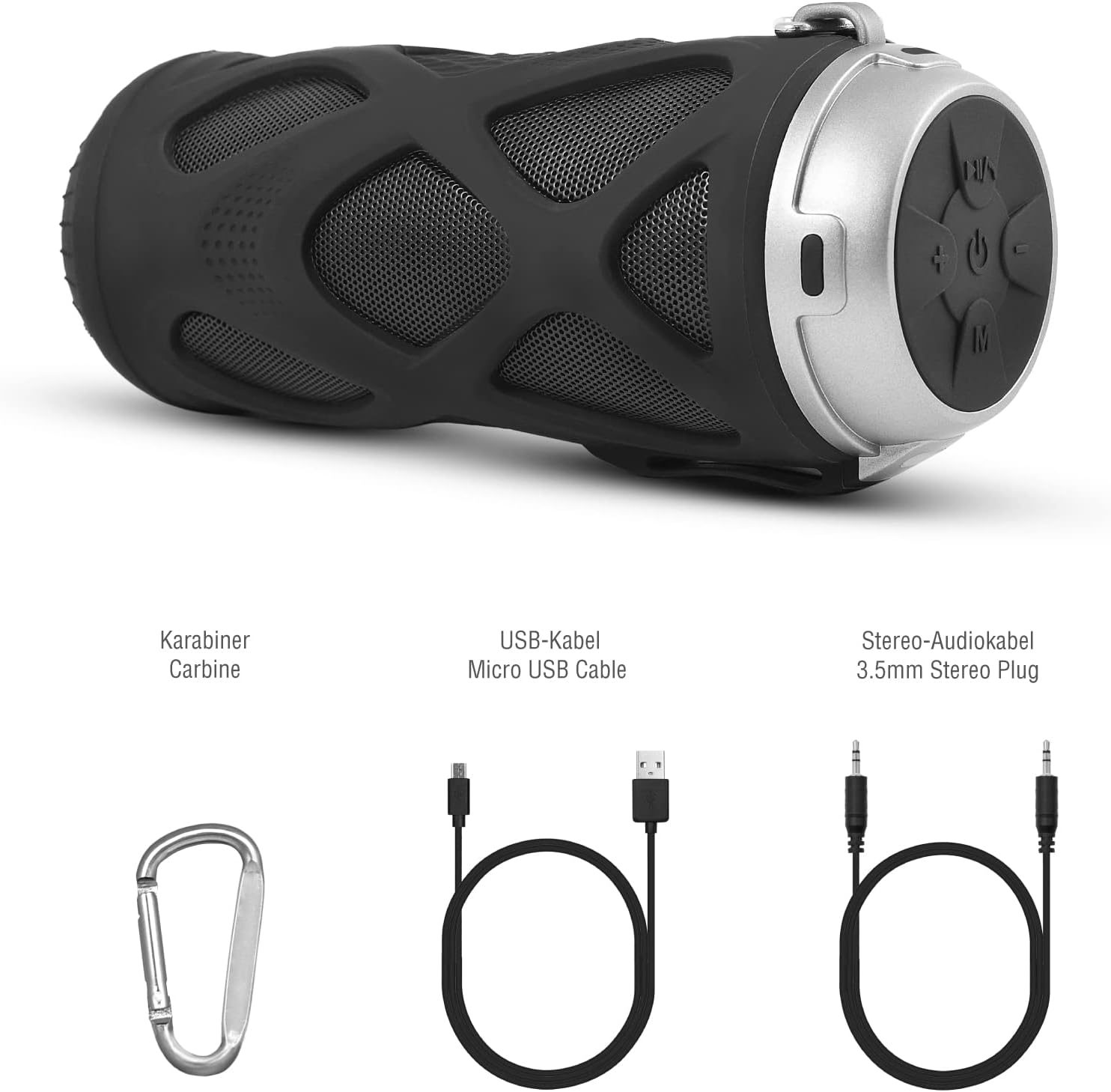
Ffigur 3.1: Affeithwyr yn cynnwys
4. Cynnyrch Drosview
4.1 Panel Rheoli

Ffigur 4.1: Cynllun Panel Rheoli
- Botwm Ymlaen/Oddi: Yn pweru'r siaradwr ymlaen neu i ffwrdd.
- Play/Pause/Call/Voice Assistant Button: Controls music playback, answers/ends calls, and activates voice assistant (Siri/Google Assistant).
- Botwm Cyfaint i Lawr / Trac Blaenorol: Yn lleihau'r gyfrol neu'n hepgor i'r trac blaenorol.
- Botwm Cyfaint i Fyny / Trac Nesaf: Yn cynyddu'r gyfrol neu'n neidio i'r trac nesaf.
- Botwm Modd: Switches between Bluetooth, MicroSD/TF, Aux, and FM Radio modes.
4.2 Porthladdoedd a Dangosyddion
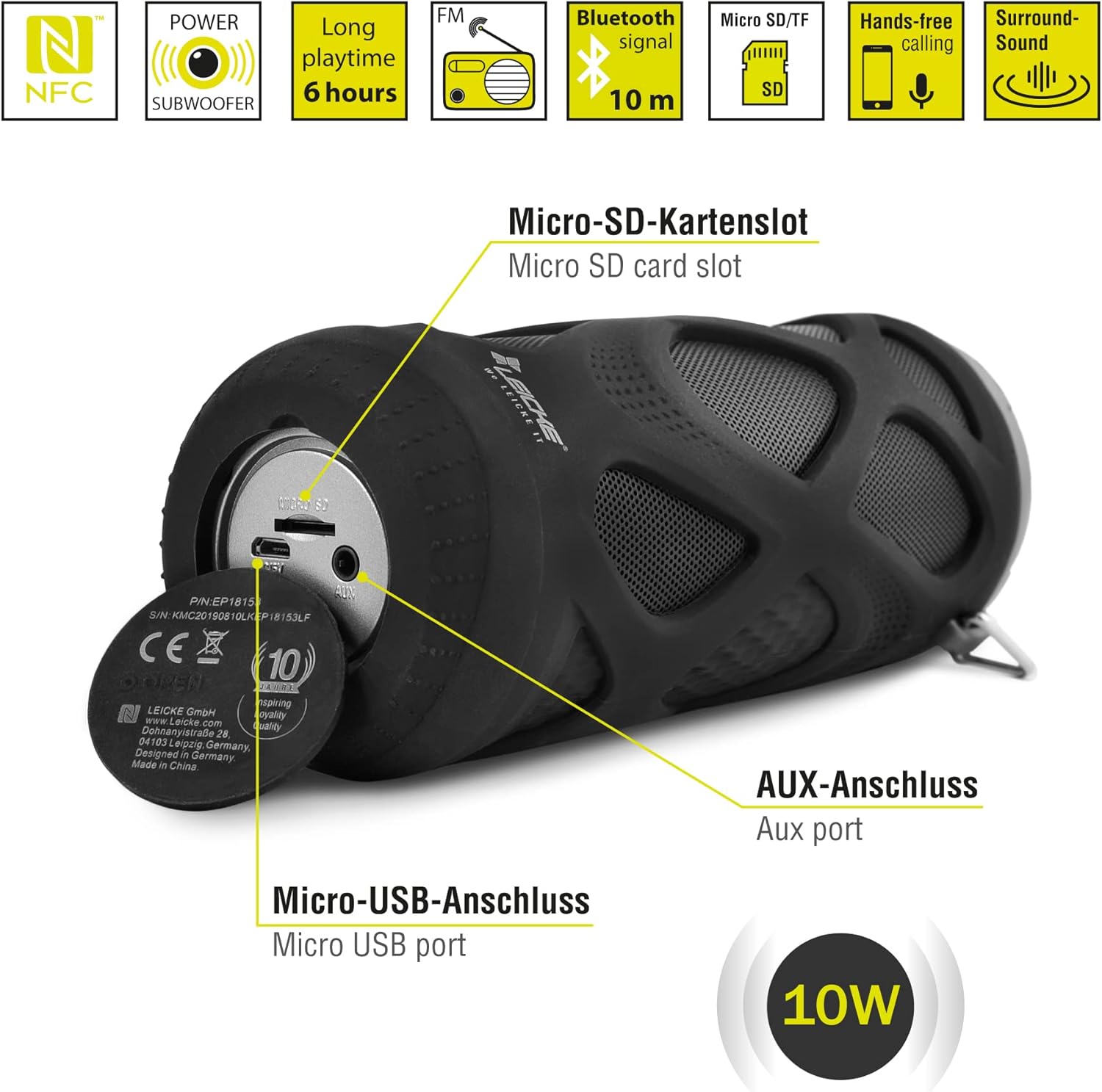
Ffigur 4.2: Porthladdoedd Drosview
- Micro SD/TF Card Slot: Insert a Micro SD or TF card for MP3 playback.
- Porthladd AUX: Cysylltwch ddyfeisiau sain allanol gan ddefnyddio'r cebl ategol 3.5mm.
- Porthladd Micro USB: Defnyddir ar gyfer codi tâl ar y siaradwr.
- Dangosydd LED: (Typically near the charging port or control panel) Indicates power status, charging status, and Bluetooth pairing status.
5. Gosod a Gweithredu
5.1 Gwefru'r Siaradwr
- Connect the Micro USB end of the charging cable to the speaker's Micro USB port.
- Connect the USB-A end to a USB power adapter (not included) or a computer's USB port.
- The LED indicator will typically show red while charging and turn off or change color when fully charged.
- A full charge takes approximately 2-3 hours and provides up to 6 hours of playtime.
5.2 Pweru Ymlaen/Diffodd
- I Bweru Ymlaen: Pwyswch a dal y Botwm ymlaen / i ffwrdd for a few seconds until you hear an audible prompt and the LED indicator lights up.
- I Bweru i ffwrdd: Pwyswch a dal y Botwm ymlaen / i ffwrdd again for a few seconds until you hear an audible prompt and the LED indicator turns off.
5.3 Pâr Bluetooth
- Ensure the speaker is powered on and in Bluetooth mode (the LED indicator will typically flash blue). If not, press the Botwm modd i newid i'r modd Bluetooth.
- Ar eich ffôn clyfar, tabled, neu ddyfais arall sydd â Bluetooth, ewch i'r gosodiadau Bluetooth.
- Chwiliwch am available devices and select "LEICKE DJ Roxxx" from the list.
- Ar ôl paru, bydd y dangosydd LED yn rhoi'r gorau i fflachio ac yn aros yn las solet, a byddwch yn clywed sain cadarnhau.
- Bydd y siaradwr yn ailgysylltu'n awtomatig â'r ddyfais a barwyd ddiwethaf pan gaiff ei throi ymlaen, os yw'r ddyfais o fewn cyrraedd a bod Bluetooth wedi'i alluogi.
5.4 MicroSD/TF Card Playback
- Insert a Micro SD or TF card (pre-loaded with MP3 audio files) into the Micro SD/TF card slot.
- The speaker will automatically switch to MicroSD/TF mode and begin playing music. If not, press the Botwm modd to select MicroSD/TF mode.
- Defnyddiwch y Chwarae/Saib, Cyfrol i fyny / Trac Nesaf, a Cyfrol i Lawr / Trac Blaenorol botymau i reoli chwarae.
5.5 AUX Mewnbwn
- Connect one end of the 3.5mm auxiliary cable to the speaker's AUX port.
- Connect the other end to the headphone jack of your audio device (e.g., MP3 player, laptop).
- Bydd y siaradwr yn newid yn awtomatig i'r modd AUX. Os na, pwyswch y Botwm modd i ddewis modd AUX.
- Volume can be controlled via the speaker or your connected device. Track control must be done from the connected device.
Gweithrediad Radio 5.6 FM
- Gwasgwch y Botwm modd dro ar ôl tro nes i chi fynd i mewn i'r modd Radio FM.
- Yn y modd FM, pwyswch y Botwm Chwarae/Saib once to automatically scan and save available FM stations. The speaker will then play the first saved station.
- Defnyddiwch y Cyfrol i fyny / Trac Nesaf a Cyfrol i Lawr / Trac Blaenorol botymau i newid rhwng gorsafoedd sydd wedi'u cadw.
5.7 Swyddogaeth Stereo Di-wifr Gwirioneddol (TWS)
The LEICKE DJ Roxxx speaker supports TWS pairing, allowing you to connect two DJ Roxxx speakers for a stereo sound experience (20W total output).

Ffigur 5.1: Pâr Gwir Stereo Di-wifr (TWS)
- Ensure both DJ Roxxx speakers are powered on and in Bluetooth pairing mode (LED flashing blue).
- Ar un o'r siaradwyr, pwyswch a daliwch y Botwm modd for a few seconds until you hear a pairing tone. The speakers will attempt to connect to each other.
- Once successfully paired, you will hear a confirmation sound, and the LED indicator on one speaker will flash blue (master), while the other will be solid blue (slave).
- Now, connect your device to the master speaker via Bluetooth as described in section 5.3. Both speakers will play audio in stereo.
6. Cyfarwyddiadau Gweithredu
6.1 Chwarae Cerdd
- Chwarae/Seibiant: Gwasgwch y Botwm Chwarae/Saib unwaith.
- Trac Nesaf: Pwyswch a dal y Cyfrol Up / Trac Nesaf botwm.
- Trac Blaenorol: Pwyswch a dal y Cyfrol i Lawr / Trac Blaenorol botwm.
- Cyfrol i Fyny: Gwasgwch y Cyfrol Up / Trac Nesaf botwm yn fyr.
- Cyfrol i Lawr: Gwasgwch y Cyfrol i Lawr / Trac Blaenorol botwm yn fyr.
6.2 Galwadau Di-ddwylo
- Ateb Galwad: Pan ddaw galwad i mewn, pwyswch y Botwm Chwarae/Saib/Galw unwaith.
- Galwad Diwedd: Yn ystod galwad, pwyswch y Botwm Chwarae/Saib/Galw unwaith.
- Gwrthod Galwad: When a call comes in, press and hold the Botwm Chwarae/Saib/Galw am 2 eiliad.
- Ail-redeg Rhif Diwethaf: In standby mode, double-press the Botwm Chwarae/Saib/Galw.
6.3 Actifadu Cynorthwyydd Llais
- With one click, you can activate Siri (iOS) or Google Assistant (Android) on your connected smartphone. Press the Play/Pause/Call/Voice Assistant button unwaith i actifadu.
7. cynnal
7.1 Glanhau
- Sychwch y siaradwr gyda lliain meddal, sych, neu ychydig yn feddalamp brethyn.
- Peidiwch â defnyddio glanhawyr sgraffiniol, alcohol na thoddyddion cemegol, gan y gall y rhain niweidio'r wyneb.
- Gwnewch yn siŵr bod pob porthladd yn sych cyn gwefru neu gysylltu dyfeisiau eraill.
7.2 Storio
- Storiwch y siaradwr mewn lle oer, sych i ffwrdd o olau haul uniongyrchol a thymheredd eithafol.
- If storing for an extended period, charge the battery to about 50% every few months to maintain battery health.
7.3 Gwrthsefyll Dŵr
The LEICKE DJ Roxxx speaker is designed to be splashproof, offering protection against light rain or splashes. It is ddim yn dal dŵr and should not be submerged in water or exposed to heavy rain. Ensure the port cover is securely closed to maintain splash resistance.

Ffigur 7.1: Splashproof Design for Outdoor Use
8. Datrys Problemau
| Problem | Achos Posibl | Ateb |
|---|---|---|
| Nid yw'r siaradwr yn troi ymlaen. | Batri isel. | Gwefrwch y siaradwr am o leiaf 30 munud. |
| Methu paru drwy Bluetooth. | Nid yw'r siaradwr yn y modd paru; diffodd Bluetooth y ddyfais; yn rhy bell o'r ddyfais. | Ensure speaker is in Bluetooth mode (flashing blue LED). Turn on Bluetooth on your device. Move speaker closer to device (within 10m). Forget previous pairings on your device and try again. |
| Dim sain. | Cyfaint yn rhy isel; modd anghywir; dyfais ddim yn chwarae. | Increase speaker and device volume. Ensure correct mode (Bluetooth, AUX, MicroSD). Check if audio is playing on your source device. |
| Derbyniad radio FM gwael. | Signal gwan; ymyrraeth. | Move the speaker to a different location. Re-scan for stations. |
| Ni adnabyddir cerdyn microSD. | Card not inserted correctly; unsupported format; corrupted files. | Ail-osodwch y cerdyn. Gwnewch yn siŵr files are in MP3 format. Try a different MicroSD card. |
9. manylebau
| Enw Model | DJ Roxxx |
| Rhif Model | B09P4Z5MN5 |
| Brand | LEICKE |
| Technoleg Cysylltedd | Bluetooth |
| Technoleg Cyfathrebu Di-wifr | Bluetooth |
| Math o Siaradwr | Siaradwr Bluetooth cludadwy |
| Pŵer Allbwn Siaradwr Uchaf | 10 Wat |
| Dull Rheoli | Botymau Cyffyrddol |
| Nodweddion Arbennig | Integrated Microphone, Portable Wireless, MicroSD/TF Player, Aux Input, FM Radio, Hands-Free Calling, Voice Assistant Support, TWS Function, Splashproof |
| Ffynhonnell Pwer | Cable Electric (Rechargeable Battery) |
| Dimensiynau Cynnyrch (L x W x H) | 7 x 7 x 18 cm |
| Pwysau Eitem | 400 gram |
| Defnyddiau a Argymhellir | For smartphone or tablet |
| Dyfeisiau Cydnaws | Gliniadur, ffôn clyfar |
| Yn Ddiddos | False (Splashproof only) |
10. Gwarant a Chefnogaeth
LEICKE products come with a standard manufacturer's warranty. For detailed warranty information, please refer to the warranty card included in your package or visit the official LEICKE websafle.
If you encounter any issues or have questions regarding your LEICKE DJ Roxxx speaker, please contact LEICKE customer support:
- Gwneuthurwr: LEICKE
- Gwerthwr: LEICKE - Leipzig (as per Amazon listing)
- Cefnogaeth: Refer to the official LEICKE website or contact information provided with your purchase for the most up-to-date support channels.