
1. Rhagymadrodd
Thank you for choosing the iPega PG-P4008 Wireless Game Controller. This manual provides detailed instructions on how to set up, operate, and maintain your controller. The PG-P4008 offers broad compatibility with PS4, PS3, Android (10.0+), iOS (13.0+), and Windows PC, connecting wirelessly via Bluetooth for an enhanced gaming experience.
2. Cynnyrch Drosview
The iPega PG-P4008 is designed for versatile gaming across multiple platforms. It features a comfortable ergonomic design, responsive controls, and several advanced functionalities to immerse you in your games.
Nodweddion Allweddol:
- Wireless Bluetooth connectivity (BT2.1+EDR) with up to 8 meters range.
- No driver installation required for connection.
- Integrated colored LED light indicator for operational status.
- Dual motors for realistic vibration feedback during gameplay.
- Built-in three-dimensional acceleration sensor and gyroscope sensor with six-axis induction.
- Integrated speaker and 3.5mm earphone jack for game audio.
- Dual-point capacitive touchpad for enhanced control.
- Compatible with PS4, PS3, Android (10.0+), iOS (13.0+), and Windows PC.
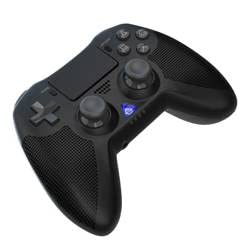
Delwedd 1: Blaen view of the iPega PG-P4008 Wireless Game Controller. This image displays the controller's ergonomic design, dual analog sticks, D-pad, action buttons, touchpad, and the central LED indicator.
3. Gosod a Chysylltiad
The PG-P4008 controller connects wirelessly via Bluetooth. Follow these steps to pair your controller with your device:
- Pŵer Ymlaen: Ensure the controller is charged. Press and hold the Botwm PS (or equivalent power button) to turn on the controller.
- Modd Pâr:
- For PS4/PS3: Connect the controller to the console using a USB cable. Once recognized, you can disconnect the cable for wireless play. The connection method is similar to the official P4 controller.
- For Android/iOS: Activate Bluetooth on your mobile device. On the controller, press and hold the SHARE button + PS button simultaneously until the LED indicator flashes rapidly, indicating pairing mode. Select "PG-P4008" (or similar) from your device's Bluetooth list to connect.
- For Windows PC: Ensure your PC has Bluetooth capability. On the controller, press and hold the PS button + OPTIONS button simultaneously until the LED indicator flashes rapidly. On your PC, go to Bluetooth settings, add a new device, and select "PG-P4008" (or similar) to pair.
- Cysylltiad Llwyddiannus: Once connected, the LED indicator on the controller will change to a solid color, indicating a successful pairing.
Nodyn: No additional driver software is required for operation. The controller supports a stable connection up to 8 meters.
4. Cyfarwyddiadau Gweithredu
Dangosydd LED:
The built-in colored LED light indicates the controller's operational status and player assignment, similar to the official PS4 controller. Different colors will signify different stages or player numbers.
Adborth dirgryniad:
The controller features dual motors embedded in the handles, providing tactile vibration feedback to enhance your gaming immersion. This feedback will vary based on in-game events.
Touchpad:
The dual-point capacitive touchpad allows for intuitive control in games that support touch input, offering an additional layer of interaction.
Audio Functionality:
Connect your 3.5mm earphones to the integrated jack on the controller to experience game audio directly, providing a private and immersive sound experience.
5. cynnal
- Keep the controller dry and away from moisture to prevent damage to internal components.
- Clean the controller regularly with a soft, dry cloth. Avoid using harsh chemicals or abrasive materials.
- Storiwch y rheolydd mewn lle oer, sych pan nad yw'n cael ei ddefnyddio.
- Osgowch amlygu'r rheolydd i dymheredd eithafol neu olau haul uniongyrchol.
- Do not attempt to disassemble or modify the controller, as this will void any potential warranty and may cause damage.
6. Datrys Problemau
- Rheolydd ddim yn cysylltu:
- Gwnewch yn siŵr bod y rheolydd wedi'i wefru'n llawn.
- Gwiriwch fod Bluetooth wedi'i alluogi ar eich dyfais.
- Make sure the controller is in the correct pairing mode for your device (refer to Section 3).
- Rhowch gynnig ar ailgychwyn y rheolydd a'ch dyfais.
- Remove previous pairings from your device's Bluetooth list and try pairing again.
- Oedi mewnbwn neu ddatgysylltiad:
- Ensure you are within the 8-meter operating range.
- Lleihau ymyrraeth gan ddyfeisiau diwifr eraill.
- Check for any physical obstructions between the controller and the device.
- Dirgryniad ddim yn gweithio:
- Gwnewch yn siŵr bod y gêm rydych chi'n ei chwarae yn cefnogi adborth dirgryniad.
- Gwiriwch y gosodiadau yn y gêm i sicrhau bod dirgryniad wedi'i alluogi.
- Audio not working via 3.5mm jack:
- Ensure your earphones are properly plugged in.
- Check the volume settings on your device and in-game.
- Test with another pair of earphones to rule out earphone issues.
7. manylebau
| Rhif Model | PG-P4008 |
| Brand | iPega |
| Cysylltedd | Bluetooth (BT2.1+EDR) |
| Di-wifr Range | Hyd at 8 metr |
| Dyfeisiau Cydnaws | PS4, PS3, Android (10.0+), iOS (13.0+), Windows PC |
| Nodweddion Arbennig | Wireless, Touchpad, Vibration, 6-axis Gyroscope, Built-in Speaker, 3.5mm Audio Jack |
| Nifer y Botwm | 17 |
| Ffynhonnell Pwer | Wedi'i Bweru â Batri |
8. Gwarant a Chefnogaeth
Information regarding product warranty and customer support is not provided within this manual. Please refer to the product packaging or the retailer's websafle am fanylion am orchudd gwarant a sut i gysylltu â chymorth cwsmeriaid i gael cymorth.